
1. Úvod
Thank you for choosing the Aiwa AWPOK200D Bluetooth Audio Tower. This powerful audio system is designed to deliver clear, precise sound with deep bass, suitable for both indoor and outdoor use. It features Bluetooth connectivity, TWS function, USB playback and charging, microphone inputs for karaoke, and dynamic LED lighting. This manual provides essential information for safe and optimal use of your device.
2. Bezpečnostní informace
Please read all safety instructions carefully before using the device and retain this manual for future reference. Incorrect operation due to disregard of instructions may cause damage to the product or personal injury.
- Zdroj napájení: Connect the device only to an AC 100-240V, 50/60Hz power supply. Ensure the voltage matches the requirements before plugging in.
- Větrání: Neblokujte žádné větrací otvory. Kolem jednotky ponechte dostatečný prostor pro správné proudění vzduchu.
- Voda a vlhkost: Do not expose the device to rain, moisture, or dripping/splashing liquids. Do not place objects filled with liquids, such as vases, on the apparatus. The device is not waterproof.
- Zdroje tepla: Uchovávejte zařízení mimo dosah zdrojů tepla, jako jsou radiátory, topná tělesa, sporáky nebo jiné přístroje (včetně amplifikátory), které produkují teplo.
- Čištění: Unplug the device from the power outlet before cleaning. Use a dry, soft cloth. Do not use liquid cleaners or aerosol cleaners.
- Servis: Nepokoušejte se tento výrobek opravit sami. Veškerý servis svěřte kvalifikovanému servisnímu personálu.
- Umístění: Umístěte jednotku na stabilní, rovný povrch, aby nedošlo k jejímu pádu.
- Děti: Uchovávejte mimo dosah dětí.
3. Konec produktuview
Familiarize yourself with the main components of your Aiwa AWPOK200D Audio Tower.

Obrázek 3.1: Přední view of the Aiwa AWPOK200D Audio Tower, showcasing its dual speakers and dynamic blue and purple LED lighting.

Obrázek 3.2: Zadní view of the Aiwa AWPOK200D Audio Tower, highlighting the power input and bass reflex ports.

Obrázek 3.3: Detailní view of the top control panel of the Aiwa AWPOK200D, showing USB ports, AUX input, microphone inputs, and various control buttons for playback, volume, and functions.
4. Nastavení
Follow these steps to set up your Aiwa AWPOK200D Audio Tower.
- Rozbalení: Carefully remove the audio tower from its packaging. Retain the packaging for future transport or storage.
- Umístění: Place the audio tower on a stable, flat surface. Ensure there is enough space around the unit for proper ventilation.
- Připojení napájení: Connect the power cable to the AC input on the rear of the unit and then plug it into a standard AC 100-240V, 50/60Hz wall outlet.
- Počáteční zapnutí: Press the power button (usually located on the top control panel) to turn on the device. The LCD display should illuminate.
5. Návod k obsluze
This section details how to use the various functions of your audio tower.
5.1. Připojení Bluetooth
- Povolit Bluetooth: Turn on the audio tower. Press the "FUNCTION" button on the control panel until "BT" appears on the LCD display, indicating Bluetooth mode.
- Párování: On your mobile device (smartphone, tablet, etc.), enable Bluetooth and search for available devices. Select "AWPOK200D" from the list.
- Spojení: Once paired, the audio tower will indicate a successful connection, and you can now play audio from your device wirelessly.
5.2 Funkce True Wireless Stereo (TWS)
The TWS function allows you to pair two AWPOK200D units together for a stereo sound experience.
- Zapnutí obou jednotek: Ensure both AWPOK200D units are powered on and in Bluetooth mode.
- Initiate TWS Pairing: On one of the units (this will be the primary unit), press and hold the TWS button (if available, otherwise refer to specific button on control panel, often combined with another function or a dedicated TWS button). The unit will search for another AWPOK200D.
- Připojit: Once connected, both units will play audio in stereo. Connect your mobile device to the primary unit via Bluetooth as described in section 5.1.
5.3. Přehrávání a nabíjení přes USB
- USB přehrávání: Vložte USB flash disk s audio soubory ve formátu MP3 files into the USB port labeled "USB" (5V=200mA). The unit will automatically switch to USB mode and begin playback. Use the playback controls (Play/Pause, Next/Previous) on the control panel.
- Nabíjení mobilu: The USB port labeled "USB CHARGE" (5V=1000mA) can be used to charge your mobile devices. Connect your device's USB charging cable to this port.
5.4. Auxiliary (AUX) and RCA Inputs
- Vstup AUX: Connect an external audio device (e.g., MP3 player, smartphone) using a 3.5mm audio cable to the "AUX IN" port. Press the "FUNCTION" button until "AUX" is displayed.
- RCA vstup: Connect devices with RCA audio output (e.g., DVD player, TV) to the "AUDIO RCA" input ports (red for right, white for left). Press the "FUNCTION" button until "RCA" is displayed.
5.5. Microphone Inputs and Karaoke Function
- Připojení mikrofonu: Connect up to two microphones to the 6.3mm "MIC 1" and "MIC 2" input jacks.
- Hlasitost mikrofonu: Adjust the microphone volume using the "MIC VOL +/-" controls.
- Efekt ozvěny: Use the "EQ/ECHO" knob or button to add an echo effect to the microphone audio.
- Zrušení hlasu: Activate the "VOICE CANCEL" function (often labeled "KEY/VOICE CANCEL") to reduce or remove vocals from a playing track, making it suitable for karaoke.
5.6. Sound Enhancements and Equalizer
- Pořádné basy: Press the "SUPER BASS" button to activate or deactivate the enhanced bass effect.
- Přednastavení ekvalizéru: Use the "EQ" button to cycle through 5 preset equalizer functions (e.g., Pop, Rock, Jazz, Classic, Flat) to optimize sound for different music genres.
5.7. LED osvětlení
- Ovládání světla: Press the "LIGHT" button to cycle through different LED light modes or to turn the lights off. The unit features intermittent LED lights with mode selection.
6. Údržba
Proper care and maintenance will ensure the longevity of your audio tower.
- Čištění: Always unplug the device before cleaning. Use a soft, dry cloth to wipe the exterior surfaces. Do not use abrasive cleaners, waxes, or solvents as they may damage the finish.
- Skladování: If not in use for an extended period, unplug the power cable and store the unit in a cool, dry place, away from direct sunlight and extreme temperatures.
- Větrání: Ensure the ventilation openings are free from dust and debris. Use a soft brush or vacuum cleaner to gently clear any blockages.
7. Řešení problémů
If you encounter issues with your Aiwa AWPOK200D, refer to the following common problems and solutions.
| Problém | Možná příčina | Řešení |
|---|---|---|
| Žádná síla | Napájecí kabel není připojen; Zásuvka nefunguje; Jednotka je vypnutá. | Ensure power cable is securely connected. Test the outlet with another device. Press the power button to turn on the unit. |
| Žádný zvuk | Volume too low; Incorrect input mode selected; Audio cable not connected properly; Bluetooth not paired. | Increase the master volume. Select the correct input mode (Bluetooth, USB, AUX, RCA). Check audio cable connections. Re-pair Bluetooth device. |
| Párování Bluetooth se nezdařilo | Device too far; Bluetooth not enabled on source device; Unit not in pairing mode. | Move the source device closer to the audio tower. Ensure Bluetooth is enabled on your device. Make sure the audio tower is in Bluetooth pairing mode. |
| Mikrofon nefunguje | Mikrofon není připojen; Hlasitost mikrofonu je příliš nízká; Vypínač mikrofonu je vypnutý. | Ensure microphone is securely plugged into the correct input. Increase "MIC VOL". Check if the microphone's power switch is on. |
| Párování TWS se nezdařilo | Units too far apart; One unit not in TWS pairing mode; Already connected to another device. | Ensure both units are close to each other. Verify both units are in Bluetooth mode and one is initiating TWS pairing. Disconnect any existing Bluetooth connections before TWS pairing. |
8. Specifikace
Detailed technical specifications for the Aiwa AWPOK200D Audio Tower.

Obrázek 8.1: Technical specifications of the Aiwa AWPOK200D, including features, power output, and power supply details.
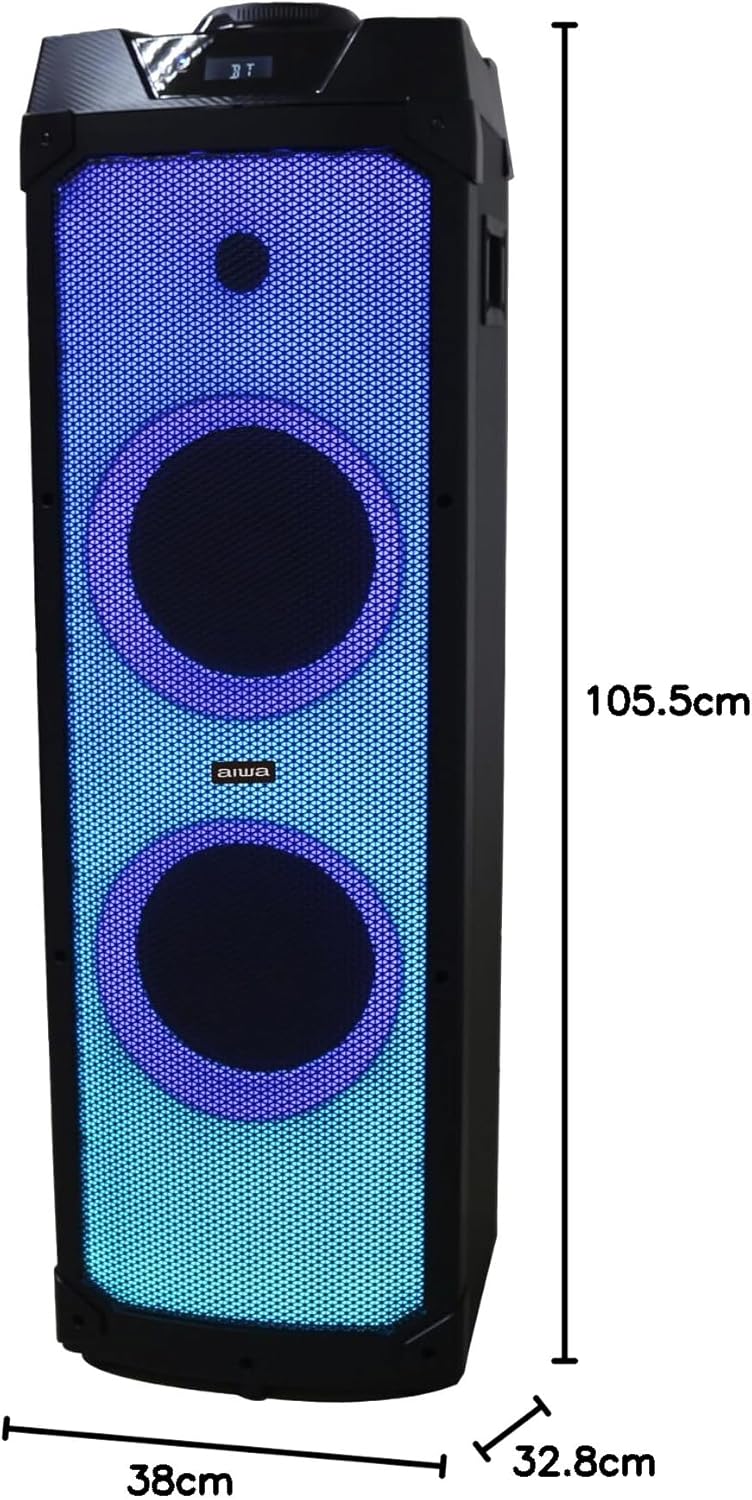
Obrázek 8.2: Dimensions of the Aiwa AWPOK200D Audio Tower, showing a height of 105.5 cm, width of 38 cm, and depth of 32.8 cm.
| Funkce | Detail |
|---|---|
| Značka | Ne |
| Model | AWPOK200D |
| Typ reproduktoru | Subwoofer, Floor-standing |
| Maximální výstupní výkon | 2000 wattů (PMPO) |
| Výstupní výkon (RMS) | 80W x 2 |
| Technologie připojení | Bluetooth V5.1, USB, AUX (3.5mm), RCA |
| Zdroj napájení | AC 100-240V, 50/60Hz |
| Mikrofonní vstupy | 2 x 6.3 mm |
| USB porty | 1 for playback (5V=200mA), 1 for charging (5V=1000mA) |
| Speciální funkce | TWS Function, Intermittent LED Lights, Super Bass Effect, 5 Preset Equalizer Functions, Voice Cancel for Karaoke, LCD Display |
| Kontrolní metoda | Tactile buttons, Knob |
| Unit Dimensions (L x D x H) | 328 (L) X 381 (D) X 1040 (H) mm |
| Velikost reproduktoru | 2 x 8" woofers, 1 x tweeter |
9. Záruka a podpora
The Aiwa AWPOK200D Audio Tower comes with a limited warranty. For specific details regarding warranty coverage, duration, and terms, please refer to the warranty card included with your product or contact Aiwa customer support.
For technical assistance, troubleshooting beyond this manual, or service inquiries, please visit the official Aiwa webnebo se obraťte na jejich zákaznický servis. Uschovejte si účtenku jako doklad o koupi pro případ reklamace.
You can find more information and support by visiting the official Aiwa store: Aiwa Official Store