
KPREPUBLIC Cherry MX2a Purple Switch x70
KPREPUBLIC Cherry MX2a Purple Switch User Manual
Model: Cherry MX2a Purple Switch x70
Zavedení
This manual provides comprehensive instructions for the KPREPUBLIC Cherry MX2a Purple Switches. These switches are designed for mechanical keyboards, offering a tactile typing experience. Understanding the proper handling, installation, and care will ensure optimal performance and longevity of your switches.
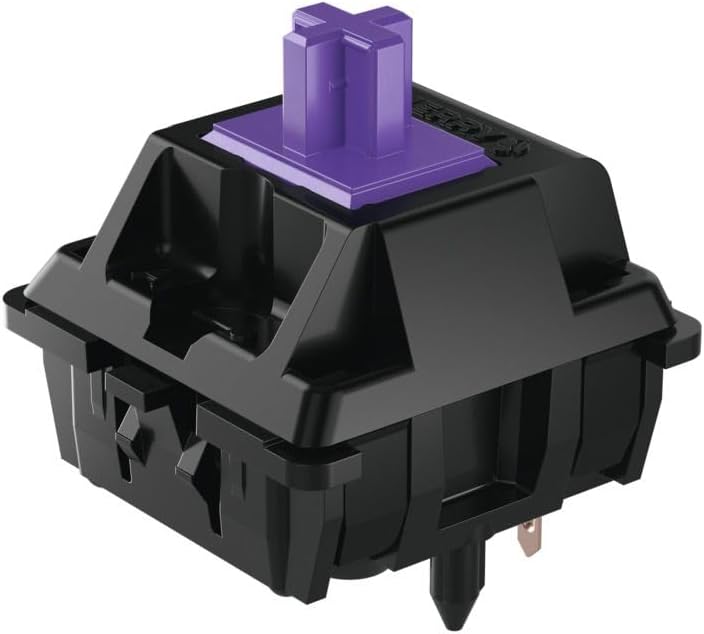
Image: A single KPREPUBLIC Cherry MX2a Purple Switch, showcasing its black housing and purple stem.
Nastavení a instalace
The Cherry MX2a Purple Switches are 5-pin switches, compatible with most hot-swappable mechanical keyboard PCBs that support 5-pin switches. For soldered PCBs, ensure proper alignment before soldering.
Kroky instalace:
- Příprava: Ensure your keyboard PCB is clean and free of debris. If replacing existing switches, carefully remove them using a switch puller.
- Zarovnání: Align the two metal pins and the central plastic pin of the Cherry MX2a switch with the corresponding holes on the PCB. The two smaller plastic alignment pins should also fit into their respective holes.
- Vložení: Gently press the switch into the PCB until it clicks into place. Ensure the switch is fully seated and flush with the PCB. Do not force the switch, as this may bend the pins.
- Ověření: After installing all switches, test each key to ensure it registers correctly. If a key does not register, carefully remove the switch, check for bent pins, straighten them if necessary, and reinsert.
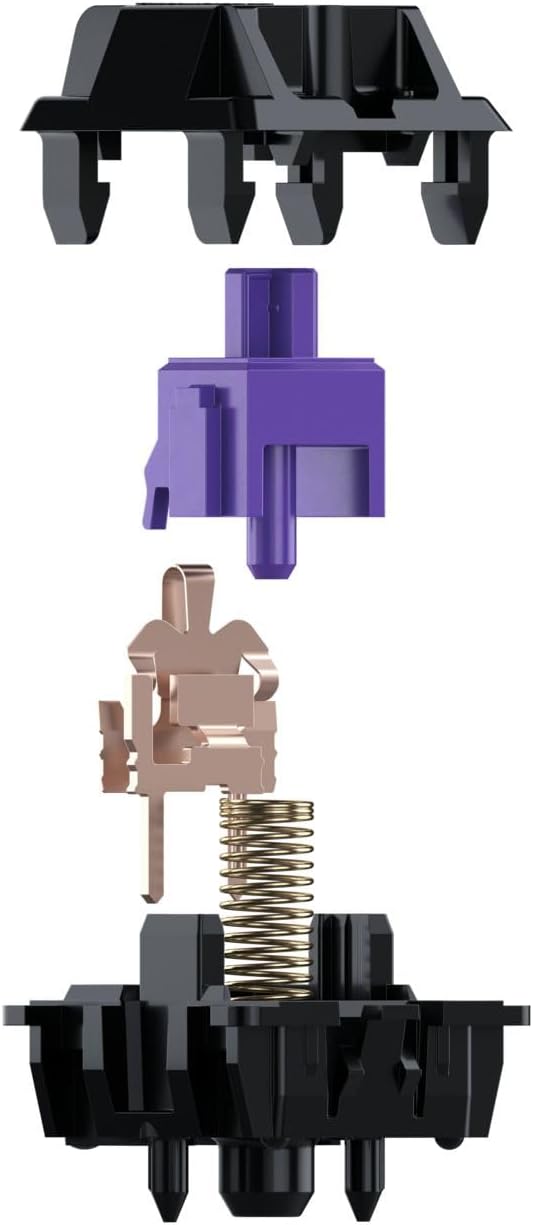
Obrázek: Explodoval view of the Cherry MX2a Purple Switch, showing its individual components: top housing, purple stem, spring, and bottom housing with metal contacts.
Provozní charakteristiky
The Cherry MX2a Purple Switch is a tactile switch, meaning it provides a noticeable bump during actuation, offering feedback to the user without a loud click. This makes it suitable for both typing and gaming where tactile feedback is preferred.
- Hmatová zpětná vazba: A distinct bump is felt as the key is pressed, indicating actuation.
- Ovládací síla: The force required to register a keypress is optimized for a balanced typing experience.
- Factory Lubed: These switches come pre-lubricated from the factory, ensuring smooth operation and reducing spring ping or scratchiness.
- 5pinový design: Provides enhanced stability when mounted on a PCB.
Údržba
Proper maintenance can extend the lifespan and maintain the performance of your Cherry MX2a Purple Switches.
Čištění:
- Odstranění prachu: Regularly use compressed air to blow away dust and debris from around and under the keycaps.
- Čištění kláves: Remove keycaps and clean them with a mild soap solution and water. Ensure they are completely dry before reattaching.
- Čištění spínačů: For deeper cleaning, switches can be carefully removed from hot-swappable PCBs. Use a soft brush or cotton swab with isopropyl alcohol to clean the exterior of the switch housing. Avoid getting liquid inside the switch.
Mazání (volitelné):
While these switches are factory lubed, some users may prefer to re-lube them for a customized feel. This process involves disassembling the switch and applying a thin layer of specialized switch lubricant to the stem, spring, and housing rails. This advanced maintenance should only be performed by experienced users.
Odstraňování problémů
Zde jsou některé běžné problémy a jejich možná řešení:
| Problém | Možná příčina | Řešení |
|---|---|---|
| Key not registering | Bent switch pins, switch not fully seated, faulty PCB socket. | Remove switch, straighten pins carefully, reinsert. Ensure switch is fully pushed in. Test with another switch to rule out PCB issue. |
| Inconsistent feel/scratchiness | Insufficient lubrication, dust/debris inside switch. | Clean around the switch with compressed air. Consider re-lubricating the switch if comfortable with disassembly. |
| Switch feels stuck/sluggish | Excessive dust/debris, foreign object. | Remove keycap and inspect for obstructions. Use compressed air to clear. |
Specifikace
Detailed technical specifications for the Cherry MX2a Purple Switch:
- Značka: KPREPUBLIC
- Model: Cherry MX2a Purple Switch x70
- Provozní režim: Manuál
- Typ terminálu: Through Hole (5-pin)
- Typ obvodu: 1-cestný
- Typ pohonu: Stiskněte tlačítko
- Materiál kontaktu: Copper, Brass, Gold
- Počet pozic: 1
- Způsob ovládání: Dotek
- Barva: Cherry MX2a Purple
- Počet položek: 70 (for this specific product variant)
- Výrobce: KPREPUBLIC
- První k dispozici: 14. června 2024
Záruka a podpora
KPREPUBLIC products are manufactured to high standards. For specific warranty information regarding your Cherry MX2a Purple Switches, please refer to the purchase documentation or contact KPREPUBLIC customer support directly.
For technical assistance, troubleshooting beyond this manual, or warranty claims, please visit the official KPREPUBLIC webnebo se obraťte na jejich zákaznické oddělení. Uschovejte si doklad o koupi pro případné dotazy týkající se záruky.
Ask a question about this manual
Ask about setup, troubleshooting, compatibility, parts, safety, or missing instructions. Manuals+ will review the question and use this page’s manual context to help answer it.