
Zavedení
This manual provides detailed instructions for the installation, operation, and maintenance of your Herdio 4-Channel Bluetooth 5.0 Amplifier Receiver. Please read this manual thoroughly before using the product to ensure proper function and longevity.
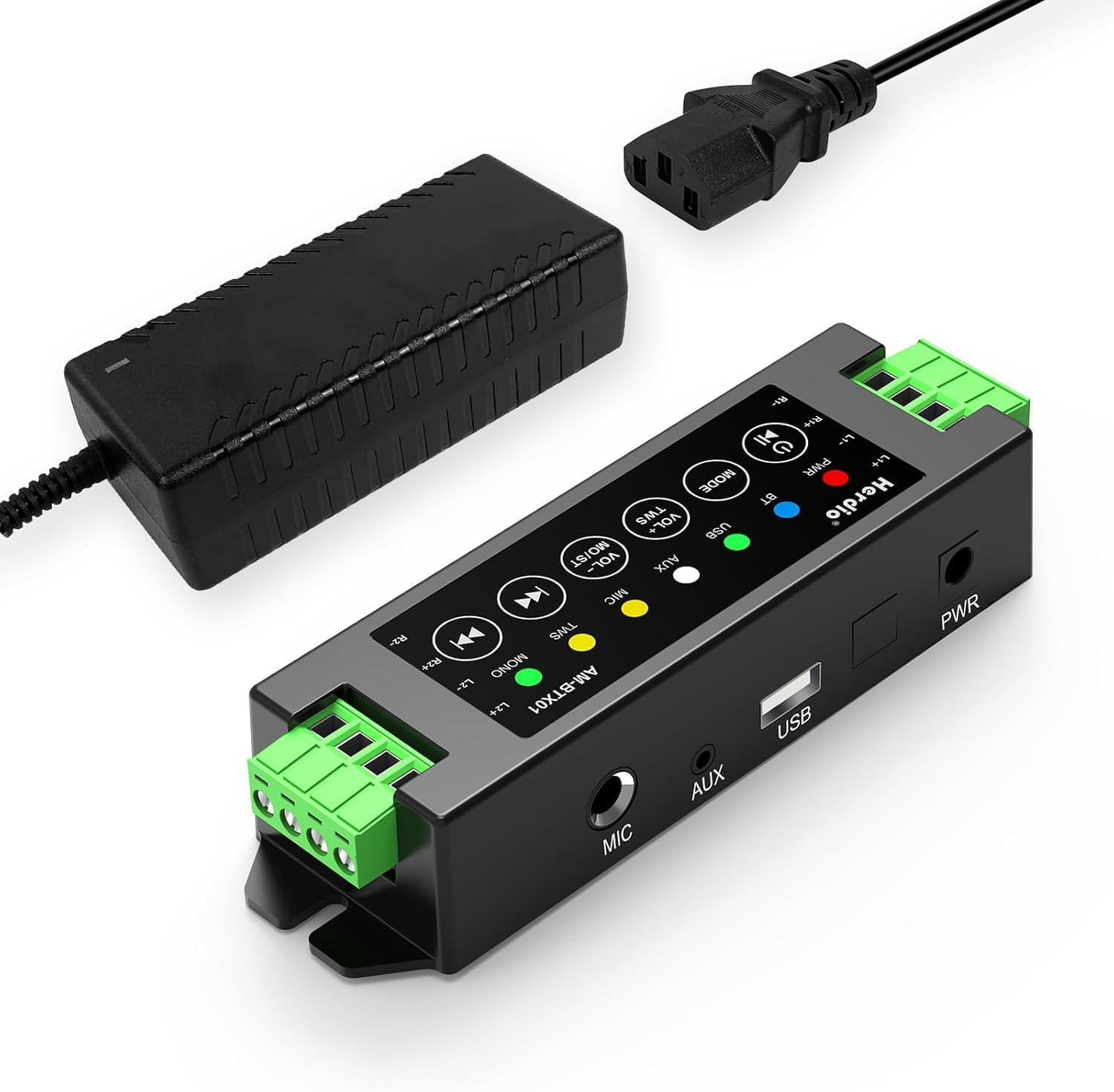
Image: The Herdio 4-Channel Bluetooth Amplifier Receiver, shown with its power supply unit. This compact amplifier is designed for various audio setups.
Obsah balení
Ověřte, zda jsou v balení obsaženy všechny níže uvedené položky:
- 1 x Herdio 4-Channel Ampdoživotní
- 1 x 24V5A AC-DC Power Supply
- 2 x Screws for Mounting
- 1 x Screwdriver for Mounting
- 1 x Uživatelská příručka

Image: A visual representation of the items included in the package: the amplifier, power supply, screwdriver, screws, and user manual.
Specifikace
| Značka | Herdio |
| Číslo modelu | HE-68-24V5A-DE |
| Typ montáže | Držák na zeď |
| Zdroj napájení | Corded Electric (24V5A AC-DC Power Supply) |
| Typ konektoru | USB |
| Materiál | Akrylonitrilbutadienstyren (ABS) |
| Počet kanálů | 4 |
| Zvukový vstup | USB, MIC, AUX, TWS (True Wireless Stereo) |
| Rozměry produktu (D x Š x V) | 1.18 x 6.3 x 1.96 palce |
| Hmotnost položky | 1.17 libry |
| Technologie připojení | Bluetooth 5.0 |
| Barva | Černý |
| Kompatibilní zařízení | Computers, Home Theatre, CD Players, PC, Laptops, Phone |
| Výkon | 200 W (40 W na kanál) |
| Minimální odolnost proti zatížení | 4 Ohmy |

Obrázek: Diagram znázorňující amplifier's specifications, including Bluetooth version 5.0, dynamic mic input, stereo Class-D amp type, and 4 Ohm minimum load resistance, alongside a basic connection setup.
Nastavení a instalace
1. Připojení reproduktoru
The amplifier supports up to four passive speakers. Ensure proper polarity when connecting speaker wires.
- Identifikujte kladný (+) a záporný (-) pól na reproduktorech a na ampživější.
- Using the provided screwdriver, loosen the terminal screws on the ampživější.
- Insert the positive wire from a speaker into the corresponding positive terminal (L1+, R1+, L2+, R2+) on the ampživější.
- Insert the negative wire from the same speaker into the corresponding negative terminal (L1-, R1-, L2-, R2-) on the ampživější.
- Zajistěte vodiče utažením šroubů svorek.
- Opakujte pro všechny čtyři reproduktory.

Image: A clear diagram illustrating the connection of four passive speakers to the amplifier, highlighting positive and negative terminals for correct wiring.

Obrázek: Detailní záběr view demonstrating the use of the provided screwdriver to connect speaker wires into the amplifier's green terminal blocks.
2. Připojení napájení
Connect the provided 24V5A AC-DC power supply to the amplifier's power input port, then plug the power supply into a standard electrical outlet.

Image: A hand connecting the power adapter's barrel jack into the power input port of the Herdio ampživější.
3. Input Source Connection (Optional)
The amplifier supports multiple input methods:
- Vstup AUX: Connect devices like CD players or PCs using a 3.5mm audio cable to the AUX port.
- Vstup USB: Connect a USB drive for audio playback.
- Vstup MIC: Connect a microphone to the MIC port for voice input.

Obrázek: The amplifier displaying its various input options: AUX, USB, and MIC, with corresponding cables connected to illustrate usage.
4. Montáž (volitelné)
The amplifier can be wall-mounted using the provided screws. Ensure the mounting location is suitable and consider cable lengths.

Obrázek: Dva bývalíamples z amplifier mounted on a wall, one showing a close-up of the unit and another showing it integrated into a living room setting.
Important: Estimate the distance to speakers and power outlet before installation. This amplifier is not waterproof; avoid installation in uncovered or wet areas.
Návod k obsluze

Image: A detailed diagram of the amplifier's control panel, labeling each button and its corresponding function for easy operation.
1. Zapnutí/vypnutí
- Zapnutí/vypnutí: Dlouze stiskněte Napájení/přehrávání/pozastavení tlačítko.
- Přehrát/pozastavit: Krátce stiskněte Napájení/přehrávání/pozastavení během přehrávání.
2. Výběr režimu
- Přepnout režim: Krátce stiskněte MODE button to cycle through Bluetooth (BT), USB, AUX, and MIC input modes.
- Resetovat: Dlouze stiskněte MODE button to reset the ampživější.
3. Ovládání hlasitosti
- Zvýšení hlasitosti: Krátce stiskněte VOL+ / MO/ST tlačítko.
- Snížit hlasitost: Krátce stiskněte VOL- / TWS tlačítko.
- Volume can also be adjusted from the connected source device (e.g., phone, PC).
4. Párování Bluetooth
When in Bluetooth mode, the amplifier automaticky přejde do režimu párování. Hledat "Herdio" or similar on your device's Bluetooth settings and connect.
- Reset Bluetooth: To forget automatic Bluetooth connections, long press the Napájení/přehrávání/pozastavení button. You will need to manually reconnect your device afterward.
5. Funkce TWS (True Wireless Stereo)
The TWS function allows two Herdio amplifiers of the same model to connect wirelessly, enabling up to eight passive speakers to play music simultaneously for a wider soundstage.
- Aktivace TWS: Stiskněte a podržte VOL- / TWS button on both amplifiers to initiate TWS pairing.
- Deactivate TWS: Stiskněte tlačítko VOL- / TWS button again to disconnect the TWS link.

Image: An illustration demonstrating the TWS feature, where two amplifiers are wirelessly linked to provide synchronized audio across multiple rooms or a larger area.
6. Track Navigation
- Předchozí skladba: Krátce stiskněte Předchozí stopa button. Long press to fast backward.
- Další skladba: Krátce stiskněte Další stopa button. Long press to fast forward.
7. Přepínač stereo/mono
- Switch Stereo/Mono: Dlouze stiskněte VOL+ / MO/ST button to toggle between stereo and mono output.
Údržba
- Udržujte amplifier in a dry, well-ventilated area.
- Avoid exposing the unit to direct sunlight, extreme temperatures, or high humidity.
- Vnější povrch čistěte měkkým, suchým hadříkem. Nepoužívejte tekuté čisticí prostředky ani rozpouštědla.
- Ujistěte se, že všechna připojení jsou bezpečná a bez prachu nebo nečistot.
Odstraňování problémů
| Problém | Možná příčina | Řešení |
|---|---|---|
| Žádná síla | Power supply not connected or faulty. | Ensure the power supply is securely connected to both the amplifier and a working power outlet. Check if the power adapter is functional. |
| Žádný zvukový výstup | Incorrect input mode, speaker wires loose, volume too low, or source device issue. |
|
| Bluetooth se nepřipojuje | Amplifier not in Bluetooth mode, device too far, or previous pairing conflict. |
|
| Zkreslení nebo statický zvuk | Poor signal quality, speaker impedance mismatch, or interference. |
|
| TWS function not working | Incorrect TWS pairing procedure or amplifiers are not the same model. |
|
Záruka a podpora
Herdio provides a one-year after-sales warranty for this product. We also offer lifelong product pre-sales and after-sales consulting services.
If you have any questions or encounter issues with your product, please contact us. We aim to reply within 24 hours. For product malfunctions within the one-year warranty period, free after-sales service will be provided.
For support, please visit the Herdio Store on Amazon or contact the seller directly through your Amazon order history.