
Zavedení
Welcome to the user manual for your new boAt Stone 352 Pro Bluetooth Speaker. This guide provides detailed instructions on how to set up, operate, and maintain your speaker, ensuring you get the best audio experience. Please read this manual thoroughly before using the product.
Co je v krabici
Upon unboxing your boAt Stone 352 Pro, you should find the following items:
- 1 x boAt Stone 352 Pro Bluetooth Speaker
- 1 x nabíjecí kabel (typu C)
- 1 x Uživatelská příručka (tento dokument)
- 1 x Záruční list
- 1 x Katalog

Image: The boAt Stone 352 Pro speaker, a USB Type-C charging cable, and the warranty card/user manual are shown, representing the contents of the product box.
Video: An unboxing demonstration of the boAt Stone 352 Pro Bluetooth Speaker, showing the speaker, charging cable, and documentation included in the package.
Konec produktuview
The boAt Stone 352 Pro is a portable Bluetooth speaker designed to deliver powerful audio with enhanced features. Key highlights include:
- 14W boAt charakteristický zvuk: Experience clear and powerful audio output.
- Dynamic RGB LEDs: Enhance your listening experience with vibrant lighting effects.
- Až 12 hodin přehrávání: Užijte si delší dobu přehrávání hudby na jedno nabití.
- Funkce TWS: Connect two Stone 352 Pro speakers for a stereo sound experience.
- Vestavěný mikrofon: Facilitates hands-free calling.
- Bluetooth v5.3: Zajišťuje stabilní a efektivní bezdrátové připojení.
- IPX5 voděodolnost: Poskytuje ochranu před postříkáním a potem.
- Více režimů připojení: Supports Bluetooth, AUX, and TF Card playback.
- Nabíjení typu C: Moderní a pohodlné nabíjecí rozhraní.

Image: A black boAt Stone 352 Pro speaker, showcasing its cylindrical design and the illuminated RGB LED strip on the front.
Ovládací prvky a indikátory
Familiarize yourself with the speaker's controls and indicators for optimal use.

Image: The side panel of the boAt Stone 352 Pro speaker, highlighting the power button, volume up/down buttons, and mode selection button.
- Vypínač: Stisknutím a podržením zapnete/vypnete zařízení. Krátkým stisknutím přehrajete/pozastavíte hudbu.
- Zvýšení hlasitosti (+): Krátkým stisknutím zvýšíte hlasitost. Dlouhým stisknutím přejdete na další skladbu.
- Snížit hlasitost (-): Krátkým stisknutím snížíte hlasitost. Dlouhým stisknutím přejdete na předchozí skladbu.
- Tlačítko režimu (M): Krátkým stisknutím přepínáte mezi režimy Bluetooth, AUX a TF karta.
- RGB LED Strip: Indicates power status, charging, and provides dynamic lighting effects.
Začínáme
Nabíjení reproduktoru
Before first use, fully charge your speaker. The boAt Stone 352 Pro features a Type-C charging port.
- Connect the Type-C end of the charging cable to the speaker's charging port.
- Connect the USB-A end of the cable to a compatible USB power adapter (5V/1A recommended).
- The RGB LED strip will indicate charging status. It typically takes approximately 2 hours for a full charge.
- Po úplném nabití odpojte nabíjecí kabel.

Obrázek: Podrobný view of the boAt Stone 352 Pro's side panel, illustrating the Type-C charging interface and the various connectivity ports (Bluetooth, AUX, TF Card).
Zapnutí/vypnutí
- To power on, press and hold the Power button until you hear an audible prompt and the RGB LEDs illuminate.
- To power off, press and hold the Power button again until you hear an audible prompt and the RGB LEDs turn off.
Návod k obsluze
Připojení Bluetooth
- Ensure the speaker is powered on and in Bluetooth mode (indicated by a specific LED pattern or audible prompt).
- Na smartphonu nebo audio zařízení povolte Bluetooth a vyhledejte dostupná zařízení.
- Select "boAt Stone 352 Pro" from the list of devices.
- Once paired, you will hear a confirmation tone, and the speaker's LED will indicate a successful connection.
- Reproduktor se po zapnutí automaticky znovu připojí k poslednímu spárovanému zařízení, pokud je zařízení v dosahu.
Režim AUX
For wired connections, use the AUX port.
- Connect one end of a 3.5mm AUX cable (not included) to the speaker's AUX port.
- Druhý konec připojte k 3.5mm audio výstupu vašeho audio zařízení.
- Press the 'M' (Mode) button on the speaker to switch to AUX mode.
- Zvuk se nyní bude přehrávat přes reproduktor z připojeného zařízení.
Přehrávání TF karet
Přehrávejte hudbu přímo z TF (microSD) karty.
- Vložte TF kartu se zvukem MP3 files into the speaker's TF card slot.
- Press the 'M' (Mode) button to switch to TF Card mode.
- Reproduktor automaticky začne přehrávat hudbu z karty.
Funkce TWS (True Wireless Stereo)
Connect two boAt Stone 352 Pro speakers wirelessly for a true stereo sound experience.
- Ujistěte se, že jsou oba reproduktory zapnuté a nejsou připojeny k žádnému jinému zařízení Bluetooth.
- On one speaker (this will be the primary speaker), long press the 'M' (Mode) button until you hear a TWS pairing prompt.
- The two speakers will automatically search and pair with each other. A confirmation tone will indicate successful TWS pairing.
- Now, connect your audio device to the primary speaker via Bluetooth as described above.
- Both speakers will play audio in stereo.

Image: Two boAt Stone 352 Pro speakers, one black and one blue, operating in TWS mode, demonstrating synchronized audio playback from a connected smartphone.
Hands-free volání
Vestavěný mikrofon umožňuje pohodlné handsfree hovory při připojení přes Bluetooth.
- When an incoming call is received, press the Power button once to answer.
- To end a call, press the Power button once again.
- To reject an incoming call, long press the Power button.
RGB LED Functionality
The boAt Stone 352 Pro features dynamic RGB LEDs that add a visual element to your audio experience.

Obrázek: Detailní záběr view of the boAt Stone 352 Pro's RGB LED strip, displaying a gradient of colors from blue to green to orange, highlighting its dynamic lighting feature.
- The RGB LEDs automatically cycle through various colors, synchronizing with the music or providing ambient lighting.
- Specific button presses may allow for changing LED modes or turning them off (refer to product-specific quick start guide for advanced controls if available).
Údržba a péče
- Čištění: K čištění reproduktoru používejte měkký, suchý hadřík. Nepoužívejte abrazivní čisticí prostředky ani rozpouštědla.
- Voděodolnost (IPX5): The speaker is IPX5 rated, meaning it is protected against low-pressure water jets from any direction. It is not designed for submersion in water. Ensure the charging port cover is securely closed to maintain water resistance.
- Skladování: Reproduktor skladujte na chladném a suchém místě mimo dosah přímého slunečního záření a extrémních teplot.
- Péče o baterie: Chcete-li prodloužit životnost baterie, vyhněte se častému úplnému vybíjení reproduktoru. Pravidelně jej nabíjejte, i když jej delší dobu nepoužíváte.

Image: The boAt Stone 352 Pro speaker with water droplets on its surface, emphasizing its IPX5 splash and sweat resistance feature.
Odstraňování problémů
| Problém | Možné řešení |
|---|---|
| Reproduktor se nezapne. | Ujistěte se, že je reproduktor nabitý. Připojte jej ke zdroji napájení a zkuste to znovu. |
| Nelze spárovat přes Bluetooth. |
|
| Žádný zvuk nebo nízká hlasitost. |
|
| Párování TWS se nezdařilo. |
|
| Kvalita hovoru je špatná. |
|
Specifikace
| Funkce | Detail |
|---|---|
| Název modelu | Kámen 352 Pro |
| Typ reproduktoru | přenosný reproduktor |
| Výstupní výkon reproduktoru | 14 wattů |
| Verze Bluetooth | v5.3 |
| Dosah Bluetooth | 10 metrů |
| Průměrná životnost baterie | 12 hodiny |
| Doba nabíjení | 2 hodiny |
| Kapacita baterie | 3600 miliamp hodiny |
| Voděodolnost | IPX5 |
| Technologie připojení | Bluetooth, USB, Wi-Fi (Note: While Wi-Fi is listed, primary connectivity is Bluetooth, AUX, and TF Card as per product features.) |
| Kontrolní metoda | Stiskněte tlačítko |
| Rozměry produktu | 15.8H x 9.4Š x 9.4V centimetrů |
| Hmotnost položky | 20 gramů |
| Zahrnuté komponenty | Speaker, Cable, User Manual, Warranty Card, Catalogue |
Záruka a podpora
Your boAt Stone 352 Pro Bluetooth Speaker comes with a standard brand warranty. Please refer to the included Warranty Card for specific terms and conditions.
- Záruční doba: Obvykle 1 rok od data nákupu.
- Proces reklamace: For warranty claims or technical support, please contact boAt customer service or visit their official website. Keep your purchase receipt and warranty card handy.
- Prodloužená záruka: An optional 1 Year Extended Warranty by OneAssist is available for purchase.
Pro další pomoc se můžete také obrátit na boAt Hearables App for additional user help guides and support resources.
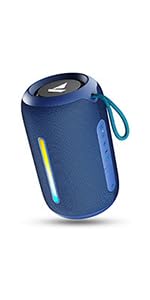
Image: A QR code for the boAt Hearables App, which provides additional support and features for the speaker.