
1. Konec produktuview
The SMARTGEN HGM1791CAN Genset Controller is designed for single unit automation and monitoring control of gensets, including pumping units. It facilitates both manual and automatic start/stop operations based on remote signals. The controller continuously monitors and protects genset operation by collecting and analyzing critical data such as generation voltage, current, water temperature, and oil pressure. It provides fault indications and supports timely maintenance actions.
The HGM1791CAN features a 128x64 LCD display with backlight, offering both Chinese and English language interfaces for user convenience. Its touch-button operation ensures clarity and intuitive control. Parameters and delay values can be adjusted via the front panel or through PC software connected via a USB port.
Klíčové vlastnosti:
- 128x64 LCD display with backlight, supporting Chinese and English interfaces.
- Durable hard screen acrylic material for display protection.
- Silicone panel and buttons for enhanced high and low-temperature adaptation.
- Wide power supply range of DC (8~35)V, compatible with 12V or 24V starting batteries.
- Measurement and display of generator single-phase voltage, proud, frekvence, výkon a procento zatíženítage.
- Precision measurement and display of engine parameters: Oil Pressure, Temperature, Fuel Level, Total Running Time, Battery Voltage, Engine Speed, and Accumulated Start Times.
- Integrated genset fault protection and display functions.
- Three operational modes: Manual, Auto, and Stop.
- Compatibility with multiple temperature, pressure, and fuel level sensors, which can be user-defined.
- Multiple crank disconnection conditions (engine speed sensor, oil pressure, generator frequency).
- Three configurable input ports (digital or sensor input).
- Two fixed relay outputs (fuel relay, start relay).
- Three configurable output ports (common alarm, preheat, idle control).
- User-settable parameters retained during power loss, adjustable via front panel or PC software (Type-C USB).
- Digital regulation for reliable and stable control.
- Modular design, self-extinguishing ABS plastic enclosure, pluggable terminal blocks, embedded installation.
2. Nastavení a instalace
The HGM1791CAN controller is designed for embedded installation. Ensure the mounting location is secure and protected from excessive vibration or moisture. The compact structure and pluggable terminal blocks facilitate straightforward wiring.
2.1. Montáž
Install the controller into a suitable panel cutout. Secure it using the provided mounting hardware. Ensure adequate space for wiring connections at the rear.
2.2. Připojení vodičů
All connections are made via pluggable terminal blocks. Refer to the wiring diagram provided with your product for specific terminal assignments. Ensure all connections are secure and correctly polarized.
- Napájení: Connect DC (8~35)V power to the designated terminals. The controller is compatible with both 12V and 24V starting batteries.
- Generator Connections: Připojte generátor hlasitostitage, current transformer (CT) inputs, and frequency inputs as per the wiring diagram.
- Engine Sensors: Connect oil pressure, water temperature, and fuel level sensors. The controller supports various sensor types, which can be user-defined.
- Vstupní porty: Utilize the three configurable input ports for digital signals or additional sensor inputs as required by your application.
- Výstupní porty: Connect the two fixed relay outputs (fuel, start) and three configurable output ports (common alarm, preheat, idle control) to the respective actuators or indicators.
- USB port: The Type-C USB port is for connecting to a PC for parameter configuration using dedicated software.
Důležité: Always ensure power is disconnected before making or changing any wiring connections to prevent damage to the controller or associated equipment.
3. Návod k obsluze
The HGM1791CAN controller features an intuitive LCD display and touch-button interface for easy operation.
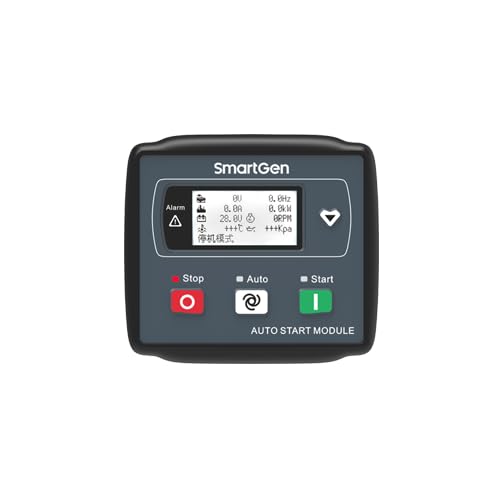
Figure 1: Front panel of the SMARTGEN HGM1791CAN Genset Controller. It features an LCD screen displaying various parameters, along with 'Stop', 'Auto', and 'Start' buttons.
3.1. Zobrazení a navigace
The 128x64 LCD displays real-time genset and engine parameters. Use the navigation buttons (typically arrow keys or dedicated menu buttons) to scroll through different screens and access settings.
3.2. Provozní režimy
The controller supports three primary operating modes, selected via dedicated buttons on the front panel:
- Režim zastavení: The genset is stopped and will not start automatically. This mode is typically used for maintenance or when the genset is not required.
- Automatický režim: The genset will automatically start and stop based on a remote start signal or pre-configured conditions (e.g., low battery voltage, utility power failure).
- Manuální režim: The genset can be manually started and stopped using the 'Start' and 'Stop' buttons on the front panel.
3.3. Parameter Monitoring
The LCD provides real-time data for comprehensive monitoring:
- Generator Parameters: svtage (V), Frequency (Hz), Current (A), Power (kW), Load Percentage (%).
- Engine Parameters: Oil Pressure (kPa), Temperature (°C), Fuel Level (%), Battery Voltage (V), Engine Speed (RPM).
- Provozní údaje: Total Running Time (H), Accumulated Start Times.
3.4. Konfigurace parametrů
Parameters can be adjusted to suit specific application requirements:
- Přední panel: Basic parameters and delay values can be set directly using the controller's buttons and LCD menu.
- PC Software: For advanced configuration and comprehensive parameter adjustment, connect the controller to a PC via the Type-C USB port and use the dedicated SMARTGEN configuration software. All parameters are digitally regulated for enhanced reliability.
Poznámka: All user-configured parameters are stored in non-volatile memory and will not be lost in the event of a power failure.
4. Údržba
Regular maintenance ensures the longevity and reliable operation of your HGM1791CAN Genset Controller.
- Čištění: Periodically clean the controller's front panel and display with a soft, dry cloth. Avoid using abrasive cleaners or solvents.
- Kontroly připojení: Annually inspect all wiring connections for tightness and signs of corrosion. Loose connections can lead to intermittent operation or damage.
- Aktualizace softwaru: Check the SMARTGEN website periodically for any available firmware updates for your controller model.
- Podmínky prostředí: Zajistěte, aby provozní prostředí zůstalo v rámci specifikovaného rozsahu teploty a vlhkosti, aby nedošlo k předčasnému selhání součástí.
The controller's robust design, including its silicone panel and buttons, contributes to its high and low-temperature adaptation, reducing the need for frequent physical maintenance.
5. Řešení problémů
The HGM1791CAN controller includes comprehensive fault protection and display functions to assist in diagnosing issues. When a fault occurs, the controller will indicate the condition on the LCD.
Běžné problémy a řešení:
- Ovladač se nezapíná:
- Check the DC power supply connections (8-35V).
- Ověřte objem baterietage je v přijatelném rozsahu.
- Inspect fuses in the power supply line.
- Generátor se nedaří spustit:
- Ensure the controller is in 'Auto' or 'Manual' mode.
- Check for active fault alarms displayed on the LCD.
- Verify fuel level and battery charge.
- Inspect start relay and fuel relay connections.
- Confirm crank disconnection conditions are met (engine speed, oil pressure, generator frequency).
- Nesprávné hodnoty senzorů:
- Check sensor wiring for loose connections or damage.
- Verify the sensor type configured in the controller matches the installed sensor.
- Ensure sensors are correctly calibrated if applicable.
- Communication Issues (PC Software):
- Ensure the Type-C USB cable is securely connected.
- Verify the correct drivers are installed on the PC.
- Confirm the SMARTGEN configuration software is running and correctly configured for the controller model.
For persistent issues or faults not listed, consult the detailed troubleshooting guide available from SMARTGEN or contact technical support.
6. Technické specifikace
| Funkce | Specifikace |
|---|---|
| Model | HGM1791CAN |
| Zobrazit | 128x64 LCD with Backlight |
| Rozsah napájení | DC (8~35)V |
| Kompatibilita | 12V or 24V Starting Batteries |
| Provozní režimy | Manual, Auto, Stop |
| Configurable Input Ports | 3 (Digital or Sensor Input) |
| Fixed Relay Outputs | 2 (Fuel Relay, Start Relay) |
| Configurable Output Ports | 3 (Common Alarm, Preheat, Idle Control) |
| Komunikační rozhraní | Type-C USB (for PC software) |
| Materiál pouzdra | Self-extinguishing ABS Plastic |
| Typ instalace | Vložené |
| Hmotnost položky | 6 unce |
| Výrobce | SMARTGEN |
7. Záruka a podpora
For warranty information, technical support, or service inquiries regarding your SMARTGEN HGM1791CAN Genset Controller, please contact your authorized SMARTGEN dealer or the manufacturer directly. Details can typically be found on the SMARTGEN official website or through the seller from whom the product was purchased (e.g., SmartGen-America).
Please have your product model number (HGM1791CAN) and purchase details ready when contacting support.