
1. Úvod
This manual provides instructions for the VDIAGTOOL VD70 BiDirectional Scan Tool and the V200 Pro Upgrade Kit. The VD70 is an automotive diagnostic scanner designed for comprehensive vehicle system analysis, offering advanced functions such as OE-level diagnostics, bi-directional control, and ECU coding. The V200 Pro Upgrade Kit complements the VD70 by providing a versatile power circuit probe tester and a 30-piece back probe set for electrical system diagnosis.

Image: The VDIAGTOOL VD70 BiDirectional Scan Tool, shown within its protective carrying case, displaying its main interface.

Image: The VDIAGTOOL V200 Pro Upgrade Kit, including the power circuit probe tester, cables, and various back probes.
2. Nastavení
2.1 VD70 Scan Tool Initial Setup
- Zapnutí: Connect the VD70 scan tool to the vehicle's OBD-II port. The device will power on automatically.
- Výběr jazyka: Postupujte podle pokynů na obrazovce a vyberte preferovaný jazyk.
- Wi-Fi připojení: Pro aktualizace softwaru a online funkce připojte zařízení ke stabilní síti Wi-Fi.
- Aktualizace softwaru: Navigate to the 'Updates' section on the main menu and download any available software updates to ensure optimal performance and access to the latest vehicle data.

Image: The VD70 scan tool interface highlighting its key features such as OE-level diagnostics, 36+ services, bi-directional control, and 3 years of software updates.
2.2 V200 Pro Circuit Tester Setup
- Připojení napájení: Connect the V200 Pro to a 12V or 24V vehicle battery using the provided alligator clips, or to a cigarette lighter socket. Ensure correct polarity (red to positive, black to negative).
- Nástavec sondy: Attach the desired test probe or back probe to the V200 Pro unit.

Image: A breakdown of the V200 Pro 3-in-1 kit, showing the circuit probe, breaker finder, and test leads set.
3. Provoz
3.1 VD70 Scan Tool Operation
The VD70 offers a range of diagnostic functions accessible through its intuitive interface.
- OE All Systems Diagnostics:
- Přečtěte si kódy DTC: Retrieve diagnostic trouble codes from all available vehicle modules.
- Vymazat kódy DTC: Erase diagnostic trouble codes after repairs are completed.
- Freeze Frame: View vehicle operating conditions at the moment a DTC was set.
- Informace o ECU: Získejte přístup k podrobným informacím o elektronické řídicí jednotce.
- Live Data & 8-in-One Graphing: Monitor real-time sensor data and graph up to eight data streams simultaneously for detailed analysis.
- Obousměrné řízení (aktivní testy): Perform active tests on various vehicle components to verify their functionality. This includes commanding components like EVAP solenoids, ABS motor pumps, windows, and sunroofs.
- 36+ Žhavých Služeb: Access common maintenance and reset functions, including but not limited to:
- Resetování oleje
- Odvzdušnění ABS
- Resetování plynu
- Přeučení klikového hřídele
- Reset airbagů
- Reset EPB (elektronická parkovací brzda)
- Reset BMS (systém správy baterií)
- Kódování vstřikovače
- Reset TPMS (systém monitorování tlaku v pneumatikách)
- SAS Calibrations (Steering Angle Sensor)
- Kódování řídicí jednotky motoru: Customize vehicle settings and perform module adaptations.
- IMMO Programming: Perform immobilizer functions (check compatibility before use).
- Podpora protokolů CAN FD a DoIP: Kompatibilní s novějšími komunikačními protokoly vozidel.

Image: The VD70 scan tool interface demonstrating its capability to perform in-depth OE-level all-system diagnosis, including reading DTCs, clearing DTCs, freeze frame data, and ECU information.

Image: A visual representation of the 36+ hot services offered by the VD70, covering various daily maintenance tasks for vehicles.
3.2 V200 Pro Circuit Tester Operation
The V200 Pro is designed for efficient electrical system diagnosis.
- Circuit Open Test: Identify open circuits in wiring.
- Tracing Wire: Follow wires to locate breaks or shorts.
- AC/DC Voltage Test: Změřte střídavý a stejnosměrný objemtage úrovně.
- Test diod: Check the functionality of diodes.
- Test odolnosti: Změřte elektrický odpor.
- Test polarity: Determine positive and negative polarity. The Red/Green Polarity LED provides visual indication.
- Test kontinuity: Check for continuous electrical paths.
- Zkouška pozemní zkoušky: Zkontrolujte správné uzemnění.
- Activate Components: Safely activate components (e.g., relays, motors) for testing.
- Signal Circuit Test: Analyze signal circuits.
- Relay, Fuse, Trailer Light Test: Specific tests for these components.
- One-Click 4 Working Modes: Easily switch between different testing modes.
- Checking Short Circuit: Quickly identify short circuits.
- Locating Open/Breaker Circuit: Pinpoint open circuits or tripped breakers.
- Quick Self-Test: Perform a self-test to ensure the device is functioning correctly.
- Built-in Light & Beep Warning: Aids in visibility and provides audible alerts during testing.

Image: The V200 Pro Power Probe Circuit Tester highlighting its ease of use and various diagnostic capabilities for electrical problems.
3.3 Using the 30-Piece Back Probe Kit
The included back probe kit facilitates non-intrusive testing of electrical connectors and sensors.
- Select the appropriate back probe pin for the connector or sensor terminal.
- Gently insert the back probe into the connector from the wire side, ensuring it makes contact with the terminal without damaging the wire insulation or connector.
- Connect the V200 Pro or a multimeter to the back probe for measurements.
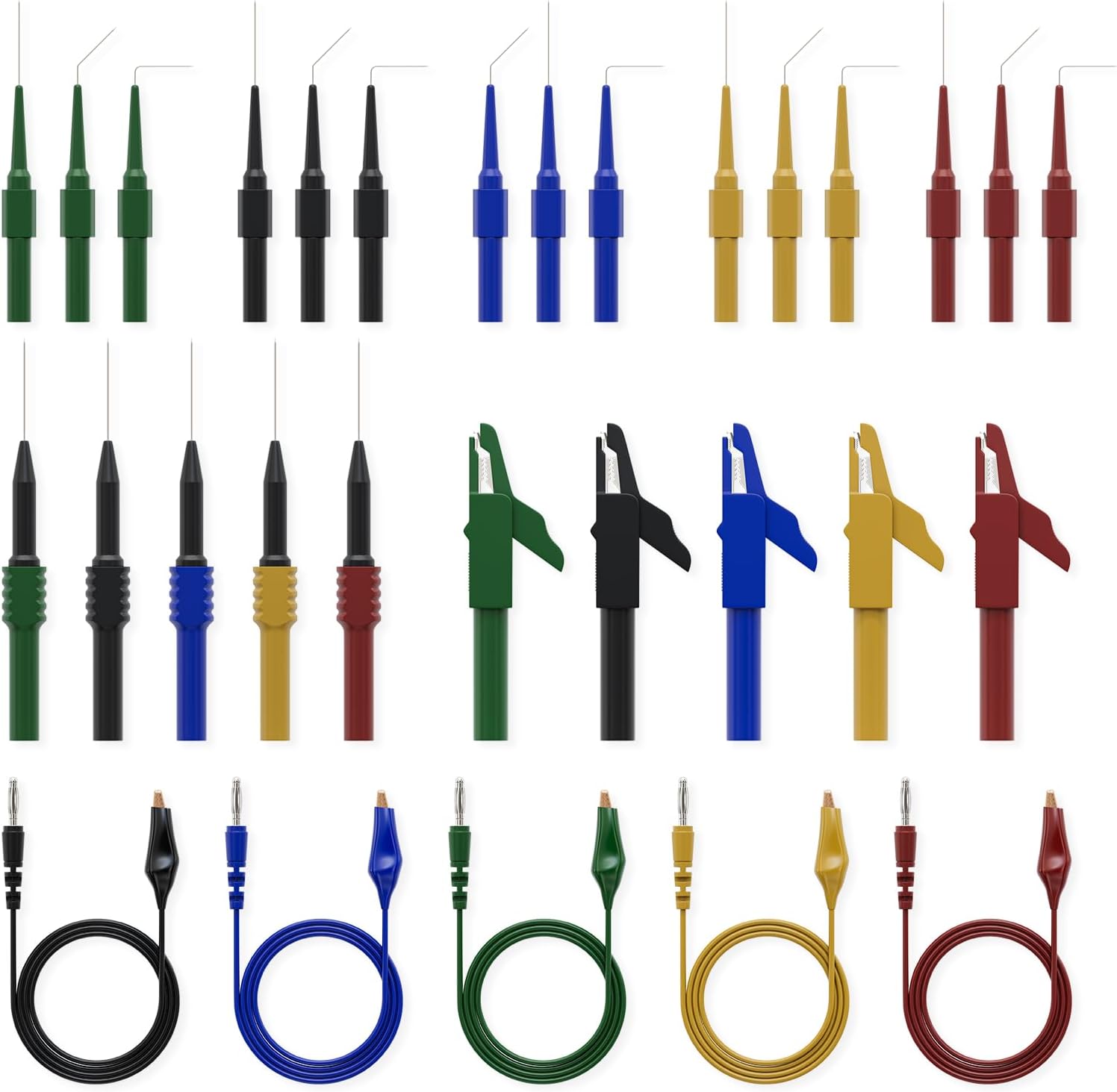
Image: The 30-piece back probe kit, showing various sizes and types of back probe pins, banana plug to alligator clip circuit test wires, and wire piercing probes.
4. Údržba
- Aktualizace softwaru: Regularly check for and install software updates for the VD70 scan tool. VDIAGTOOL provides 3 years of free software updates to ensure compatibility with new vehicles and features.
- Čištění: Clean the devices with a soft, dry cloth. Avoid using abrasive cleaners or solvents.
- Skladování: Store the tools in their protective cases in a dry, cool environment away from direct sunlight and extreme temperatures.
- Kontrola kabelů: Pravidelně kontrolujte všechny kabely a konektory, zda nevykazují známky opotřebení nebo poškození. Poškozené součásti ihned vyměňte.
5. Řešení problémů
5.1 VD70 Scan Tool
- Zařízení se nezapíná: Ensure the OBD-II connection is secure and the vehicle's ignition is on. Check the vehicle's battery voltage.
- Chyby komunikace: Verify the OBD-II cable is properly connected. Ensure the vehicle's ignition is on. Try connecting to a different vehicle to rule out vehicle-specific issues.
- Zamrznutí softwaru: Restart the device. Ensure the software is up to date.
5.2 V200 Pro Circuit Tester
- Bez napájení: Check the connection to the vehicle battery or cigarette lighter. Ensure correct polarity. Verify the vehicle's power source is active.
- Aktivovaná ochrana proti přetížení: If the overload protection engages, disconnect the probe from the circuit, wait a few moments, and then re-attempt testing after verifying the circuit's integrity.
- Nepřesná čtení: Ensure probes are making good contact with the test points. Check for damaged cables or probes.
V případě přetrvávajících problémů se podívejte na kontaktní informace v části Záruka a podpora.
6. Specifikace
6.1 VDIAGTOOL VD70 Scan Tool
- Procesor: Čtyřjádro
- Skladování: 2GB RAM + 64GB ROM
- Operační systém: Android 10.0
- Bezdrátové připojení: 2.4G & 5GHz Wi-Fi
- Baterie: 18.25Wh, 2-hour Fast Charge
- Podporované protokoly: CAN FD, DoIP, and standard OBD-II protocols
6.2 VDIAGTOOL V200 Pro Upgrade Kit
- Zdroj napájení: Vehicle Battery (12V/24V), Cigarette Lighter
- Prodlužovací kabel: 20FT+20FT
- Ochrana: Ochrana proti přetížení
- Dodávané příslušenství: 30-piece Back Probe Kit (pins, banana plug to alligator clip wires, wire piercing probes, nickel-plated copper alligator clips)
7. Záruka a podpora
- Záruka: The VDIAGTOOL VD70 and V200 Pro come with a 12-month warranty from the date of purchase.
- Returns & Replacement: A 30-day risk-free return and replacement policy is offered.
- Aktualizace softwaru: Enjoy 3 years of free software updates for the VD70 scan tool.
- Technická podpora: For any technical assistance or inquiries, please contact VDIAGTOOL support at vdiagtool2@outlook.com. 24/7 technical support is available.