
Zavedení
Thank you for choosing the Edifier STAX Spirit S5 Wireless Planar Magnetic Headphones. These headphones are engineered to deliver an exceptional audio experience, featuring advanced planar magnetic drivers with EqualMass diaphragms for precise sound reproduction and minimal distortion. With Qualcomm Snapdragon Sound technology, LDAC, and LHDC codec support, the S5 provides high-resolution wireless audio. This manual provides detailed instructions for setup, operation, maintenance, and troubleshooting to ensure you get the most out of your new headphones.
Obsah balení
Ověřte prosím, zda jsou ve vašem balení obsaženy všechny níže uvedené položky:
- 1 x Edifier STAX Spirit S5 Headset
- 2 x Cooling Mesh Earpads (pre-installed or spare)
- 1 x USB nabíjecí kabel typu C
- 1 x Earpad Pick Tool
- 1 x 3.5mm AUX audio kabel
- 1 x adaptér z 3.5 mm na 6.35 mm
- 1 x Headphone Carrying Case
- 2 x Earpad Pouches
- 1 x Uživatelská příručka
Konec produktuview
Familiarize yourself with the components and controls of your Edifier STAX Spirit S5 headphones.

Přední view of the Edifier STAX Spirit S5 headphones, showcasing their sleek black design and over-ear cups.

A user wearing the Edifier STAX Spirit S5 headphones, demonstrating their comfortable fit and profile během používání.
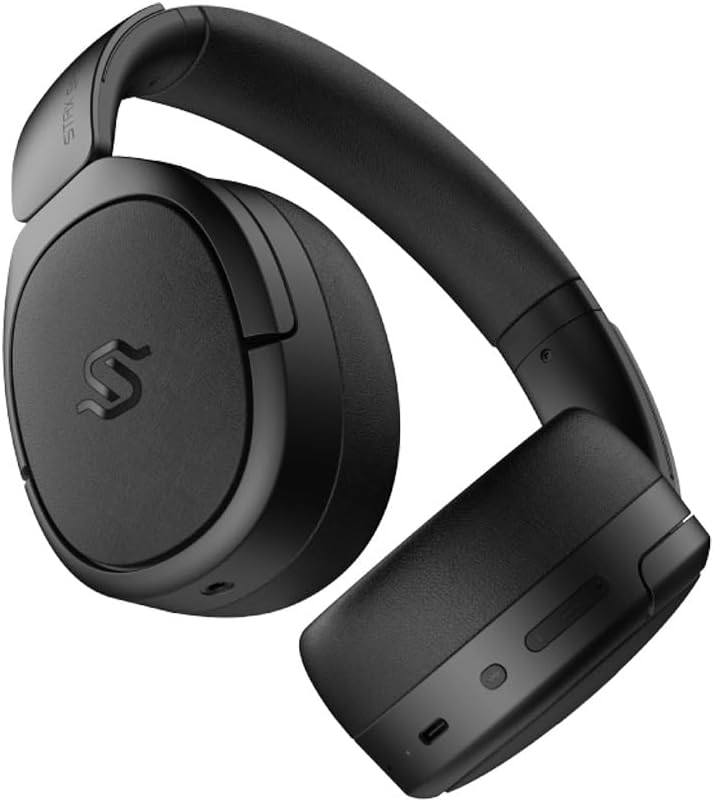
Strana view of the headphones, highlighting the control buttons and ports located on the right earcup, including the USB-C port.

A detailed close-up of the control buttons on the earcup, showing the power button, volume controls, and the USB-C charging port.

The Edifier STAX Spirit S5 headphones folded compactly, illustrating their portability and ease of storage in the included carrying case.
Nastavení
Nabíjení sluchátek
Before first use, fully charge your Edifier STAX Spirit S5 headphones.
- Connect the supplied USB Type-C cable to the charging port on the headphones and the other end to a USB power adapter (not included) or a computer's USB port.
- The LED indicator will show charging status. It typically takes approximately 10 minutes for a quick charge, providing extended playback. A full charge can provide up to 80 hours of battery life.
- Once fully charged, the LED indicator will change (refer to the specific indicator behavior in your quick start guide, if available).
Zapnutí/vypnutí
- Zapnutí: Stiskněte a podržte tlačítko napájení přibližně 3 sekundy, dokud se nerozsvítí kontrolka.
- Vypnout: Stiskněte a podržte tlačítko napájení přibližně 5 sekundy, dokud kontrolka nezhasne.
Párování pomocí Bluetooth
The STAX Spirit S5 uses Bluetooth V5.4 for stable and fast transmission.
- Ujistěte se, že jsou sluchátka vypnutá.
- Stiskněte a podržte tlačítko napájení po dobu přibližně 5–7 sekund, dokud kontrolka nezačne rychle blikat, což signalizuje režim párování.
- On your device (smartphone, tablet, computer), enable Bluetooth and search for "Edifier STAX Spirit S5" in the list of available devices.
- Select the headphones to connect. Once successfully paired, the indicator light will stop flashing and remain solid or turn off, depending on the model's specific behavior.
- Rychlé párování Google: For Android devices, the headphones support Google Fast Pair for quick and seamless connection. Simply power on the headphones near your Android device, and a pairing prompt will appear.
- Multi-device Connection: The S5 can connect to two audio devices simultaneously. After pairing with the first device, put the headphones back into pairing mode and connect to the second device. The headphones will intelligently switch between the two.
Drátové připojení
The headphones support both USB-C and 3.5mm AUX wired connections.
- USB-C Audio: Connect the USB Type-C cable from the headphones to a compatible USB-C port on your device for digital audio playback and charging.
- 3.5mm AUX Audio: Connect the 3.5mm AUX cable to the audio input port on the headphones and the other end to your audio source's 3.5mm output. Use the included 3.5mm to 6.35mm adapter for devices with a 6.35mm jack. Note that the headphones must be powered on for passive wired mode.
Návod k obsluze
Základní ovládací prvky
Hlavní ovládací prvky se nacházejí na náušníku:
- Vypínač:
- Stiskněte a podržte po dobu 3 sekund pro zapnutí.
- Stiskněte a podržte 5 sekund pro vypnutí.
- Press and hold for 5-7 seconds (from off) to enter Bluetooth pairing mode.
- Zvýšení hlasitosti (+): Krátkým stisknutím zvýšíte hlasitost.
- Snížit hlasitost (-): Krátkým stisknutím snížíte hlasitost.
- Multi-function Button (often between volume buttons):
- Krátké stisknutí: Přehrávání/Pozastavení hudby.
- Short press: Answer/End call.
- Long press: Reject call.
- Dvojité stisknutí: Další skladba.
- Trojité stisknutí: Předchozí skladba.
Zvukové technologie
The STAX Spirit S5 supports various high-fidelity audio codecs for an optimal listening experience:
- Qualcomm Snapdragon Sound: Ensures stable RF connection and efficient power consumption for extended listening.
- LDAC & LHDC: Compatible with Hi-Res Audio and Wireless Hi-Res Audio, delivering exceptional detail and clarity.
- aptX HD, aptX Adaptive, aptX Lossless: Part of the Snapdragon Audio technology, providing high-resolution audio with ultra-low latency (as low as 89ms with aptX Adaptive).
Funkce volání
The headphones are equipped with dual microphones and Qualcomm cVc technology for clear calls.
- Zrušení hluku: Integrated Qualcomm cVc actively suppresses ambient noise, enhancing voice clarity during calls.
- Soukromí: The closed-back design helps ensure conversation privacy.
Údržba
Správná údržba zajistí dlouhou životnost a výkon vašich sluchátek.
- Čištění:
- Sluchátka otřete měkkým, suchým hadříkem.
- For earpads, use a slightly damp hadříkem, pokud je to nutné, ale vyhněte se nadměrné vlhkosti.
- Nepoužívejte agresivní chemikálie, čisticí rozpouštědla ani silné čisticí prostředky.
- Výměna náušníků:
- The STAX Spirit S5 comes with two sets of earpads (mesh and leather).
- To replace, gently pull off the existing earpad. Use the included earpad pick tool if needed to carefully detach it from the earcup.
- Align the new earpad with the earcup and press firmly around the edges until it clicks securely into place.
- Skladování:
- Pokud sluchátka nepoužíváte, uložte je do dodaného přepravního pouzdra, abyste je chránili před prachem, poškrábáním a nárazy.
- Vyhněte se skladování při extrémních teplotách nebo vysoké vlhkosti.
- Péče o baterie:
- Abyste šetřili životnost baterie, vyvarujte se častého úplného vybíjení sluchátek.
- Pokud skladujete po delší dobu, nabijte baterii před uskladněním přibližně na 50 %.
Odstraňování problémů
Pokud se se sluchátky setkáte s problémy, podívejte se na následující běžné problémy a jejich řešení:
| Problém | Možná příčina | Řešení |
|---|---|---|
| Sluchátka se nezapínají. | Slabá baterie. | Nabijte sluchátka pomocí kabelu USB-C. |
| Nelze spárovat přes Bluetooth. | Sluchátka nejsou v režimu párování; Bluetooth zařízení je vypnuté; rušení. | Ensure headphones are in pairing mode (flashing light). Turn Bluetooth off/on on your device. Move closer to the device. Clear previous pairings on your device. |
| Žádný zvuk nebo nízká hlasitost. | Příliš nízká hlasitost; nesprávný zdroj zvuku; uvolněný kabel (kabelový režim). | Increase volume on headphones and source device. Ensure correct audio output is selected on your device. Check wired connections. |
| Poor audio quality (wireless). | Distance from device; interference; low-quality audio source. | Reduce distance to your device. Avoid strong electromagnetic interference. Use high-quality audio files/streaming services. |
| Mikrofon nefunguje během hovorů. | Incorrect input device selected; microphone muted. | Ensure the headphones are selected as the input device in your call application settings. Check if the microphone is muted. |
If the problem persists, please contact Edifier customer support.
Specifikace
Key technical specifications for the Edifier STAX Spirit S5 headphones:
| Značka | Edifier |
| Název modelu | S5 |
| Číslo modelu | S5spaceblack |
| Barva | Černý |
| Technologie připojení | Drátové, bezdrátové (Bluetooth) |
| Technologie bezdrátové komunikace | Bluetooth |
| Verze Bluetooth | V5.4 (implied from feature bullets) |
| Jack pro sluchátka | 3.5mm Jack, USB-C |
| Impedance | 120 ohmů |
| Umístění uší | Over-Ear |
| Form Factor | Circum-Aural |
| Hmotnost položky | 420 gramů |
| Složení baterie | Lithium-iontová |
| Nabíjecí baterie | Ano |
| Doba nabíjení | Approx. 10 minutes (for quick charge) |
| Speciální funkce | Rychlé nabíjení |
| Kompatibilní zařízení | Computer, Laptop, Mobile Phone |
| Specifické použití pro produkt | Music, Professional, Studio Listening |
Záruka a podpora
The Edifier STAX Spirit S5 headphones come with a two-year warranty, ensuring reliable performance and support.
For technical assistance, warranty claims, or further inquiries, please contact Edifier customer support through their official webnebo prodejce, od kterého jste produkt zakoupili. Uschovejte si prosím doklad o koupi pro ověření záruky.