
VIVO STAND-V002OW
VIVO Dual Monitor Desk Mount User Manual
Model: STAND-V002OW
Značka: VIVO
Zavedení
This manual provides comprehensive instructions for the assembly, operation, and maintenance of your VIVO Dual Monitor Mechanical Arm Desk Mount (Model: STAND-V002OW). Designed for ergonomic workspace solutions, this mount supports two monitors up to 32 inches and 19.8 lbs each, offering versatile positioning and efficient cable management.
Nastavení a instalace
Follow these steps carefully for proper assembly and installation.
Official VIVO assembly video for the STAND-V002O Mechanical Arm Dual Monitor Desk Mount. This video demonstrates the complete installation process, including attaching the clamp, assembling the arms, mounting monitors, and managing cables.
Sestavení krok za krokem
Krok 1: Sestavení Clamp Báze
Adjust the knob on the lower clamp. Attach the lower clamp do horního třamp. Then, secure the clamp assembly to the base and attach it to your desktop.

Image showing the VIVO Dual Monitor Desk Mount with both C-clamp and grommet base options.
Step 2: Insert Lower Arms
Insert the lower arms into the base and secure them by tightening the set screws.
Step 3: Insert Upper Arms
Insert the upper arms into the lower arms and secure them by tightening the set screws.
Step 4: Attach VESA Plates
Attach the VESA plates to the upper arms.
Step 5: Prepare Monitors
Install two screws into the top two VESA holes on each monitor.
Step 6: Mount Monitors
Hook each monitor onto its respective VESA plate and secure it.
Krok 7: Správa kabelů
Manage cables using the integrated cable system in the upper and lower arms.

Image illustrating the cable management system integrated into the monitor arms.
Important Note on Monitor Extension
DO NOT EXTEND MONITOR BEHIND DESK. Doing so may cause stability issues for the mount and/or accidental desk tip over.
Provoz a seřízení
The VIVO Dual Monitor Desk Mount offers extensive adjustability for optimal viewpohodlí.
Nastavení výšky:
The arms feature a mechanical spring system allowing for toolless monitor placement. Adjust the height by gently moving the monitor up or down.

Diagram illustrating the height adjustment range of the monitor arms from 6.25 inches to 16 inches.
Naklápění, otáčení a rotace:
The mounting brackets offer +90° to -90° tilt, 180° swivel, and 360° rotation for convenient, customizable viewing úhly.
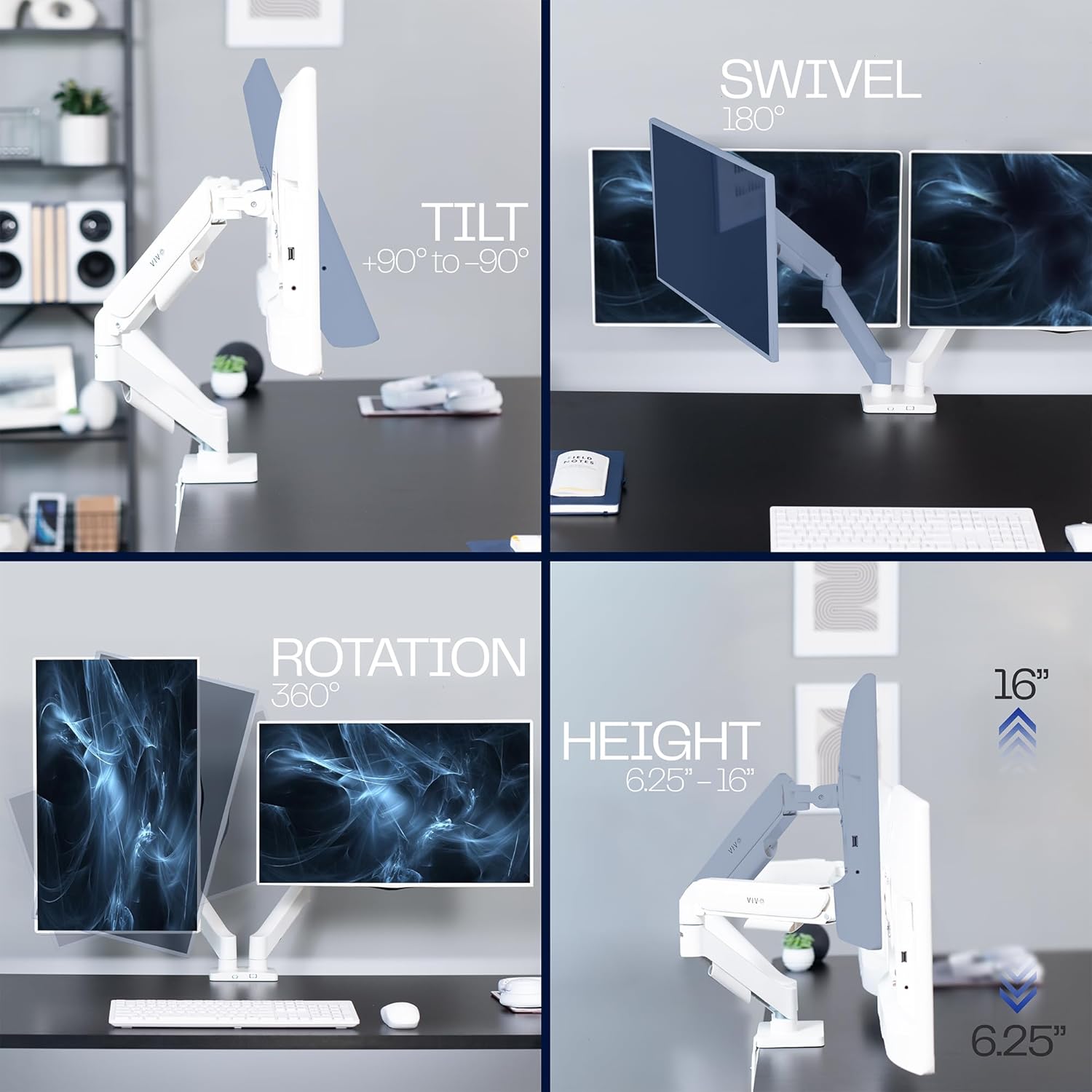
Images demonstrating the tilt (+90° to -90°), swivel (180°), and rotation (360°) features of the monitor mount.
Arm Tension Adjustment:
If the monitor won't lower, adjust the arm tension counter-clockwise to decrease support (may take 10-20 turns). If the monitor won't raise, adjust the arm tension clockwise to increase support (may take 10-20 turns). Use the provided Allen key for this adjustment.
Správa kabelů
Keep your workspace tidy by routing cables through the built-in cable channels located on the underside of the upper and lower arms.
Odstraňování problémů
Monitor is too low or sags:
The arm tension may be too loose. Turn the adjustment screw clockwise to increase support until the monitor holds its position.
Monitor is too high or won't lower:
The arm tension may be too tight. Turn the adjustment screw counter-clockwise to decrease support until the monitor can be easily lowered.
Držák se zdá být nestabilní:
Zajistěte, aby C-clamp or grommet base is securely tightened to the desk. Verify all arm connections are firm. Avoid extending monitors too far behind the desk.
For further assistance, please refer to the contact information in the "Warranty and Support" section.
Specifikace
| Funkce | Detail |
|---|---|
| Značka | VIVO |
| Číslo modelu | STAND-V002OW |
| Kompatibilní velikost obrazovky | 17 to 32 inches (flat and curved) |
| Nosnost (na obrazovku) | 4.4 libry až 19.8 libry |
| Kompatibilita VESA | 75x75mm, 100x100mm |
| Typ montáže | C-třamp (up to 3.1" thick) or Grommet (up to 1.9" thick) |
| Úhel náklonu | +90° až -90° |
| Úhel otočení | 180° |
| Otáčení | 360° |
| Materiál | Hliník, ocel, plast |
| Hmotnost položky | 8.8 libry |
Záruka a podpora
VIVO is committed to providing high-quality products and customer support.
Ochrana produktu:
This product is backed by VIVO's generous product protection. For details, please refer to the official VIVO webwebu nebo v dokumentaci k nákupu.
Kontaktujte podporu:
Pro technickou pomoc nebo reklamace v záruce navštivte prosím Obchod VIVO na Amazonu nebo se poraďte s Uživatelská příručka (PDF) pro kontaktní informace.
Ask a question about this manual
Ask about setup, troubleshooting, compatibility, parts, safety, or missing instructions. Manuals+ will review the question and use this page’s manual context to help answer it.