
WESEARY WG1
Uživatelská příručka k bezdrátovému hernímu headsetu WESEARY WG1 2.4 GHz
Model: WG1 | Brand: WESEARY
Zavedení
Thank you for choosing the WESEARY WG1 Wireless Gaming Headset. This manual provides comprehensive instructions for setting up, operating, and maintaining your headset to ensure an optimal gaming and audio experience. The WG1 headset offers versatile connectivity, superior sound quality, and comfortable design for extended use across multiple platforms.

The WESEARY WG1 Wireless Gaming Headset, featuring its sleek white design, accompanying 2.4GHz USB dongle, and charging cable.
Obsah balení
Zaškrtněte prosím políčko u následujících položek:
- 1 x WESEARY WG1 Wireless Gaming Headset
- 1 x 2.4GHz USB Dongle
- 1 x USB nabíjecí kabel
- 1 x Uživatelská příručka
Vlastnosti produktu
Pohlcující zvukový zážitek
The WESEARY WG1 headset features 50mm titanium-coated drivers that deliver deep bass and clear treble, capturing every detail from in-game footsteps to weapon fire. With 3D cinematic stereo surround sound in game mode, you can fully immerse yourself in your audio environment.

Detailní view of the 50mm titanium-plated drivers, engineered for unparalleled sound clarity and a potent auditory journey.
Dual EQ Modes: Gaming & Music
Switch between two optimized EQ modes: Game Mode and Music Mode. Game Mode utilizes ultra-low latency 2.4G technology (under 20ms delay on PS5/PS4/PC) for precise in-game audio. Music Mode provides rich, detailed audio quality for an enhanced listening experience.
Crystal Clear Voice Communication
Equipped with dual beamforming microphones and a rotatable microphone, the headset features exclusive ENC noise reduction technology. This ensures your voice is accurately captured while suppressing up to 95% of background noise, allowing for clear communication with teammates.
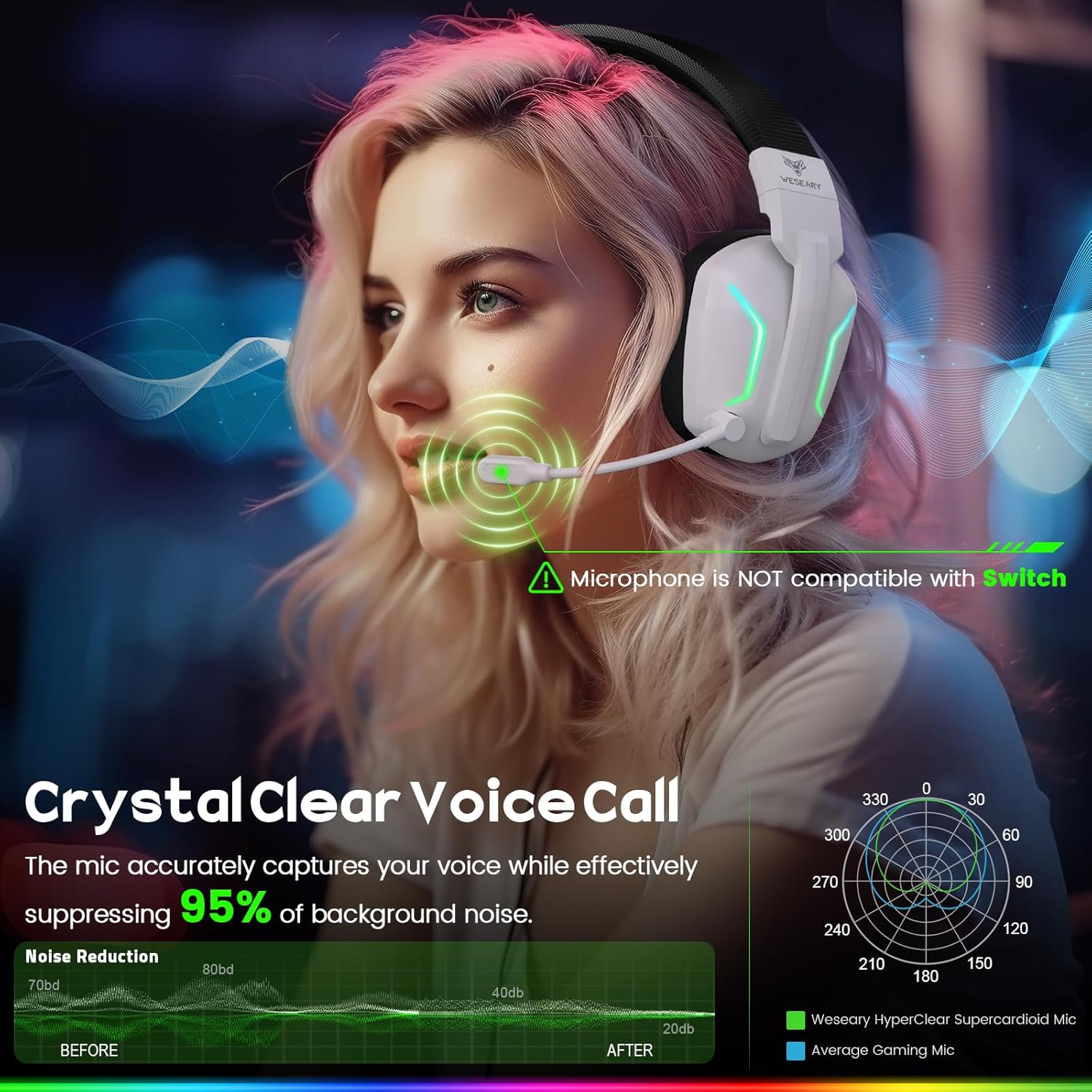
The headset's microphone with ENC noise reduction technology, ensuring crystal clear voice calls by suppressing background noise.
Ergonomický design a pohodlí
Designed for extended wear, the WG1 features adjustable headbands and luxuriously soft, breathable ear cushions. Its foldable design enhances portability, allowing you to enjoy maximum gaming comfort anywhere.

The WESEARY WG1 headset's ergonomic design, featuring lightweight, breathable mesh earcups and adjustable headbands for universal comfort.
Průvodce nastavením
Connecting via 2.4GHz Dongle (for PS5, PS4, PC, Mac)
- Insert the 2.4GHz USB dongle into an available USB port on your PS5, PS4, PC, or Mac.
- Power on the headset by long-pressing the power button (1) for 3 seconds.
- The headset will automatically connect to the dongle. The LED indicator on the dongle will turn solid blue, and the headset's LED will indicate a successful connection.
- Adjust audio settings on your device if necessary to ensure the headset is selected as the input/output device.
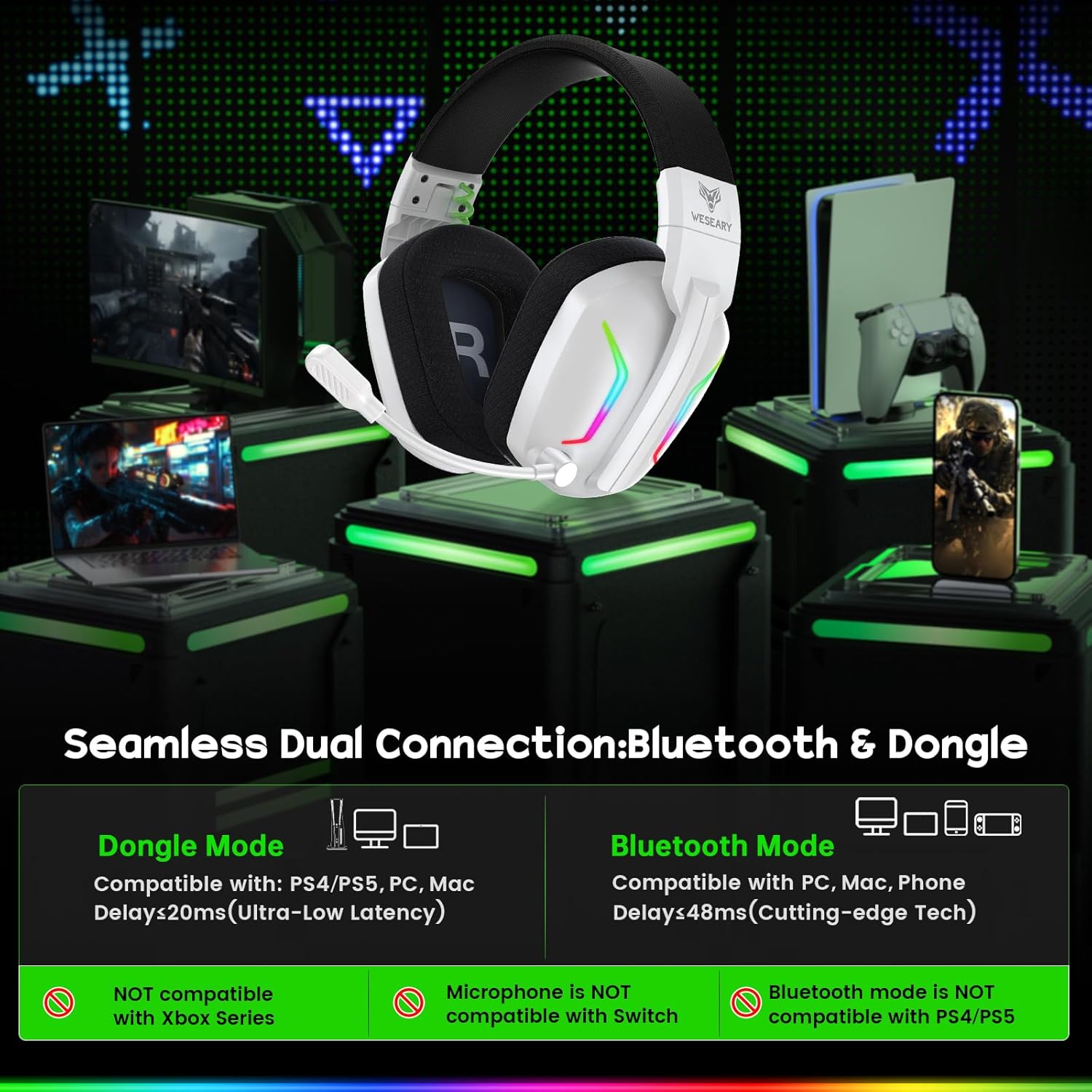
The headset's seamless dual connection capability, showing compatibility with various devices via 2.4GHz dongle and Bluetooth.
Connecting via Bluetooth (for Mobile, Tablets, iPad)
- Zkontrolujte, zda je náhlavní souprava zapnutá.
- Long-press the microphone button (4) for 2 seconds to switch to Bluetooth mode. The headset's LED will flash, indicating pairing mode.
- On your mobile device, tablet, or iPad, go to Bluetooth settings and search for "WESEARY WG1".
- Select the headset to pair. Once connected, the headset's LED will turn solid.
Poznámka: Bluetooth mode is not compatible with PS4 or PS5. The microphone is not available when connected to Nintendo Switch via Bluetooth.
Návod k obsluze
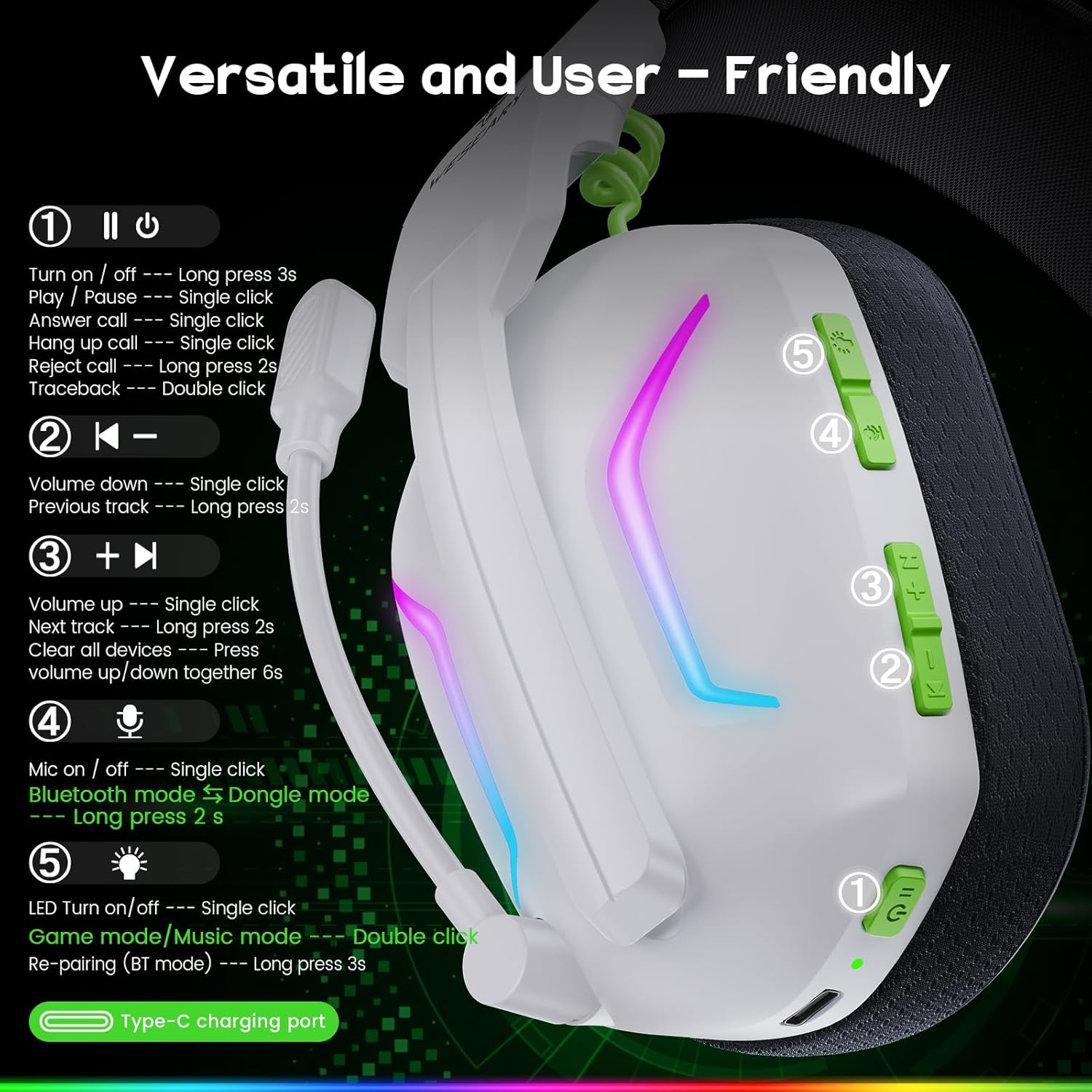
Nadview of the versatile and user-friendly controls located on the headset.
Ovládání je ukončenoview
- (1) Power/Multi-function Button:
- Long press 3s: Power On/Off
- Single click: Play/Pause, Answer Call, Hang Up Call
- Long press 2s: Reject Call
- Double click: Traceback
- (2) Volume Down Button:
- Single click: Volume Down
- Long press 2s: Previous Track
- (3) Volume Up Button:
- Single click: Volume Up
- Long press 2s: Next Track
- Press together (Volume Up + Volume Down) for 6s: Clear all devices (reset pairing)
- (4) Microphone Button:
- Single click: Mic On/Off
- Long press 2s: Switch to Bluetooth Mode (from Dongle mode)
- (5) LED Light Button:
- Single click: LED Turn On/Off
- Double click: Switch Game mode/Music mode
- Long press 3s: Re-pairing (Bluetooth mode)
Kompatibilita
The WESEARY WG1 headset offers broad compatibility:
- 2.4GHz Dongle Mode: Compatible with PS5, PS4, PC, Mac, and Laptops.
- Režim Bluetooth: Compatible with mobile phones, tablets, and iPads.
- Nintendo Switch: Audio is compatible, but the microphone function is not available.
- Nekompatibilní: Xbox Series (All Xbox consoles).
Baterie a nabíjení
The headset is equipped with a 900mAh battery, providing an impressive 50 hours of playtime on a single charge. A low battery reminder function is included for timely recharging. Full charge takes approximately 2.5 hours via the Type-C charging port.

The WESEARY WG1 headset offers up to 50 hours of playtime on a single charge, providing extended use for gaming and music.
Pokyny pro nabíjení
- Connect the provided USB charging cable to the Type-C charging port on the headset.
- Druhý konec kabelu připojte k USB zdroji napájení (např. k USB portu počítače, síťovému adaptéru).
- LED indikátor na sluchátkách bude ukazovat stav nabíjení a po plném nabití zhasne.
Údržba
To ensure the longevity and optimal performance of your WESEARY WG1 headset, follow these maintenance guidelines:
- Čištění: K otření sluchátek použijte měkký, suchý hadřík. V případě náušníků použijte mírněamp Lze použít hadřík, ale před použitím se ujistěte, že je zcela suchý. Nepoužívejte agresivní chemikálie ani abrazivní čisticí prostředky.
- Skladování: Store the headset in a cool, dry place away from direct sunlight and extreme temperatures. Utilize its foldable design for compact storage.
- Péče o baterie: Vyhněte se častému úplnému vybíjení baterie. Pro dlouhodobé skladování nabijte sluchátka přibližně na 50 %, aby se zachovala jejich životnost.
- Péče o kabely: Handle the charging cable gently. Avoid sharp bends or excessive pulling to prevent damage.
Odstraňování problémů
| Problém | Možná příčina | Řešení |
|---|---|---|
| Z sluchátek se nehlásí žádný zvuk | Headset not powered on; Volume too low; Incorrect audio output selected on device; Dongle/Bluetooth not connected. | Ensure headset is powered on. Increase volume. Check device's audio settings. Reconnect dongle or re-pair Bluetooth. |
| Mikrofon nefunguje | Microphone muted; Incorrect input device selected; Compatibility issue (e.g., Switch Bluetooth). | Press the Microphone button (4) to unmute. Check device's sound input settings. Note microphone limitations for Switch Bluetooth. |
| Connection issues (2.4GHz) | Dongle not properly inserted; Interference; Out of range. | Ensure dongle is fully inserted. Move closer to the dongle. Avoid strong Wi-Fi signals or other 2.4GHz devices. |
| Connection issues (Bluetooth) | Headset not in pairing mode; Device's Bluetooth off; Already connected to another device. | Long-press Mic button (4) for 2s to enter Bluetooth pairing mode. Ensure device's Bluetooth is on. Disconnect from other devices or clear pairing history (Volume Up + Down for 6s). |
| Krátká výdrž baterie | Not fully charged; LED lights constantly on. | Ensure headset is fully charged (2.5 hours). Turn off LED lights (single click LED button 5) to conserve battery. |
Technické specifikace
| Funkce | Specifikace |
|---|---|
| Značka | WESEARY |
| Název modelu | WG1 |
| Technologie připojení | Wireless (2.4GHz, Bluetooth) |
| Velikost ovladače | 50 mm |
| Impedance | 32 ohmů |
| Frekvenční rozsah | 20 Hz - 20,000 XNUMX Hz |
| Typ mikrofonu | Dual Beamforming, Rotatable, ENC Noise Reduction |
| Kapacita baterie | 900 mAh Lithium-ion |
| Doba nabíjení | Přibl. 2.5 hodin |
| Prázdno | Až 50 hodin |
| Materiál | Akrylonitrilbutadienstyrenový (ABS) plast |
| Umístění uší | Over-Ear |
| Speciální funkce | With Microphone, Noise Isolation, Foldable, LED Light |
Záruka a podpora
The WESEARY WG1 Wireless Gaming Headset comes with a Záruka 12 měsíců. In case of any quality issues or concerns, please contact the seller or WESEARY customer support for assistance, refund, or replacement.
For further support, please refer to the contact information provided with your purchase or visit the official WESEARY webmísto.
Související dokumenty - WG1
 |
Uživatelská příručka a průvodce bezdrátovou náhlavní soupravou TATYBO WT3 Komplexní uživatelská příručka pro bezdrátovou sluchátka TATYBO WT3, která zahrnuje nastavení, připojení, funkce, řešení problémů a specifikace. Kompatibilní s PC, PS4, PS5, Switch a mobilními zařízeními. |
 |
Uživatelská příručka k bezdrátovému hernímu headsetu PHOINIKAS Q5S Uživatelská příručka pro bezdrátová herní sluchátka PHOINIKAS Q5S 2.4 GHz, podrobný popis funkcí, pokyny k připojení k PC, PS4, PS5 a řešení problémů. |
 |
Uživatelská příručka k bezdrátovým herním sluchátkům Gtheos Captain 300 Komplexní uživatelská příručka pro bezdrátová herní sluchátka Gtheos Captain 300 2.4 GHz s Bluetooth, s podrobným popisem nastavení, funkcí a použití pro PC, PlayStation, Xbox a Nintendo Switch. |
 |
Uživatelská příručka k bezdrátové náhlavní soupravě Q6 2.4 GHz Tento dokument obsahuje komplexní pokyny a specifikace pro bezdrátovou náhlavní soupravu Q6 2.4 GHz, včetně informací o nastavení, provozu, řešení problémů a kompatibilitě s PC, PS4, PS5, TV a Switch. |
 |
Uživatelská příručka pro bezdrátový herní headset Skapendy VK84 Uživatelská příručka k bezdrátovému hernímu headsetu Skapendy VK84 s podrobným popisem obsahu balení, funkcí produktu, pokynů k nabíjení, funkcí tlačítek, režimů Bluetooth a 2.4 GHz, kompatibility zařízení, návodů k nastavení pro PC, Mac, PS4/PS5 a Nintendo Switch, technických specifikací, informací o záruce, shody s FCC a pokynů k recyklaci. |
 |
Uživatelská příručka k vylepšenému bezdrátovému hernímu headsetu Krysenix KGH2 Komplexní uživatelská příručka pro vylepšený bezdrátový herní headset Krysenix KGH2, která zahrnuje obsah balení, funkce, nabíjení, provozní režimy (Bluetooth, 2.4GHz Dongle), nastavení připojení pro různá zařízení, specifikace, záruku, řešení problémů a shodu s FCC. |
Ask a question about this manual
Ask about setup, troubleshooting, compatibility, parts, safety, or missing instructions. Manuals+ will review the question and use this page’s manual context to help answer it.