
1. Úvod
Welcome to the HOTWAV Hyper 7 Pro rugged smartphone user manual. This guide will assist you in understanding and utilizing all the features of your new device. The Hyper 7 Pro is designed for durability and high performance, featuring Android 14, 5G connectivity, a 200MP camera, and a large 10800mAh battery.
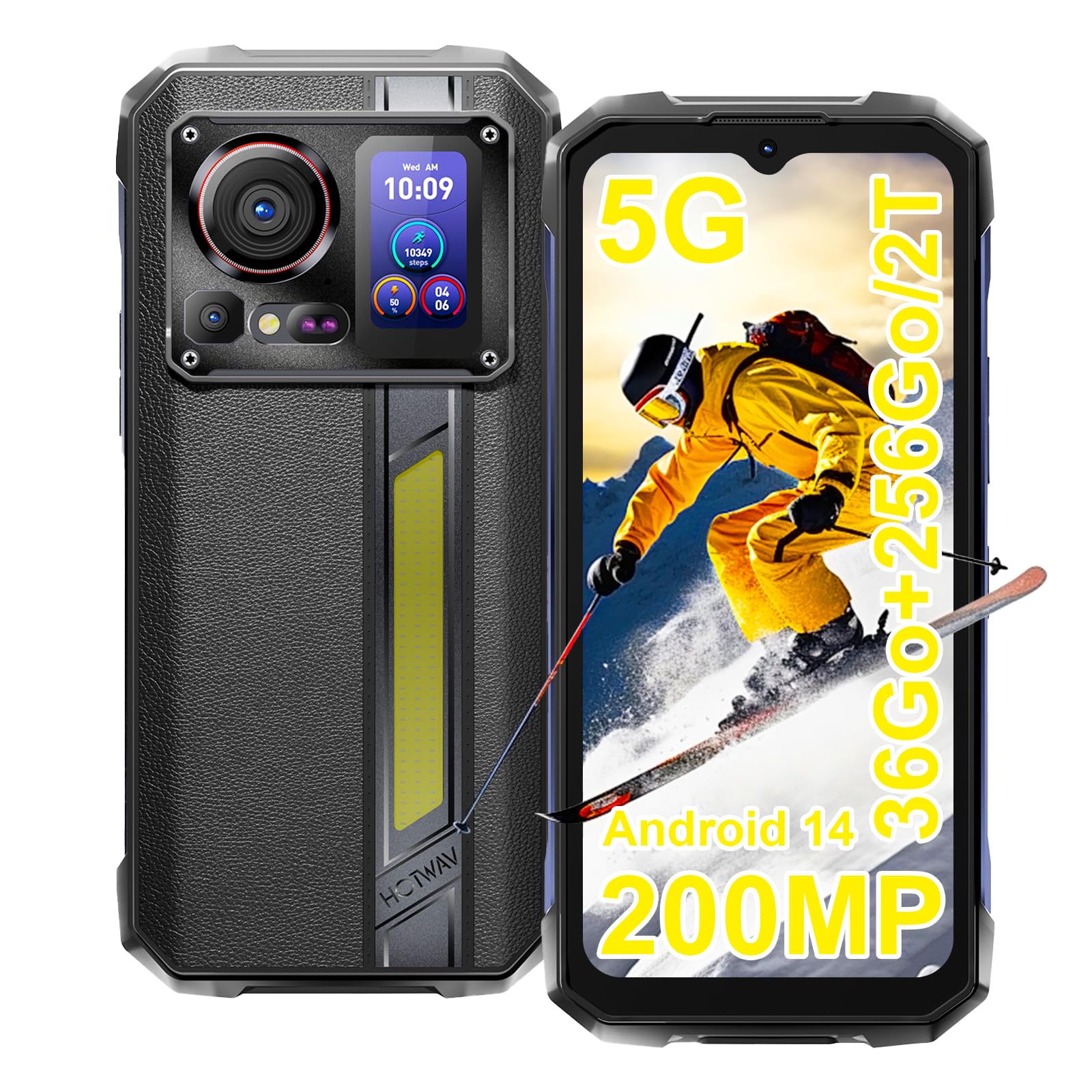
Image: The HOTWAV Hyper 7 Pro rugged smartphone, showcasing its robust design and rear display.
2. Co je v krabici
Upon unboxing your HOTWAV Hyper 7 Pro, please ensure all the following items are present:
- HOTWAV Hyper 7 Pro Smartphone
- Kabel USB typu C
- Napájecí adaptér (33W)
- Nástroj pro vysunutí SIM karty
- Pre-applied Screen Protector (Gorilla Glass)
- Další chránič obrazovky
- Uživatelská příručka

Image: All items included in the HOTWAV Hyper 7 Pro package, including the phone, charger, cables, and documentation.
3. Průvodce nastavením
3.1. Instalace SIM karet a karty MicroSD
- Vyhledejte držák SIM karty na levé straně zařízení.
- Vložte nástroj pro vysunutí SIM karty do malého otvoru vedle zásobníku a jemně zatlačte, dokud zásobník nevyskočí.
- Place your Nano-SIM card(s) and/or a microSD card (up to 2TB) into the designated slots on the tray. Ensure the gold contacts face downwards.
- Opatrně vložte zásobník zpět do telefonu, dokud nezacvakne na místo.
3.2. Počáteční zapnutí a základní konfigurace
- Press and hold the Power button (located on the right side) until the HOTWAV logo appears.
- Postupujte podle pokynů na obrazovce a vyberte jazyk, připojte se k síti Wi-Fi a nastavte si účet Google.
- Configure your preferred security methods, such as Face ID and Fingerprint Unlock.
3.3. Nabíjení zařízení
Před prvním použitím se doporučuje zařízení plně nabít.
- Připojte kabel USB typu C k nabíjecímu portu ve spodní části telefonu.
- Connect the other end of the cable to the provided 33W power adapter.
- Plug the power adapter into a wall outlet. The charging indicator will appear on the screen.

Image: The HOTWAV Hyper 7 Pro charging with its 33W fast charger, highlighting the OTG function.
4. Návod k obsluze
4.1. Main Display and Navigation
The Hyper 7 Pro features a 6.6-inch FHD+ display with a 120Hz refresh rate for smooth interactions. Navigate through the Android 14 interface using standard touch gestures: tap, swipe, pinch-to-zoom.

Image: The vibrant 6.6-inch FHD+ display of the Hyper 7 Pro, showcasinjeho vizuální kvalitu.
4.2. Secondary Rear Screen
The innovative secondary screen on the back provides quick access to essential information and controls without activating the main display.
- Zobrazení času: View aktuální čas a datum.
- Ovládání kamery: Použijte jako a viewhledáček pro selfie ze zadní kamery nebo rychlé snímky.
- Music Applications: Control playback for music apps.
- Oznámení: See incoming call and message alerts.
- Battery Status & Step Count: Monitor battery level and daily steps.

Image: The versatile secondary display on the back of the Hyper 7 Pro, showing different information widgets.
4.3. Funkce fotoaparátu
The Hyper 7 Pro is equipped with a powerful camera system:
- Zadní kamera: 200MP main sensor for high-resolution photos and a 24MP night vision camera with infrared LEDs for clear images in low light.
- Přední kamera: 32MP pro ostré selfie a videohovory.
- AI Algorithms: Enhance saturation for night scenes, portraits, and landscapes.
- Nahrávání videa: Podporuje nahrávání videa v rozlišení 4K.

Image: A visual comparison demonstrating the superior detail captured by the Hyper 7 Pro's 200MP camera.
4.4. Customizable Side Button
The red side button can be configured for three different actions:
- Jedno stisknutí: Assign to open a specific app or function.
- Dvojitým stisknutím tlačítka: Assign to open a different app or function.
- Dlouhé stisknutí: Assign to open a third app or function.
Configure these settings in the phone's 'Side Key Function' menu.

Image: The customizable side button on the Hyper 7 Pro, showing how different press actions can launch various applications.
4.5. Připojení a speciální funkce
- 5G síť: Využijte vysokorychlostní internetové připojení.
- Wi-Fi 6 a Bluetooth 5.2: Advanced wireless connectivity for faster speeds and stable connections.
- NFC: For contactless payments and quick pairing with other devices.
- GPS: Integrated GPS, Beidou, Galileo, and GLONASS for precise navigation.
- Camping Light: A powerful 280-lumen LED light on the back, with timer and SOS/Flash functions.
- Funkce OTG: Connect USB devices or use your phone as a power bank to charge other devices.
- Režim v rukavicích: Zvýšená citlivost dotyku pro použití s rukavicemi.
- FM rádio: Poslouchejte své oblíbené rozhlasové stanice.

Image: The powerful LED camping light of the Hyper 7 Pro, demonstrating its illumination capabilities.
5. Údržba
5.1. Čištění zařízení
The HOTWAV Hyper 7 Pro is IP68/IP69K rated for water and dust resistance. To clean, gently wipe the device with a soft, damp cloth. For stubborn dirt, you may rinse it under low-pressure fresh water, ensuring all ports are securely closed. Avoid using harsh chemicals or abrasive materials.

Image: The Hyper 7 Pro enduring water splashes, highlighting its waterproof design.
5.2. Péče o baterie
Pro prodloužení životnosti baterie s kapacitou 10800 mAh:
- Vyhněte se extrémním teplotám.
- Use only the provided 33W charger and USB-C cable.
- Nenechávejte baterii často úplně vybít.
5.3. Aktualizace softwaru
Regularly check for and install system updates to ensure optimal performance, security, and access to new features. You can usually find this option in your phone's Settings menu under 'System' or 'About phone'.
5.4. Správa úložiště
With 256GB of internal storage and support for up to 2TB microSD cards, you have ampprostor. Pravidelně znovuview vaše files and applications to free up space and maintain performance. Consider backing up important data to cloud storage or an external device.
6. Řešení problémů
If you encounter issues with your HOTWAV Hyper 7 Pro, refer to the following common solutions:
- Zařízení se nezapíná: Ensure the battery is charged. Connect the phone to the charger for at least 30 minutes, then try powering on again.
- Problémy s nabíjením: Verify that the charger and USB-C cable are securely connected and undamaged. Try a different power outlet. Ensure the charging port is clean and free of debris.
- Network Connectivity Problems (5G/Wi-Fi): Check if Airplane Mode is off. Restart your phone. For mobile data, ensure your SIM card is correctly inserted and your plan is active. For Wi-Fi, forget the network and reconnect.
- Fotoaparát nefunguje: Restart the camera app or the phone. Check app permissions for the camera in Settings.
- Pomalý výkon: Close unnecessary background apps. Clear cache for frequently used apps. Ensure you have sufficient storage space. Restart the device.
- Obrazovka nereaguje: Restart the phone by holding the power button for an extended period (usually 10-15 seconds). If a hard reset is needed, consult the online support resources.
- Softwarové závady: Ensure your Android 14 system is up to date. If issues persist, a factory reset might be necessary (back up your data first).
If these steps do not resolve your issue, please contact HOTWAV customer support for further assistance.
7. Specifikace
| Funkce | Specifikace |
|---|---|
| Značka | HOTWAV |
| Název modelu | Hyper 7 Pro |
| Operační systém | Android 14 |
| Procesor | Osmijádrový procesor MediaTek Dimensity 7050 (2.6 GHz) |
| BERAN | 16 GB (rozšiřitelné až na 36 GB pomocí virtuální paměti) |
| Interní úložiště | 256 GB |
| Rozšiřitelné úložiště | Až 2 TB (microSD) |
| Velikost displeje | 6.6 palce FHD+ |
| Rozlišení displeje | 1080*2408 pixelů |
| Obnovovací frekvence | 120 Hz |
| Ochrana displeje | Corning Gorilla Glass 3 |
| Kapacita baterie | 10800 XNUMX mAh |
| Nabíjení | 33W rychlé nabíjení, reverzní nabíjení OTG |
| Zadní kamera | 200 MP Main, 24 MP Night Vision |
| Přední kamera | 32 MP |
| Rozlišení videa | 4K |
| Hodnocení trvanlivosti | IP68, IP69K, MIL-STD-810H |
| Konektivita | 5G, Wi-Fi 6, Bluetooth 5.2, NFC |
| Navigace | GPS, Beidou, Galileo, GLONASS |
| Typ SIM karty | Dual Nano-SIM |
| Rozměry | 17.5 x 8.2 x 1.8 cm |
| Hmotnost | 406 gramů |
8. Záruka a podpora
8.1. Informace o záruce
Your HOTWAV Hyper 7 Pro comes with a 2-letá záruka od data nákupu. Tato záruka se vztahuje na výrobní vady a poruchy při běžném používání. Uschovejte si prosím doklad o koupi pro případ uplatnění záruky.
8.2. Zákaznická podpora
For any technical assistance, warranty claims, or product-related inquiries, please contact HOTWAV customer support through their official website or the contact information provided with your purchase. Ensure you have your device model and purchase details ready when contacting support.

Image: HOTWAV's commitment to customer satisfaction, including a 2-year warranty and dedicated customer service.