
BESIGN BK07
Uživatelská příručka BESIGN BK07 Bluetooth Car Kit
Model: BK07
1. Konec produktuview
The BESIGN BK07 Bluetooth Car Kit is a wireless receiver designed to upgrade your car stereo system or home audio setup with Bluetooth capabilities. It enables hands-free calling and music streaming from your mobile devices, providing a seamless audio experience.

Image: The BESIGN BK07 Bluetooth Car Kit, featuring a USB connector on one end and a 3.5mm audio jack on the other, connected by a coiled cable.
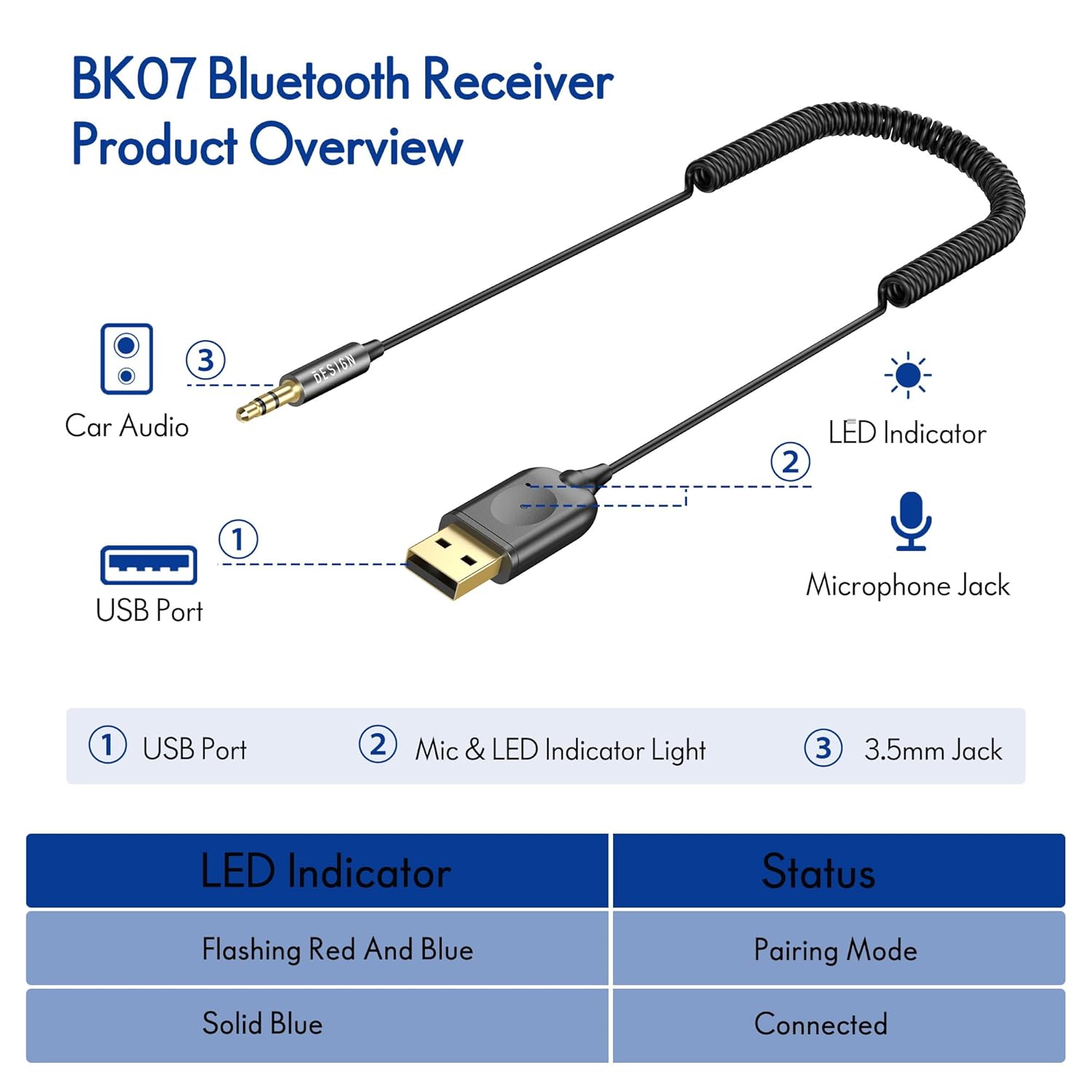
Image: Diagram illustrating the components of the BK07: (1) USB Port, (2) Mic & LED Indicator Light, and (3) 3.5mm Jack. The table below shows LED indicator statuses: Flashing Red And Blue for Pairing Mode, and Solid Blue for Connected.
2. Vlastnosti
- Bluetooth V5.3: Utilizes the latest Bluetooth 5.3 technology for lower power consumption, wider compatibility, and stable transmission.
- Hands-free volání: Integrated microphone allows for clear hands-free phone calls while driving.
- Streamování hudby: Stream audio wirelessly from your smartphone, tablet, or other Bluetooth-enabled devices to your car or home audio system.
- Duální připojení telefonu: Supports connecting with two smartphones simultaneously.
- Plug and Play: Simple installation by plugging into a USB power port and a 3.5mm Aux Port.
- Široká kompatibilita: Compatible with various car audio systems, home stereos, speakers, smartphones, tablets, and laptops that have a 3.5mm audio input and USB power source.
- Automatické opětovné připojení: Automatically reconnects to previously paired devices upon power-up.

Image: Visual representation of the BK07's advanced features, including Bluetooth 5.3, 10-meter distance range, fast transmission rate, more stable transmission rate, and auto reconnection.

Image: A person driving, demonstrating the use of the BK07 for hands-free calling, navigation broadcast, and car stereo music.
3. Obsah balení
The BESIGN BK07 Bluetooth Car Kit package typically includes:
- 1 x BESIGN BK07 Bluetooth Receiver
- 1 x Uživatelská příručka (tento dokument)
4. Pokyny k nastavení
Setting up your BESIGN BK07 is a simple three-step process:
- Zástrčka: Locate an available USB power port and a 3.5mm Aux Port in your car or home audio system. Plug the USB connector of the BK07 into the USB port and the 3.5mm audio jack into the Aux Port. The device will power on automatically.
- Pár: Once powered on, the LED indicator on the BK07 will flash red and blue, indicating it is in pairing mode. On your smartphone or other Bluetooth device, go to Bluetooth settings and search for available devices. Select "BESIGN BK07" from the list to pair. The LED indicator will turn solid blue once successfully connected.
- Hrát: After successful pairing, you can now play music or make hands-free calls through your car or home audio system. Adjust the volume on your audio system and your connected device as needed.

Image: Step-by-step visual guide showing how to plug the device into a car's USB and Aux ports, pair it with a smartphone via Bluetooth settings, and then play music.

Image: Illustrates the wide compatibility of the BK07, showing its 3.5mm Aux & Output connection to Car Audio, Speakers, and Amplifiers, and its Bluetooth & Input connection from Smartphones, Tablets/iPads, and Laptops.

Image: Demonstrates the BK07 being used to add Bluetooth functionality to a wired speaker system in a home setting.
5. Návod k obsluze
5.1 Zapnutí/vypnutí
The BESIGN BK07 powers on automatically when connected to a powered USB port. It powers off when disconnected from the USB port.
5.2 Pairing with a New Device
When the BK07 is powered on for the first time or if it loses connection to a previously paired device, it will automatically enter pairing mode (LED flashes red and blue). On your smartphone or other Bluetooth device, go to Bluetooth settings and search for available devices. Select "BESIGN BK07" from the list to pair. The LED indicator will turn solid blue once successfully connected.
5.3 Reconnecting to a Paired Device
The BK07 will automatically attempt to reconnect to the last paired device when powered on. Ensure Bluetooth is enabled on your device. If reconnection fails, manually select "BESIGN BK07" from your device's Bluetooth list.
5.4 Volání bez použití rukou
When a call comes in, the audio will automatically switch to the car/home audio system. The built-in microphone allows for hands-free conversation. To answer/end a call, use your phone's controls. The device does not have physical buttons for call control.
5.5 Přehrávání hudby
Once connected, open your preferred music application on your smartphone or tablet and begin playback. Audio will be streamed wirelessly to your connected audio system. Control music playback (play/pause, skip tracks) directly from your connected device.
5.6 Dual Phone Connectivity
The BK07 supports connecting to two smartphones simultaneously. After pairing the first phone, pair the second phone. The device will manage audio from both, prioritizing incoming calls. Music playback will typically come from the last active device.
6. Řešení problémů
| Problém | Možné řešení |
|---|---|
| Zařízení se nezapne. | Ensure the USB port is providing power. Try a different USB port or a USB car charger. |
| Nelze spárovat s mým zařízením. |
|
| Žádný zvuk nebo slabý zvukový výstup. |
|
| Audio quality is poor or has static/whirring noise. |
|
| Hands-free calling microphone not working well. |
|
7. Specifikace
| Specifikace | Detail |
|---|---|
| Číslo modelu | BK07 |
| Verze Bluetooth | V5.3 |
| Typ konektoru | Auxiliary (3.5mm), USB Type-A |
| Typ kabelu | AUX |
| Kompatibilní zařízení | Tablet, Smartphone, Car Audio Systems, Home Stereo Systems, Speakers |
| Speciální funkce | Hands-Free Calls, Built-In Microphone, Dual Phone Connectivity, Auto Reconnection |
| Rozměry balení | 5.98 x 3.94 x 0.87 palce |
| Hmotnost položky | 1.45 unce |
| Výrobce | BESIGN |
| Země původu | Čína |
8. Údržba
To ensure the longevity and optimal performance of your BESIGN BK07 Bluetooth Car Kit, please follow these maintenance guidelines:
- Čištění: K čištění zařízení používejte měkký, suchý hadřík. Nepoužívejte tekuté čisticí prostředky ani aerosoly.
- Skladování: Store the device in a cool, dry place when not in use for extended periods. Avoid extreme temperatures, direct sunlight, and high humidity.
- Zacházení: Handle the device with care. Avoid dropping it or subjecting it to strong impacts. Do not pull on the cable excessively when disconnecting.
- Moc: It is recommended to disconnect the device from power when not in use for long periods, especially if your vehicle's USB port remains powered when the ignition is off.
9. Záruka a podpora
For warranty information, technical support, or customer service inquiries regarding your BESIGN BK07 Bluetooth Car Kit, please refer to the contact information provided on the product packaging or visit the official BESIGN store on Amazon:
Uschovejte si účtenku jako doklad o koupi pro případ reklamace.
Výrobce: BESIGN
Model: BK07
ASIN: B0D5QPC5ZH
Ask a question about this manual
Ask about setup, troubleshooting, compatibility, parts, safety, or missing instructions. Manuals+ will review the question and use this page’s manual context to help answer it.