
Revolution R180 Connect
Uživatelská příručka pro chytrý toustovač Revolution R180 Connect
Model: R180 Connect (R180C-01)
1. Úvod
This manual provides essential information for the safe and efficient operation of your Revolution R180 Connect Smart Toaster. Please read all instructions carefully before use and retain this manual for future reference.

Image 1.1: The Revolution R180 Connect Smart Toaster, featuring a touchscreen display and two toasting slots.
2. Důležité bezpečnostní informace
Při používání elektrických spotřebičů je třeba vždy dodržovat základní bezpečnostní opatření, včetně následujících:
- Přečtěte si všechny pokyny.
- Nedotýkejte se horkých povrchů. Použijte rukojeti nebo knoflíky.
- Abyste se chránili před úrazem elektrickým proudem, neponořujte kabel, zástrčky ani toustovač do vody ani jiné kapaliny.
- Když je jakýkoli spotřebič používán dětmi nebo v jejich blízkosti, je nutný pečlivý dohled.
- Vytáhněte zástrčku ze zásuvky, když ji nepoužíváte a před čištěním. Před nasazením nebo sejmutím dílů nechte vychladnout.
- Nepoužívejte žádný spotřebič s poškozeným kabelem nebo zástrčkou, ani po poruše spotřebiče či jeho jakémkoli poškození. Pro kontrolu, opravu nebo seřízení kontaktujte zákaznický servis.
- Použití příslušenství, které není doporučeno výrobcem spotřebiče, může způsobit zranění.
- Nepoužívejte venku.
- Nenechávejte kabel viset přes okraj stolu nebo pultu ani se dotýkat horkých povrchů.
- Neumisťujte na horký plynový nebo elektrický hořák nebo do jeho blízkosti nebo do vyhřáté trouby.
- Při přemisťování spotřebiče obsahujícího horký olej nebo jiné horké kapaliny je třeba dbát mimořádné opatrnosti.
- Nepoužívejte spotřebič k jinému než určenému použití.
- Do toustovače se nesmí vkládat příliš velké potraviny, obaly z kovové fólie nebo náčiní, protože by mohlo dojít k požáru nebo úrazu elektrickým proudem.
- Pokud jsou topinkovače zakryty nebo se dotýkají hořlavého materiálu, včetně záclon, závěsů, stěn a podobně, když jsou v provozu, může dojít k požáru.
- Nepokoušejte se vytlačit jídlo, když je toustovač zapojený.
- Nepracujte bez dozoru.
- The Toastie Press accessory (sold separately) is designed for use with this toaster. Ensure proper installation and removal as per its instructions.
3. Obsah balení
Po vybalení ověřte, zda jsou všechny položky přítomny a v dobrém stavu:
- Revolution R180 Connect Smart Toaster
- Vyjímatelný zásobník na drobky
- Uživatelská příručka (tento dokument)
Note: The Toastie Press and Warming Rack are sold separately and are not included in the standard package.
4. Nastavení
4.1 Počáteční umístění
- Umístěte toustovač na stabilní, rovný a žáruvzdorný povrch.
- Ensure adequate clearance (at least 6 inches) from walls, cabinets, and other objects to allow for proper ventilation.
- Do not place the toaster directly under cabinets or near flammable materials.
4.2 Připojení napájení
- Úplně odviňte napájecí kabel.
- Zapojte toustovač do standardní elektrické zásuvky s napětím 120 V AC.
- The touchscreen will illuminate, indicating the toaster is powered on.
4.3 Připojení k Wi-Fi (volitelné)
The R180 Connect features Wi-Fi connectivity for automatic clock setting, weather display, and over-the-air updates.
- On the touchscreen, navigate to the settings menu (gear icon).
- Select "Wi-Fi Setup" and follow the on-screen prompts to connect to your home network.
- Once connected, the toaster will automatically set the time and display local weather information.
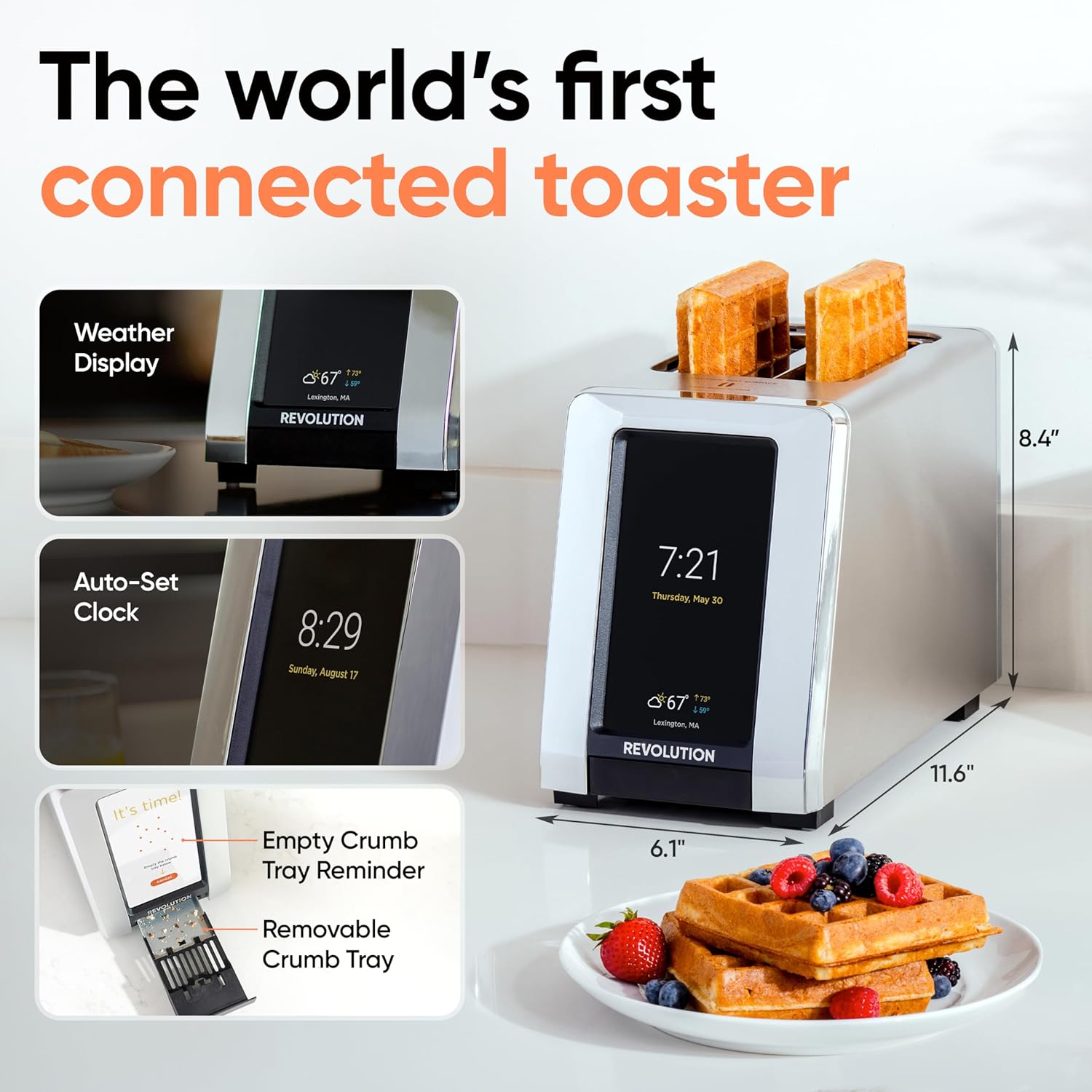
Image 4.1: The R180 Connect displaying weather and time, highlighting its smart features and dimensions.
5. Návod k obsluze
5.1 Základní opékání
The R180 Connect simplifies toasting with a 3-tap process:
- Vyberte druh chleba: On the touchscreen, choose the icon corresponding to your food item (e.g., bread, bagel, waffle).
- Choose State: Select whether the item is Čerstvý, Zmrazené, nebo pro Znovu zahřejte.
- Upravte stupeň zhnědnutí: Use the slider or tap the desired browning level (1-7). The toaster remembers your last setting.
- Začněte opékat: Klepněte na Start button. The toaster will automatically lower the food and begin the toasting cycle.

Image 5.1: The toaster's touchscreen interface, demonstrating the selection of bread type and browning preferences.
12 000 vstupůtaGLO Technology
InstaGLO 2.0 heating technology rapidly reaches full heat in approximately 2 seconds. This process sears the outside of the food, locking in moisture and flavor, resulting in a crispy exterior and soft interior.

Image 5.2: Visual comparison illustrating the faster and tastier results achieved with InstaGLO technology.
5.3 Using the Toastie Press (Sold Separately)
The Revolution Toastie Press allows you to prepare grilled cheese, paninis, and quesadillas directly in your toaster without butter or oil. Refer to the Toastie Press instruction manual for detailed usage.
- Insert the Toastie Press into the toaster slots.
- Place your sandwich or food item inside the press.
- On the toaster's touchscreen, select "Toastie Mode" and choose your desired browning level.
- Klepněte Start.
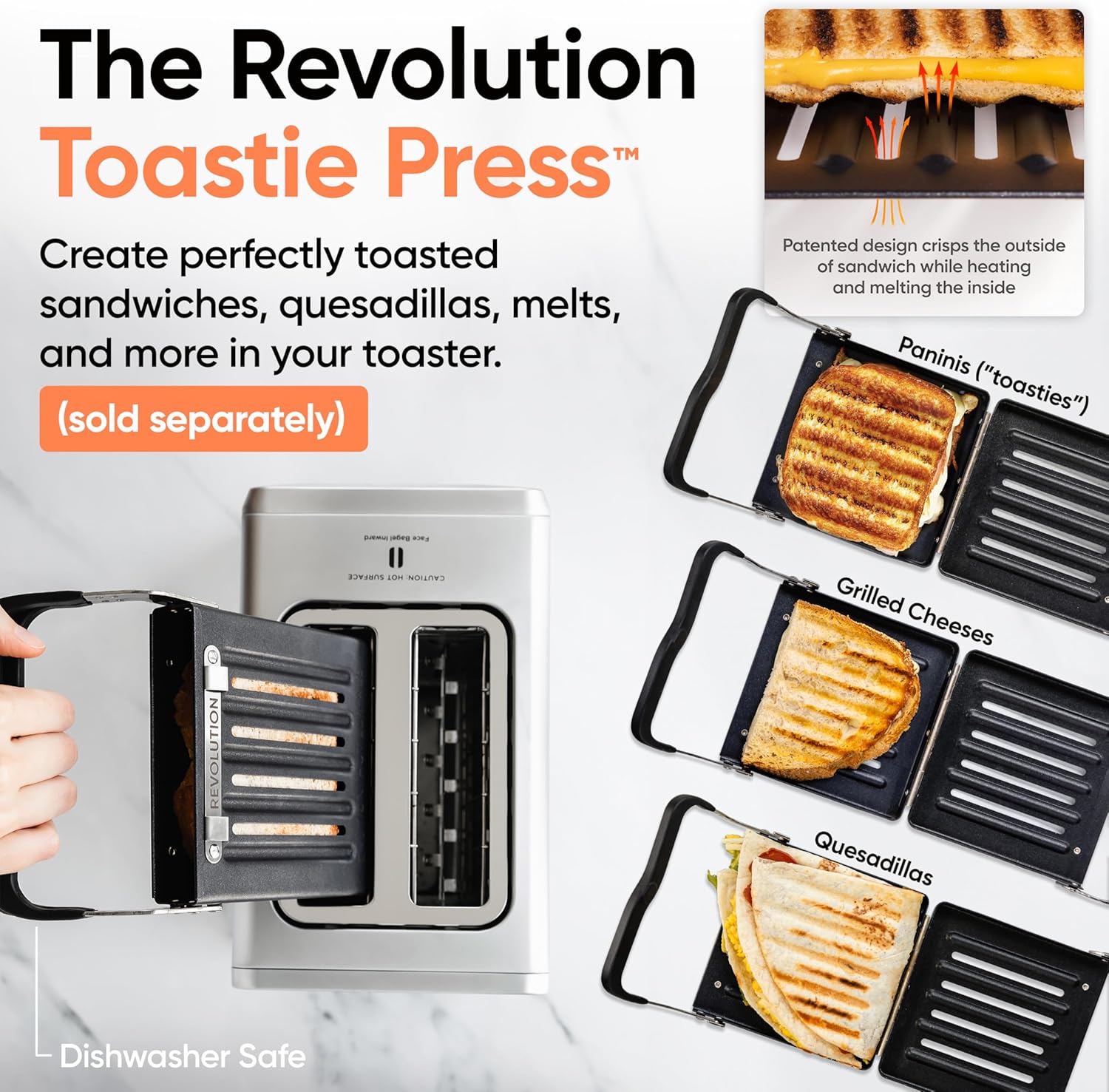
Image 5.3: The Revolution Toastie Press, an optional accessory for making toasted sandwiches.
6. Údržba a čištění
6.1 Crumb Tray Cleaning
The toaster will periodically remind you to clean the crumb tray. Regular cleaning prevents crumb buildup and reduces fire risk.
- Unplug the toaster from the power outlet and allow it to cool completely.
- Locate the removable crumb tray at the bottom front of the toaster.
- Vytáhněte zásobník, abyste jej mohli vyjmout.
- Vyhoďte drobky a otřete misku dočistaamp tkanina.
- Před opětovným vložením misky do toustovače se ujistěte, že je zcela suchá.
Image 6.1: The removable crumb tray, shown being accessed for cleaning.
6.2 Čištění exteriéru
- Ensure the toaster is unplugged and cool.
- Vnější povrchy otřete měkkým, damp tkanina. Nepoužívejte abrazivní čisticí prostředky ani drátěnky.
- For stainless steel models, use a stainless steel cleaner if necessary, following the product's instructions.
- Do not spray cleaning solutions directly onto the toaster.
7. Řešení problémů
| Problém | Možná příčina | Řešení |
|---|---|---|
| Toaster does not power on. | Není zapojeno do zásuvky; porucha elektrické zásuvky. | Ensure the toaster is securely plugged into a working outlet. Test the outlet with another appliance. |
| Food is not toasting evenly. | Incorrect bread type or browning level selected; crumb tray full. | Verify the correct bread type and browning level are selected. Clean the crumb tray. |
| Připojení k Wi-Fi selhalo. | Nesprávné heslo; mimo dosah; problém se sítí. | Re-enter Wi-Fi password carefully. Move toaster closer to router. Restart router. |
| Toaster emits smoke. | Food lodged inside; crumb tray full; foreign object. | Immediately unplug the toaster. Allow to cool. Carefully remove any lodged food or foreign objects. Clean crumb tray. If smoke persists, discontinue use and contact customer support. |
8. Specifikace
- Model: R180 Connect (R180C-01)
- Značka: Revoluce
- Počet řezů: 2
- Wattage: 1500 wattů
- svtage: 120 voltů (AC)
- Materiál: Nerez
- Rozměry produktu: 11.65"H x 6.13"Š x 8.4"V
- Hmotnost položky: 7.17 libry
- Speciální funkce: Touchscreen, Wi-Fi Connectivity, InstaGLO Technology
- UPC: 810034150882
9. Záruka a podpora
For warranty information, product registration, or technical support, please visit the official Revolution Cooking webnebo kontaktujte jejich oddělení zákaznických služeb.
Revolution Cooking, LLC
Visit the Revolution Store on Amazon
Note: Specific warranty terms may vary by region and purchase date. Please refer to the documentation provided with your purchase for precise details.
Související dokumenty - R180 Connect
 |
Revolution Cooking R180 2-Slice High-Speed Smart Toaster User Manual User manual and setup guide for the Revolution Cooking R180 2-Slice High-Speed Smart Toaster. Includes safety instructions, usage steps, personalization settings, and care guide. |
 |
Revolution InstaGLO R180 High-Speed Smart Toaster User Manual Official user manual for the Revolution InstaGLO R180 High-Speed Smart Toaster, including safety instructions, usage guide, personalization settings, and warranty information. |
 |
Uživatelská příručka k lisu na panini Revolution - Pokyny k vaření a bezpečnost Podrobný návod k použití příslušenství Revolution Panini Press, určeného pro Revolution InstaGToustovač LO. Obsahuje návod k instalaci, návod k obsluze, nastavení vaření, bezpečnostní opatření a návod k čištění. |
 |
Relion 1900 Technical Guide: Power Efficient HPC Server for Datacenters This technical guide details the Relion 1900, a power-efficient Intel-based HPC server from Penguin Computing, designed for next-generation datacenters. It covers hardware installation, specifications, and BIOS setup. |
 |
サムスン Galaxy Buds Live SM-R180 ユーザーマニュアル サムスン Galaxy Buds Live (SM-R180) の公式ユーザーマニュアル。基本的な使い方、接続方法、Galaxy Wearableアプリの機能、トラブルシューティング、お手入れ方法などを詳しく解説しています。 |
 |
Uživatelská příručka Samsung Galaxy Buds Live Uživatelská příručka pro Samsung Galaxy Buds Live, která zahrnuje nastavení, funkce, používání aplikací a právní informace. |
Ask a question about this manual
Ask about setup, troubleshooting, compatibility, parts, safety, or missing instructions. Manuals+ will review the question and use this page’s manual context to help answer it.