
Zavedení
Děkuji za nákupasing the KOKKO KMF-1 Multi-Effects Guitar Pedal. This versatile pedal combines 18 speaker models, a drum machine, and a looper, offering a comprehensive solution for guitarists. Please read this manual carefully to ensure proper operation and to fully utilize all features.
Klíčové vlastnosti
- 18 Speaker Models: Features 18 high-fidelity speaker models, developed with advanced DSP algorithms and IR technology for world-renowned speaker simulations.
- IR Cabinet Simulation: Ensures superior sound quality with high-fidelity cabinet modeling.
- Drum Machine & Looper: Includes a drum machine with 6 styles and over 40 rhythms, and a looper with 30 seconds of non-overdub recording capability, enabling one-man band performances.
- Flexibilní možnosti napájení: Can be powered by AA batteries or an adapter.
- Více rozhraní: Equipped with external signal input, USB output, and headphone output for easy plug-and-play use.
Obsah balení
Po vybalení se prosím ujistěte, že jsou všechny níže uvedené položky přítomny a v dobrém stavu:
- 1 x KOKKO KMF-1 Multi-Effects Pedal
- (Note: Power adapter and AA batteries are typically sold separately and not included in the standard package.)
Konec produktuview
Familiarize yourself with the various parts and controls of your KMF-1 pedal.

Obrázek 1: Shora dolů view of the KOKKO KMF-1 Multi-Effects Pedal, showing the expression pedal on the left and the control panel with display, knobs, and footswitches on the right.
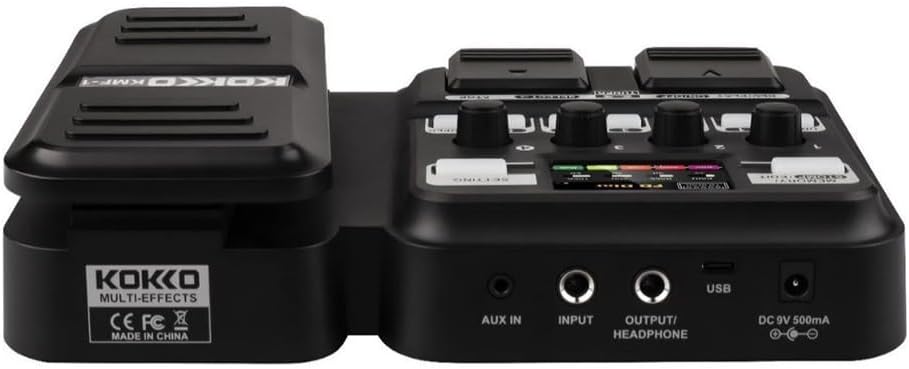
Obrázek 2: Zadní view of the KOKKO KMF-1 Multi-Effects Pedal, highlighting the AUX IN, INPUT, OUTPUT/HEADPHONE, USB, and DC 9V power input ports.
Ovládání a připojení:
- Expression pedál: Used for volume control or wah effects.
- Displej: Shows current settings, effects, and modes.
- Knobs (1-4): Control various parameters depending on the selected effect or mode.
- Footswitches (DRUM, REC/PLAY ON/OFF, TUNER, SELECT, STOP, LOOPER): For activating/deactivating functions and navigating presets.
- MEMORY/STOMP EDIT Button: Toggles between memory and stompbox modes, or enters edit mode.
- Tlačítko NASTAVENÍ: Přístup k nastavení systému.
- AUX IN: 3.5mm input for connecting external audio sources (e.g., MP3 player).
- VSTUP: 1/4" input for connecting your guitar.
- VÝSTUP/SLUCHÁTKA: 1/4" output for connecting to an ampzvlhčovač nebo sluchátka.
- USB port: Pro připojení k počítači pro nahrávání nebo aktualizace softwaru.
- Vstup DC 9V: For connecting a 9V DC power adapter (center negative).
Nastavení
Zapnutí:
- Napájení baterie: Open the battery compartment on the underside of the pedal and insert 4 x AA batteries (not included), ensuring correct polarity.
- Napájení AC adaptéru: Connect a 9V DC (center negative) power adapter (not included) to the DC 9V input jack.
Connecting Your Gear:
- Připojte svou kytaru k VSTUP jack using a 1/4" instrument cable.
- Připojte VÝSTUP/SLUCHÁTKA jack pro tvou kytaru amplifier's input or to headphones using a 1/4" cable.
- (Optional) Connect an external audio source (e.g., smartphone, MP3 player) to the AUX IN jack pomocí 3.5mm stereo kabelu.
- (Volitelné) Připojte USB port to your computer for direct recording or firmware updates.
Návod k obsluze
Základní provoz:
- Zapnutí/vypnutí: The unit powers on automatically when connected to power. Disconnect power to turn off.
- Ovládání hlasitosti: Use the expression pedal to control the overall output volume.
- Navigace v předvolbách: Use the SELECT footswitch to cycle through different presets or effects.
Using Speaker Models:
The KMF-1 features 18 high-quality speaker models. These models simulate the sound characteristics of various guitar cabinets.
- Enter the speaker model selection mode (refer to display).
- Use the SELECT footswitch or corresponding knobs to browse and choose your desired speaker model.
- Adjust parameters like gain, tone, and volume using the numbered knobs (1-4) as indicated on the display.
bicí automat:
The built-in drum machine offers 6 styles and over 40 rhythms to practice or jam along with.
- Stiskněte tlačítko BUBEN footswitch to activate the drum machine.
- Use the SELECT footswitch or knobs to choose a drum style and rhythm.
- Adjust the drum volume using the appropriate knob.
- Stiskněte BUBEN again to stop the drum machine.
Funkce smyčky:
The looper allows you to record up to 30 seconds of audio without overdubbing, perfect for creating backing tracks.
- Stiskněte tlačítko ZAP/VYP NAHRÁVÁNÍ/PŘEHRÁVÁNÍ footswitch once to start recording. The display will indicate recording status.
- Play your guitar part.
- Stiskněte ZAP/VYP NAHRÁVÁNÍ/PŘEHRÁVÁNÍ again to stop recording and immediately start playback of the recorded loop.
- Přehrávání zastavíte stisknutím tlačítka ZASTÁVKA nožní spínač.
- To clear the loop, press and hold the ZASTÁVKA nožní spínač.
Funkce tuneru:
The integrated tuner allows for accurate guitar tuning.
- Stiskněte tlačítko TUNER footswitch to activate the tuner. The output signal will be muted.
- Play a single note on your guitar. The display will show the note and indicate if it is sharp, flat, or in tune.
- Adjust your guitar's tuning until the display indicates the note is in tune.
- Stiskněte tlačítko TUNER footswitch again to exit the tuner and unmute the output.
Memory/Stomp Edit Mode:
This mode allows you to switch between saved presets (Memory mode) and individual stompbox effects (Stomp mode), as well as edit parameters.
- Stiskněte tlačítko MEMORY/STOMP EDIT button to toggle between Memory and Stomp modes.
- In Stomp mode, individual effects can be turned on/off using their dedicated footswitches or by selecting them.
- To edit parameters, press and hold the MEMORY/STOMP EDIT button to enter edit mode. Use the knobs and footswitches to adjust settings as displayed.
- Save your changes by following the on-screen prompts (usually by pressing a specific footswitch or button).
Nastavení systému:
Access system settings to configure global parameters.
- Stiskněte tlačítko NASTAVENÍ button to enter the system settings menu.
- Use the footswitches or knobs to navigate through the menu options.
- Adjust settings such as display brightness, factory reset, etc.
- Stiskněte tlačítko NASTAVENÍ znovu stiskněte tlačítko pro opuštění menu.
Údržba
- Čištění: K čištění pedálu používejte měkký, suchý hadřík. Nepoužívejte abrazivní čisticí prostředky ani rozpouštědla.
- Skladování: Pedál skladujte na chladném a suchém místě mimo dosah přímého slunečního záření a extrémních teplot.
- Výměna baterie: If using batteries, replace them when the low battery indicator appears or when the pedal's performance degrades. Remove batteries if the pedal will not be used for an extended period.
- Vyhněte se vlhkosti: Keep the pedal away from water and other liquids.
- Zacházejte opatrně: Zabraňte pádu pedálu nebo jeho vystavení silným nárazům.
Odstraňování problémů
| Problém | Možná příčina | Řešení |
|---|---|---|
| Žádný zvukový výstup. | Incorrect cable connections; Low battery; Tuner is active; Ampzvlhčovač je vypnutý. | Check all cables are securely connected. Replace batteries or use AC adapter. Deactivate tuner. Ensure ampZosilňovač je zapnutý a hlasitost je zvýšená. |
| Zkreslený nebo špatná kvalita zvuku. | Input level too high; Incorrect effect settings; Damaged cable. | Adjust guitar volume or pedal input level. Check and adjust effect parameters. Try a different cable. |
| Pedál se nezapne. | No power source; Dead batteries; Faulty adapter. | Ensure power adapter is connected or batteries are inserted correctly. Replace batteries. Try a different compatible power adapter. |
| Looper not recording. | Incorrect looper mode; Memory full. | Ensure you are in the correct looper recording mode. Clear previous loops if memory is full. |
Specifikace
| Funkce | Detail |
|---|---|
| Název modelu | KMF-1 |
| Rozměry produktu (D x Š x V) | 31 x 20 x 7 cm (12.2 x 7.9 x 2.8 palce) |
| Hmotnost položky | 900 g (1.98 lb) |
| Napájení | 9V DC (center negative) adapter or 4 x AA batteries |
| Hardwarové rozhraní | USB |
| Modely reproduktorů | 18 (IR technology) |
| Doba nahrávání looperu | 30 seconds (non-overdub) |
| Bubnové rytmy | Over 40 rhythms across 6 styles |
| Číslo modelu výrobce | 43ST9NRST131F1P8K5GRJ7 |
Záruka a podpora
KOKKO products are designed and manufactured to the highest quality standards. For information regarding warranty coverage, technical support, or service, please refer to the warranty card included with your product or visit the official KOKKO webstránky. Uschovejte si prosím doklad o koupi pro případné reklamace.
Pro další pomoc se prosím obraťte na náš tým zákaznické podpory.