
Ninkear A15
Uživatelská příručka k notebooku Ninkear A15
Model: A15
1. Úvod
Welcome to the Ninkear A15 Laptop user manual. This guide provides essential information for setting up, operating, maintaining, and troubleshooting your new Ninkear A15 laptop. Please read this manual thoroughly to ensure proper use and to maximize the performance and longevity of your device.
The Ninkear A15 is a high-performance laptop featuring an AMD Ryzen 5 5500U Hexa-core Processor, 16GB RAM, and a 512GB PCIe SSD, designed for a variety of computing tasks from daily productivity to graphic design and entertainment.
2. Co je v krabici
Upon opening your Ninkear A15 Laptop package, please verify that all the following items are included:
- A15 laptop x 1
- Myš x 1
- Podložka pod myš x 1
- Nabíječka x 1
3. Konec produktuview
The Ninkear A15 laptop is engineered for efficiency and user comfort. Below are key features and components:
3.1 Klíčové vlastnosti
- Výkonný procesor: Equipped with an AMD Ryzen 5 5500U processor, AMD Radeon graphics, 6 cores and 12 threads, with a frequency up to 4.0Ghz, suitable for various applications.
- Pohlcující displej: Features a 15.6-inch FHD IPS display with 1920x1080 resolution, offering a 90.3% screen-to-body ratio and a 180-degree viewing angle for clear and natural picture quality.
- Prodloužená životnost baterie: A 4350mAh battery provides up to 6 hours of daily use, making it ideal for mobile work. It supports full-function Type-C charging.
- AmpÚložiště a paměť: Comes with 16GB DDR4 RAM (3200Mhz) and a 512GB PCIe SSD, ensuring fast performance for professional software and multitasking.
- Uživatelsky přívětivý design: Includes a full digital backlit keyboard with three adjustable monochrome backlight levels (FN+F9) and a 0.5-second fingerprint unlocking feature for enhanced security and convenience.
3.2 Vizuální overview

Přední view of the Ninkear A15 Laptop, showcasinjeho elegantní design a displej.

Konecview of the Ninkear A15 Laptop highlighting key specifications like 15.6" IPS FHD display, AMD Ryzen 5 5500U processor, 16GB DDR4 RAM, 512GB PCIe SSD, 4350mAh battery, backlit keyboard, and Type-C full function port.

Detailní view of the AMD Ryzen 5 5500U processor, emphasizing its 6 cores, 12 threads, 7nm process, and 4.0GHz max turbo frequency.
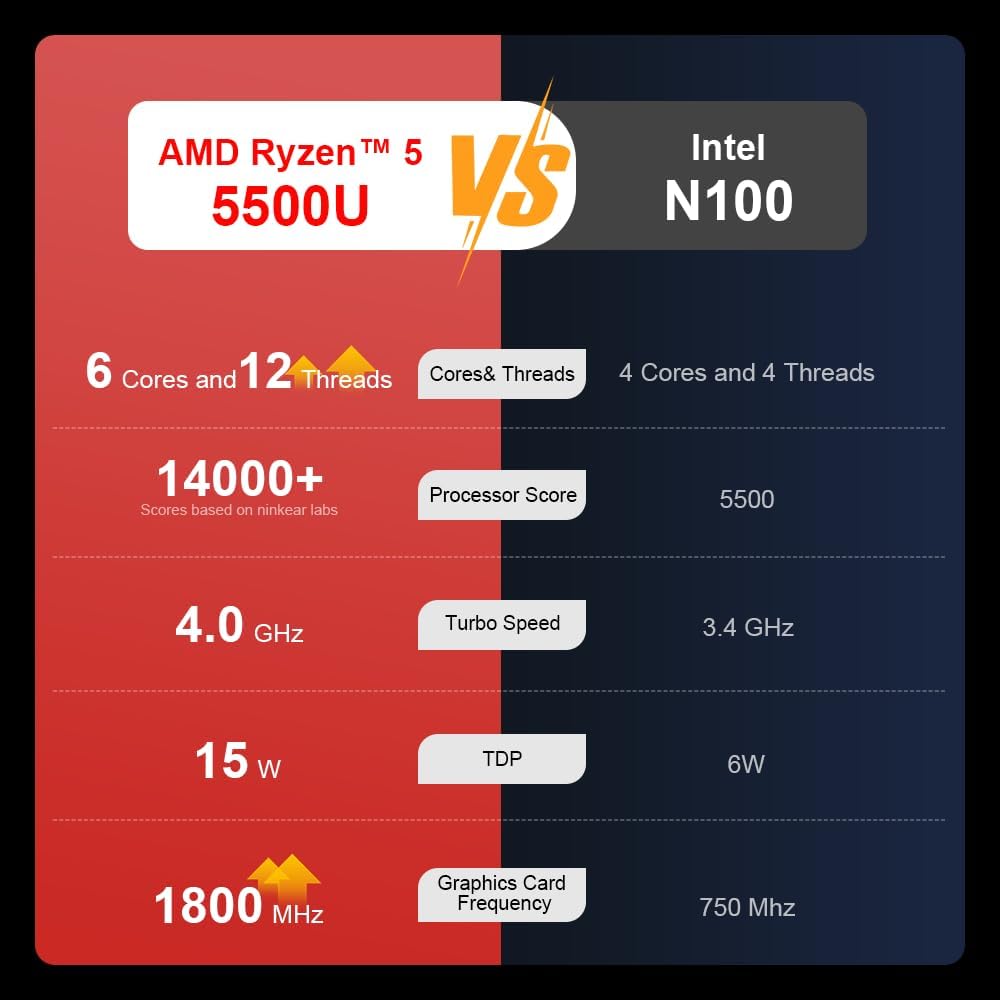
A comparison chart illustrating the performance differences between the AMD Ryzen 5 5500U and Intel N100 processors, including core/thread count, processor score, turbo speed, TDP, and graphics card frequency.

Image showing the 512GB M.2 PCIe SSD and highlighting the 3200MHz DDR4 running frequency, indicating a 20% speed improvement over 2666MHz DDR4.

The 15.6-inch IPS FHD screen of the A15, designed to deliver vibrant and accurate colors while reducing eye strain during long work hours.

Illustration of the A15 laptop's suitability for various 'recreational office' tasks, including graphic design (Ae, Ps, Ai) and gaming/entertainment.

Information about the laptop's 50.5WH high-capacity lithium-ion battery, providing up to 8 hours of local video playback and 72 hours of standby time.

A visual guide to the rich interfaces of the Ninkear A15 Laptop, including USB 3.0, USB 2.0, Headphone Jack, Charging Port, HDMI, and full-function Type-C ports.
3.3 Produktové video
Oficiální video s produktemasing the Ninkear A15 Laptop's features, including its design, display, backlit keyboard, and various ports. This video provides a dynamic overview of the laptop's capabilities and physical attributes.
4. Nastavení
Follow these steps to set up your Ninkear A15 Laptop for the first time:
- Rozbalení notebooku: Opatrně vyjměte notebook a veškeré příslušenství z obalu.
- Připojte napájení: Plug the charger into the laptop's charging port (DC-in or Type-C) and then into a power outlet.
- Počáteční spuštění: Open the laptop lid and press the power button (integrated with fingerprint sensor). The laptop will power on and begin the initial Windows 11 setup process.
- Nastavení Windows 11: Follow the on-screen instructions to complete the Windows 11 setup, including selecting your region, language, connecting to Wi-Fi, and creating a user account.
- Nastavení otisků prstů: During or after Windows setup, you can configure the fingerprint reader for quick and secure login.
5. Návod k obsluze
This section covers basic operation of your Ninkear A15 Laptop.
5.1 Zapnutí/vypnutí a režim spánku
- Zapnutí: Stiskněte tlačítko napájení.
- Vypnout: V systému Windows klikněte na tlačítko Start a poté vyberte Napájení > Vypnout.
- Režim spánku: Zavřete víko nebo klikněte na tlačítko Start a poté vyberte Napájení > Spánek.
5.2 Klávesnice a touchpad
- Podsvícená klávesnice: Stiskněte Fn + F9 to cycle through the three levels of monochrome backlight brightness or turn it off.
- Touchpad: Pro ovládání kurzoru a gest používejte integrovaný touchpad. Přizpůsobení touchpadu naleznete v nastavení systému Windows.
- Numerická klávesnice: The laptop features a full digital numeric keypad for convenient data entry.
5.3 Připojení periferních zařízení
Pro externí zařízení využijte různé porty:
- USB porty: Connect USB devices like external hard drives, mice, or keyboards to the USB 2.0 or USB 3.0 ports.
- HDMI: Connect to external monitors or projectors using the HDMI port.
- Typ C: The full-function Type-C port supports data transfer, video output, and power delivery.
- Audio jack: Připojte sluchátka nebo externí reproduktory k 3.5mm audio konektoru.
5.4 Nastavení zobrazení
Adjust display settings via Windows Settings > System > Display to optimize resolution, scaling, and multiple monitor setups.
6. Údržba
Proper maintenance ensures the longevity and optimal performance of your Ninkear A15 Laptop.
- Čištění: K čištění obrazovky a šasi použijte měkký hadřík, který nepouští vlákna. V případě odolných skvrn lehceampOtřete hadřík vodou nebo čističem obrazovek. Vyhněte se agresivním chemikáliím.
- Aktualizace softwaru: Regularly update Windows and device drivers to ensure system stability, security, and performance.
- Péče o baterie: Chcete-li prodloužit životnost baterie, vyvarujte se častého úplného vybíjení. Pokud notebook delší dobu nepoužíváte, skladujte jej na chladném a suchém místě.
- Větrání: Ujistěte se, že větrací otvory notebooku nejsou zakryty, aby nedošlo k jeho přehřátí. Používejte notebook na tvrdém a rovném povrchu.
- Záloha dat: Pravidelně zálohujte důležitá data na externí disk nebo cloudové úložiště, abyste předešli jejich ztrátě.
7. Řešení problémů
This section addresses common issues you might encounter with your Ninkear A15 Laptop.
| Problém | Možná příčina | Řešení |
|---|---|---|
| Notebook se nezapne | Low battery or power adapter issue | Ensure the charger is properly connected and the power outlet is working. Allow the laptop to charge for at least 30 minutes before attempting to power on again. |
| Obrazovka je prázdná nebo černá | Display driver issue, external display connected, or sleep mode | Press any key or move the mouse to wake from sleep. Disconnect any external monitors. Try pressing Fn + F7 (or the key with a display icon) to switch display modes. If still blank, force shut down by holding the power button for 10 seconds, then restart. |
| Wi-Fi se nepřipojuje | Wi-Fi adapter off, incorrect password, or router issue | Check if Wi-Fi is enabled in Windows settings. Verify the Wi-Fi password. Restart your router and modem. Update Wi-Fi drivers if necessary. |
| Podsvícení klávesnice nefunguje | Backlight turned off or low brightness setting | Stiskněte Fn + F9 repeatedly to adjust brightness or turn on the backlight. |
| Pomalý výkon | Too many programs running, low disk space, or outdated drivers | Close unnecessary applications. Free up disk space. Run Windows Update and update drivers. Consider running a virus scan. |
8. Specifikace
Detailed technical specifications for the Ninkear A15 Laptop:
| Funkce | Specifikace |
|---|---|
| Značka | Ninkear |
| Název modelu | A15 |
| Velikost obrazovky | 15.6 palce |
| Rozlišení obrazovky | 1920 x 1080 pixelů (FHD IPS) |
| Procesor | AMD Ryzen 5 5500U (2.1 GHz, 6 Cores, 12 Threads) |
| BERAN | 16 GB DDR4 (3200 MHz) |
| Pevný disk | 512 GB PCIe SSD |
| Grafická karta | Integrovaná grafika AMD Radeon |
| Operační systém | Windows 11 |
| Barva | Stříbro |
| Hmotnost položky | 5 libry |
| Rozměry produktu | 14 x 9 x 0.15 palce |
| Porty USB 3.0 | 2 |
| Průměrná životnost baterie | Up to 6-8 hours (daily use) |
| Speciální funkce | Backlit Keyboard, Numeric Keypad, Fingerprint Unlock, Full-function Type-C |
9. Záruka a podpora
Ninkear provides a standard warranty for the A15 Laptop. Please refer to the warranty card included in your product packaging for specific terms and conditions, including warranty duration and coverage details.
For technical support, troubleshooting assistance, or warranty claims, please contact Ninkear customer service through the official website or the contact information provided with your purchase. Ensure you have your product model (A15) and purchase details ready when contacting support.
You can also visit the official Ninkear store on Amazon for additional product information and support resources: Obchod Ninkear na Amazonu
Ask a question about this manual
Ask about setup, troubleshooting, compatibility, parts, safety, or missing instructions. Manuals+ will review the question and use this page’s manual context to help answer it.