
Hk11
RRP Creation Hk11 Pro Max Ultra 2 Smart Watch User Manual
Model: Hk11 Pro Max Ultra 2
Zavedení
This user manual provides comprehensive instructions for the RRP Creation Hk11 Pro Max Ultra 2 Smart Watch. It covers essential information regarding product setup, operation, maintenance, and troubleshooting to ensure optimal performance and user experience. Please read this manual carefully before using your new smartwatch.
Co je v krabici
Upon opening the package, please verify that all components are present and in good condition. The standard package contents include:
- Hk11 Pro Max Ultra 2 Smart Watch
- Bezdrátová nabíječka
- Extra Band (two pairs of straps are included as per product description)
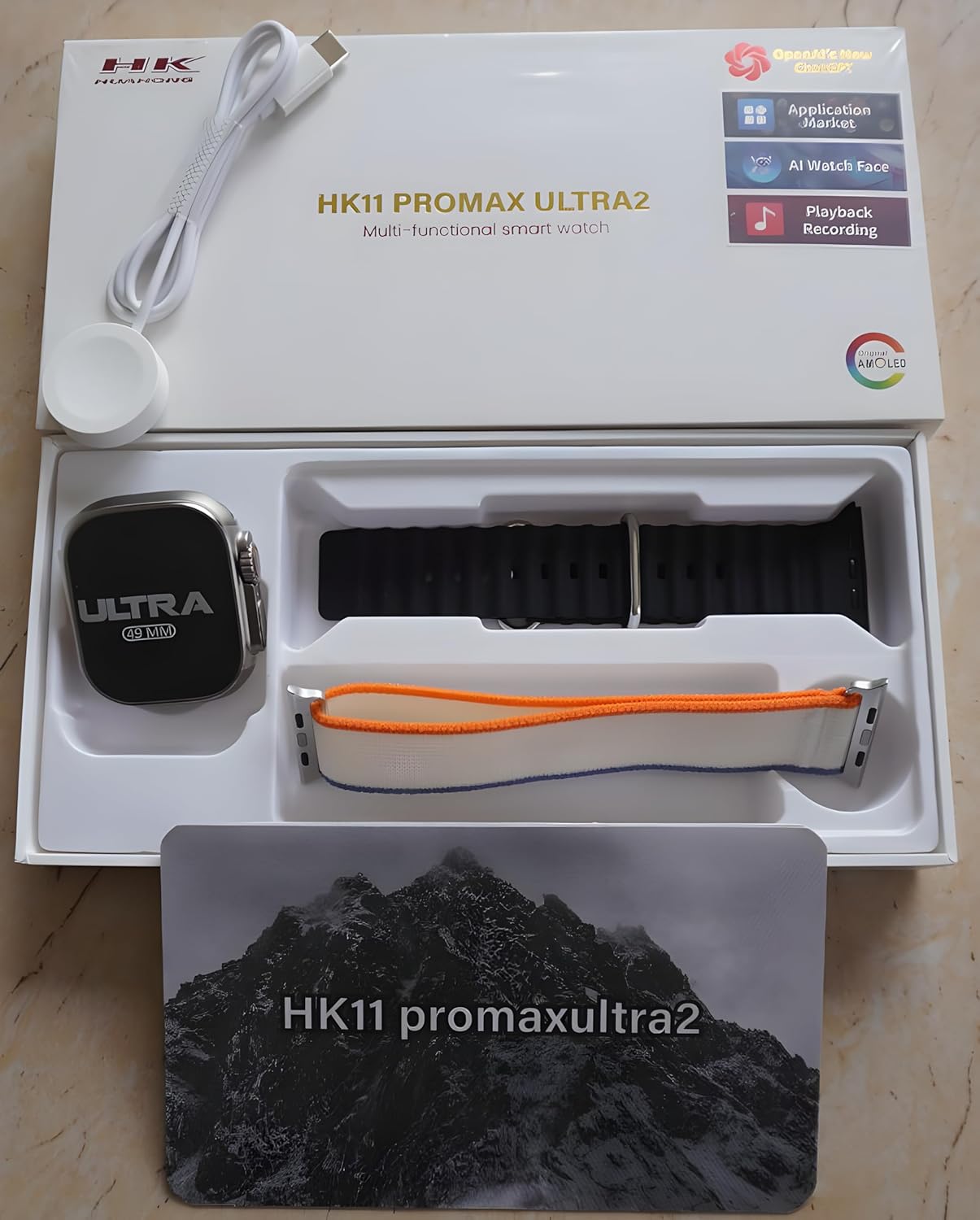
Figure 1: Package Contents. The image displays the Hk11 Pro Max Ultra 2 Smart Watch, two pairs of interchangeable straps, and the wireless charging puck, all neatly arranged within the product packaging.
Konec produktuview
The Hk11 Pro Max Ultra 2 Smart Watch features a robust design with advanced functionalities. Key components include:

Figure 2: Product Packaging. This image shows the white retail box for the HK11 Pro Max Ultra 2 Multi-functional smart watch, highlighting its key features like OpenAI's new ChatGPT, Application Market, AI Watch Face, Playback Recording, and AMOLED display.
- Zobrazit: 2.12-inch Super AMOLED full touch screen with 485*520 resolution.
- Věc: Durable Titanium alloy.
- Tlačítka/Korunka: Typically located on the side for navigation and function access.
- Senzory: Heart rate monitor, pedometer, compass, thermometer.
- Nabíjecí port: Wireless charging area on the back.
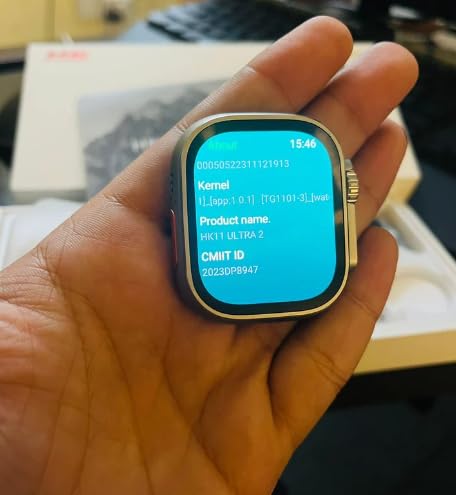
Figure 3: Smart Watch Display. This image shows the smartwatch screen displaying system information, including Kernel version, Product name (HK11 Ultra 2), and CMIIT ID.
Průvodce nastavením
1. Nabíjení chytrých hodinek
Before initial use, fully charge your smartwatch. Place the watch on the provided wireless charger. Ensure the charging contacts on the watch align with the charger. The display will indicate charging status. A full charge typically takes approximately 2-3 hours.
2. Zapnutí/vypnutí
- Zapnutí: Press and hold the side button (usually the crown) for a few seconds until the screen lights up.
- Vypnout: Stiskněte a podržte boční tlačítko a poté na obrazovce vyberte možnost „Vypnout“.
3. Párování s vaším smartphonem
Chcete-li odemknout všechny funkce chytrých hodinek, spárujte je s chytrým telefonem přes Bluetooth.
- Ujistěte se, že je ve vašem smartphonu zapnutá funkce Bluetooth.
- On your smartwatch, navigate to the Bluetooth settings or the pairing screen.
- On your smartphone, open the Bluetooth settings and search for available devices. Select "Hk11 Pro Max Ultra 2" or a similar device name from the list.
- Potvrďte požadavek na párování na hodinkách i smartphonu.
- For optimal performance and access to all features, download the companion application (if available, check the watch's manual or packaging for app name) from your phone's app store (compatible with Android 5.0 and above, and iOS 10.0 and above).
Návod k obsluze
Displej a navigace
- Dotyková obrazovka: Přejetím prstu doleva, doprava, nahoru nebo dolů můžete procházet nabídkami a obrazovkami. Klepnutím vyberete položky.
- Boční tlačítko/korunka: Press to return to the home screen, or rotate to scroll through lists (functionality may vary).
- Ovládání gesty: The watch supports gesture control for certain functions (e.g., raising wrist to wake screen).
Klíčové vlastnosti a funkce
Your Hk11 Pro Max Ultra 2 Smart Watch offers a wide range of features to enhance your daily life and health monitoring:
- Správa hovorů: Answer, dial, and receive calls directly from your wrist via Bluetooth 5.2.
- Oznámení: Receive push messages and message reminders from your paired smartphone.
- Monitor srdečního tepu: Neustále sledujte svou tepovou frekvenci.
- Monitorování krevního tlaku: Monitor your blood pressure (for reference only, not a medical device).
- Sledovač spánku: Analyzujte své spánkové vzorce, abyste si pomohli zlepšit kvalitu spánku.
- Fitness Tracker/Pedometer: Track steps, distance, and calories burned.
- Multisportovní režimy: Dedicated modes for various activities to track performance.
- Kompas: Vestavěný kompas pro navigaci.
- Teploměr: Změřte okolní teplotu.
- Dálkové ovládání: Ovládejte přehrávání hudby na svém smartphonu.
- Alarm Clock & Countdown: Set alarms and use countdown timers.
- Kalendář: Access calendar functions.
- Přizpůsobení: Multiple dial switch options to personalize your watch face.
Údržba a péče
Proper care will extend the life and maintain the performance of your smartwatch.
- Čištění: Wipe the watch and straps regularly with a soft, dry, lint-free cloth. For stubborn dirt, slightly damphadřík vodou. Nepoužívejte agresivní chemikálie ani abrazivní materiály.
- Voděodolnost: While smartwatches often have some water resistance, avoid prolonged exposure to water, swimming, or showering with the watch unless explicitly stated as waterproof for such activities. Refer to product specifications for exact water resistance ratings.
- Teplota: Nevystavujte hodinky extrémním teplotám (horkým nebo nízkým) ani přímému slunečnímu záření po delší dobu.
- Nabíjení: Always use the original wireless charger provided. Do not attempt to charge with damaged cables or chargers.
- Skladování: Pokud hodinky delší dobu nepoužíváte, skladujte je na chladném a suchém místě.
Odstraňování problémů
If you encounter issues with your smartwatch, refer to the following common troubleshooting steps:
| Problém | Možná příčina | Řešení |
|---|---|---|
| Hodinky se nezapínají. | Slabá baterie; softwarová závada. | Charge the watch for at least 30 minutes. If still unresponsive, try a forced restart (refer to specific model instructions, usually holding down a button for 10-15 seconds). |
| Nelze spárovat se smartphonem. | Bluetooth off; watch not in pairing mode; interference. | Ensure Bluetooth is on for both devices. Put watch in pairing mode. Restart both devices. Clear previous Bluetooth connections on your phone. |
| Oznámení nebyla přijata. | App permissions; Bluetooth disconnected; DND mode. | Check app notification permissions on your phone. Ensure Bluetooth connection is stable. Disable Do Not Disturb mode on both devices. |
| Nepřesné zdravotní údaje. | Nesprávné usazení; zablokování senzoru. | Ujistěte se, že hodinky máte pevně na zápěstí, ne příliš těsně ani příliš volně. Vyčistěte senzor na zadní straně hodinek. |
| Krátká výdrž baterie. | Frequent use of features; high brightness; old firmware. | Reduce screen brightness. Limit continuous heart rate monitoring. Turn off unnecessary features. Ensure firmware is updated. |
Pokud problém přetrvává i po vyzkoušení těchto kroků, kontaktujte prosím zákaznickou podporu.
Specifikace
Detailed technical specifications for the Hk11 Pro Max Ultra 2 Smart Watch:
| Funkce | Detail |
|---|---|
| Obrazovka displeje | 2.12 inch Super AMOLED Full Touch Screen |
| Rezoluce | 485*520 pixelů |
| Verze Bluetooth | 5.2 |
| Paměť | 256 MB |
| Velikost | 49 mm |
| Kompatibilní systémy | Android 5.0 (above), iOS 10.0 (inclusive) and above |
| Kapacita baterie | 480 XNUMX mAh |
| Materiál pouzdra | Titanová slitina |
| Normální životnost baterie | 2-3 dní |
| Pohotovostní doba | Až 3 dní |
| Speciální funkce | Compass, Thermometer, Calendar, Alarm Clock, Power Reserve, Remote Control, Countdown, Sleep Tracker, Fitness Tracker, Passometer, Call Reminder, Answer Call, Push Message, Message Reminder, Dial Call, Heart Rate Tracker, Moisture Measurement, Gesture control, Heart Rate Monitor |
| Typ nabíjení | Bezdrátová nabíječka |
Záruka a podpora
For information regarding warranty coverage and customer support, please refer to the warranty card included with your product or contact the retailer/manufacturer directly. Keep your purchase receipt as proof of purchase.
Manufacturer: RRP cration, nawada fatehpur Sec-86 Gurgaon
Model: Hk11
ASIN: B0D4R3WCDH
Ask a question about this manual
Ask about setup, troubleshooting, compatibility, parts, safety, or missing instructions. Manuals+ will review the question and use this page’s manual context to help answer it.