1. Konec produktuview
The Dafit ZL02CPRO Smart Watch is a versatile wearable device designed for health monitoring, fitness tracking, and smart notifications. It features a 1.28-inch round TFT screen, Bluetooth call functionality, and multi-sport modes. This manual provides detailed instructions for setup, operation, and maintenance of your smart watch.
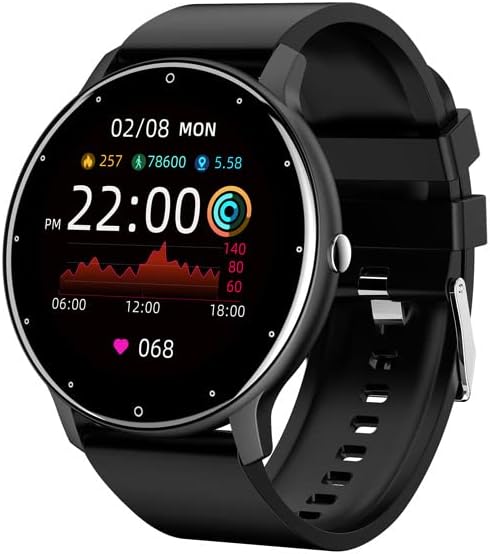
Figure 1.1: Dafit ZL02CPRO Smart Watch (Black Silicone Strap)
Tento obrázek ukazuje hlavní view of the Dafit ZL02CPRO Smart Watch in black with a silicone strap. The watch face displays the current time, date, step count, distance, and heart rate data, illustrating its primary functions.
2. Co je v krabici
Po otevření obalu produktu se prosím ujistěte, že obsahuje všechny následující položky:
- Chytré hodinky Dafit ZL02CPRO
- Uživatelská příručka
- Wristbands (Silicone or Steel, depending on model)
- Nabíjecí kabel
3. Průvodce nastavením
3.1 Nabíjení zařízení
Before initial use, fully charge your smart watch. Connect the provided charging cable to the charging port on the watch and a standard USB power adapter (not included). A full charge typically takes approximately 2 hours. The watch can operate for 5-7 days on a single charge, depending on usage.
3.2 Instalace a párování aplikace
To unlock the full functionality of your smart watch, you need to install the companion application on your smartphone. The watch supports Android 5.0 and above, and Apple iOS 9.0 or later.
- Stáhněte si aplikaci: Hledat "Dafit" in your smartphone's app store (Google Play Store for Android or Apple App Store for iOS) and install the application.
- Povolit Bluetooth: Ujistěte se, že je na vašem smartphonu povoleno Bluetooth.
- Otevřete aplikaci: Launch the Dafit application and follow the on-screen instructions to create an account or log in.
- Spárování hodinek: Within the app, navigate to the device pairing section. The app will search for nearby devices. Select "ZL02CPRO" or the corresponding device name when it appears. Confirm the pairing request on both your phone and the watch if prompted.
- Udržujte spojení: For optimal performance and to receive notifications, keep the Bluetooth distance between your watch and smartphone within 10 meters.
4. Návod k obsluze
4.1 Základní navigace
The ZL02CPRO Smart Watch features a full touch screen for intuitive navigation. Swipe across the screen to access different functions and menus. Press the side button to return to the main watch face or to power on/off the device.
4.2 Funkce monitorování stavu
The watch is equipped with sensors to track various health and fitness metrics:
- Sledování aktivity: Monitors daily steps, calories burned, and distance traveled.
- Monitorování srdeční frekvence: Poskytuje nepřetržité nebo dle potřeby měření tepové frekvence.
- Monitorování spánku: Sleduje spánkové vzorce a kvalitu spánku.
- Multisportovní režimy: Supports various exercise modes to record specific workout data, including exercise time, heart rate tracking, and mileage. GPS movement track data is available when connected to your smartphone's GPS.
4.3 Funkce chytrého asistenta
Your smart watch acts as a personal assistant, keeping you connected and organized:
- Oznámení: Receive alerts for incoming calls, SMS messages, and notifications from various applications directly on your wrist. You can reject calls from the watch.
- Dálkové ovládání: Control music playback and trigger your smartphone's camera remotely.
- Zpráva o počasí: Získejte aktuální informace o počasí v reálném čase.
- Připomenutí: Set sedentary reminders and alarm clocks.
- Nástroje: Access stopwatch functionality.
- Nastavení obrazovky: Adjust screen brightness and activate power-saving mode.

Figure 4.1: Customizable Watch Faces and On-Wrist View
This image illustrates the variety of customizable watch faces available for the ZL02CPRO Smart Watch, allowing users to personalize their device. It also shows the watch being worn on a wrist, demonstrating its comfortable fit and display visibility during use.
4.4 Jazyková podpora
The watch supports multiple languages, including Chinese, English, German, Spanish, French, Russian, Arabic, Ukrainian, Italian, and Portuguese. Language settings can typically be adjusted within the companion app.
5. Water Resistance and Care
The ZL02CPRO Smart Watch is IP68 waterproof, meaning it is resistant to dust and can withstand immersion in water up to 1.5 meters for 30 minutes. It can be worn when washing hands or in the rain. However, it is important to note that the watch is ne suitable for use in showers, saunas, or during diving activities, as steam and high water pressure can damage the device.
To maintain the watch's condition, regularly clean the device and straps with a soft, dry cloth. Avoid exposing the watch to extreme temperatures or harsh chemicals.
6. Specifikace
| Funkce | Detail |
|---|---|
| Typ obrazovky | TFT obrazovka |
| Velikost obrazovky | 1.28 palce (kulaté) |
| Materiál pouzdra | Plastové PC |
| Materiál popruhu | Anti-static Silicone or Steel (depending on model) |
| Hmotnost položky | 80 gramů (2.82 unce) |
| Kapacita baterie | 230 miliamp hodiny |
| Doba nabíjení | Přibl. 2 hodin |
| Životnost baterie | 5–7 dní (typické použití) |
| Hodnocení odolnosti proti vodě | IP68 |
| Technologie připojení | Bluetooth |
| Kompatibilita operačního systému | Android 5.0+ / iOS 9.0+ |
| GPS | Prostřednictvím smartphonu |
| Číslo modelu | cn101 |
7. Řešení problémů
Pokud se s chytrými hodinkami Dafit ZL02CPRO setkáte s problémy, podívejte se na následující běžná řešení:
- Hodinky se nezapínají: Ujistěte se, že jsou hodinky plně nabité. Připojte je k nabíjecímu kabelu a zdroji napájení na dobu alespoň 30 minut.
- Nelze spárovat se smartphonem:
- Ujistěte se, že máte na smartphonu i hodinkách povoleno Bluetooth.
- Make sure the watch is within 10 meters of your smartphone.
- Restartujte hodinky i smartphone.
- Try unpairing and re-pairing the device through the Dafit app.
- Check if the Dafit app is updated to the latest version.
- Neobdržená oznámení:
- Verify that the watch is successfully paired and connected via Bluetooth.
- Check notification permissions for the Dafit app in your smartphone's settings.
- Ensure notifications are enabled within the Dafit app for specific applications.
- Disable any "Do Not Disturb" or "Power Saving" modes on your phone or watch that might block notifications.
- Nepřesné zdravotní údaje:
- Ujistěte se, že hodinky máte na zápěstí pevně utažené, ale ne příliš.
- Vyčistěte senzor na zadní straně hodinek.
- For best results, ensure your profile information (height, weight) is accurate in the Dafit app.
- Krátká výdrž baterie:
- Snižte jas obrazovky.
- Limit continuous heart rate monitoring.
- Zakažte nepotřebná oznámení.
- Activate power-saving mode if available.
If issues persist, please contact customer support for further assistance.
8. Záruka a podpora
This product comes with a standard manufacturer's warranty. For specific warranty terms and conditions, please refer to the documentation provided with your purchase or contact the seller directly. For technical support or any questions regarding the operation of your Dafit ZL02CPRO Smart Watch, please reach out to the customer service team via the contact information provided by your retailer or on the product packaging.