
1. Úvod
Thank you for choosing the TREBLAB HD-360 Pro Ultra High-Tech Bluetooth Speaker. This manual provides essential information for setting up, operating, and maintaining your speaker to ensure optimal performance and longevity. The HD-360 Pro delivers immersive 360° surround sound with a 90W high-powered 5-driver system, subwoofer, and 8 bass radiators, designed for home, party, and outdoor use.
2. Co je v krabici
- TREBLAB HD-360 Pro Speaker
- Nabíjecí kabel USB-C
- 3.5 mm AUX kabel
- Rychlý průvodce
- Záruční list
3. Konec produktuview
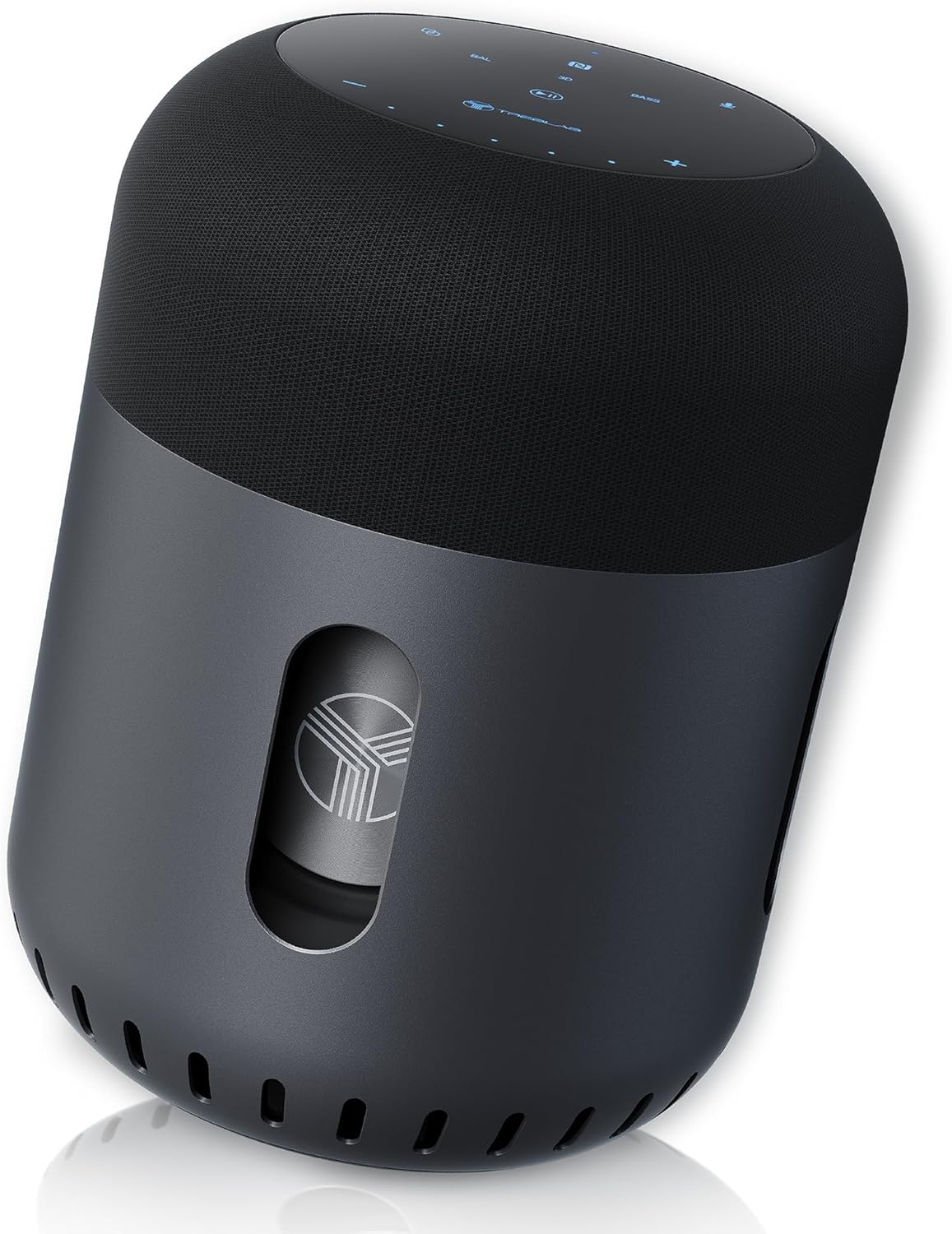
Přední view of the TREBLAB HD-360 Pro speaker, showcasinjeho elegantní design a robustní konstrukce.
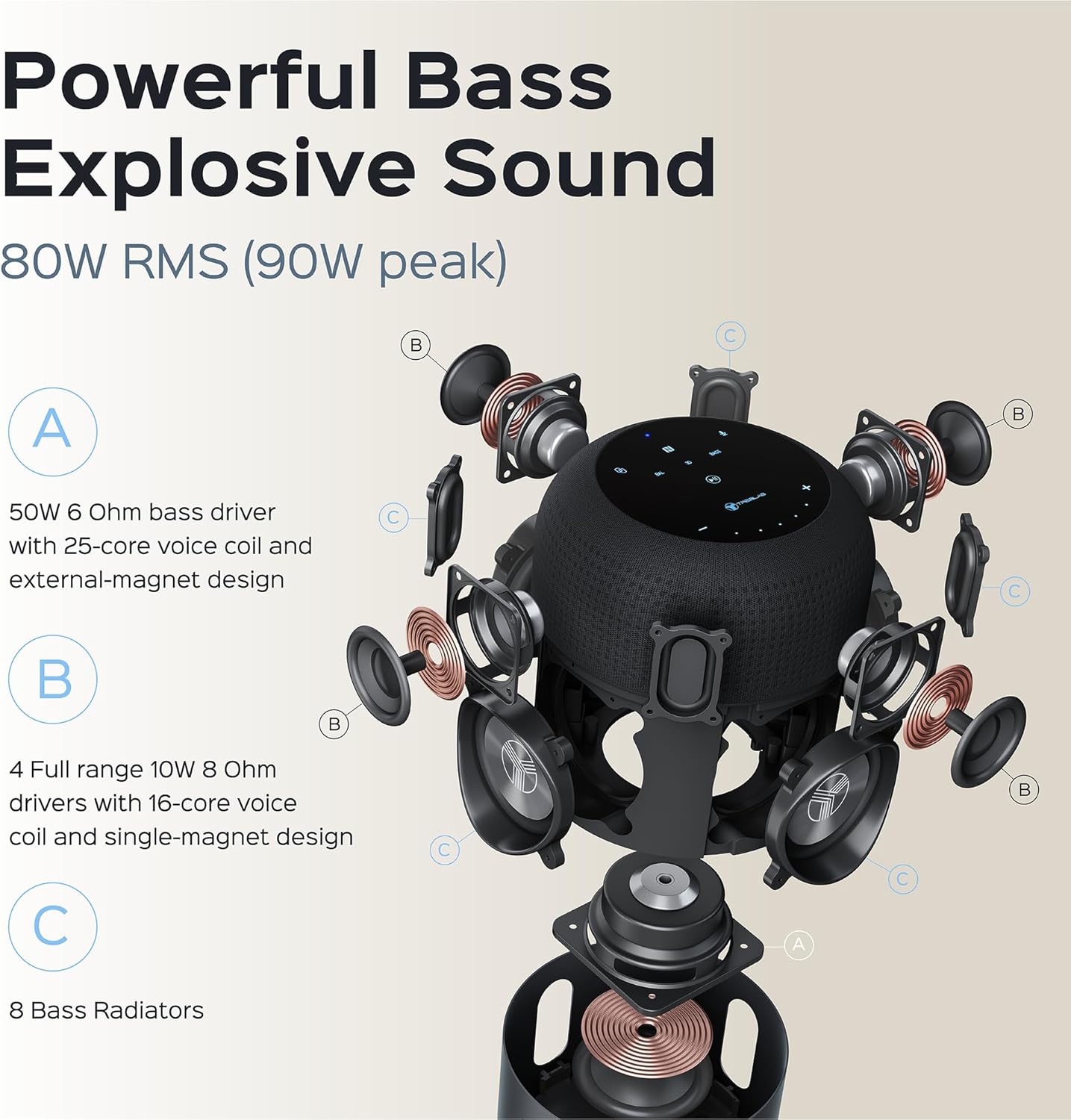
Detailní rozklad view illustrating the 5-driver system, subwoofer, and 8 bass radiators for powerful, explosive sound.
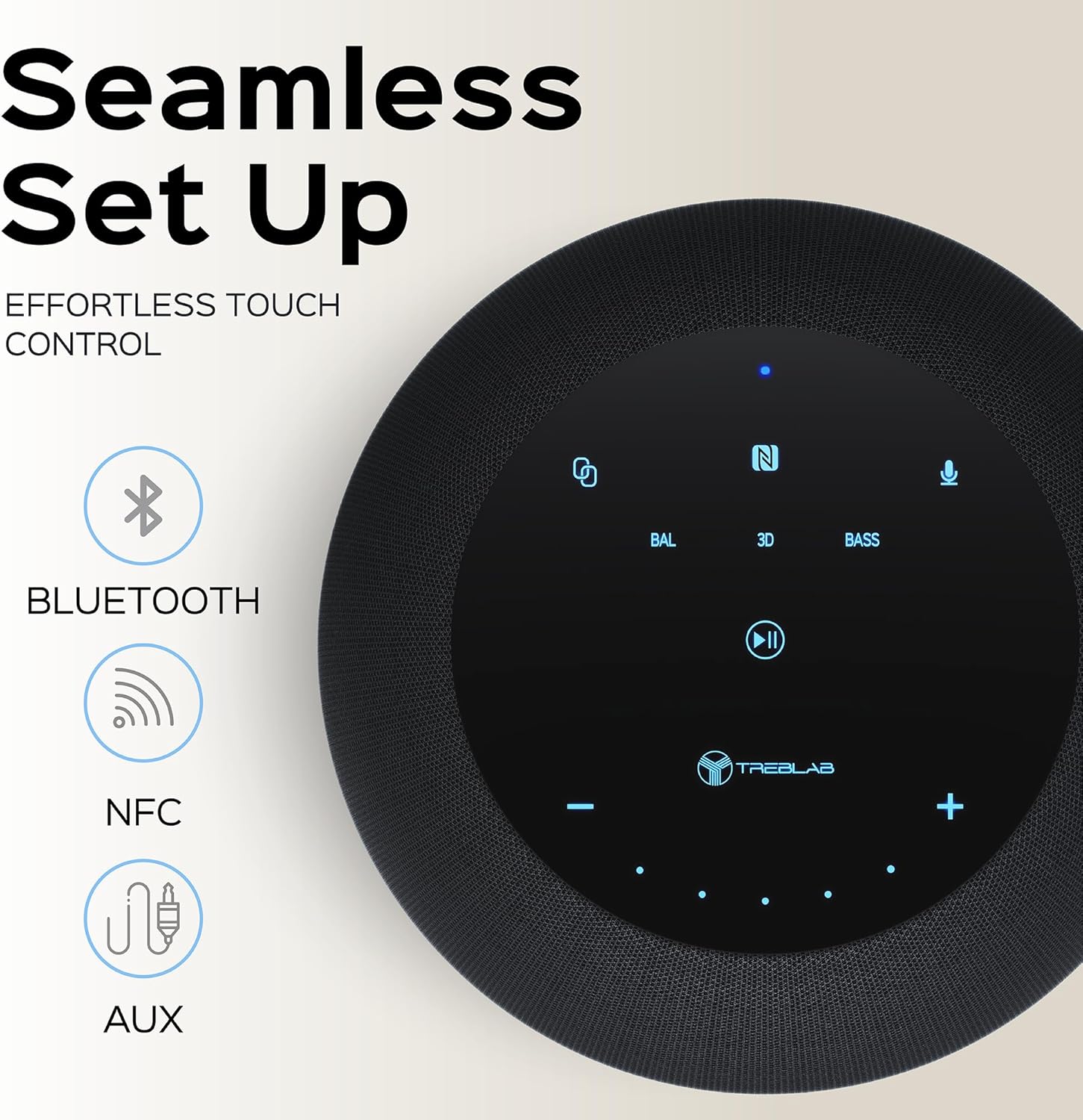
Top panel showing the intuitive touch controls for seamless operation, including Bluetooth, NFC, and AUX input options.

The speaker features an IPX4 waterproof rating, making it resistant to splashes and light rain, suitable for various environments.
4. Nastavení
4.1 Počáteční nabíjení
Before first use, fully charge your TREBLAB HD-360 Pro speaker. Connect the provided USB-C charging cable to the speaker's charging port and a compatible USB power adapter (not included). The charging indicator light will show the charging status. A full charge takes approximately 2 hours.
4.2 Zapnutí/vypnutí
To power on the speaker, press and hold the Power button on the top panel until you hear an audible prompt and the indicator lights illuminate. To power off, press and hold the Power button again until the lights turn off.
5. Návod k obsluze
5.1 Párování Bluetooth
- Ujistěte se, že je reproduktor zapnutý a v režimu párování (signalizováno blikajícím modrým světlem).
- Na svém zařízení (chytrý telefon, tablet, notebook) povolte Bluetooth.
- Hledat available Bluetooth devices and select "TREBLAB HD-360 Pro" from the list.
- Po připojení se kontrolka rozsvítí modře a ozve se potvrzovací zvuk.
The speaker supports Bluetooth 5.0 for fast and stable connections up to 34 feet (10 meters).
5.2 Párování s pravým bezdrátovým stereo (TWS) systémem
For an enhanced stereo experience, you can pair two TREBLAB HD-360 Pro speakers together:
- Ujistěte se, že jsou oba reproduktory zapnuté a nejsou připojeny k žádným jiným zařízením Bluetooth.
- Na jednom reproduktoru (to bude primární reproduktor) stiskněte a podržte tlačítko TWS, dokud neuslyšíte výzvu.
- The speakers will automatically search for and connect to each other. Once paired, you will hear a confirmation sound, and the indicator lights will synchronize.
- Připojte zařízení k primárnímu reproduktoru přes Bluetooth, jak je popsáno v části 5.1.

Illustration of two HD-360 Pro speakers connected via TWS for a doubled audio experience.
5.3 Dotykové ovládání
The HD-360 Pro features intuitive touch controls on its top panel:
- Zvýšení/Snížení hlasitosti: Klepněte na ikony „+“ nebo „-“.
- Přehrát/pozastavit: Tap the Play/Pause icon.
- Další / předchozí skladba: Swipe left or right on the touch surface.
- Přijmout/ukončit hovor: Klepněte na ikonu Telefon.
- Aktivovat Voice Assistant: Tap the Microphone icon.
- Zvukové režimy: Tap 'BAL' for Balanced, '3D' for 3D Surround, or 'BASS' for Bass Boost mode.
5.4 Volání
When connected via Bluetooth, the speaker's built-in microphone allows you to make and receive calls hands-free. Use the Phone icon on the touch panel to manage calls.
6. Nabíjení
The TREBLAB HD-360 Pro is equipped with a 15600 mAh battery, providing up to 22 hours of playtime on a single charge. To charge, use the included USB-C cable. The speaker can be used while charging.

Detailní záběr view of the USB-C charging port and AUX input, protected by a rubber flap.
7. Údržba a péče
- Čištění: Reproduktor otřete měkkým, suchým hadříkem. Nepoužívejte abrazivní čisticí prostředky ani rozpouštědla.
- Voděodolnost: The speaker has an IPX4 rating, meaning it is splash-proof. Do not submerge the speaker in water. Ensure the charging port cover is securely closed when near water.
- Skladování: Reproduktor skladujte na chladném a suchém místě mimo dosah extrémních teplot a přímého slunečního záření.
8. Řešení problémů
| Problém | Možná příčina | Řešení |
|---|---|---|
| Reproduktor se nezapne | Slabá baterie; Tlačítko napájení nebylo podrženo dostatečně dlouho. | Charge the speaker; Press and hold Power button for 3-5 seconds |
| Nelze spárovat přes Bluetooth | Reproduktor není v režimu párování; Bluetooth zařízení vypnuto; Reproduktor je již připojen k jinému zařízení | Ensure speaker is blinking blue; Turn on device Bluetooth; Disconnect from other devices |
| Žádný zvuk | Příliš nízká hlasitost; Nesprávný vstupní zdroj; Zařízení není připojeno | Increase volume on speaker and device; Check Bluetooth connection; Ensure AUX cable is fully inserted |
| Párování TWS se nezdařilo | Reproduktory jsou příliš daleko od sebe; Jeden reproduktor je již spárován se zařízením | Place speakers closer; Ensure both speakers are disconnected from other devices before TWS pairing |
9. Specifikace
| Funkce | Detail |
|---|---|
| Název modelu | HD-360-Pro |
| Typ reproduktoru | Subwoofer, Portable Bluetooth Speaker |
| Výstupní výkon | 90 W (špička) / 80 W RMS |
| Technologie připojení | Bluetooth 5.0, AUX, NFC |
| Bezdrátové Dosah | Až 33 stop (10 metrů) |
| Životnost baterie | Až 22 hodin |
| Kapacita baterie | 15600 miliamp hodiny |
| Doba nabíjení | 2 Hours (USB-C Fast Charging) |
| Voděodolnost | IPX4 (odolné proti stříkající vodě) |
| Materiál | Metal (Aluminum), ABS, Fabric |
| Rozměry (D x Š x V) | 5.79"H x 7.68"Š x 5.79"V |
| Hmotnost položky | 5.2 liber (2.36 kg) |
| Mikrofony | 4 (for calls) |
| Kanál prostorového zvuku | 3.0 |
10. Bezpečnostní informace
- Nevystavujte reproduktor extrémním teplotám, přímému slunečnímu záření ani vysoké vlhkosti.
- Vyvarujte se pádu reproduktoru nebo jej nevystavujte silným nárazům.
- Uchovávejte mimo dosah dětí.
- Nepokoušejte se reproduktor rozebírat ani upravovat. Zrušíte tak platnost záruky a může dojít k jeho poškození.
- Používejte pouze dodaný nabíjecí kabel.
- Baterii zlikvidujte zodpovědně v souladu s místními předpisy.
11. Záruka a podpora
The TREBLAB HD-360 Pro comes with a limited warranty. Please refer to the included Warranty Card for details regarding coverage and terms. For technical support, troubleshooting assistance, or warranty claims, please visit the official TREBLAB webnebo kontaktujte jejich zákaznický servis.
You can also find the full User Manual in PDF format zde.
Visit the TREBLAB Store for more products and information: TREBLAB Official Store