
Zavedení
This manual provides comprehensive instructions for the Symcode USB Laser Barcode Scanner (Model: 6543841919). This handheld wired barcode scanner is designed for efficient and accurate 1D barcode reading, suitable for various business, retail, and warehouse environments. Its plug-and-play functionality ensures ease of use across multiple operating systems.

Figure 1: Symcode USB Laser Barcode Scanner, a compact and ergonomic device for efficient barcode scanning.

Figure 2: The scanner features a small, exquisite, and streamlined design for comfortable handling, contrasting with larger, heavier alternatives.
Obsah balení
Po vybalení se prosím ujistěte, že balení obsahuje všechny následující položky:
- 1 x Laser Barcode Scanner
- 1 x USB Cable (1.5m/5ft)
- 1 x Uživatelská příručka
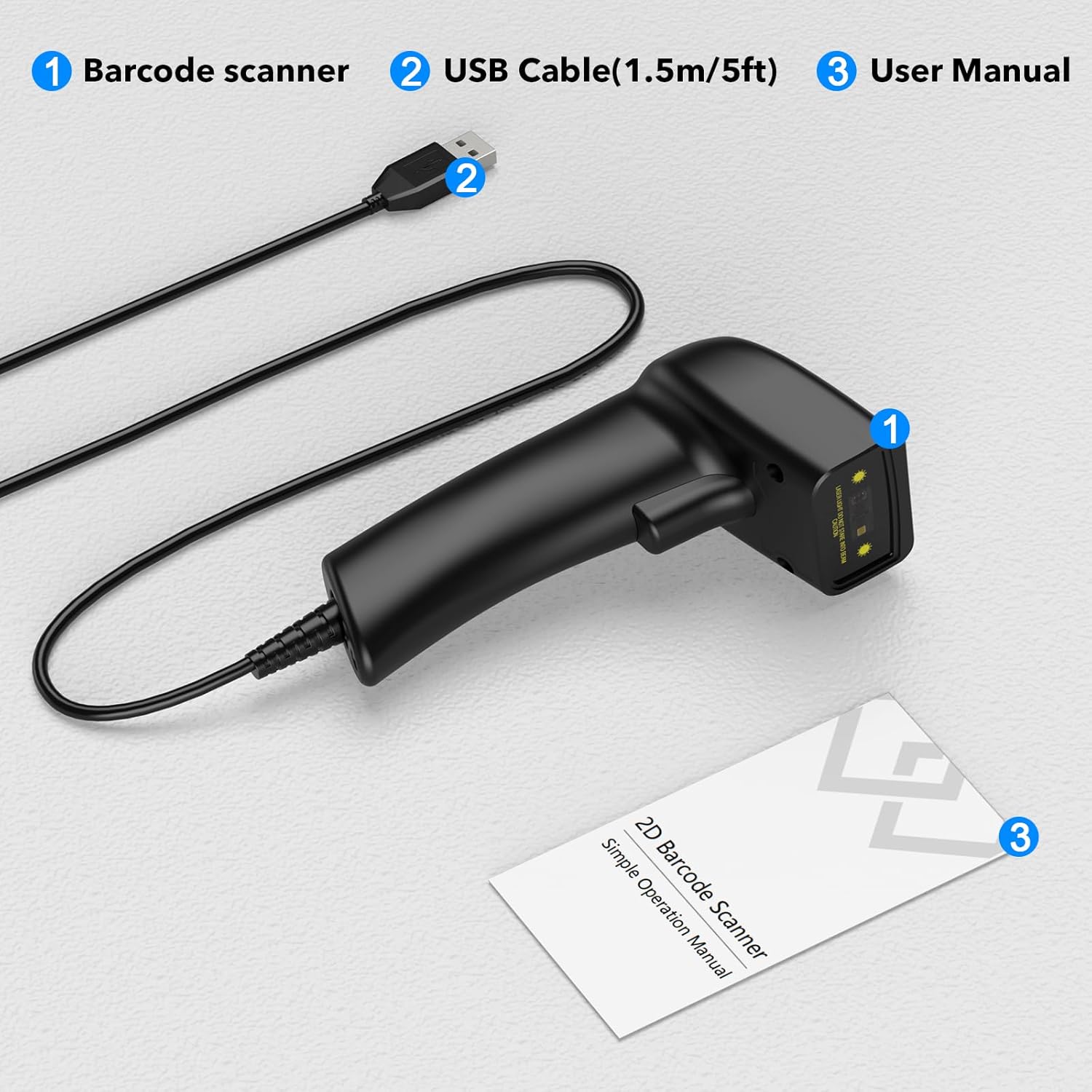
Figure 3: The standard package includes the barcode scanner unit, a USB cable for connection, and this user manual.
Specifikace
Detailed technical specifications for the Symcode USB Laser Barcode Scanner:
| Funkce | Popis |
|---|---|
| Rozměry | 165 x 63 x 87 mm (6.5 x 2.48 x 3.43 palce) |
| Hmotnost | 156 g (4.2 uncí) |
| Světelný zdroj | 650nm~670nm Visible Laser |
| Rychlost skenování | 100 skenů za sekundu |
| Read Precision | 0.1 mm (4 mil) |
| Kontrast tisku | minimálně 30 %. |
| Hloubka ostrosti | 0~600mm (0.33mm, PCS 90%) |
| Scan Scope | 10-250 mm |
| Vzdálenost čtení | 2.5~600mm (100% UPC/EAN) |
| Podporované čárové kódy | EAN-8/13, UPC-A/E, Code 39/93/128, EAN-128, Codabar, Industrial 2 of 5, Interleave 2 of 5, Matrix 2 of 5, MSI, Code 11, RSS variants, Chinese 2 of 5 |
| Bitová chybovost | 1 / 5 milionů |
| Proud | 85mA (working), 36mA (storage) |
| Rozhraní | USB |
| Provozní teplota | 0℃~45℃ (32°F~113°F) |
| Skladovací teplota | -20 ℃ ~ 60 ℃ (-4 ° F ~ 140 ° F) |
| Vlhkost | 5%~95% nekondenzující |
| Materiál | ABS + PC |
| Kompatibilní OS | Windows, Mac, Linux, iOS, Android |
Nastavení
The Symcode Barcode Scanner is designed for simple plug-and-play operation. No driver installation or complex setup is required.
- Připojte kabel USB: Insert the USB cable into the port at the base of the barcode scanner.
- Připojení k hostitelskému zařízení: Plug the other end of the USB cable into an available USB port on your computer (PC, Mac, or Linux) or compatible device.
- Rozpoznávání systému: The operating system will automatically detect and install the necessary generic drivers. This process usually takes a few seconds.
- Prepare for Scanning: Open a text editor (e.g., Notepad, WordPad, Microsoft Word, Excel, QuickBooks, Novell) or any application where you wish the scanned barcode data to appear. Ensure the cursor is active in the input field.

Figure 4: The scanner connects directly to your computer via a standard USB cable, supporting various operating systems.
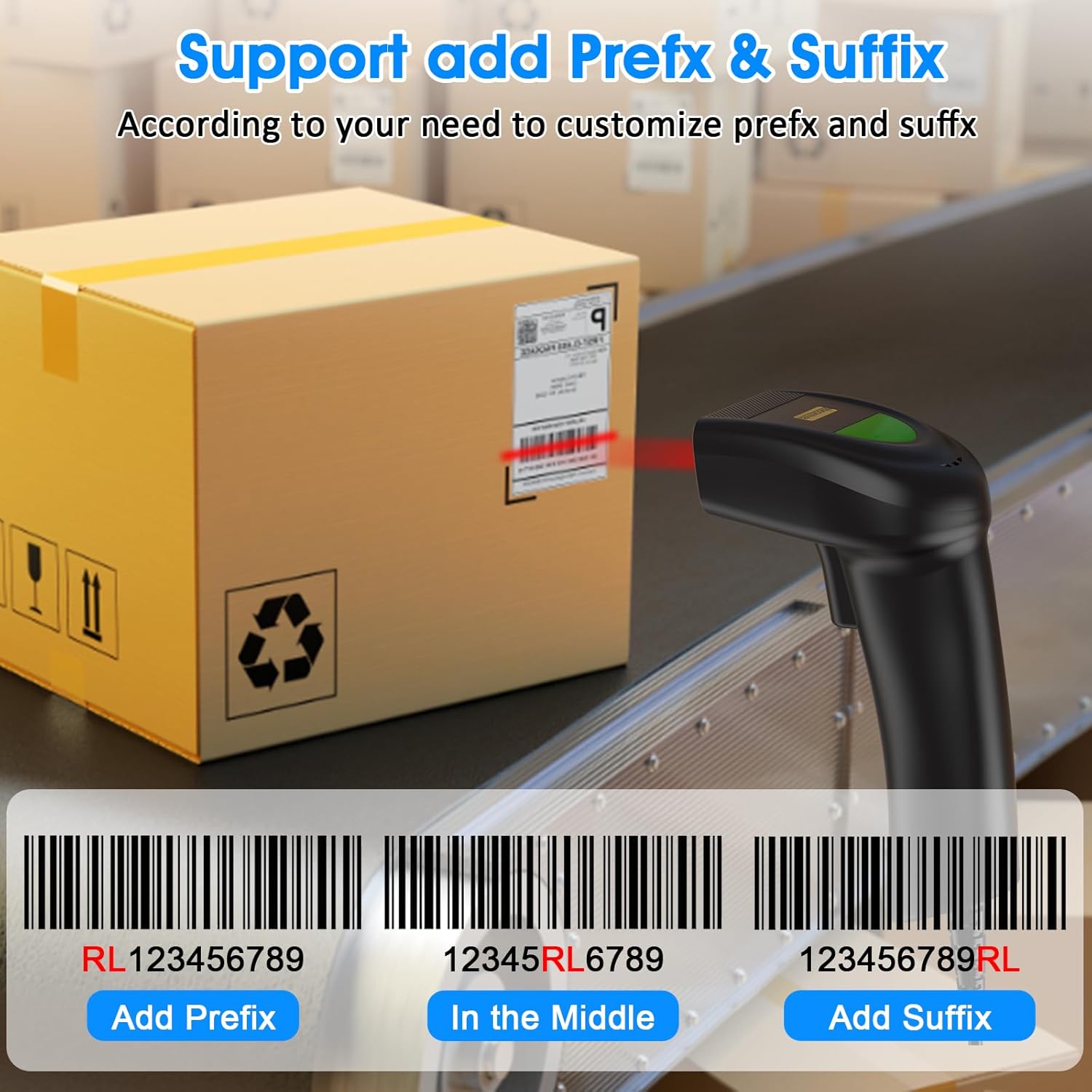
Figure 5: The USB cable serves both as a data transmission cable for scanning and as a power source for the device, enabling immediate plug-and-play functionality.
Návod k obsluze
Základní skenování
To scan a barcode, point the scanner's laser beam at the barcode you wish to read. Press the trigger button. A successful scan will typically result in a beep and the data appearing in your active application.
Přizpůsobení nastavení
The scanner offers configurable options to tailor its behavior to your specific needs. These settings are typically changed by scanning special configuration barcodes found in the full user manual (not included in this summary).
Sound and Vibration Control
You can enable or disable the sound and vibration feedback of the scanner. This is useful in environments where audible beeps might be disruptive or where tactile feedback is preferred.
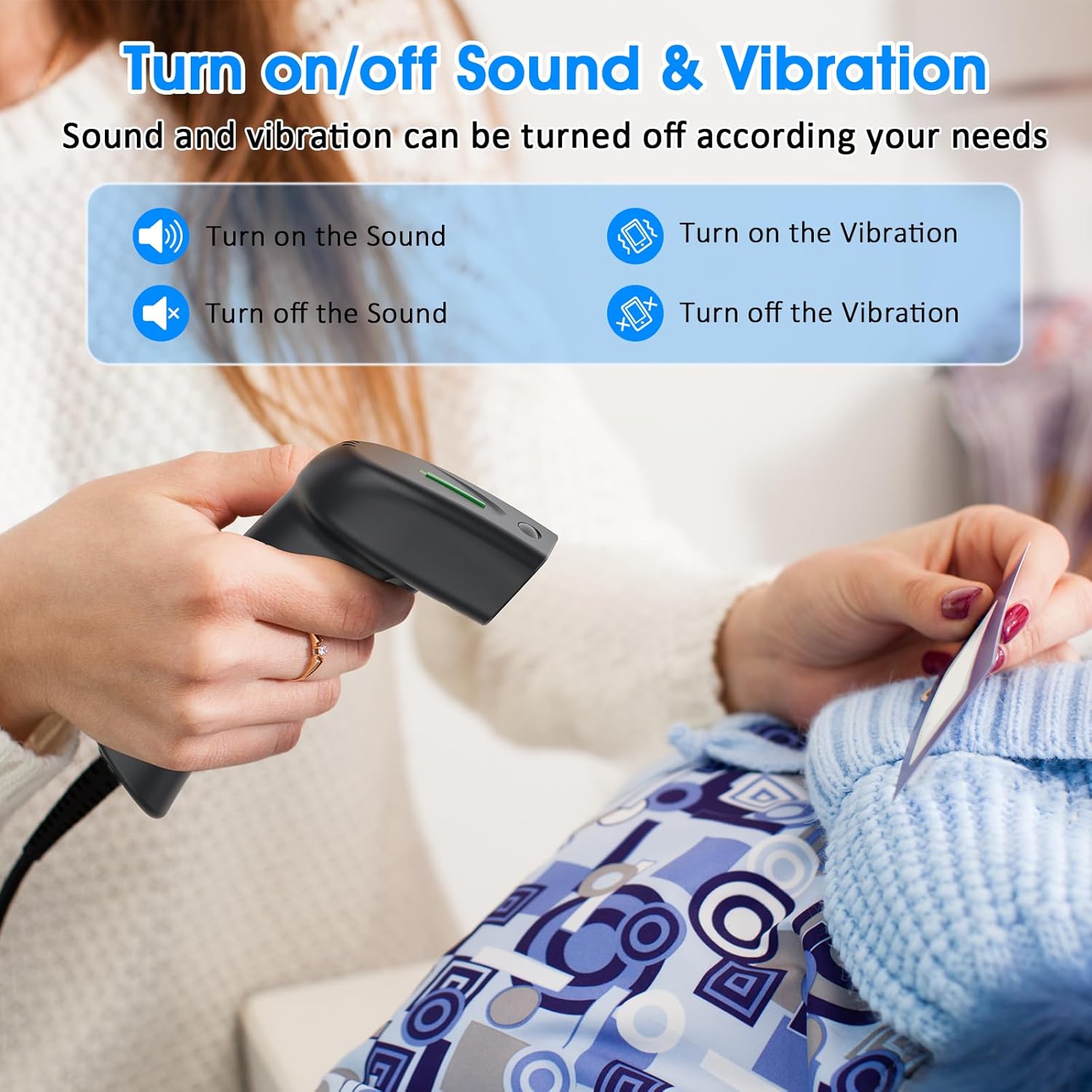
Figure 6: The scanner allows users to independently turn on or off sound and vibration feedback based on operational requirements.

Figure 7: Specific barcodes can be scanned to toggle the sound feature on or off. For example, scanning the barcode 30300C1 might turn off the sound.
Adding Prefix and Suffix
The scanner supports adding custom prefix and suffix strings to the scanned barcode data. This feature is highly configurable, allowing for up to 180 different options. This is useful for data formatting or integration with specific software systems.
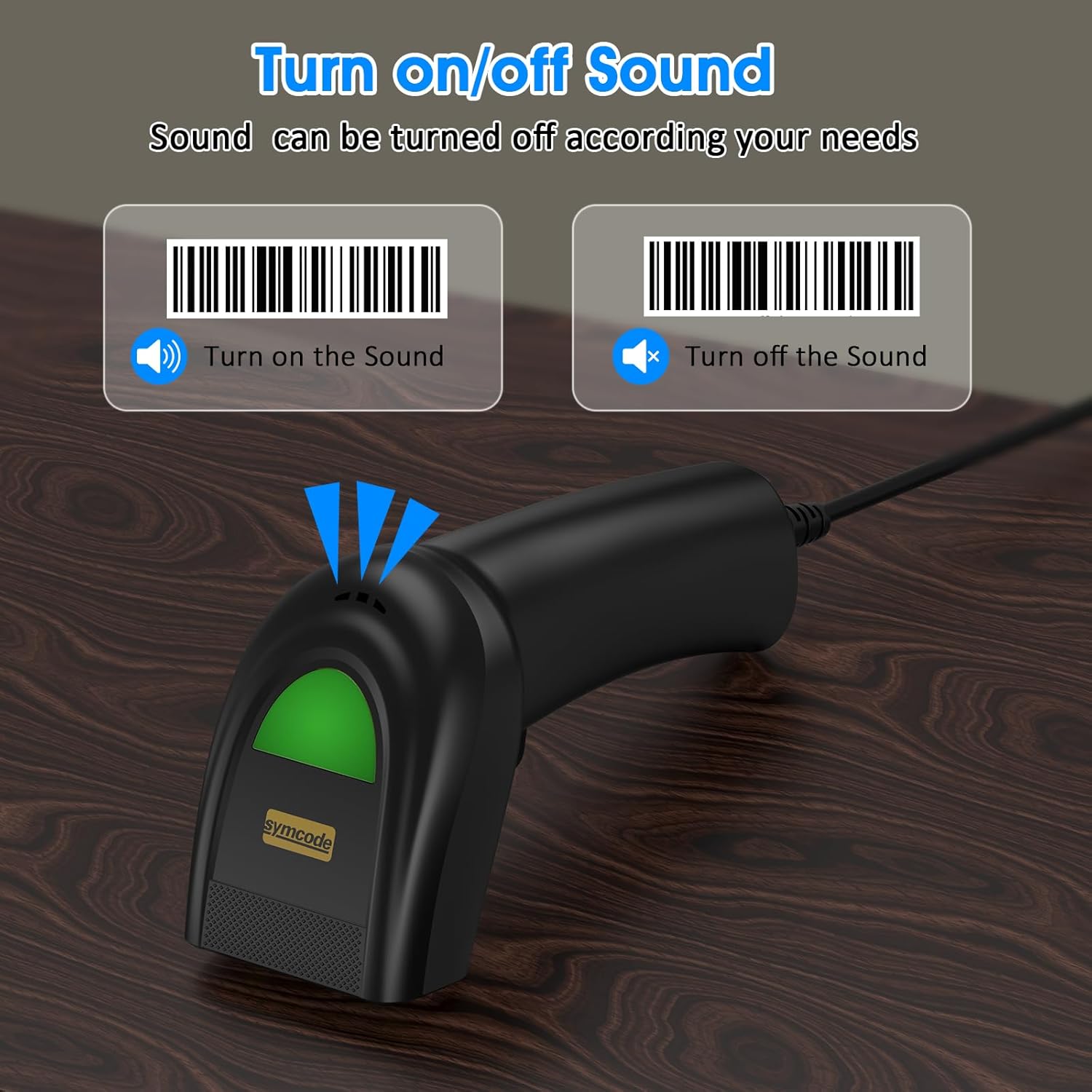
Figure 8: Customize scanned data by adding a prefix (e.g., RL123456789), inserting text in the middle, or appending a suffix to the barcode value.
Údržba
Správná údržba zajišťuje dlouhou životnost a optimální výkon vašeho skeneru čárových kódů.
- Čištění: Use a soft, dry, lint-free cloth to clean the scanner's exterior. For the scanning window, use a lens cleaning cloth and a mild, non-abrasive cleaning solution if necessary. Avoid harsh chemicals or abrasive materials.
- Skladování: Pokud skener nepoužíváte, skladujte jej na chladném a suchém místě mimo dosah přímého slunečního záření a extrémních teplot.
- Péče o kabely: Neohýbejte ani nekruťte kabel USB nadměrně, mohlo by dojít k poškození vnitřních vodičů.
Odstraňování problémů
If you encounter issues with your Symcode Barcode Scanner, refer to the following common problems and solutions:
- Problem: Scanner does not respond or scan.
- Řešení 1: Ujistěte se, že je kabel USB bezpečně připojen ke skeneru i hostitelskému zařízení.
- Řešení 2: Zkuste zapojit skener do jiného USB portu na počítači.
- Řešení 3: Verify that the host device (computer) is powered on and functioning correctly.
- Řešení 4: Open a text editor (e.g., Notepad, WordPad) or an application like Microsoft Word or Excel, and ensure the cursor is active in an input field before scanning. The scanner acts as a keyboard input device.
- Problem: Scanned data does not appear or appears incorrectly.
- Řešení 1: Ensure the cursor is active in the desired input field of your application.
- Řešení 2: Check if the barcode is damaged or poorly printed. Try scanning a different, known-good barcode.
- Řešení 3: Verify that the barcode type you are scanning is supported by the scanner (refer to Specifications section).
- Řešení 4: If you have configured prefixes or suffixes, ensure they are set correctly.
- Problem: Scanner makes noise but doesn't scan or won't stop making noise.
- Řešení 1: Refer to the "Sound and Vibration Control" section in Operating Instructions to adjust or disable the sound feedback.
- Řešení 2: If the scanner is continuously beeping or scanning without trigger input, it might be in continuous scan mode. Consult the full user manual for instructions on how to switch scanning modes.
- Problem: Scanner does not work with Square POS system.
- Poznámka: This specific model of barcode scanner is not compatible with the Square POS system. Please consider this limitation when integrating with your existing setup.
- Problem: Scanner does not scan QR codes (2D barcodes).
- Poznámka: This is a 1D laser barcode scanner and is designed to read linear (1D) barcodes only. It does not support 2D barcodes such as QR codes, Data Matrix, or PDF417.
Záruka a podpora
Symcode products are manufactured to high quality standards. While specific warranty details are not provided in this document, for any product support, technical assistance, or warranty inquiries, please contact Symcode directly through their official channels or the retailer from whom you purchased the product.
You can often find support information on the Symcode brand store on Amazon or their official webweb. Před kontaktováním podpory si prosím připravte číslo modelu produktu (6543841919) a podrobnosti o nákupu.