
NXGKET 2AYV7YG-811
NXGKET FRS 2-Way Radio Walkie Talkies User Manual
Model: 2AYV7YG-811
Zavedení
This manual provides detailed instructions for the operation and maintenance of your NXGKET FRS 2-Way Radio Walkie Talkies. Please read this manual thoroughly before using the product to ensure proper function and safety. These walkie talkies are designed for reliable communication in various environments, featuring long-range transmission, durable batteries, and NOAA weather alerts.

Popis obrázku: This image displays the four NXGKET walkie talkie units included in the pack, showcasing their distinct color options: purple, blue, orange, and yellow.
Konec produktuview
Obsah balení
- 4 x NXGKET FRS 2-Way Radio Walkie Talkies
- 4x sluchátka
- 2 x 2-in-1 USB-C Charging Cables
Klíčové vlastnosti
- Intelligent Control System: Includes auto squelch, auto memory, auto scan, auto power saving, and low battery alarm.
- iVOX Hands-Free Operation: Allows for voice-activated transmission without pressing buttons.
- Odolný design: Drop-proof construction.
- Kanály a kódy ochrany osobních údajů: 22 FRS channels with 122 privacy codes (2684 combinations).
- NOAA Emergency Weather Alert: Provides alerts for unpredictable weather conditions.
- Dobíjecí baterie: Built-in 1200mAh Li-ion battery with overcharge, overvoltage a ochranu proti zkratu.
- Nabíjení USB-C: Convenient charging with included 2-in-1 USB-C cables.
- Přenos na velké vzdálenosti: Upgraded custom gain antenna and lossless transmission technology for clear communication.
Identifikace součásti
Refer to the diagram below for identification of the walkie talkie components.

Popis obrázku: A detailed diagram of the NXGKET walkie talkie, highlighting key components such as the antenna, LCD display, PTT button, Power button, Up/Down buttons, Menu/Lock button, Speaker/Mic, Charge Jack (USB-C), and Earphone Jack.
Nastavení
Nabíjení baterie
- Locate the USB-C charging port on the walkie talkie.
- Connect one end of the provided 2-in-1 USB-C charging cable to the walkie talkie's charging port.
- Connect the other end of the USB-C charging cable to a compatible USB power source (e.g., wall adapter, power bank, computer USB port).
- The charging indicator light on the walkie talkie will illuminate to show it is charging.
- A full charge typically provides 3-4 days of use.
- The walkie talkie automatically shuts down after 3-4 hours of non-use to conserve power. Restart it when needed.

Popis obrázku: Two NXGKET walkie talkies (orange and yellow) connected to USB-C charging cables, illustrating the convenient charging method. The image also compares the built-in 1200mAh Li-ion battery to AAA batteries, highlighting its durability.
Zapnutí/vypnutí
- Pro zapnutí stiskněte a podržte Tlačítko napájení dokud se nerozsvítí LCD obrazovka.
- Chcete-li přístroj vypnout, stiskněte a podržte tlačítko Tlačítko napájení dokud se LCD obrazovka nevypne.
Návod k obsluze
Selecting Channels and Privacy Codes
- Stiskněte tlačítko MENU button once to enter channel selection mode. The channel number will flash on the LCD screen.
- Použijte "+" (Nahoru) nebo "-" (Down) buttons to select your desired channel (1-22).
- Stiskněte tlačítko MENU button again to enter privacy code selection mode. The privacy code will flash.
- Použijte "+" (Nahoru) nebo "-" (Down) buttons to select your desired privacy code (1-122).
- Stiskněte tlačítko MENU button a third time or wait a few seconds for the settings to be saved.
- Důležité: For successful communication, all walkie talkies must be set to the same channel and privacy code.
Vysílání a příjem
- Pro přenos stiskněte a podržte PTT (Push-to-Talk) button and speak clearly into the microphone.
- Uvolněte PTT tlačítko pro zastavení vysílání a poslech odpovědi.
- The walkie talkie will automatically receive transmissions when not transmitting.
iVOX (Hands-Free Operation)
- The iVOX feature allows for voice-activated transmission without needing to press the PTT button.
- To activate/deactivate iVOX, consult the full user manual for specific button sequences, as this feature often has adjustable sensitivity levels.
Nouzové upozornění na počasí NOAA
- To enter the NOAA channel mode, long press the "+" (Up) key. The radio will automatically jump to one of the 11 NOAA channels.
- Stiskněte tlačítko MENU key to lock the selected NOAA channel.
- Použijte "+" (Nahoru) nebo "-" (Down) keys to adjust to a different NOAA channel if desired.
- To exit the NOAA channel mode, long press the "+" (Up) key again.

Popis obrázku: A family hiking through a forest, each carrying an NXGKET walkie talkie. Icons at the bottom represent various weather phenomena like tornadoes, snowstorms, rainstorms, fires, tsunamis, and earthquakes, indicating the NOAA emergency weather alert capability for outdoor safety.
Údržba
Péče o baterie
- To maximize battery life, fully charge the walkie talkies before first use.
- Vyhněte se pravidelnému úplnému vybití baterie.
- Store the walkie talkies in a cool, dry place when not in use for extended periods.
- The built-in Li-ion battery includes protection against overcharge, overvoltage a zkraty.
Čištění
- Wipe the exterior of the walkie talkie with a soft, damp tkanina.
- Nepoužívejte drsné chemikálie ani abrazivní čisticí prostředky.
- Ujistěte se, že je kryt nabíjecího portu bezpečně uzavřen, aby se zabránilo vniknutí prachu a vlhkosti.
Odstraňování problémů
- Bez napájení: Ensure the battery is charged. Connect the walkie talkie to the charger and verify the charging indicator.
- Nelze komunikovat: Verify that all walkie talkies are on the same channel and privacy code. Check that the PTT button is being pressed fully during transmission.
- Špatná kvalita zvuku/statický šum: Move to an open area with fewer obstructions. Ensure you are within the effective communication range. Check for any interference from other electronic devices.
- Omezený rozsah: Range is affected by terrain, weather, and obstructions (buildings, dense foliage). Optimal range is achieved in open areas.
- Baterie se rychle vybíjí: Ensure the walkie talkie is fully charged. Reduce usage of power-intensive features like continuous transmission.
Specifikace
| Značka | NXGKET |
| Číslo modelu | 2AYV7YG-811 |
| Počet kanálů | 22 kanálů FRS |
| Kódy ochrany osobních údajů | 122 |
| Frekvenční rozsah | 462.5500-462.7250MHz, 467.5625-467.7125MHz |
| Dosah hovoru (maximální) | Až 3 mil (v otevřeném prostoru) |
| Typ baterie | Vestavěná 1200mAh Li-ion dobíjecí baterie |
| svtage | 3.6 voltů |
| Speciální funkce | Keypad Lock, Lightweight, Long Range, Rechargeable, Weather Alert (NOAA), VOX |
| Úroveň odolnosti proti vodě | Není odolný vůči vodě |
| Hmotnost položky | 1.37 libry (za balení) |
| Rozměry balení | 6.65 x 4.72 x 3.15 palce |
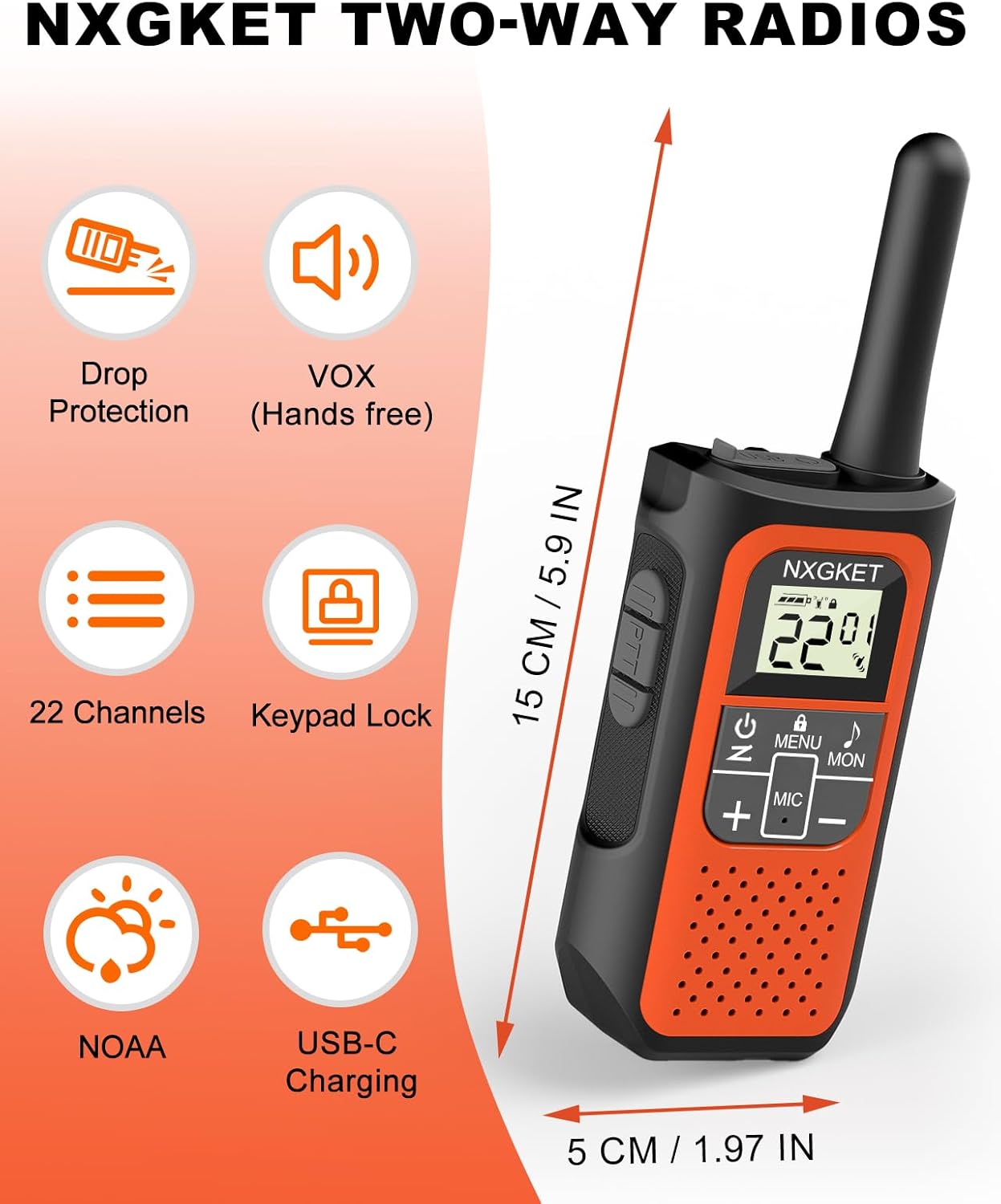
Popis obrázku: An orange NXGKET two-way radio displayed alongside icons representing its features: Drop Protection, VOX (Hands-free), 22 Channels, Keypad Lock, NOAA, and USB-C Charging. Dimensions of the radio (15 cm / 5.9 inches height, 5 cm / 1.97 inches width) are also indicated.

Popis obrázku: A graphic titled "Long Range Walkie-Talkies" showing a person on a mountain path using a walkie talkie, with signal waves extending. Text indicates communication ranges: up to 1.5 miles in city and town, up to 3 miles in open water area, and up to 5 miles in mountain or valley.
Záruka a podpora
Informace o záruce
Na tento produkt se vztahuje jednoletá záruka výrobce. Uschovejte si prosím doklad o koupi pro případ uplatnění záruky.
Zákaznická podpora
For technical assistance, troubleshooting, or warranty inquiries, please contact NXGKET customer support. Refer to the product packaging or the official NXGKET webstránky s aktuálními kontaktními informacemi.
Ask a question about this manual
Ask about setup, troubleshooting, compatibility, parts, safety, or missing instructions. Manuals+ will review the question and use this page’s manual context to help answer it.