
Andoer 0226b5d0-9fdc-46fa-87a1-023ef5ed8edc
Andoer 4K Digital Camera User Manual
Model: 0226b5d0-9fdc-46fa-87a1-023ef5ed8edc
Zavedení
This manual provides detailed instructions for the safe and effective use of your Andoer 4K Digital Camera. Please read this manual thoroughly before operating the camera and retain it for future reference. This camera is designed for capturing high-quality photos at 48MP and videos at 4K resolution, featuring a 2.8-inch screen, 16X digital zoom, auto-focus, anti-shake technology, and a built-in flash.
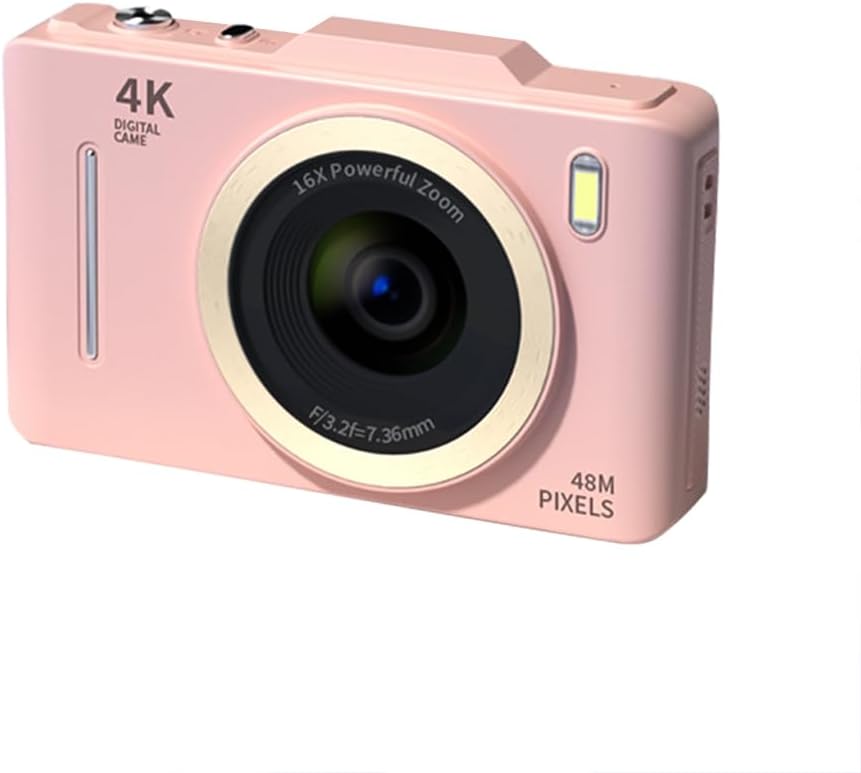
Obrázek: Přední strana view of the Andoer 4K Digital Camera in pink, showcasing its lens, flash, and 4K Digital Camera branding.
Důležité bezpečnostní informace
Varování:
- Not suitable for children. Please read the product instructions and applicable age range carefully before purchase and use.
- Nevystavujte fotoaparát vodě ani nadměrné vlhkosti.
- Zabraňte pádu fotoaparátu na zem nebo jeho vystavení silným nárazům.
- Use only specified batteries and charging methods.
- Nepokoušejte se fotoaparát rozebírat ani upravovat.

Image: A warning label indicating that the product is not suitable for children, with the warning translated into multiple languages.
Obsah balení
Zkontrolujte prosím, zda jsou v balení přítomny všechny položky:
- Andoer 4K Digital Camera
- USB kabel
- Dobíjecí lithiová baterie
- Uživatelská příručka
- Poutko na zápěstí (může se lišit v závislosti na balení)
Konec produktuview
Seznamte se s komponenty fotoaparátu:
- Čočka: Hlavní optická součástka pro snímání obrazu.
- Blikat: Provides additional light in low-light conditions.
- 2.8palcový LCD displej: Pro viewing live feed, reviewing photos/videos, and navigating menus.
- Ovládací tlačítka: Power, Shutter, Zoom (W/T), Menu, OK, Display, Delete.
- USB port: Pro nabíjení a přenos dat.
- Přihrádka na baterie: Obsahuje dobíjecí baterii.
- Slot pro paměťovou kartu: Pro vložení SD karty (není součástí balení).

Obrázek: Zadní view of the camera highlighting the 2.8-inch display screen and various control buttons for navigation and operation.
Nastavení
1. Instalace a nabíjení baterie
- Otevřete kryt přihrádky na baterie, který se nachází na spodní straně fotoaparátu.
- Insert the provided lithium battery, ensuring the correct polarity.
- Bezpečně zavřete kryt bateriového prostoru.
- Connect the camera to a power source using the USB cable for charging. The charging indicator light will illuminate.
- Nabíjení je dokončeno, když kontrolka zhasne.
2. Instalace paměťové karty
Pro ukládání fotografií a videí je vyžadována paměťová karta (SD karta, není součástí balení).
- Vyhledejte slot pro paměťovou kartu, obvykle poblíž prostoru pro baterii.
- Vložte SD kartu kovovými kontakty směrem k přední straně fotoaparátu, dokud nezacvakne na místo.
- Chcete-li kartu vyjmout, jemně na ni zatlačte, dokud nevyskočí.
Návod k obsluze
Zapnutí/vypnutí
- Stiskněte a podržte Moc tlačítko pro zapnutí nebo vypnutí fotoaparátu.
Fotografování
- Zapněte fotoaparát.
- Komponujte snímek pomocí 2.8palcového LCD displeje.
- Stiskněte tlačítko Závěrka button halfway down to activate auto-focus (AF).
- Once focused, press the Závěrka button fully to capture the photo.
Nahrávání videí
- Zapněte fotoaparát.
- Switch to video mode (refer to the on-screen icons or menu for mode selection).
- Stiskněte tlačítko Závěrka tlačítko pro zahájení nahrávání.
- Stiskněte tlačítko Závěrka dalším tlačítkem nahrávání zastavíte.
Funkce zvětšení
- Použijte W (Široký) a T (Telephoto) buttons to adjust the 16X digital zoom.

Image: A visual comparison demonstrating the effect of 1x digital zoom versus 16x digital zoom, showing how the camera can magnify distant subjects.
Používání blesku
- The built-in flash can be activated in low-light conditions. Access flash settings via the menu to select modes like Auto Flash, Fill-in Flash, or Flash Off.

Image: Illustrates the effect of the built-in flash, showing a scene with and without flash to demonstrate improved lighting in dark environments.
Anti-Shake Feature
- The camera features digital anti-shake technology to reduce blur caused by camera movement. This feature is typically active by default or can be enabled in the settings menu.

Image: Demonstrates the effectiveness of the anti-shake feature by comparing a clear image taken with anti-shake mode to a blurry image without it, both showing people in motion.
Krása Filtry
- Access the menu to apply various beauty filters (e.g., Original, Cool colors, Retro, Black and white) to your photos for creative effects.

Image: Displays different beauty filter options available on the camera, including Original, Cool colors, Retro, and Black and white, applied to a portrait.
Video s detekcí pohybu
- Enable motion detection in the video settings. The camera will automatically start recording when movement is detected within the frame.

Image: Illustrates the motion detection feature, showing a dog in motion with a white square indicating the detection area.
Přehrávání a opětovnéview
- Stiskněte tlačítko Přehrávání button (often labeled with a play icon) to view pořízené fotografie a videa.
- Pro procházení médií použijte navigační tlačítka.
- Stiskněte tlačítko Vymazat tlačítko pro odstranění nežádoucích files.
Připojení k počítači
- Připojte fotoaparát k počítači pomocí dodaného kabelu USB.
- The camera will appear as a removable disk drive, allowing you to transfer files.
Údržba
- Čištění objektivu: Používejte měkký hadřík bez žmolků, speciálně určený pro objektivy fotoaparátů. Nepoužívejte abrazivní materiály ani agresivní chemikálie.
- Čištění obrazovky: Wipe the LCD screen gently with a soft, dry cloth.
- Skladování: When not in use for extended periods, remove the battery and store the camera in a cool, dry place away from direct sunlight.
- Péče o baterie: Před prvním použitím baterii plně nabijte. Vyhněte se častému úplnému vybíjení baterie, abyste prodloužili její životnost.
Odstraňování problémů
| Problém | Možné řešení |
|---|---|
| Fotoaparát se nezapne. | Ujistěte se, že je baterie správně nainstalována a plně nabitá. |
| Nelze fotografovat/nahrávat videa. | Check if a memory card is inserted and has sufficient free space. Ensure the camera is in the correct mode (photo/video). |
| Obrázky jsou rozmazané. | Ensure the lens is clean. Check lighting conditions. Enable anti-shake feature. Hold the camera steady. |
| Blesk nefunguje. | Check flash settings in the menu; ensure it's not set to 'Flash Off'. |
| Počítač nerozpoznál fotoaparát. | Ensure the USB cable is securely connected. Try a different USB port or cable. Restart both camera and computer. |
Specifikace
| Funkce | Detail |
|---|---|
| Značka | Andoer |
| Číslo modelu | 0226b5d0-9fdc-46fa-87a1-023ef5ed8edc |
| Efektivní rozlišení | 48 MP |
| Rozlišení videa | 4K (2160p) |
| Velikost obrazovky | 2.8 palce |
| Digitální zoom | 16X |
| Automatické ostření | Ano (detekce kontrastu) |
| Stabilizace obrazu | Digitální Anti-Shake |
| Vestavěný blesk | Ano |
| Typ baterie | Lithium Ion |
| Formát fotografie | JPEG |
| Formát videa | MP4 |
| Externí rozhraní | USB |
| Typ snímače | CMOS |
| Barva | Pink (variant) |
| Úroveň odolnosti proti vodě | Není odolný vůči vodě |
Záruka a podpora
For warranty information and technical support, please refer to the documentation included with your purchase or visit the official Andoer webUschovejte si doklad o koupi pro případ reklamace.
Andoer Official Store: Visit Andoer Store on Amazon
Ask a question about this manual
Ask about setup, troubleshooting, compatibility, parts, safety, or missing instructions. Manuals+ will review the question and use this page’s manual context to help answer it.