
BONTEC MDM001A
Návod k obsluze stolního držáku BONTEC pro jeden monitor MDM001A
Model: MDM001A
Zavedení
This manual provides detailed instructions for the safe and proper installation, operation, and maintenance of your BONTEC Single Monitor Desk Mount MDM001A. Please read this manual thoroughly before installation and retain it for future reference.
Důležité bezpečnostní informace
- Nosnost: Do not exceed the maximum weight capacity of 22 lbs (10 kg). Overloading may result in property damage or personal injury.
- Velikost obrazovky: Tento držák je určen pro monitory s úhlopříčkou od 13 do 34 palců.
- Kompatibilita VESA: Ujistěte se, že váš monitor má montážní šablony VESA 75x75 mm nebo 100x100 mm.
- Stabilita stolu: Verify that your desk surface is stable and strong enough to support the combined weight of the mount and your monitor.
- Instalace: Follow all installation steps carefully. If you are unsure about any part of the installation, seek professional assistance.
- Pohyblivé části: Be cautious when adjusting the mount to avoid pinching fingers or other body parts.
Obsah balení
Please verify that all components are present and undamaged before proceeding with installation. If any parts are missing or damaged, contact customer support.
- Sestava ramene monitoru
- Stůl Clamp Komponent
- Základní součást průchodky
- Deska VESA
- Hardware Kit (screws, washers, spacers)
- Allenovy klíče
- Klipy pro správu kabelů

Obrázek: Overview of the BONTEC Single Monitor Desk Mount MDM001A, illustrating the main components and both desk clamp and grommet base installation options.
Nastavení a instalace
The BONTEC Single Monitor Desk Mount offers two installation methods: Desk Clamp and Grommet Base. Choose the method best suited for your desk.
Kontrola kompatibility
- Velikost monitoru: 13-34 palců
- Hmotnost monitoru: Až 22 liber (10 kg)
- Vzory VESA: 75x75mm nebo 100x100mm
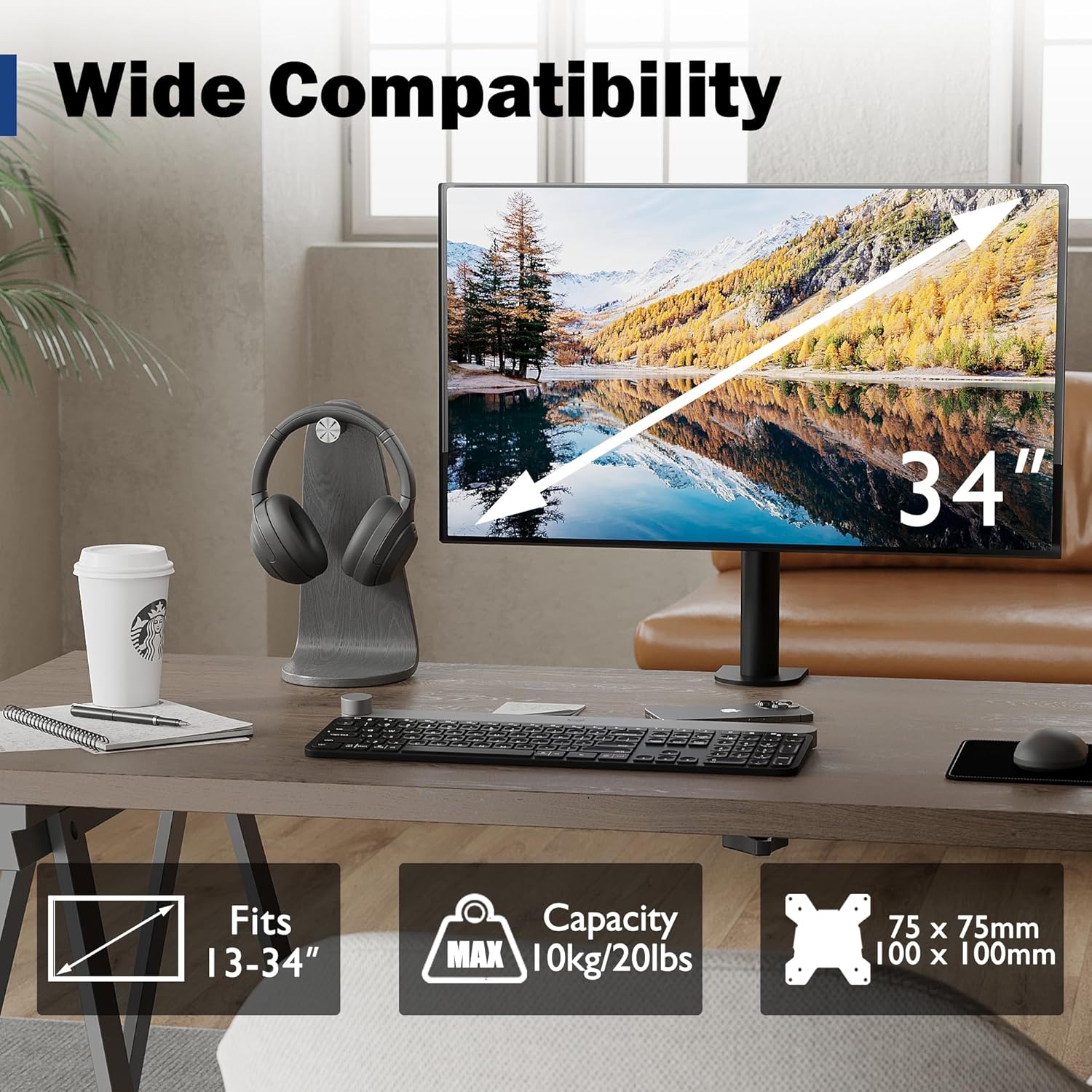
Image: Visual representation of monitor compatibility requirements, including screen size, weight, and VESA patterns.
Způsoby instalace
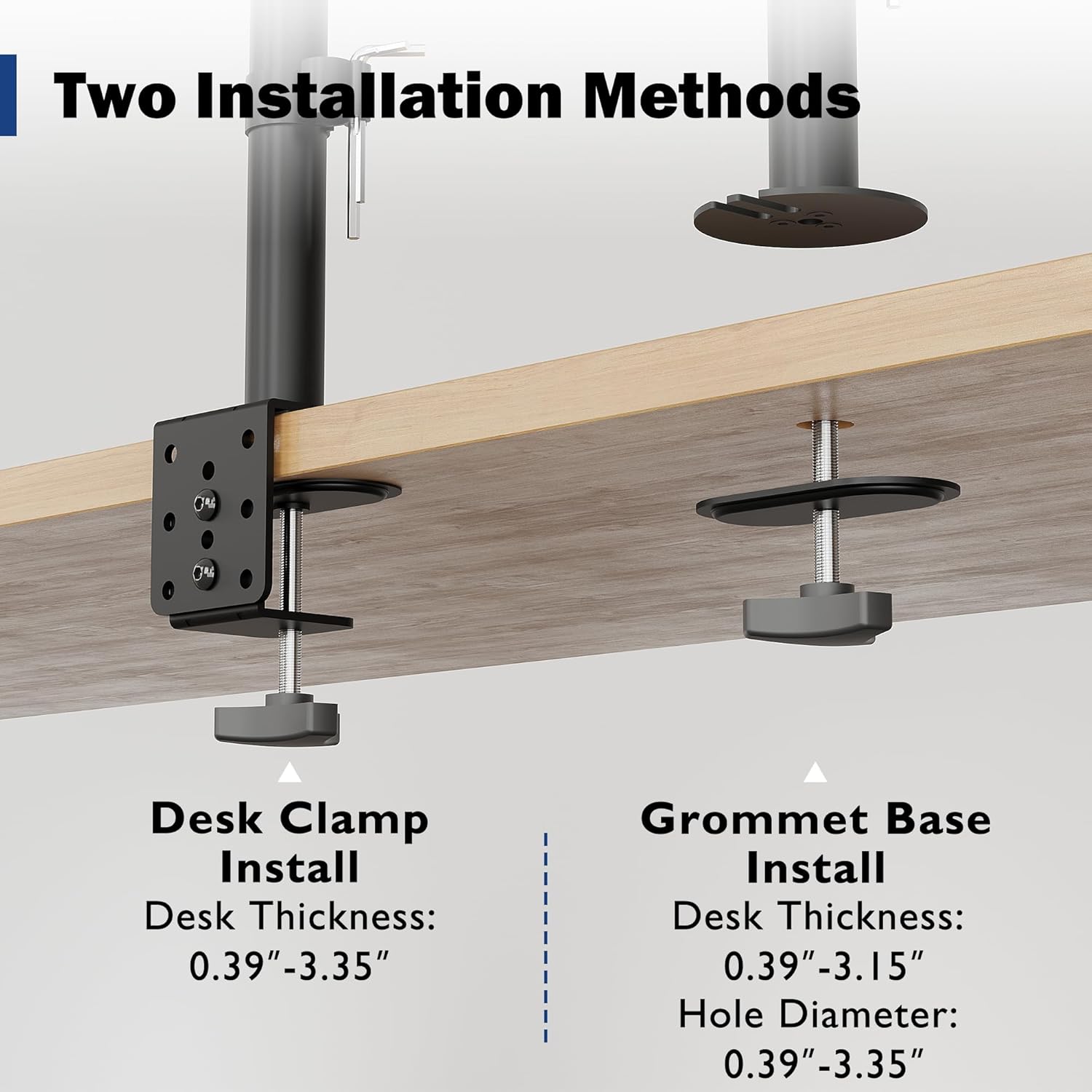
Image: Detailed illustration comparing the Desk Clamp and Grommet Base installation methods, including compatible desk thickness and hole diameter specifications.
Method 1: Desk Clamp Instalace
- Připevněte psací stůl třamp component to the main pole.
- Umístěte třamp on the edge of your desk. Ensure the desk thickness is between 0.39" and 3.35".
- Utáhněte třamp screw firmly until the mount is securely fixed to the desk.
Method 2: Grommet Base Installation
- If your desk has a bolt-through hole, ensure its diameter is between 0.39" and 3.35" and the desk thickness is between 0.39" and 3.15".
- Demontáž stolu clamp and use the grommet base plate and screw.
- Insert the grommet screw through the desk hole and secure it from underneath with the provided nut.
- Připevněte hlavní tyč k základně s průchodkou.
Připevnění monitoru
- Attach the VESA plate to the back of your monitor using the appropriate screws and spacers from the hardware kit. Ensure a secure fit.
- Opatrně nasuňte monitor (s připojenou deskou VESA) na montážní hlavu ramene.
- Tighten any security screws on the mounting head to prevent accidental dislodging.
Provoz a seřízení
The BONTEC monitor mount offers various adjustments to optimize your viewzkušenosti a ergonomické držení těla.
Nastavení výšky
The monitor can be raised or lowered along the 16.73-inch pole. Loosen the collar on the pole, adjust the monitor to the desired height, and then re-tighten the collar to secure its position.

Image: Illustration of the monitor mount's vertical height adjustment capability along the central pole.
Naklápění, otáčení a rotace
The special swivel head design allows for flexible positioning:
- Náklon: Adjust the screen vertically by ±15° to reduce glare and find the optimal viewúhel.
- Otočný: Rotate the monitor horizontally up to 360° to share your screen or change viewsměr.
- Otáčení: Rotate the screen 360° from landscape to portrait mode for different tasks.
After adjusting the angle, use the back screw lock on the VESA plate to provide extra security and maintain the desired position.

Image: Visual guide to the tilt, swivel, and rotation adjustments available on the monitor mount.
Správa kabelů
Utilize the integrated cable management clips along the pole to route and organize your monitor cables. This helps maintain a tidy workspace and prevents cable clutter.
An integrated storage slot for Allen keys is also provided on the pole for convenient access to adjustment tools.

Obrázek: Detail view of the cable management clips and the Allen key storage slot on the mount's pole.
Údržba
- Čištění: Očistěte držák měkkým hadříkemamp hadříkem. Nepoužívejte abrazivní čisticí prostředky ani rozpouštědla, která by mohla poškodit povrchovou úpravu.
- Pravidelné kontroly: Pravidelně kontrolujte všechny šrouby a spoje, zda jsou pevně utažené a bezpečné. V případě potřeby je dotáhněte.
- Mazání: No lubrication is typically required for this product.
Odstraňování problémů
| Problém | Možná příčina | Řešení |
|---|---|---|
| Monitor se prohýbá nebo nedrží svou polohu. | Mounting screws are loose; monitor weight exceeds capacity. | Ensure all screws, especially the back screw lock on the VESA plate, are tightened. Verify monitor weight is within 22 lbs (10 kg). |
| Držák je na stole nestabilní. | Psací stůl třamp/grommet base is not tightened sufficiently. | Znovu utáhněte upínací kroužek stoluamp or grommet base screw. Ensure desk thickness is within specified limits. |
| Obtížné nastavení výšky monitoru. | Height adjustment collar is too tight. | Loosen the height adjustment collar on the pole before attempting to adjust height. Re-tighten once desired height is achieved. |
| Cables are messy. | Cable management not utilized. | Route cables through the integrated cable management clips on the pole. |
Specifikace
- Značka: BONTEC
- Model: MDM001A
- Kompatibilita velikosti obrazovky: 13-34 palců
- Nosnost: 22 lb (10 kg)
- Kompatibilita VESA: 75x75mm, 100x100mm
- Rozsah náklonu: ±15°
- Rozsah otáčení: 360°
- Otáčení: 360°
- Nastavení výšky: Up to 16.73 inches (along pole)
- Stůl Clamp Tloušťka: 0.39" - 3.35"
- Grommet Base Desk Thickness: 0.39" - 3.15"
- Průměr otvoru pro průchodku: 0.39" - 3.35"
- Materiál: Kov
- Barva: Černý
Záruka a podpora
Specific warranty details are not provided within this manual. For warranty information, technical support, or to inquire about replacement parts, please visit the official BONTEC webwebu nebo se přímo obraťte na jejich zákaznický servis.
Webmísto: Obchod BONTEC na Amazonu
Ask a question about this manual
Ask about setup, troubleshooting, compatibility, parts, safety, or missing instructions. Manuals+ will review the question and use this page’s manual context to help answer it.