
1. Úvod
Tato příručka obsahuje komplexní pokyny pro nastavení, provoz a údržbu vašeho ovládacího panelu iCON Pro Audio P1-Nano Compact DAW s dodaným displejem D5. Přečtěte si prosím pečlivě tuto příručku, abyste zajistili správné používání a maximalizovali funkčnost vašeho zařízení.
2. Konec produktuview
2.1 Klíčové vlastnosti
- Prémiové ovládání DAW: Kompaktní USB C-MIDI ovládací prvek pro výkonné ovládání DAW.
- Přizpůsobitelný dotykový displej: 4palcová dotyková obrazovka s 5 barevně kódovanými vrstvami, která nabízí až 80 zobrazitelných a akčních funkcí.
- Kompatibilita s více DAW: Bezproblémová integrace s oblíbenými DAW, včetně Bitwig, Cubase/Nuendo, Logic Pro X, Ableton Live a Pro Tools. Ovládejte až tři DAW současně.
- Přesné ovládání: Dotykový motorizovaný fader (12bitové rozlišení), 8 knoflíků s dvojitou funkcí, podsvícená tlačítka pro automatizaci a plynule ovládané jog kolečko.
- Odolný a všestranný: Robustní kovové casing, kompaktní a přenosný, podporuje protokoly Mackie Control a HUI. Kompatibilní se systémy MacOS a Windows.
- Vylepšený pracovní postup: Ovládání kanálů, tlačítka pro transport, samostatná tlačítka pro přepínání mezi jednotlivými kanály a hlavní tlačítka, podsvícené funkce zoomu a ostření.
- Součástí balení je displej D5: Rozšiřuje možnosti ovládání o dodatečnou vizuální zpětnou vazbu.
- Uživatelsky přívětivý software: Software iMap™ pro snadnou konfiguraci a přizpůsobení.
- Kompatibilita nožního spínače: Podporuje nožní spínače s 1/4palcovými vstupy pro uživatele A a uživatele B.
2.2 Co je v krabici
- Ovládací plocha Icon Pro Audio P1-Nano
- Zobrazovací jednotka D5
3. Nastavení
3.1 Fyzická připojení
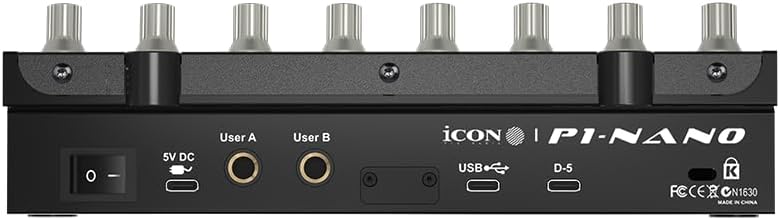
Připojte P1-Nano k počítači a zdroji napájení takto:
- Připojte P1-Nano k počítači pomocí kabelu USB-C.
- Připojte 5V DC napájecí adaptér k P1-Nano a do elektrické zásuvky.
- Připojte zobrazovací jednotku D5 k vyhrazenému portu D5 na P1-Nano.
- Volitelné: Pro lepší ovládání připojte pedály nožního spínače k 6 mm vstupům User A a User B.
3.2 Instalace softwaru a konfigurace iMap
Chcete-li plně využít potenciál svého P1-Nano, stáhněte si a nainstalujte software iMap z oficiální stránky produktu iCON Pro Audio. Tento software umožňuje komplexní přizpůsobení tlačítek, klávesových zkratek a MIDI příkazů.
P1-Nano je kompatibilní se systémy MacOS i Windows. Aktualizace firmwaru lze provádět přes připojení USB-C.
3.3 Integrace DAW
P1-Nano podporuje bezproblémovou integraci s různými digitálními audio stanicemi (DAW) pomocí protokolů Mackie Control a HUI. Dodává se s předinstalovanými mapami pro 18 populárních DAW, včetně Bitwig, Cubase/Nuendo, Logic Pro X, Ableton Live a Pro Tools. Můžete se připojit a ovládat až tři DAW současně.
4. Obsluha P1-Nano

4.1 Motorizovaný fader
P1-Nano je vybaven jediným dotykovým motorizovaným faderem s 12bitovým rozlišením, který umožňuje přesné a automatizované ovládání úrovní stop a dalších parametrů ve vašem DAW.
4.2 Knoflíky enkodéru
Osm knoflíků s dvojitou funkcí enkodéru poskytuje všestranné ovládání různých parametrů, jako je panorama, úrovně sendu, ovládání plug-inů a další. Jejich dvojitá funkce umožňuje hlubší ovládání v závislosti na vybraném režimu nebo vrstvě.
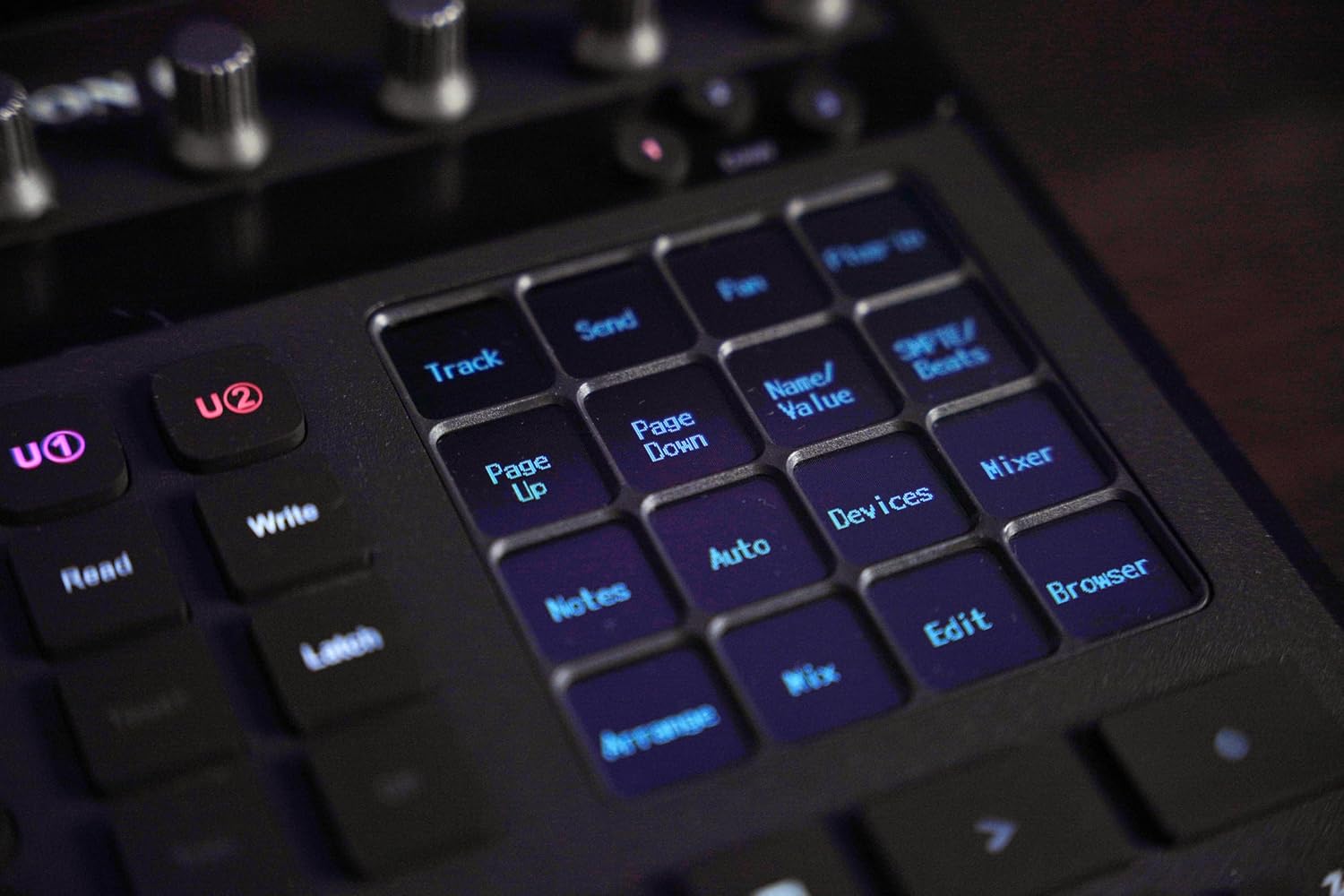
4.3 Dotykový displej a vrstvy příkazů
Ústředním prvkem je 4palcový dotykový displej s 5 barevně kódovanými vrstvami. Tyto vrstvy poskytují přístup až k 80 zobrazitelným a akčním funkcím, které lze v reálném čase uspořádat tak, aby odpovídaly vašemu pracovnímu postupu. Displej poskytuje vizuální zpětnou vazbu pro vybrané parametry a příkazy.
4.4 Ovládání transportu a kolečko Jog
Samostatná tlačítka pro přehrávání (Přehrát, Zastavit, Nahrávat, Rychle vpřed, Převíjet zpět) poskytují intuitivní ovládání přehrávání vašeho DAW. Plynule ovládané kolečko jog umožňuje přesné posouvání, navigaci a úpravy v rámci vašeho projektu.
4.5 Funkce navigace a zoomu
Podsvícené funkce zoomu a ostření spolu se směrovými tlačítky umožňují efektivní navigaci v DAW projektu a umožňují rychle najít a upravit konkrétní sekce nebo stopy.
4.6 Hlavní tlačítko přiřazení
Tlačítko Master Assign umožňuje rychle přiřadit motorizovaný fader k ovládání hlavní stopy nebo jiných určených hlavních parametrů ve vašem DAW.
4.7 Kompatibilita nožního spínače
P1-Nano podporuje externí nožní spínače prostřednictvím svých 1/4palcových vstupů User A a User B. Ty lze nakonfigurovat pomocí softwaru iMap pro spouštění různých příkazů, což do vašeho pracovního postupu přidává možnosti ovládání bez použití rukou.
5. Zobrazovací jednotka D5
Součástí dodávky je displej D5, který se bezproblémově integruje s P1-Nano a poskytuje dodatečnou vizuální zpětnou vazbu pro názvy skladeb, parametry a další důležité informace, čímž dále rozšiřuje vaše možnosti ovládání a monitorování.

6. Přizpůsobení pomocí softwaru iMap
Software iMap je srdcem přizpůsobení P1-Nano. Umožňuje vám přizpůsobit ovládací plochu vašim specifickým potřebám a pracovnímu postupu.
6.1 Funkce tlačítek
Pomocí rozhraní drag-and-drop v iMapu můžete přiřadit příkazy DAW různým tlačítkům na funkčních vrstvách dotykové obrazovky.
6.2 Příkazy klávesových zkratek
Naprogramujte klávesové zkratky na funkční tlačítka dotykové obrazovky pro rychlý přístup k často používaným příkazům.
6.3 MIDI příkazy
Nastavte si MIDI příkazy a použijte svůj P1-Nano jako MIDI kontroler pro virtuální nástroje a další software. Software iMap je dodáván s předinstalovanými mapami pro 18 populárních DAW, což zjednodušuje počáteční nastavení.
7. Specifikace
| Funkce | Detail |
|---|---|
| Hmotnost položky | 2 libry |
| Rozměry produktu | 7.1 x 8.38 x 2.36 palce |
| Číslo modelu položky | IPA-P1NANOD5-BUN |
| Kompatibilní zařízení | Většina zařízení s portem USB nebo USB-C |
| Typ konektoru | USB |
| Hardwarové rozhraní | USB |
| Podporovaný software | Ableton Live (a další významné DAW) |
| Typ materiálu | Kov |
| Hudební styl | Elektronický |
| Klíč nástroje | Žádný |
| Počet kanálů mixéru | 8 |
| Hardwarová platforma | PC/Mac |
8. Údržba
Pro zajištění dlouhé životnosti a optimálního výkonu vašeho P1-Nano dodržujte tyto pokyny pro údržbu:
- Čištění: K čištění povrchu jednotky používejte měkký, suchý hadřík. Nepoužívejte abrazivní čisticí prostředky, rozpouštědla ani vosky, protože by mohly poškodit povrchovou úpravu a elektronické součástky.
- Prostředí: Uchovávejte zařízení v čistém a suchém prostředí. Nevystavujte jej extrémním teplotám, vlhkosti nebo přímému slunečnímu záření.
- Zacházení: S jednotkou zacházejte opatrně. Zabraňte jejímu pádu nebo silným nárazům.
9. Řešení problémů
Pokud narazíte na problémy s vaším P1-Nano, postupujte podle následujících běžných kroků pro řešení problémů:
- Žádné napájení/Jednotka se nezapíná: Ujistěte se, že je 5V DC napájecí adaptér bezpečně připojen k zařízení i k funkční zásuvce. Ověřte, zda je kabel USB-C správně připojen k počítači.
- Bez ovládání DAW:
- Zkontrolujte, zda operační systém vašeho počítače rozpoznává zařízení P1-Nano.
- Ověřte, zda je na P1-Nano a v softwaru iMap vybrána správná DAW.
- Ujistěte se, že jsou protokoly Mackie Control nebo HUI správně povoleny a nakonfigurovány v nastavení vašeho DAW.
- Restartujte DAW a P1-Nano.
- Porucha faderu/knoflíku: Zkontrolujte, zda se kolem faderu nebo knoflíků nenacházejí nějaké fyzické překážky nebo nečistoty. Pokud problémy přetrvávají, zkuste znovu kalibrovat ovládací prvky pomocí softwaru iMap, pokud je taková možnost k dispozici.
- D5 Displej prázdný/nefunkční: Ujistěte se, že je displej D5 bezpečně připojen k vyhrazenému portu D5 na zařízení P1-Nano.
- Aktualizace firmwaru: Pravidelně kontrolujte iCON Pro Audio webweb s nejnovějšími aktualizacemi firmwaru, které mohou vyřešit chyby a zlepšit výkon.
10. Záruka a podpora
iCON Pro Audio P1-Nano je kryt zárukou výrobce. Podrobné informace o záruce, registraci produktu a technickou podporu naleznete na oficiálních stránkách iCON Pro Audio. webwebu. Najdete tam také další zdroje, nejčastější dotazy a kontaktní informace na zákaznický servis.