
1. Konec produktuview
The Pknight DR & PB MINI is a compact DMX recorder and playback controller designed for efficient management of DMX lighting programs. It offers robust recording capabilities, flexible playback options, and essential tools for DMX system verification.

Figure 1: Pknight DR & PB MINI DMX Recorder and Playback Controller.
Klíčové vlastnosti:
- Effortless Recording and Playback: Record up to 255 DMX programs and play them back using intuitive Record ID assignments.
- Flexible Playback Options: Seamlessly play recorded DMX programs manually or via External Device Control, allowing real-time management through DMX consoles, computer software, or mobile applications.
- Uživatelsky přívětivé rozhraní: Simple button controls and an OLED screen facilitate quick DMX recording and playback.
- Removable Micro SD Card: Equipped with a default 32GB Micro-SD card, easily removable for quick storage and capable of holding hours of playback programs.
- Secure and Easy Storage: Programs are safely recorded as files on the SD card, ensuring easy backup and transfer, preventing loss of playback programs.
- Packet Loss Detection Mode: Ensure signal stability with Packet Loss Detection Mode, which tests and verifies the reliability of your DMX system.
2. Obsah balení
Ověřte, zda jsou v balení přítomny všechny položky:
- Pknight DMX Recorder and Playback Controller DR & PB MINI
- 32GB Micro-SD Card (pre-installed)
- Napájecí kabel USB Type-C
- Uživatelská příručka (tento dokument)
3. Průvodce nastavením
3.1. Zařízení skončiloview a Připojení

Figure 2: Device layout with labeled buttons and ports.
- DMX IN: Connect your DMX console or signal source here.
- DMX OUT: Připojte se k vašim DMX světelným tělesům.
- USB Type-C: Power input (DC 5V).
- Slot Micro SD: Insert/remove Micro SD card for program storage.
- Tlačítko MENU: Procházejte možnostmi nabídky.
- Tlačítka NAHORU/DOLŮ: Adjust values or scroll through options.
- Tlačítko ENTER: Confirm selection or start/stop actions.
3.2. Počáteční zapnutí
- Ensure the Micro SD card is properly inserted into the slot.
- Connect the USB Type-C cable to the device and a 5V DC power source.
- The OLED screen will power on, displaying the current status.
4. Návod k obsluze
4.1. DMX Recording Mode
The device allows recording of up to 255 DMX programs. Each program is assigned a unique Record ID from 1 to 255.

Figure 3: OLED screen displaying DMX Recording Mode with Record ID and status.
- Connect your DMX console or signal source to the DMX IN přístav.
- Stiskněte tlačítko MENU button to navigate to the '2. Record Show' option.
- Použijte NAHORU/DOLŮ buttons to select an empty Record ID (e.g., 001). The screen will show 'Empty Program' and 'Ready to record'.
- Stiskněte tlačítko ENTER button to start recording. The screen will display the recording duration.
- Operate your DMX console to create the desired lighting sequence.
- Stiskněte tlačítko ENTER button again to stop recording. The program will be saved to the Micro SD card.
4.2. DMX Playback Mode
Recorded DMX programs can be played back manually or triggered by external devices.
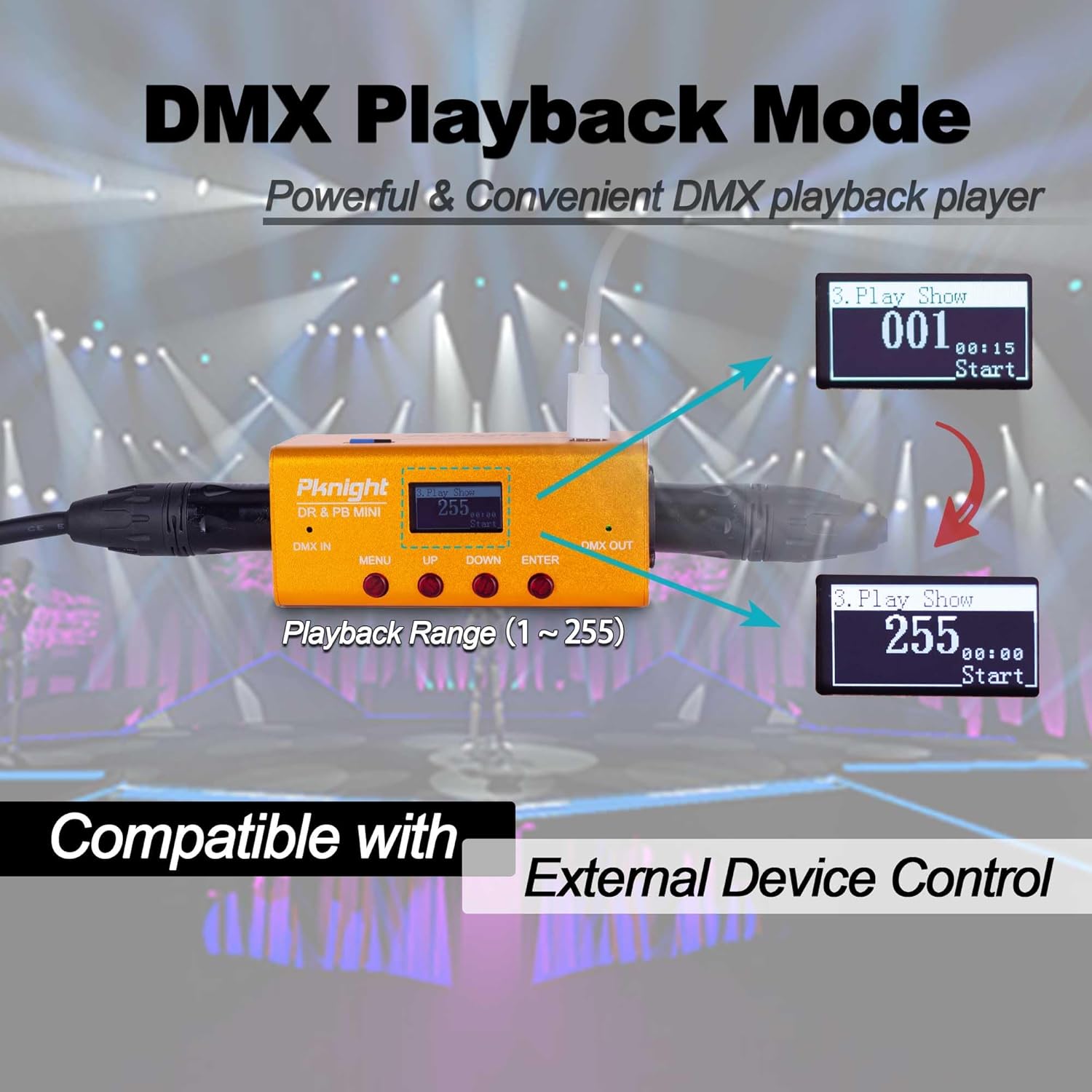
Figure 4: OLED screen displaying DMX Playback Mode with Playback Range.
- Připojte DMX OUT port to your DMX lighting fixtures.
- Stiskněte tlačítko MENU button to navigate to the '3. Play Show' option.
- Použijte NAHORU/DOLŮ buttons to select the desired Record ID (1-255) for playback.
- Stiskněte tlačítko ENTER button to start playback. The screen will display the playback duration.
- Stiskněte tlačítko ENTER dalším tlačítkem přehrávání zastavíte.
4.3. External Device Control
The DR & PB MINI supports external device control for flexible playback integration.
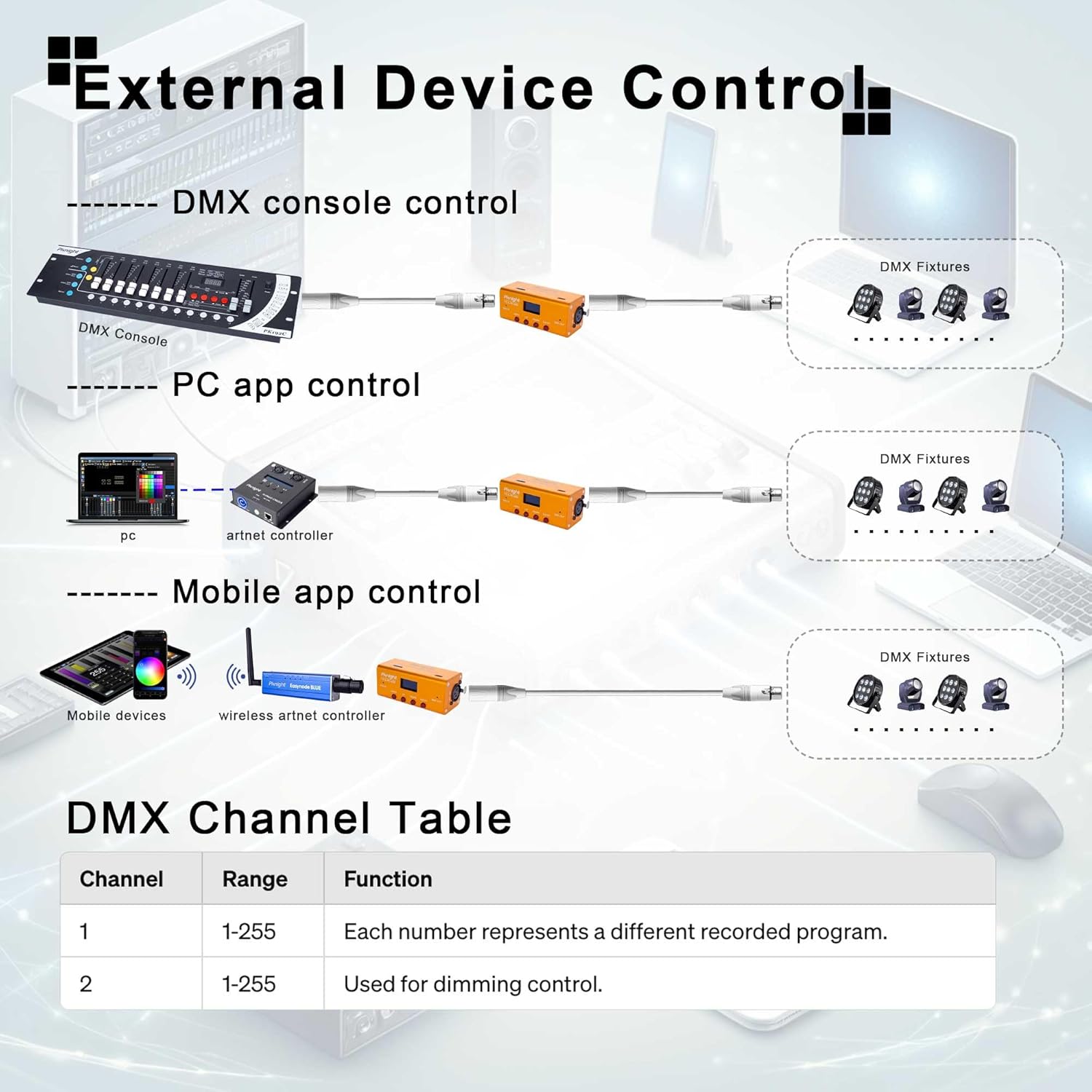
Figure 5: Various methods for external device control, including DMX consoles, PC applications, and mobile applications.
The device utilizes two DMX channels for external control:
- Channel 1: Range 1-255, each number represents a different recorded program to be triggered.
- Channel 2: Range 1-255, used for dimming control of the output.
4.4. Packet Loss Detection Mode
This mode helps verify the reliability of your DMX system by detecting packet loss.
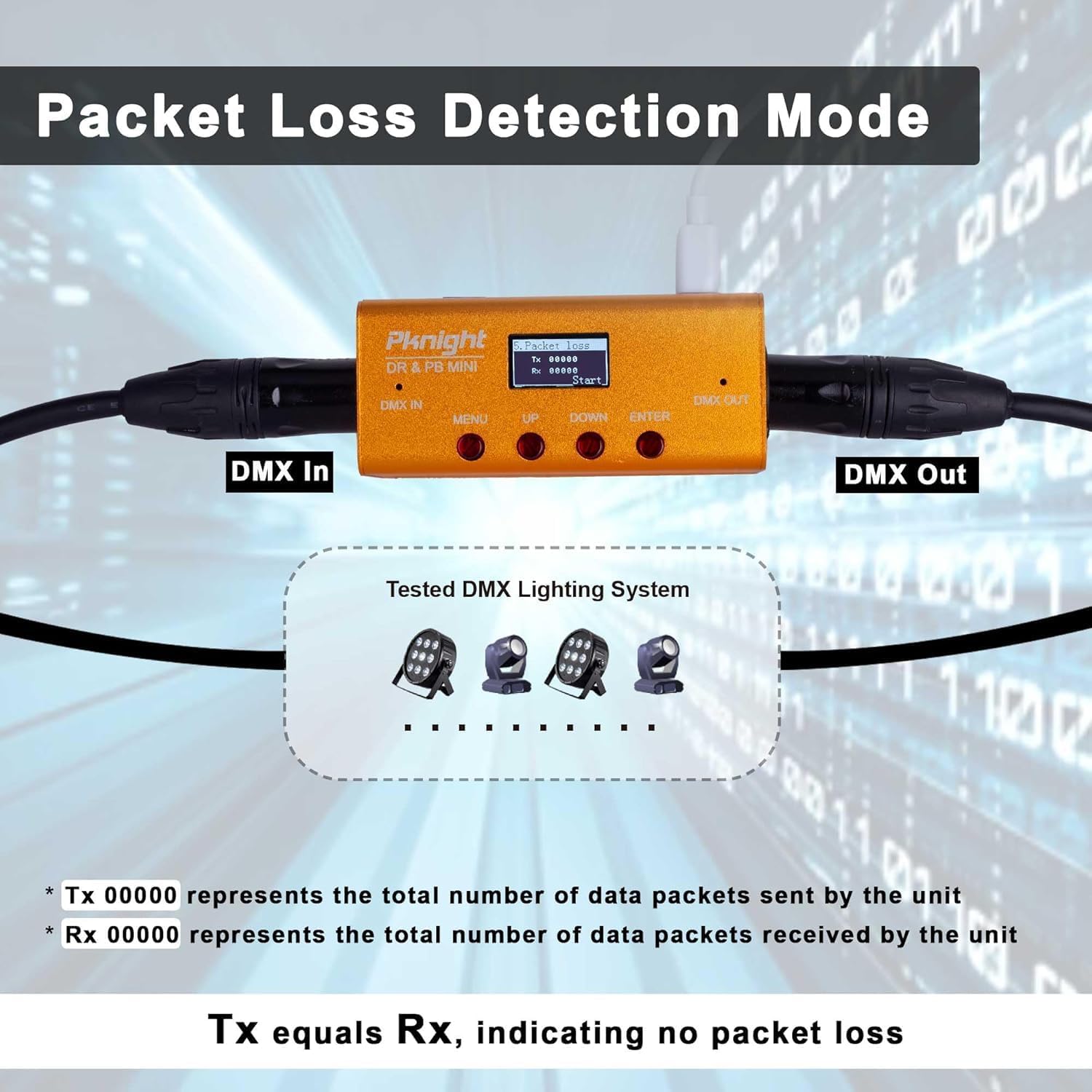
Figure 6: OLED screen displaying Packet Loss Detection Mode with Tx and Rx counts.
- Připojte DMX IN a DMX OUT ports to your DMX system.
- Stiskněte tlačítko MENU button to navigate to the '5. Packet Loss' option.
- Stiskněte tlačítko ENTER button to start the test. The screen will display 'Tx' (transmitted packets) and 'Rx' (received packets).
- If 'Tx' equals 'Rx', it indicates no packet loss and a stable DMX signal.
- If there is a discrepancy, it suggests potential issues with your DMX cabling or devices.
5. Údržba
5.1. Správa karet Micro SD
The Micro SD card stores all recorded DMX programs. Regular backup is recommended.
- To remove the Micro SD card, gently push it inward until it clicks, then release. The card will eject.
- Connect the Micro SD card to a computer to back up your program files.
- Ensure the card is properly formatted (FAT32) if replacing or re-using.

Figure 7: Removable Micro SD card for program storage and backup.
5.2. Obecná péče
- Udržujte zařízení čisté a bez prachu. K čištění používejte měkký, suchý hadřík.
- Nevystavujte zařízení extrémním teplotám, vlhkosti nebo přímému slunečnímu záření.
- Nepokoušejte se zařízení sami otevírat ani opravovat, jinak ztratíte platnost záruky.
6. Řešení problémů
6.1. Běžné problémy
- Zařízení se nezapíná: Ensure the USB Type-C cable is securely connected to a 5V DC power source.
- No DMX output during playback: Verify that the DMX OUT cable is correctly connected to your fixtures. Check the selected Record ID for playback.
- Problémy s nahráváním: Ensure the DMX IN cable is properly connected to your console. Check for 'Empty Program' status before starting a new recording.
- Packet Loss Detection shows discrepancies: Inspect DMX cables for damage, ensure proper termination, and check all DMX devices in the chain.
- Playback not in sync with music: This device is primarily for DMX signal recording and playback. Precise musical synchronization may require external MIDI or timecode integration, which is beyond the scope of this device's direct functionality.
7. Technické specifikace
| Specifikace | Hodnota |
|---|---|
| Číslo modelu | DR & PB MINI |
| Značka | Pknight |
| Hmotnost položky | 10.5 unce (0.3 kilogramů) |
| Rozměry balení | 7.01 x 4.37 x 2.2 palce |
| Technologie připojení | USB |
| Počet kanálů | 512 (1 vesmír) |
| Skladování | 32GB Micro-SD card (default) |
| Kapacita programu | Až 255 programy |
| Kompatibilní zařízení | DMX consoles, PC, Laptop, Tablet, Smartphone (for external control) |
8. Oficiální produktová videa
8.1. DMX Recorder and Playback Controller Tutorial
This video provides a detailed tutorial on how to use the Pknight DMX Recorder and Playback Controller, covering its various functions and modes of operation.
8.2. DMX Recorder Tips: Remember to Backup Your Micro SD to Prevent Data Loss!
Learn essential tips for managing your DMX recordings, including the importance of backing up your Micro SD card to prevent data loss.
8.3. Pknight DMX Recorder Tutorial & How to Use
An instructional video demonstrating the basic functions and usage of the Pknight DMX Recorder.
9. Záruka a podpora
Pknight products are designed for reliability and performance. For warranty information and technical support, please refer to the official Pknight website or contact Pknight tech directly through your purchase platform.
Pro další pomoc prosím navštivte Pknight Store on Amazon.