
1. Bezpečnostní informace
Před montáží a použitím si pečlivě přečtěte všechny bezpečnostní pokyny, abyste předešli zranění nebo poškození výrobku.
- Ujistěte se, že stůl je sestaven na rovném a stabilním povrchu.
- Do not exceed the maximum load capacity of 80 kg (dynamic).
- Během nastavování výšky držte děti a domácí zvířata v dostatečné vzdálenosti od stolu.
- Při nastavování výšky stolu se ujistěte, že nad ani pod ním nejsou žádné překážky.
- Neseďte ani nestojte na rámu stolu.
- Only use the power adapter provided with the desk.
- Pravidelně kontrolujte všechny šrouby a matice, abyste se ujistili, že jsou utažené.
2. Konec produktuview
The FLEXISPOT Electric Standing Desk frame is designed for ergonomic versatility, allowing seamless transitions between sitting and standing positions. It features a robust steel construction and a digital control panel for easy height adjustments and memory presets.
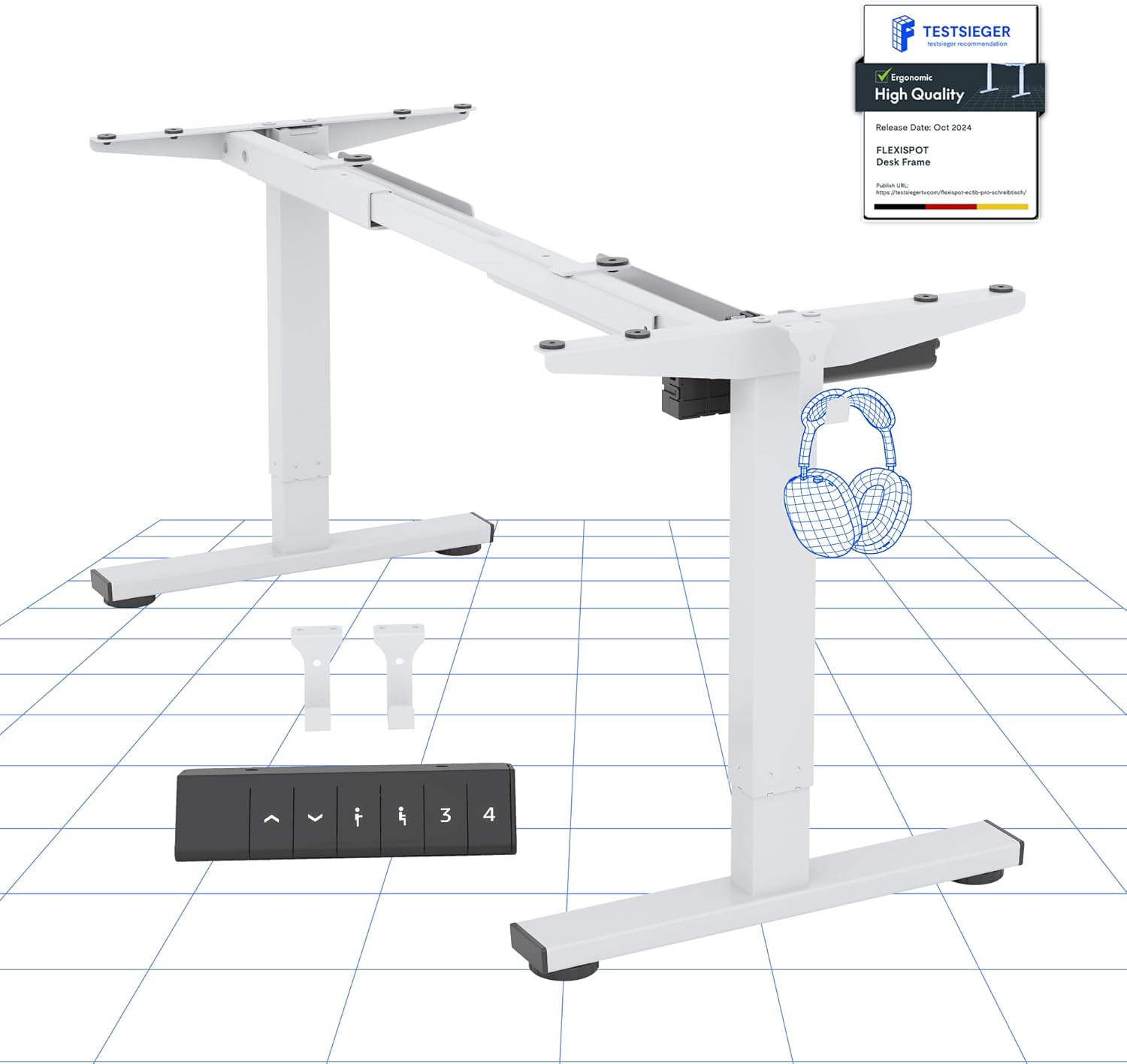
Obrázek 2.1: Konecview of the FLEXISPOT Electric Standing Desk Frame and its digital control panel.
Klíčové komponenty:
- Nastavitelné nohy: Dvou-stage lifting columns for smooth height transitions.
- Hrazda: Connects the legs and supports the desktop.
- Nohy: Provide stability and include anti-slip pads.
- Digitální ovládací panel: For height adjustment and memory functions.
- Motor: Powers the height adjustment mechanism.
- Ovládací skříňka: Houses the electronic components.
3. Pokyny k nastavení
Follow these steps to assemble your FLEXISPOT Electric Standing Desk frame. A desktop (not included) is required for full functionality.
3.1 Desktop Compatibility
The desk frame is designed to accommodate desktops with the following dimensions:
- Délka: 100 cm až 160 cm (39.4 palců až 63 palců)
- Šířka: 50 cm až 80 cm (19.7 palců až 31.5 palců)

Image 3.1: Illustration of the adaptable desktop size range for the desk frame.
3.2 Montážní kroky
- Rozbalte komponenty: Carefully remove all parts from the packaging and verify against the parts list (refer to your included physical manual for a detailed list).
- Assemble Feet: Attach the feet to the bottom of each lifting column using the provided screws.
- Připojení příčníku: Extend the crossbar to the desired width for your desktop. Securely attach the crossbar to the lifting columns.
- Instalace řídicí jednotky a motoru: Mount the control box and motor according to the instructions in your physical manual, ensuring all cables are connected correctly.
- Připojení ovládacího panelu: Secure the digital control panel to the underside of your chosen desktop in an accessible location.
- Připojit plochu: Carefully place your desktop onto the assembled frame. Align the pre-drilled holes (if any) or mark and drill new pilot holes. Secure the desktop to the frame using appropriate screws.
- Správa kabelů: Organize and secure all cables to prevent tangling and ensure safe operation.
- Počáteční zapnutí: Zapojte napájecí adaptér do ovládací jednotky a poté do zásuvky ve zdi.
4. Návod k obsluze
Your FLEXISPOT Electric Standing Desk is equipped with a user-friendly digital control panel for effortless height adjustment.
4.1 Digital Control Panel Functions

Obrázek 4.1: Detailní view digitálního ovládacího panelu.
- Tlačítka nahoru/dolů (▲ / ▼): Press and hold to manually adjust the desk height up or down. The current height is displayed on the LED screen.
- Předvolby paměti (1, 2, 3, 4): Tato tlačítka umožňují uložit a vyvolat až čtyři preferovaná nastavení výšky.
- 'M' Button (or 'Set' button, if present): Used to save a height into a memory preset.
4.2 Nastavení předvoleb paměti
- Nastavte stůl do požadované výšky pomocí tlačítek Nahoru/Dolů.
- Press the 'M' button (or 'Set' button). The LED display will show 'S-'.
- Within 3 seconds, press one of the number buttons (1, 2, 3, or 4) to save the current height to that preset. The display will show the number you pressed, confirming the setting.
4.3 Protikolizní systém
The desk is equipped with an advanced anti-collision system. If the desk encounters an obstacle during height adjustment, it will automatically stop and reverse slightly to prevent damage or injury. This feature enhances safety during operation.

Image 4.2: Visual representation of the anti-collision system and other features.
5. Údržba
Proper maintenance ensures the longevity and optimal performance of your standing desk.
- Čištění: Rám stolu a ovládací panel otřete měkkým hadříkem.amp hadříkem. Nepoužívejte abrazivní čisticí prostředky ani rozpouštědla.
- Správa kabelů: Periodically check that all cables are securely fastened and not pinched or damaged.
- Spojovací materiál: Ensure all screws and bolts remain tight. Retighten if necessary.
- Protiskluzové podložky: Verify that the anti-slip pads on the feet are intact and providing stable contact with the floor.
6. Řešení problémů
Pokud narazíte na problémy se stolem, podívejte se na následující běžné problémy a jejich řešení:
| Problém | Možná příčina | Řešení |
|---|---|---|
| Stůl se nehýbe. | Power cable disconnected, motor cable loose, overload. | Check all cable connections. Reduce weight on the desk. Perform a reset (see below). |
| Stůl se pohybuje nerovnoměrně. | Nerovnoměrné zatížení, uvolněné spoje. | Distribute weight evenly. Check all connections. Perform a reset. |
| Zobrazený chybový kód. | Specifická systémová chyba. | Refer to your physical manual for specific error code meanings. Often, a reset can resolve temporary errors. |
| Protikolizní systém se často spouští. | Sensitivity too high, minor obstructions. | Ensure clear path for desk movement. Some models allow sensitivity adjustment (refer to physical manual). |
6.1 Postup resetování
A reset can often resolve minor operational issues. The exact procedure may vary slightly; refer to your physical manual for precise steps. A common reset method involves:
- Press and hold the Down (▼) button until the desk reaches its lowest position and then slightly rises or makes a sound.
- Release the button, then press and hold it again until the desk moves down slightly, then up, and stops. This indicates a successful reset.
If problems persist after troubleshooting, please contact customer support.
7. Specifikace
Detailed technical specifications for the FLEXISPOT Electric Standing Desk frame:

Image 7.1: Detailed desk dimensions and performance metrics.
| Funkce | Detail |
|---|---|
| Značka | FLEXISPOT |
| Model | B0D3Q89YP2 |
| Rozsah nastavení výšky | 71.5 cm - 116 cm (28.1 palce - 45.7 palce) |
| Maximální nosnost | 80 kg (176 lb) |
| Adaptable Desktop Length | 100 cm - 160 cm (39.4 palce - 63 palce) |
| Adaptable Desktop Width | 50 cm - 80 cm (19.7 palce - 31.5 palce) |
| Materiál | Legovaná ocel |
| Ovládací panel | Digital with 6 buttons and 4 memory presets |
| Spotřeba energie v pohotovostním režimu | < 0.5 W |
| Protikolizní systém | Ano |
| Certifikace | CE/BIFMA/ROHS |
8. Záruka a podpora
Společnost FLEXISPOT se zavázala k poskytování vysoce kvalitních produktů a spokojenosti zákazníků.
8.1 Informace o záruce
- Záruka na rám: 5 roky
- Záruka na motor: 3 roky
These warranties cover manufacturing defects and malfunctions under normal use. Please retain your proof of purchase for warranty claims.
8.2 Technická podpora
FLEXISPOT offers free lifetime technical support for your product. If you have any questions, require assistance with assembly, operation, or troubleshooting, please contact our support team.
For further assistance, please visit the official FLEXISPOT store or contact customer service through your purchase platform.
FLEXISPOT Store: Visit FLEXISPOT on Amazon