
1. Úvod
Thank you for choosing the JIGUUN PRO2000W-12 Pure Sine Wave Power Inverter. This manual provides essential information for the safe and efficient operation of your inverter. Please read it thoroughly before use and retain it for future reference.
This inverter converts 12V DC power from your battery into 120V AC power, suitable for powering various household appliances, electronics, and tools. Its pure sine wave output ensures compatibility with sensitive electronics, providing stable and clean power.

Image 1.1: JIGUUN 2000 Watt Pure Sine Wave Power Inverter with included battery cables.
2. Bezpečnostní informace
WARNING: Failure to follow these safety instructions may result in injury, damage to the inverter, or damage to connected devices.
- Větrání: Zajistěte dostatečné větrání kolem střídače. Neblokujte chladicí otvory.
- Prostředí: Operate the inverter in a dry, well-ventilventilated area, away from direct sunlight, heat sources, flammable materials, and moisture.
- Spojení: Always connect the inverter to a 12V DC battery. Ensure all connections are tight and secure to prevent arcing and overheating.
- Základy: The inverter must be properly grounded. Connect the grounding terminal to a suitable ground point.
- Kapacita zatížení: Do not exceed the inverter's continuous power rating (2000W) or peak surge rating (4000W). Overloading can cause damage and trigger safety protections.
- Ochranné vlastnosti: The inverter includes protection against undervoltage, přeptage, overheating, overload, and short circuit. If a protection mode is activated, disconnect the load and troubleshoot the issue.
- Děti: Uchovávejte měnič mimo dosah dětí.
- Údržba: Nepokoušejte se otevírat ani upravovat měnič. Veškerý servis svěřte kvalifikovanému personálu.
3. Konec produktuview a Komponenty
Familiarize yourself with the various parts of your JIGUUN Power Inverter.

Image 3.1: Front and rear panel components of the JIGUUN Power Inverter.
Přední panel:
- LCD displej: Shows battery level, DC input voltage, AC výstup objtage, output frequency, and load power.
- Indikátor napájení: Illuminates when the inverter is operational.
- Přepínač ON/OFF: Řídí hlavní napájení střídače.
- USB Ports (2.1A): Pro nabíjení zařízení napájených přes USB.
- AC Receptacles (x4): Standardní zásuvky 120 V AC pro připojení spotřebičů.
- AC Ground Terminal: For proper grounding of the inverter.
Zadní panel:
- Negative DC Terminal (Black): Connects to the negative terminal of the 12V battery.
- Positive DC Terminal (Red): Connects to the positive terminal of the 12V battery.
- Cooling Fans (x2): Automatically activate to dissipate heat and maintain optimal operating temperature.
4. Co je v krabici
Ověřte, zda jsou v balení přítomny všechny položky:
- 1x JIGUUN 2000W Pure Sine Wave Inverter
- 1x Dálkové ovládání
- 1x Set of Battery Cables (1x Red, 1x Black)
- 4x Spare Fuses (30A)
- 1x Alligator Clip Safety Ground
- 1x Uživatelská příručka

Image 4.1: All items included in the JIGUUN Power Inverter package.
5. Nastavení
5.1 Připojení baterie
- Ujistěte se, že je vypínač střídače v poloze „VYPNUTO“.
- Připojte ČERVENÝ kabel baterie k kladné (+) svorku vaší 12V baterie.
- Připojte druhý konec ČERVENÝ kabel k kladné (+) DC input terminal on the inverter.
- Připojte ČERNÝ kabel baterie k záporné (-) svorku vaší 12V baterie.
- Připojte druhý konec ČERNÝ kabel k záporné (-) DC input terminal on the inverter.
- Ujistěte se, že všechna připojení jsou pevná a bezpečná. Volná připojení mohou způsobit přehřátí a poškození.

Image 5.1: DC input terminals for battery connection.

Image 5.2: Included battery cables for connection.
5.2 Uzemnění střídače
For safety, the inverter must be properly grounded. Connect the alligator clip safety ground cable from the inverter's ground terminal to a suitable ground point, such as the chassis of a vehicle or a dedicated earth ground.
5.3 Nastavení dálkového ovládání
The remote control allows for convenient power management from a distance. No wire connection is required for the remote control to function.
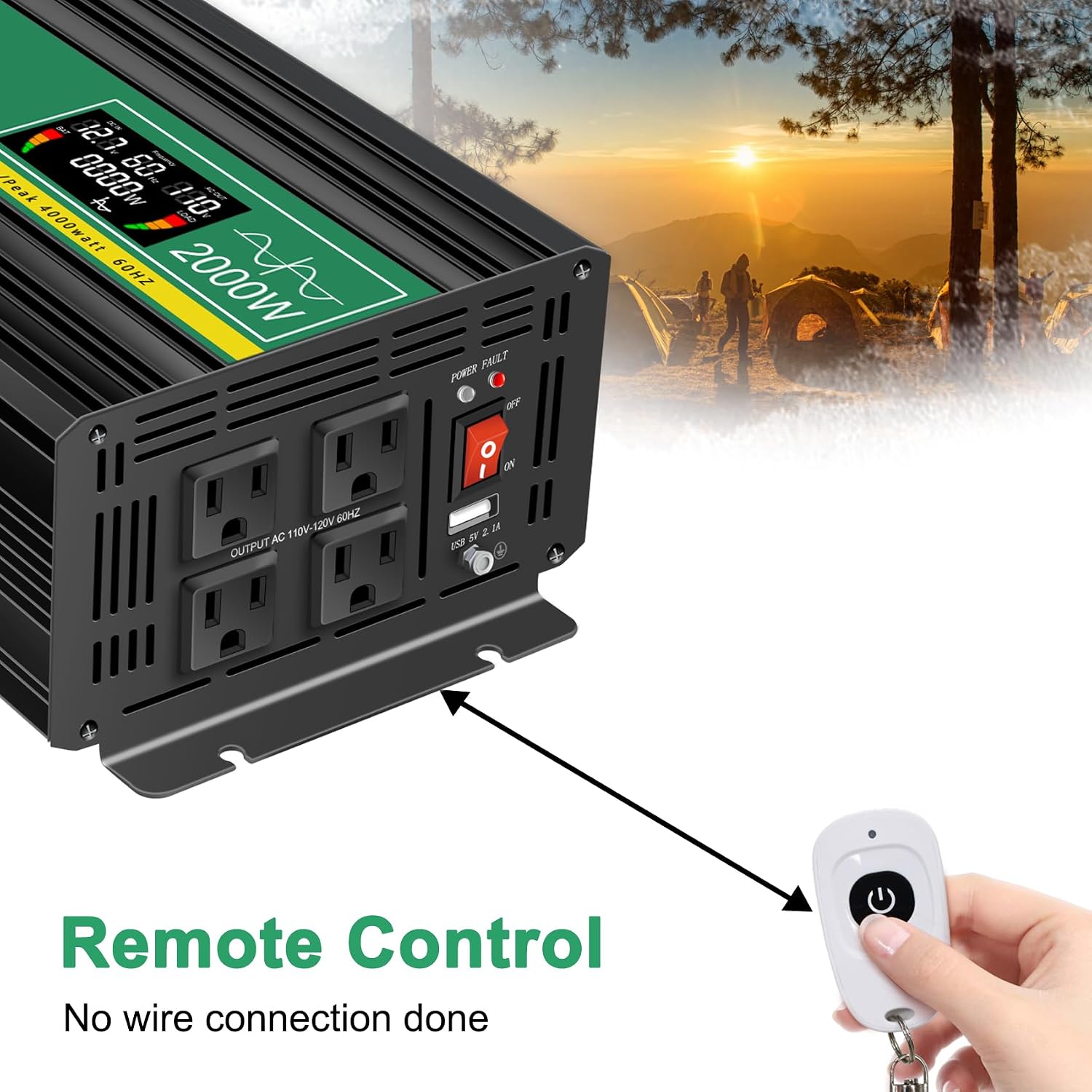
Image 5.3: Remote control for the JIGUUN Power Inverter.
6. Návod k obsluze
6.1 Zapnutí/vypnutí
- After ensuring all connections are secure, flip the ON/OFF switch on the inverter to the 'ON' position. The LCD display will illuminate, and the power indicator will light up.
- Chcete-li přístroj vypnout, přepněte vypínač do polohy „VYPNUTO“.
- Alternatively, use the remote control to power the inverter on or off.
6.2 Používání LCD displeje
The intelligent LCD display provides real-time information about the inverter's status:
- Ukazatel úrovně baterie: Indicates the charge level of the connected battery.
- Loads Level Bar: Shows the current power draw from connected AC devices.
- DC vstupní voltage: Zobrazuje objemtage from the 12V battery.
- Výstupní napětí ACtage: Shows the 120V AC output voltage.
- Výstupní frekvence: Zobrazuje výstupní frekvenci střídavého proudu (60 Hz).
- Výkon zátěže: Zobrazuje celkovou spotřebutagje přitahován připojenými zařízeními.
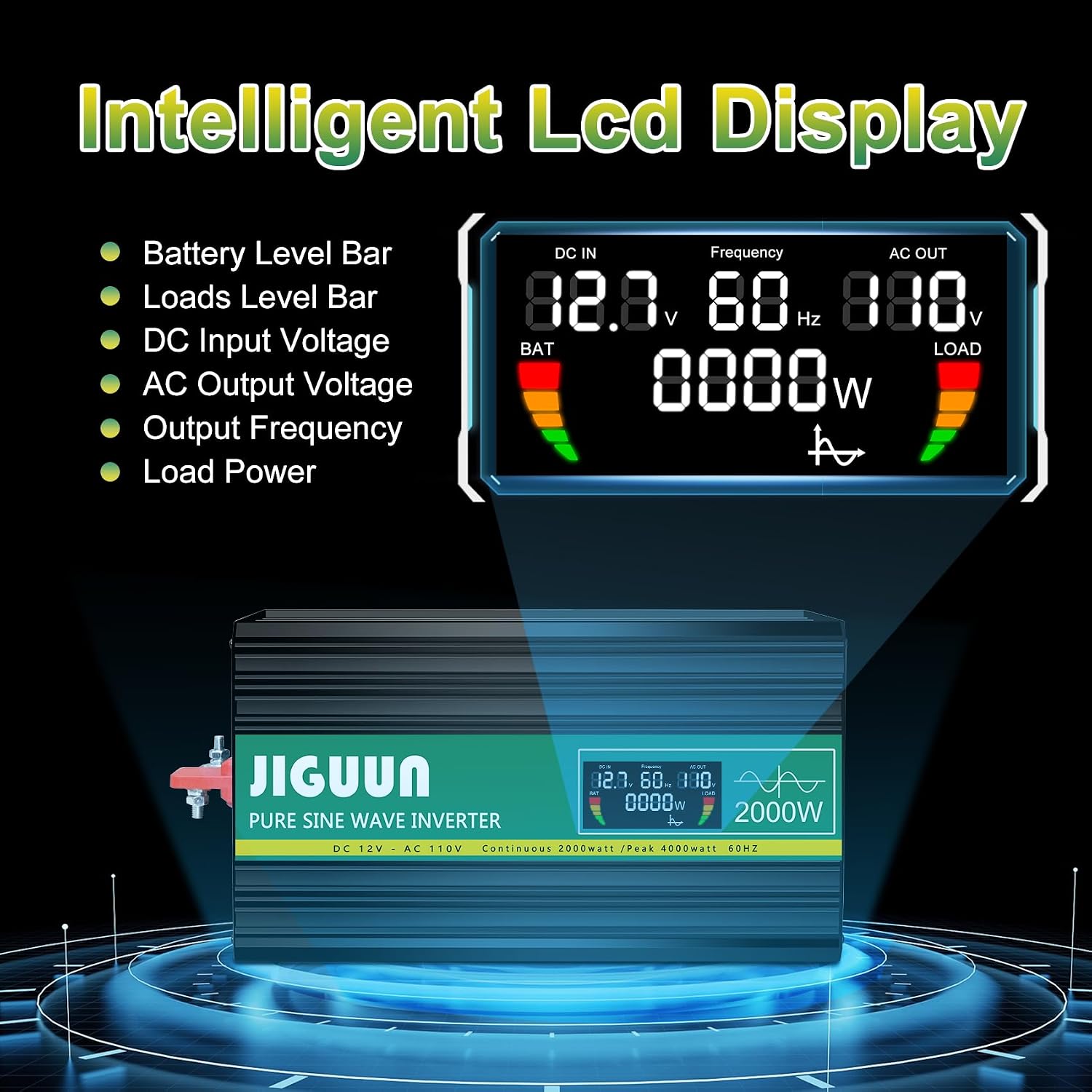
Obrázek 6.1: Detailní view of the LCD display information.
6.3 Connecting AC and USB Devices
- With the inverter powered on, plug your 120V AC appliances into the four AC receptacles.
- Plug your USB-powered devices into the USB ports for charging.
- Zajistěte celkový watttage of all connected AC devices does not exceed 2000W continuously.

Obrázek 6.2: Příkladampméně spotřebičů napájených střídačem.
7. Údržba
7.1 Čištění
Regularly clean the exterior of the inverter with a dry, soft cloth. Do not use liquid cleaners or solvents. Ensure cooling vents are free from dust and debris to maintain optimal airflow.
7.2 Chladicí systém
The inverter features temperature-sensitive control fans that activate automatically when the internal temperature exceeds 45°C. These fans ensure rapid cooling and quiet operation. Ensure the fan vents are not obstructed.

Image 7.1: Inverter cooling fans and intelligent temperature control.
7.3 Výměna pojistky
The inverter has built-in fuses for protection. If a fuse needs replacement, it is recommended to contact customer service or a qualified technician. Spare 30A fuses are included in the package for emergency situations, but professional assistance is advised for replacement.

Image 7.2: Spare 30A fuses.
8. Řešení problémů
Pokud měnič nefunguje správně, podívejte se na následující běžné problémy a jejich řešení:
| Problém | Možná příčina | Řešení |
|---|---|---|
| Žádný výstupní výkon / Měnič se nezapíná | Uvolněné připojení baterie Nízký objem baterietage Vypínač měniče VYP Spálená pojistka | Zkontrolujte a utáhněte kabely baterie. Nabijte nebo vyměňte baterii. Ensure switch is ON. Contact customer service for fuse inspection/replacement. |
| Inverter shuts down / Error warning | Přetížení Přehřívání Nízký/Vysoký vstupní objtage Zkrat | Snižte připojené zatížení. Ensure proper ventilation, clear fan vents. Zkontrolujte objem baterietage. Disconnect all loads, check for faulty wiring/appliances. |
| Connected appliance not working | Appliance power exceeds inverter capacity Porucha spotřebiče Inverter in protection mode | Verify appliance wattage. Vyzkoušejte spotřebič s jiným zdrojem napájení. Check inverter display for error codes. |
8.1 Protection System
The JIGUUN inverter is equipped with a comprehensive safety and security system (BMS) to protect itself and your devices:
- Nízký objem baterietage Ochrana
- Baterie Over Voltage Ochrana
- Ochrana proti přepólování
- Ochrana proti zkratu
- Invertor Over Voltage Ochrana
- Invertor Low Voltage Ochrana
- Temperature Control (Overheating Protection)
- Ground Fault Circuit Interrupter (GFCI) Protection
- Ochrana proti přetížení

Image 8.1: Comprehensive safety and security system icons.
9. Specifikace
| Funkce | Specifikace |
|---|---|
| Název modelu | PRO2000W-12 |
| Nepřetržitý výkon | 2000 wattů |
| Špičkový rázový výkon | 4000 wattů |
| DC vstupní voltage | 12V |
| Výstupní napětí ACtage | 120V |
| Výstupní frekvence | 60 Hz |
| Výstupní průběh | Čistá sinusová vlna |
| Účinnost konverze | >90 % |
| AC zásuvky | 4 |
| USB výstup | 2.1A |
| Hmotnost položky | 11.11 libry |
| Rozměry (D x Š x V) | 19.29 x 9.65 x 6.85 palce |
| Doporučená použití | Home, Office, Vehicle (RV, Camping, Emergency) |
| Zdroj napájení | Solární a bateriové napájení |
10. Záruka a podpora
10.1 Informace o záruce
The JIGUUN PRO2000W-12 Power Inverter comes with a 1-letá záruka, which includes free replacement for manufacturing defects. Please retain your proof of purchase for warranty claims.
10.2 Zákaznická podpora
For technical assistance, troubleshooting, warranty claims, or any other inquiries, please contact JIGUUN customer service. Refer to the contact information provided with your product packaging or visit the official JIGUUN webstránky pro podrobnosti o podpoře.