
LETIANPAI 1
LETIANPAI 36m LED Neon Rope Lights User Manual
Model: 1
1. Úvod
Thank you for choosing the LETIANPAI 36m LED Neon Rope Lights. This product is designed to provide versatile and vibrant lighting for various indoor and outdoor applications. Featuring RGB color options, app and remote control, music synchronization, and a timer function, these lights offer a customizable lighting experience. Please read this manual thoroughly before installation and use to ensure proper operation and safety.
2. Bezpečnostní informace
Dodržujte prosím následující bezpečnostní opatření, abyste předešli poškození produktu nebo zranění osob:
- Zajistěte napájení objtagPřed připojením zkontrolujte, zda e odpovídá požadavkům produktu.
- Do not cut the LED rope lights while connected to power.
- The controller unit is není vodotěsný. Protect it from moisture and direct water exposure.
- While the LED rope itself is rated IP65 for outdoor use, ensure all connections and the power adapter are protected from water if used outdoors. Exercise caution and ensure proper protection for all non-IP65 rated components.
- Nepokoušejte se produkt opravovat ani upravovat. Pro pomoc kontaktujte zákaznickou podporu.
- Uchovávejte mimo dosah dětí.
- Avoid prolonged direct eye exposure to the LED light.
- Install using only the provided clips; the rope light does not have adhesive backing.
3. Obsah balení
Ověřte, zda jsou v balení přítomny všechny položky:
- 36m LED Neon Rope Light (2 rolls)
- Napájecí adaptér
- Dálkové ovládání
- Montážní spony a šrouby
- Uživatelská příručka (tento dokument)
4. Specifikace
| Funkce | Specifikace |
|---|---|
| Značka | LETIANPAI |
| Číslo modelu | 1 |
| Délka | 36 metrů (120 stop) |
| Barva | RGB (Multi-color) |
| Typ světelného zdroje | LED |
| Teplota barev | 6500 Kelvinů |
| Ingress Protection (Rope) | IP65 (Waterproof for the rope light itself) |
| Kontrolní metody | Remote Control, Mobile Application ("Lotus Lantern") |
| Speciální funkce | Music Synchronization, Timer Function, Brightness/Speed Adjustment |
| Zdroj napájení | Elektrický kabel |
| Třída energetické účinnosti | A (EPREL Database Link) |
| Hmotnost položky | 2.65 kg |
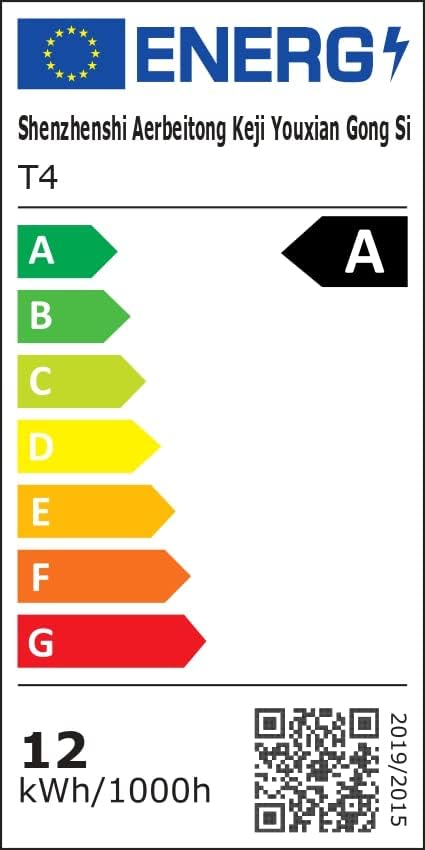 Image: Energy Efficiency Label showing class A for the LED Neon Rope Lights.
5. Nastavení a instalace
Follow these steps to install your LED Neon Rope Lights:
- Naplánujte si svůj návrh: Before mounting, gently lay out the neon rope light to visualize your desired pattern or path on the wall or surface.
 Image: Step 1 - Planning the path for the neon rope light.
 - Install Fixing Clips: Secure the provided fixing clips to the wall or surface along your planned path using screws. Ensure the clips are spaced appropriately to hold the rope light firmly.
 Image: Step 2 - Installing fixing clips onto the wall.
 - Insert Rope Light into Clips: Carefully press the neon rope light into the installed fixing clips.
 Image: Step 3 - Inserting the neon rope light into the clips.
 - Připojte napájecí adaptér: Connect the power adapter to the neon rope light. Ensure the connection is secure.
- Připojení k napájení: Plug the power adapter into a suitable electrical outlet. The lights are now ready for operation.
 Image: Final installation example with the neon rope lights connected to power.
Important Note for Outdoor Use: While the rope light itself is IP65 rated, the power adapter and controller are not. For outdoor installations, ensure these components are housed in a waterproof enclosure or protected from direct exposure to rain and moisture.
6. Návod k obsluze
Your LETIANPAI LED Neon Rope Lights can be controlled via the included remote control or a mobile application.
6.1 Obsluha dálkového ovladače
The remote control allows for quick adjustments to your lighting. Point the remote directly at the controller unit for optimal response.
 Image: Remote control and mobile app interface.
- Vypínač: Zapnout/vypnout světla.
- RGB Buttons: Select specific Red, Green, or Blue colors.
- Výběr barvy: Choose from a variety of preset colors.
- Nastavení jasu: Zvyšte nebo snižte intenzitu světla.
- Výběr režimu: Cycle through various dynamic lighting modes.
- Nastavení rychlosti: Upravte rychlost dynamických režimů.
- Hudební režim: Activate music synchronization (see section 6.3).
6.2 Mobile Application Control ("Lotus Lantern")
For advanced control and customization, download the "Lotus Lantern" app from your smartphone's app store.
- Stáhnout aplikaci: Hledat "Lotus Lantern" on the App Store (iOS) or Google Play Store (Android).
- Připojit: Follow the in-app instructions to connect your lights via Bluetooth.
- Vlastnosti: The app offers a wider range of features including:
- Precise color selection from a color wheel.
- Customizable dynamic modes.
- Music synchronization (using phone's microphone).
- Timer function for scheduled On/Off times.
 Image: Mobile app control interface for LED neon rope lights.
6.3 Synchronizace hudby
The lights can react to music, changing colors and patterns according to the rhythm.
- Dálkové ovládání: Press the "Music" button on the remote.
- Mobilní aplikace: Select the music mode within the "Lotus Lantern" app. The app uses your phone's microphone to detect sound.
 Image: Music and Mic Mode in action, with lights changing to the rhythm.
6.4 Funkce časovače
Set schedules for your lights to turn on or off automatically using the mobile application.
- Open the "Lotus Lantern" app.
- Navigate to the timer settings.
- Set your desired ON and OFF times.
 Image: Timer function setting for automatic on/off.
7. Údržba
To ensure the longevity and optimal performance of your LED Neon Rope Lights:
- Čištění: Disconnect power before cleaning. Wipe the rope light with a soft, dry cloth. Do not use harsh chemicals or abrasive cleaners.
- Skladování: If storing for an extended period, coil the rope light loosely and store it in a cool, dry place away from direct sunlight.
- Inspekce: Periodically check the rope light and connections for any signs of damage or wear.
8. Řešení problémů
| Problém | Možná příčina | Řešení |
|---|---|---|
| Světla se nerozsvítí. | Žádné napájení, uvolněné připojení, vybitá baterie v dálkovém ovladači. | Check power outlet, ensure all connections are secure, replace remote battery. |
| Dálkové ovládání nefunguje. | Remote battery dead, remote out of range, obstruction. | Replace remote battery, ensure remote is pointed at the controller, remove obstructions. |
| Aplikace se nemůže připojit ke světelům. | Bluetooth vypnutý, světla nejsou v režimu párování, problém s aplikací. | Ensure Bluetooth is enabled on your phone, restart the app, power cycle the lights. |
| Světla blikají nebo zobrazují nesprávné barvy. | Loose connection, power fluctuation, damaged rope light. | Check connections, try a different power outlet. If problem persists, contact support. |
| Synchronizace hudby nefunguje. | Microphone blocked, volume too low, app permissions. | Ensure phone microphone is not blocked and volume is adequate. Check app permissions for microphone access. |
9. Záruka a podpora
LETIANPAI offers a 100% záruka spokojenosti. If you encounter any issues with your product, please contact our customer support team. We are committed to resolving any problems within 24 hours.
For assistance, please refer to the contact information provided with your purchase or visit the official LETIANPAI webmísto.
Ask a question about this manual
Ask about setup, troubleshooting, compatibility, parts, safety, or missing instructions. Manuals+ will review the question and use this page’s manual context to help answer it.