
1. Úvod
This manual provides essential information for the safe and effective operation of your Mastech MS8301A Digital Multimeter. Please read this manual thoroughly before using the device to ensure proper functionality and to prevent potential hazards. Keep this manual for future reference.
2. Bezpečnostní informace
Always adhere to the following safety precautions to avoid electric shock or personal injury, and to prevent damage to the multimeter or the equipment under test.
- Přečtěte si pokyny: Understand all instructions and safety information before use.
- Jmenovitý objemtage: Neaplikujte více než jmenovitý objemtage, as marked on the multimeter, between the terminals or between any terminal and ground.
- Testovací potenciální zákazníci: Zkontrolujte měřicí kabely, zda nejsou poškozené, nebo zda nejsou na nich obnažené kovové části. Pokud jsou poškozené, vyměňte je.
- Circuit Disconnection: Odpojte napájení obvodu a vybijte všechny vysokonapěťovétage kondenzátory před testováním odporu, kontinuity, diod nebo kapacity.
- Výběr funkce: Ensure the function switch is in the correct position for the measurement being performed.
- Živé obvody: Do not measure current on a live circuit with the test leads connected in parallel.
- Provozní prostředí: Do not operate the multimeter in explosive gas, vapor, or damp prostředí.
- Osobní ochranné prostředky: Always wear appropriate personal protective equipment, such as safety glasses, when working with electrical circuits.
- Hodnocení bezpečnosti: This device is rated for CAT III 600V. Do not exceed this rating.
3. Konec produktuview
3.1 Vlastnosti
The Mastech MS8301A Digital Multimeter offers a range of features for various electrical measurements:
- Zobrazit: 2000 počtů
- Pozastavení dat: Zmrazí zobrazenou hodnotu pro pohodlné zaznamenání.
- Tester baterií: For 1.5V and 9V batteries.
- Kompaktní design: Product Size: 150mm x 74mm x 48mm (5.9" x 2.9" x 1.7")
- lehký: Product Weight: 220g (0.48lb)

Image: Detailed features and specifications of the Mastech MS8301A multimeter, including display count, data hold, battery test function, and physical dimensions.
3.2 Komponenty
The Mastech MS8301A package typically includes the following components:
- Mastech MS8301A Digital Multimeter Unit
- Měřicí kabely (červený a černý)
- AAA Batteries (2x1.5V)
- Calibration Certificate (if applicable)
- Rychlý průvodce
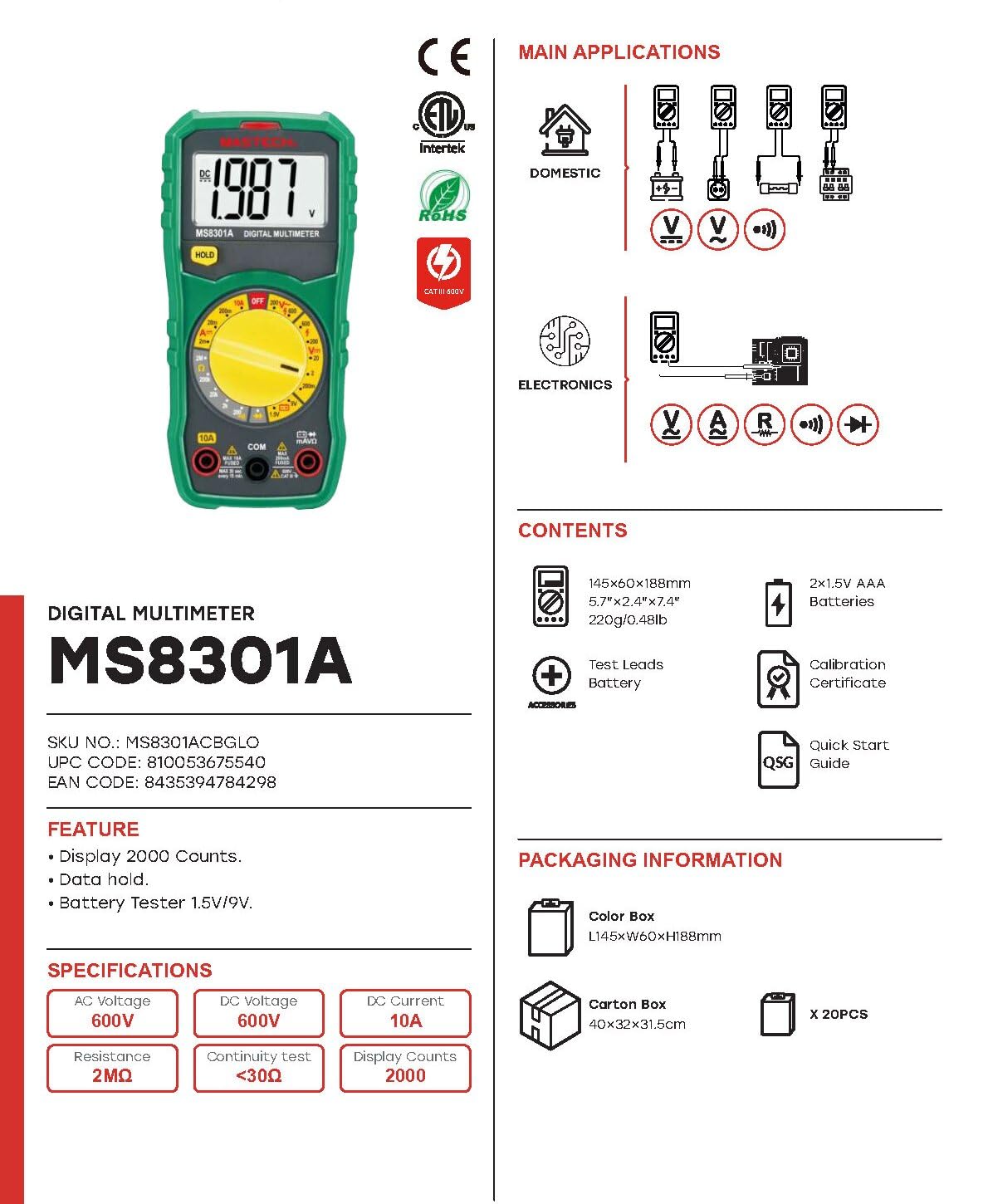
Image: The Mastech MS8301A Digital Multimeter showing its front panel, rotary switch, display, input jacks, and a list of included accessories such as test leads and batteries.
4. Nastavení
4.1 Instalace baterie
- Ujistěte se, že je multimetr vypnutý, a odpojte všechny měřicí kabely.
- Najděte kryt přihrádky na baterie na zadní straně multimetru.
- Odšroubujte upevňovací šroub(y) a sejměte kryt.
- Vložte dvě 1.5V baterie AAA a dodržujte správnou polaritu (+ a -) vyznačenou uvnitř přihrádky.
- Nasaďte kryt prostoru pro baterie a zajistěte jej šroubem (šrouby).
4.2 Připojení měřicích kabelů
Připojte měřicí vodiče k příslušným vstupním zdířkám na multimetru:
- Vložte černý měřicí kabel do COM (obyčejný) zvedák.
- Pro většinu měření (objemtage, Resistance, Diode, Continuity, Temperature, Battery Test), insert the červený měřicí kabel do VΩmA zvedák.
- For high current measurements (up to 10A), insert the červený měřicí kabel do 10A zvedák.
5. Návod k obsluze
Before taking any measurement, ensure the test leads are correctly connected and the rotary switch is set to the desired function.
5.1 Měření DC Voltage (V=)
- Set the rotary switch to the desired V= range (e.g., 20V for measuring up to 20V DC).
- Připojte červený měřicí vodič ke kladnému (+) pólu obvodu a černý měřicí vodič k zápornému (-) pólu.
- Přečtěte si svtage hodnota na displeji.
5.2 Měření AC Voltage (V~)
- Set the rotary switch to the desired V~ range (e.g., 200V for measuring up to 200V AC).
- Připojte měřicí vodiče k AC napětítage zdroj.
- Přečtěte si svtage hodnota na displeji.
5.3 Měření stejnosměrného proudu (A=)
- Důležité: Disconnect power to the circuit before connecting the multimeter in series.
- Set the rotary switch to the desired A= range (e.g., 200mA or 10A). Remember to move the red lead to the 10A jack for high current.
- Otevřete obvod, kde má být měřen proud.
- Connect the multimeter in series with the circuit, ensuring the current flows through the multimeter.
- Zapněte obvod a odečtěte hodnotu proudu na displeji.
5.4 Měření odporu (Ω)
- Důležité: Před měřením odporu se ujistěte, že je obvod bez napětí a všechny kondenzátory jsou vybité.
- Set the rotary switch to the desired Ω rozsah.
- Připojte měřicí vodiče k měřené součástce.
- Odečtěte hodnotu odporu na displeji.
5.5 Test diod (→|)
- Důležité: Ujistěte se, že je dioda odpojena od obvodu.
- Nastavte otočný přepínač do polohy Test diod pozice.
- Connect the red test lead to the anode and the black test lead to the cathode of the diode. The display will show the forward voltage pokles.
- Prohoďte vodiče. Na displeji by se mělo zobrazit „OL“ (otevřená smyčka), pokud je dioda v pořádku.
5.6 Zkouška kontinuity ())))
- Důležité: Ujistěte se, že je obvod bez napětí.
- Nastavte otočný přepínač do polohy Test kontinuity pozice.
- Connect the test leads across the component or wire to be tested.
- If the resistance is below approximately 30Ω, the buzzer will sound, indicating continuity. The display will also show the resistance value.
5.7 Test baterie (1.5 V/9 V)
- Nastavte otočný přepínač do polohy 1.5V or 9V battery test position, corresponding to the battery type.
- Connect the red test lead to the positive (+) terminal of the battery and the black test lead to the negative (-) terminal.
- Přečtěte si objem baterietage na displeji.
5.8 Zadržení dat
Press the "HOLD" button to freeze the current reading on the display. Press it again to release the hold function and resume live readings.
6. Specifikace
| Měření | Rozsah | Rezoluce |
|---|---|---|
| DC svtage | 200mV / 2V / 20V / 200V / 600V | 100µV / 1mV / 10mV / 100mV / 1V |
| AC svtage | 200V / 600V | 100 mV / 1 V |
| Stejnosměrný proud | 2mA / 20mA / 200mA / 10A | 1µA / 10µA / 100µA / 10mA |
| Odpor | 200Ω / 2kΩ / 20kΩ / 200kΩ / 2MΩ | 0.1Ω / 1Ω / 10Ω / 100Ω / 1kΩ |
| Test kontinuity | Buzzer sounds at <30Ω | — |
| Test diod | Vpřed svtage pokles | — |
| Test baterie | 1.5V / 9V | — |
Obecné specifikace
- Zobrazit: 2000 počtů
- Napájení: 2x 1.5V AAA baterie
- Rozměry: 150 mm x 74 mm x 48 mm (5.9" x 2.9" x 1.7")
- Hmotnost: 220 g (0.48 lb)
- Hodnocení bezpečnosti: CATIII 600V
- Materiál: Akrylonitrilbutadienstyren (ABS)
- Barva: Modrý

Image: A table detailing manual ranging specifications for various Mastech digital multimeters, including the MS8301A, showing display counts, safety ratings, and measurement capabilities.
7. Údržba
7.1 Výměna baterie
When the battery low indicator appears on the display, replace the batteries immediately to ensure accurate readings. Follow the steps outlined in Section 4.1 for battery installation.
7.2 Čištění
Otřete pouzdro reklamouamp hadříkem a jemným čisticím prostředkem. Nepoužívejte abrazivní prostředky ani rozpouštědla. Před použitím se ujistěte, že je multimetr zcela suchý.
7.3 Skladování
If the multimeter is not used for an extended period, remove the batteries to prevent leakage and damage to the device. Store in a cool, dry place away from direct sunlight.
8. Řešení problémů
| Problém | Možná příčina | Řešení |
|---|---|---|
| Žádný displej nebo tlumený displej | Vybité nebo slabé baterie; nesprávná polarita baterií. | Vyměňte baterie; zkontrolujte orientaci baterií. |
| Zobrazuje se „OL“ (přetížení) | Measurement exceeds selected range; open circuit. | Select a higher range; check for open circuit in the component or leads. |
| Nesprávné údaje | Incorrect function selected; poor test lead connection; damaged test leads. | Verify function switch position; ensure secure lead connection; inspect and replace damaged leads. |
| Žádný pípnutí pro signalizaci kontinuity | Open circuit; resistance too high. | Check for breaks in the circuit; ensure resistance is below 30Ω. |
9. Záruka a podpora
Mastech products are designed for reliability and performance. For specific warranty information, please refer to the warranty card included with your product or contact Mastech customer support. Keep your purchase receipt as proof of purchase.
For technical support or service inquiries, please visit the official Mastech webnebo se obraťte na jejich autorizovaná servisní střediska.