
1. Úvod
This manual provides detailed instructions for the setup, operation, and maintenance of your Vixic P-T M950 Label Maker Machine. Please read this manual thoroughly before using the device to ensure proper functionality and longevity.
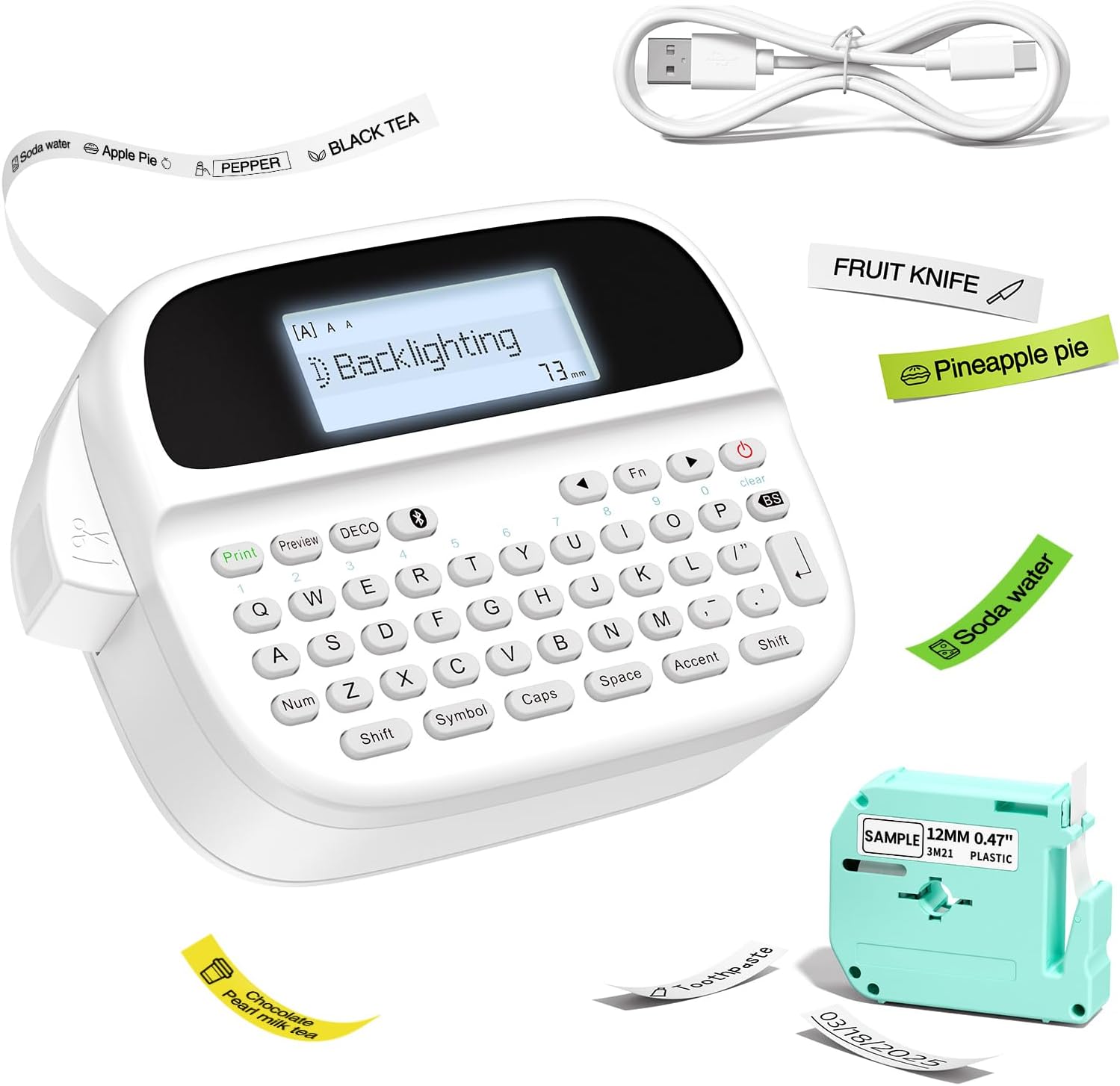
Figure 1: Vixic P-T M950 Label Maker Machine and accessories.
2. Obsah balení
Ověřte, zda jsou v balení přítomny všechny položky:
- 1 x Vixic M950 Label Maker Machine
- 1 x MZ Label Tape (Black on White, 12mm*4m)
- 1 x nabíjecí kabel typu C
- 1 x Uživatelská příručka
3. Nastavení
3.1 Nabíjení zařízení
The label maker is equipped with a built-in 1200mAh lithium battery. Before first use, fully charge the device.
- Připojte dodaný nabíjecí kabel typu C k nabíjecímu portu na zařízení.
- Druhý konec kabelu připojte ke kompatibilnímu napájecímu adaptéru USB (není součástí balení).
- The device takes approximately 2.5 hours to fully charge. The charging indicator will show the charging status.

Figure 2: Charging the Vixic M950 Label Maker. A full charge allows for approximately 1.6 hours of continuous printing.
3.2 Vkládání štítkové pásky
To load or replace the label tape:
- Locate the tape compartment on the back of the label maker.
- Open the integrated back cover.
- Insert the label tape cassette into the compartment, ensuring it clicks into place. The tape end should extend slightly from the printer's output slot.
- Bezpečně zavřete zadní kryt.

Figure 3: Loading the label tape cassette into the Vixic M950 Label Maker.
4. Návod k obsluze
4.1 Zapnutí/vypnutí
Press the power button to turn the device on or off. The backlit LCD display will illuminate upon powering on.
4.2 Vytváření štítků
The Vixic M950 offers two modes for label creation:
4.2.1 Keyboard Input Mode
- Zapněte zařízení.
- Use the QWERTY keyboard to type your desired text. The 14-character backlit LCD display allows for easy preview.
- Press the 'Print' button to print the label.
4.2.2 Bluetooth App Mode
For advanced customization, connect to the "Print Master" app via Bluetooth.
- Download the "Print Master" app from your device's app store.
- Ujistěte se, že je na vašem smartphonu povoleno Bluetooth.
- Open the "Print Master" app and connect to your Vixic M950 device.
- Use the app to design your label with various fonts, borders, symbols, and clip art.
- Send the design to the label maker for printing.

Figure 4: Label creation using both the integrated keyboard and the Bluetooth app.
4.3 Možnosti přizpůsobení
The Vixic M950 offers extensive customization:
- Písma: Choose from 8 artistic fonts.
- Hranice: Select from 103 borders/underscores.
- Symbols & Clip Art: Access 791 symbols and clip art options.
- Úložiště štítků: Store up to 9 labels for future printing, each supporting up to 89 characters.

Figure 5: Customization options available for label design.
4.4 Řezání štítků
The device features a built-in cutter for clean label separation. After printing, press the cutter button to trim the label.
5. Údržba
5.1 Péče o baterii
Chcete -li prodloužit životnost baterie:
- Před prvním použitím zařízení plně nabijte.
- The device automatically shuts down after 5 minutes of inactivity to conserve power.
- Nevystavujte zařízení extrémním teplotám.
5.2 Čištění
Gently wipe the exterior of the label maker with a soft, dry cloth. Do not use liquid cleaners or abrasive materials.
6. Řešení problémů
If you encounter issues with your Vixic M950, please refer to the following common solutions:
- Zařízení se nezapíná: Ensure the battery is charged. Connect the device to the Type-C cable and a power source.
- Žádný tisk nebo slabý tisk: Check if the label tape is correctly installed and not empty. Ensure the tape is properly aligned in the output slot.
- Problémy s připojením Bluetooth: Make sure Bluetooth is enabled on your smartphone and the "Print Master" app is updated. Restart both the label maker and your smartphone.
- Labels not cutting cleanly: Ensure the tape is fully extended before cutting. The built-in cutter should be free of debris.
For further assistance, please contact Vixic customer support.
7. Specifikace
| Funkce | Specifikace |
|---|---|
| Model | M950 |
| Značka | Vixic |
| Konektivita | Bluetooth, QWERTY Keyboard |
| Technologie tisku | Thermal / Thermal Transfer |
| Maximální rozlišení tisku | 203 DPI |
| Maximální rychlost tisku (černobíle) | 10 mm/s |
| Kompatibilní šířky štítků | 9 mm, 12 mm |
| Typ zobrazení | Podsvícený LCD |
| Baterie | 1200mAh lithium-iontová (dobíjecí) |
| Nabíjecí rozhraní | USB Type-C |
| Rozměry | 16.8 H x 7.2 Š x 11.8 V centimetrů |
| Hmotnost položky | 489 gramů |
| Speciální funkce | Built-in Cutter, Backlit LCD screen, QWERTY Keyboard, Portable, Rechargeable |
8. Záruka a podpora
Vixic provides professional customer service and technical support for its products. For any inquiries, technical assistance, or warranty claims, please contact our support team through the following channels:
- E-mail: Refer to your product packaging or the official Vixic webweb pro nejaktuálnější e-mailovou adresu.
- Živý chat: Available on the official Vixic webmístě v pracovní době.

Figure 6: Vixic Customer Service and Technical Support.