
MakeSkyBlue 60A-V123
MakeSkyBlue 60A MPPT Solar Charge Controller User Manual
Model: 60A-V123
1. Úvod
This user manual provides detailed instructions for the installation, operation, and maintenance of your MakeSkyBlue 60A MPPT Solar Charge Controller. This advanced controller is designed to efficiently manage power from your solar panels to charge various battery types, ensuring optimal performance and longevity of your solar power system.

Figure 1: MakeSkyBlue 60A MPPT Solar Charge Controller (Front View)
2. Klíčové vlastnosti
- Technologie MPPT: Achieves 98.2% efficiency, providing 30% more power than PWM controllers. Features dynamic shading compensation and dual cooling (aluminum + fan). EN50530 certified for LiFePO4/AGM/Gel batteries, ensuring a 20% longer lifespan.
- Multi-Voltage Kompatibilita: Versatile 12V/24V/48V auto-recognition caters to various battery setups, enhancing system flexibility.
- LCD displej: Multi-function Liquid Crystal Display with backlight shows cumulative power generation, error codes, and adjustable parameters.
- Automatická hlasitost baterietage Detekce: Automatically supports 12V, 24V, 48V Lead-Acid, AGM, and Gel batteries in series or parallel connection on Bat+, Bat- terminals.
- Intelligent Battery Protection: Guards against overcharging, overvoltage, a nízký objemtage, safeguarding your battery's health.
3. Nastavení a instalace
3.1. Obsah balení
Ověřte, zda jsou přítomny všechny komponenty:
- MakeSkyBlue 60A MPPT Solar Charge Controller
- Montážní příslušenství (pokud je součástí dodávky)
- Uživatelská příručka (tento dokument)
3.2. Montáž regulátoru
Choose a dry, well-ventilated location away from direct sunlight and heat sources. Ensure adequate clearance around the unit for proper airflow and cooling. Mount the controller vertically to allow for efficient heat dissipation through the cooling fins and fan.

Figure 2: Product Dimensions (Dimensions in inches: Height 21.65, Width 14.96, Depth 8.66)
3.3. Připojení vodičů
Follow the wiring diagram carefully. Always connect the battery first, then the solar panels, and finally the load (if applicable). Ensure all connections are secure and correct polarity is observed.
- Připojení baterie: Connect the battery to the BAT+ and BAT- terminals. The controller will automatically detect the battery voltage (12 V/24 V/48 V).
- Připojení solárního panelu: Connect the solar panel array to the PV+ and PV- terminals. Ensure the PV array open circuit voltage (Voc) is within the specified range for your battery voltage (20V-80V for 12V, 37V-105V for 24V, 72V-160V for 48V).
- Připojení zátěže (volitelné): If using the controller's load output, connect your DC load to the OUT+ and OUT- terminals.
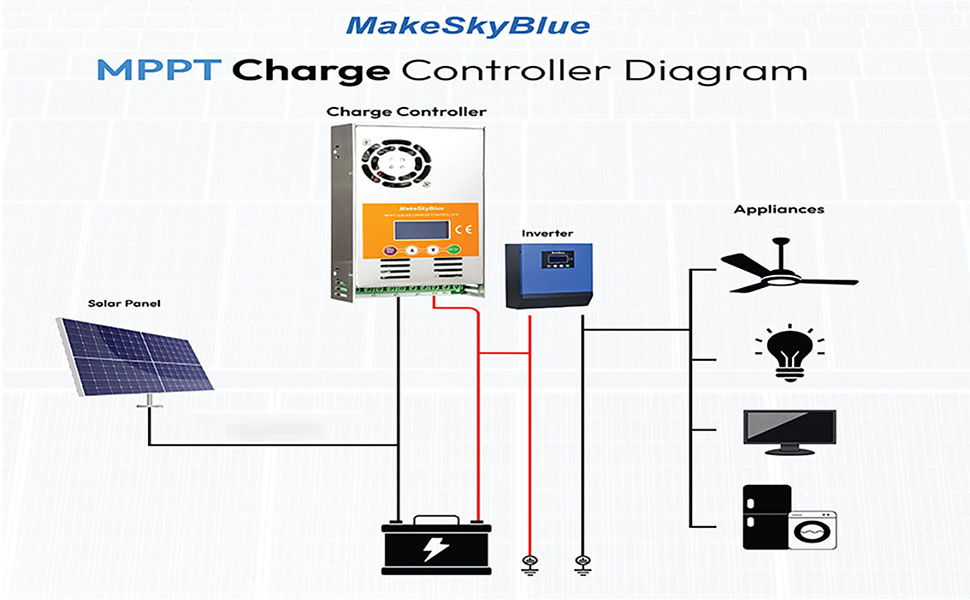
Figure 3: MPPT Charge Controller System Diagram. This diagram illustrates the connection flow from solar panel to charge controller, then to battery and inverter, which powers various appliances.
3.4. Kompatibilita baterií
The controller is compatible with a variety of battery types, including:
- Baterie AGM
- Lithium Batteries (LiFePO4)
- Lead-Acid Batteries (Flooded)
- Gelové baterie

Figure 4: Compatible Battery Types (Gel, Flooded, AGM)
4. Návod k obsluze
4.1. LCD displej nadview
The multi-function LCD provides real-time monitoring of system status, including charging current, battery voltage, and power generation. It also displays error codes for troubleshooting.
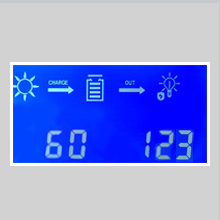
Figure 5: Close-up of the LCD Display showing charging status and numerical values.
4.2. Režimy nabíjení
Regulátor využívá tříbodovýtage charging process to optimize battery performance and extend lifespan. The default charging mode is for lead-acid batteries. Charging voltage can be set from 12V-17V for 12V batteries, 24V-34V for 24V batteries, and 48V-68V for 48V batteries.

Figure 6: MPPT Tracking Technology Graph. This graph illustrates how MPPT technology tracks the maximum power point of the solar panel, unlike PWM which operates at a fixed voltage.
5. Údržba
Pravidelná údržba zajišťuje dlouhou životnost a optimální výkon vašeho solárního regulátoru nabíjení.
- Čištění: Periodically clean the exterior of the controller, especially the cooling fins and fan area, to prevent dust buildup that can impede heat dissipation.
- Spojení: Check all wiring connections regularly to ensure they are tight and free from corrosion.
- Monitorování teploty: The controller has built-in temperature protection. The fan activates when the temperature exceeds 45°C and turns off below 40°C. Ensure the operating environment does not consistently exceed 75°C.
- Aktualizace firmwaru: Zkontrolujte výrobce webwebové stránky s dostupnými aktualizacemi firmwaru.
6. Řešení problémů
Pokud narazíte na problémy se solárním regulátorem nabíjení, podívejte se na následující běžné problémy a jejich řešení:
| Problém | Možná příčina | Řešení |
|---|---|---|
| Žádný displej/Vypnuto | Baterie není připojena nebo je nízkátage; loose wiring. | Zkontrolujte připojení baterie a objtage. Zkontrolujte, zda je baterie nabitátage je nad minimální provozní prahovou hodnotou. |
| Žádné nabíjení z fotovoltaiky | No sunlight; PV array open circuit voltagpříliš nízké/vysoké e; obrácená polarita FV. | Check sunlight conditions. Verify PV array voltage is within specifications. Correct PV polarity. |
| Ochrana proti přebití | Baterie voltage reached overcharging protection limit. | This is a normal protection feature. The controller will stop charging once the battery reaches the overcharging protection voltage (15V for 12V, 30V for 24V, 60V for 48V). |
| Upozornění na vysokou teplotu | Insufficient ventilation; ambient temperature too high. | Ensure proper airflow around the controller. Reduce ambient temperature if possible. Clean cooling fins. |
For specific error codes displayed on the LCD, refer to the detailed user manual (PDF) available for download.
7. Specifikace
| Parametr | Hodnota |
|---|---|
| Značka | MakeSkyBlue |
| Model | 60A-V123 |
| Jmenovitý proud | 60A |
| System Voltage | 12V/24V/48V Auto Detect |
| Max PV Array Power (12V Battery) | ≤ 720 XNUMX W |
| Max PV Array Power (24V Battery) | ≤ 1440 XNUMX W |
| Max PV Array Power (48V Battery) | ≤ 2800 XNUMX W |
| PV Array Open Circuit Voltage (Voc) for 12V Battery | 20V-80V |
| PV Array Open Circuit Voltage (Voc) for 24V Battery | 37V-105V |
| PV Array Open Circuit Voltage (Voc) for 48V Battery | 72V-160V |
| Limited Current Protection | 61A |
| Teplotní ochrana | >75 °C |
| Fan-on Temperature | >45 °C |
| Fan-off Temperature | <40 °C |
| Ochrana proti přebití Voltage (12V baterie) | 15V |
| Ochrana proti přebití Voltage (24V baterie) | 30V |
| Ochrana proti přebití Voltage (48V baterie) | 60V |
| Typ zobrazení | LCD |
| Barva | Pomerančový |
| Hmotnost položky | 2.83 libry |
| Rozměry balení | 10 x 8.03 x 2.83 palce |
| UPC | 634769632594 |
8. Záruka a podpora
For detailed warranty information and technical support, please refer to the official MakeSkyBlue resources.
- Oficiální uživatelská příručka (PDF): For comprehensive details and advanced settings, download the official PDF manual: Stáhněte si uživatelskou příručku
- Plány ochrany: Zvažte nákupasing extended protection plans for your device. Available options include 3-Year, 4-Year, and Complete Protect plans.
- MakeSkyBlue Store: Visit the official MakeSkyBlue store for more products and support: MakeSkyBlue Store
Ask a question about this manual
Ask about setup, troubleshooting, compatibility, parts, safety, or missing instructions. Manuals+ will review the question and use this page’s manual context to help answer it.