
1. Úvod
This manual provides instructions for the installation, operation, and maintenance of the Poly Studio V52 USB Video Bar. The Poly Studio V52 is designed for medium-sized meeting rooms, offering 4K UHD video conferencing capabilities with advanced AI features for an enhanced collaborative experience.
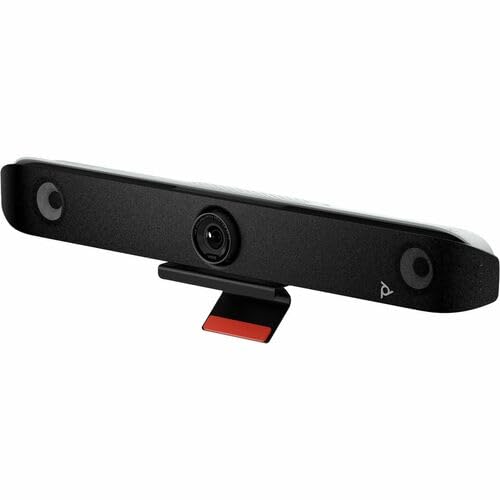
Obrázek 1.1: Přední view of the Poly Studio V52 USB Video Bar, showcasing the central camera and integrated speakers.
2. Obsah balení
Před zahájením instalace ověřte, zda jsou v balení přítomny všechny položky:
- USB Video Bar Poly Studio V52
- Napájecí adaptér a kabel
- USB Cable (Type-A to Type-C or Type-C to Type-C, depending on model)
- HDMI kabel
- Wall Mount Kit (if included)
- Rychlý průvodce
- Bezpečnostní a regulační informace
3. Konec produktuview
The Poly Studio V52 integrates a 4K camera, powerful speakers, and advanced microphones into a single device. Key features include:
- 4K UHD kamera: 20 Megapixel sensor with a 95° Field of View (FOV) and 5x digital zoom for clear visuals.
- Integrovaný zvuk: 4-way speakers deliver room-filling sound, complemented by advanced microphone arrays.
- Poly DirectorAI: Intelligent camera framing to keep participants in view.
- NoiseBlockAI & Acoustic Fence: Technologies for noise reduction and clear voice pickup.
- Flexibilní konektivita: USB for host connection, HDMI for display output, and RJ-45 for network.

Obrázek 3.1: Úhlové view of the Poly Studio V52, highlighting its sleek design and integrated components.
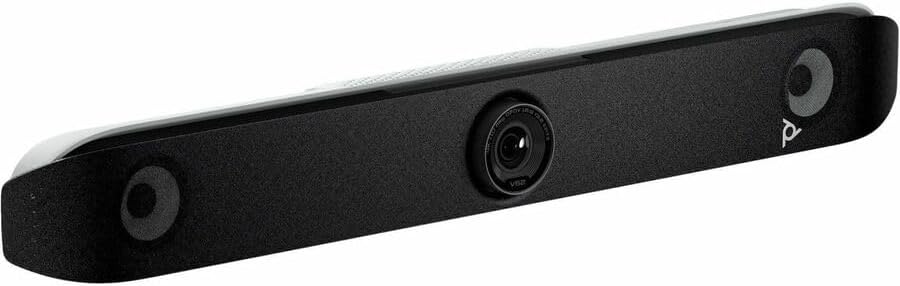
Obrázek 3.2: Zadní view of the Poly Studio V52, illustrating the various connectivity ports including USB, HDMI, and Ethernet.
4. Nastavení
4.1 Fyzické umístění
Position the Poly Studio V52 either above or below your display in the meeting room. Ensure it has a clear line of sight to all participants. If using a wall mount, follow the instructions provided with the wall mount kit.
4.2 Propojovací kabely
- Připojte napájení: Plug the power adapter into the Poly Studio V52 and then into a power outlet.
- Připojte USB: Connect one end of the USB cable to the USB port on the Poly Studio V52 and the other end to a USB port on your meeting room PC or laptop. This connection enables video, audio, and device control.
- Connect HDMI Out: Connect an HDMI cable from one of the HDMI Out ports on the Poly Studio V52 to an HDMI input on your display(s). The Poly Studio V52 has two HDMI Out ports for dual display support.
- Connect HDMI In (Optional): If you need to share content from another device (e.g., a laptop) directly through the video bar, connect an HDMI cable from that device to the HDMI In port on the Poly Studio V52.
- Připojení k síti (volitelné): For network management or specific conferencing platforms, connect an Ethernet cable from the RJ-45 port on the Poly Studio V52 to your network switch or router.
Once connected, the device will power on automatically or can be powered on via its power button (if present).
5. Návod k obsluze
5.1 Počáteční zapnutí
After connecting power, the Poly Studio V52 will typically power on and perform a self-check. Indicators on the device will show its status.
5.2 Using with Conferencing Software
The Poly Studio V52 functions as a standard USB video and audio device. To use it with your preferred video conferencing application (e.g., Zoom, Microsoft Teams, Google Meet):
- Launch your video conferencing application on the connected PC.
- Navigate to the application's audio and video settings.
- Select "Poly Studio V52" as the camera, microphone, and speaker device.
- Adjust volume and other settings as needed within the application.
5.3 Camera Control and AI Features
The Poly Studio V52 features Poly DirectorAI for automatic camera framing. This technology automatically adjusts the camera to keep all participants in view or to focus on the active speaker. Manual camera controls (pan, tilt, zoom) may be available through the conferencing application or a dedicated Poly management application, if installed.
6. Údržba
6.1 Čištění zařízení
Pro udržení optimálního výkonu a vzhledu:
- Před čištěním se ujistěte, že je zařízení vypnuté a odpojené ze zásuvky.
- K otření vnějších povrchů použijte měkký, suchý hadřík, který nepouští vlákna.
- Na odolné skvrny lehceamphadřík vodou. Nepoužívejte agresivní chemikálie, abrazivní čisticí prostředky ani rozpouštědla.
- Gently clean the camera lens with a lens cleaning cloth, if necessary.
6.2 aktualizací firmwaru
Pravidelně kontrolujte aktualizace firmwaru od výrobce website. Firmware updates can provide new features, performance improvements, and bug fixes. Follow the manufacturer's instructions for applying updates.
7. Řešení problémů
| Problém | Možná příčina | Řešení |
|---|---|---|
| Na displeji není žádný video výstup. | HDMI cable loose or faulty; incorrect display input selected; device not powered on. | Check HDMI cable connections. Ensure display is on correct input. Verify Poly Studio V52 is powered on. |
| Z reproduktorů není slyšet žádný zvuk. | Volume muted on device or PC; incorrect audio output selected in conferencing software. | Increase volume. Select "Poly Studio V52" as the speaker in your conferencing application settings. |
| Mikrofon nesnímá zvuk. | Microphone muted; incorrect audio input selected in conferencing software. | Unmute microphone. Select "Poly Studio V52" as the microphone in your conferencing application settings. |
| Camera not detected by PC. | USB cable loose or faulty; USB port issue; driver issue. | Ensure USB cable is securely connected. Try a different USB port on the PC. Restart PC. Check device manager for driver status. |
| Problémy s připojením k síti. | Ethernet cable loose; network configuration issue. | Check Ethernet cable connection. Verify network settings on the device (if accessible) or consult network administrator. |
8. Specifikace
| Název produktu | USB Video Bar Poly Studio V52 |
| Značka | HP (Poly) |
| Číslo modelu | V52 (A09D4AA#ABA) |
| Rozlišení fotoaparátu | 20 megapixelu |
| Pole View (FOV) | 95° |
| Maximální rozlišení videa | 3840 x 2160 (4K UHD) |
| Maximální snímková frekvence | 60 snímků za sekundu |
| Zvukové funkce | Noise Reduction (NoiseBlockAI), Acoustic Fence, 4-way speakers |
| Network Technology | 10/100/1000Base-T Gigabit Ethernet, Wireless LAN |
| Rozhraní / Porty | 1x Network (RJ-45), 1x HDMI In, 2x HDMI Out, USB |
| Rozměry produktu (D x Š x V) | 33.3 x 8.3 x 5.8 palce |
| Hmotnost položky | 11.45 libry |
| UPC | 198122618262 |
9. Záruka a podpora
The Poly Studio V52 USB Video Bar is covered by a manufacturer's warranty. For specific warranty terms, duration, and conditions, please refer to the warranty documentation included with your product or visit the official HP/Poly support webmísto.
For technical support, driver downloads, firmware updates, and additional resources, please visit the official Poly support portal or contact HP customer service. Keep your product model number (V52) and serial number ready when contacting support.
Online podpora: https://www.poly.com/us/en/support