
1. Úvod
This manual provides detailed instructions for the installation, setup, operation, and maintenance of your SIXTOP 10.1-inch 8-Core Android Car Stereo. Please read this manual thoroughly before using the product to ensure proper function and safety. This unit is designed for Mitsubishi Lancer EX models from 2010 to 2017. Basic versions are compatible; high-end versions may require additional wiring harnesses and CANbus.
2. Konec produktuview a klíčové vlastnosti
The SIXTOP Android Car Stereo is an advanced in-car entertainment and navigation system featuring a high-definition touchscreen and an 8-core processor for a smooth user experience. Key features include:
- 8-Core Chip & 4+64GB Memory: Ensures fast and responsive performance.
- 10.1palcová dotyková obrazovka s HD rozlišením: Nabízí jasné vizuální prvky a intuitivní ovládání.
- Bezdrátové CarPlay a Android Auto: Bezproblémová integrace smartphonu pro navigaci, hudbu a hovory.
- Bluetooth 5.0: Faster and more stable wireless connectivity.
- DSP 32EQ: Advanced audio processing with 32-band equalizer for customizable sound.
- FM/RDS & Network Radio: Access to local and global radio stations.
- Vestavěná WiFi: Allows downloading apps and online content.
- GPS/Galileo/Glonass: Supports multiple satellite positioning systems for accurate navigation.
- Inteligentní hlasové ovládání AI: Hands-free operation for various functions.
- Zrcadlový odkaz: Project your phone screen onto the stereo display.
- 59 Radio Themes: Personalize your interface with various visual themes.
- Funkce rozdělené obrazovky: Spouštějte dvě aplikace současně.
- Zobrazení globálního počasí: Informace o počasí v reálném čase.
- Ovládání na volantu: Compatible with original steering wheel buttons.
- AHD Backup Camera Included: Provides clear reversing images (720P 25fps).
Package Contents & Dimensions
The package includes the car stereo with frame, AHD backup camera, microphone, and necessary cables. Refer to the image below for dimensions and included accessories.

3. Instalační příručka
Professional installation is recommended. Ensure the vehicle's power is disconnected before beginning installation. The following video demonstrates the general installation process for a central control unit in a Mitsubishi Lancer EX.
Instalační kroky přesview:
- Příprava: Ensure the vehicle is off and the parking brake is engaged. Gather necessary tools (screwdrivers, trim removal tools).
- Demontáž obložkových panelů: Carefully pry off the dashboard trim panels surrounding the original radio. Start from the passenger side glove compartment area as shown in the video.
- Unscrew Original Radio: Locate and remove the screws securing the original car stereo.
- Odpojit kabeláž: Gently pull out the original radio and disconnect all electrical connectors and antenna cables.
- Komponenty přenosu: Transfer air vents, hazard light switch, and passenger airbag indicator from the original panel to the new stereo's frame.
- Connect New Stereo: Connect the provided wiring harness to the new Android stereo and the vehicle's existing wiring. Connect the GPS antenna, WiFi antenna, and any other accessories like the backup camera.
- Test funkčnosti: Before fully reassembling, turn on the vehicle and test the stereo's basic functions (power, audio, touchscreen, radio, Bluetooth).
- Znovu sestavit: Carefully place the new stereo into the dashboard opening and secure it with screws. Reattach all trim panels.
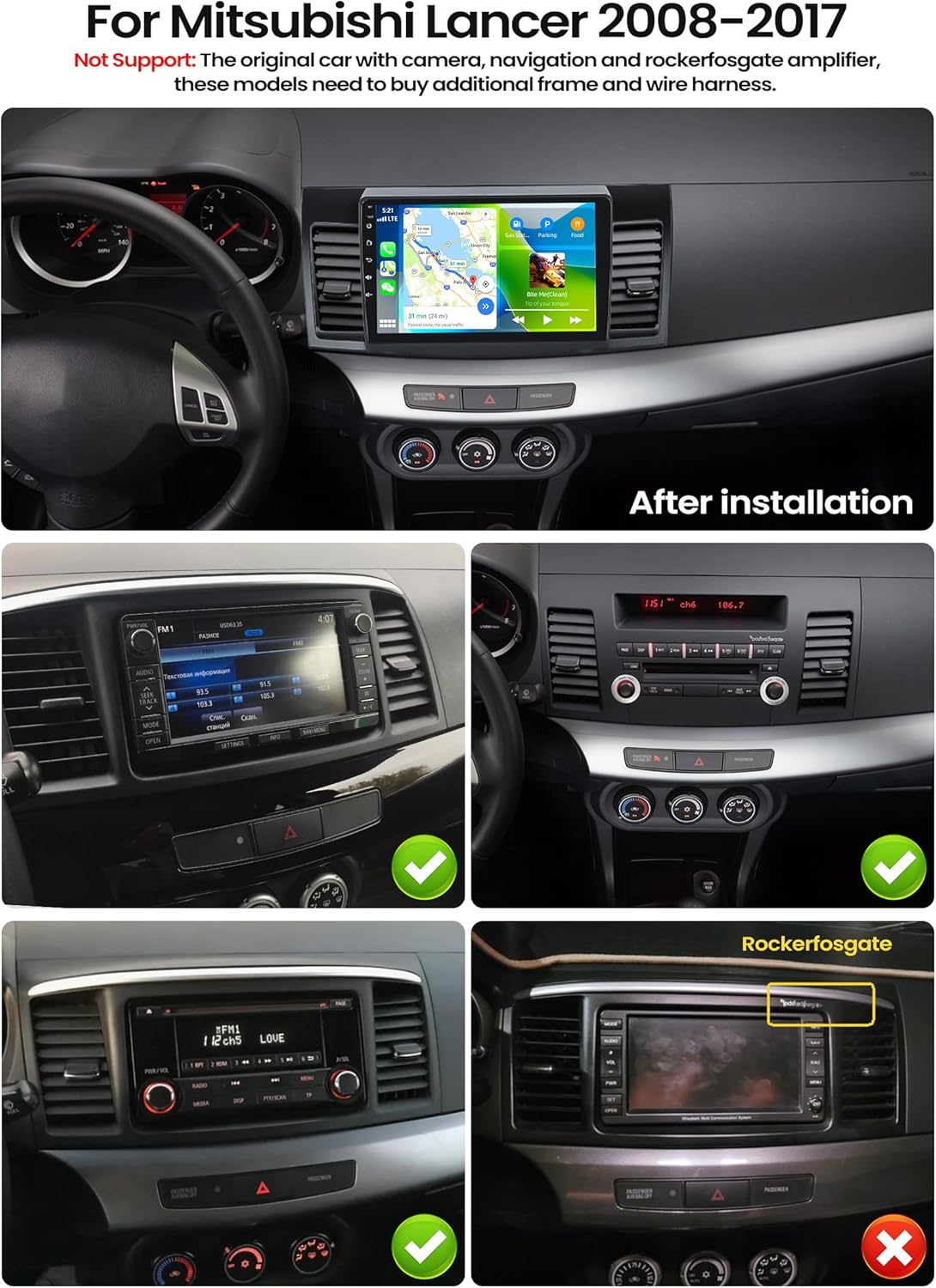
4. Počáteční nastavení a připojení
4.1. Bezdrátové připojení CarPlay a Android Auto
The stereo supports wireless CarPlay for iPhones and wireless Android Auto for Android devices. Follow these steps to connect your smartphone:
- Otevřít aplikaci: On the car stereo, open the 'ApplePlay' app for iPhones or 'Android Auto' app for Android phones.
- Enable Bluetooth on Stereo: Ensure Bluetooth is turned on in the car stereo's settings.
- Povolení Bluetooth v telefonu: On your smartphone, go to Bluetooth settings and turn on Bluetooth.
- Párování zařízení: Hledat the car stereo's Bluetooth name (e.g., RK3326S99) on your phone and pair. Complete any authorization prompts on both devices.
- Automatické připojení: Once paired, the CarPlay or Android Auto interface should automatically launch on the stereo screen.

4.2. WiFi and GPS/Galileo/Glonass
Connect to a WiFi network to download applications, stream online music, and use online maps. The stereo supports GPS, Galileo, and Glonass for accurate satellite positioning. Offline navigation maps can be downloaded from the Play Store.

5. Návod k obsluze
5.1. DSP 32EQ Audio Settings
Enhance your audio experience with the Digital Sound Processor (DSP) and 32-band equalizer. Access the DSP settings to adjust sound effects, optimize for 3D audio, panorama, HiFi scenes, and more. This allows for fine-tuning the audio output to compensate for original car speaker limitations and achieve high-quality sound.

5.2. FM/RDS & Network Radio
Tune into your favorite local FM radio stations with RDS support for station information. Additionally, the Network Radio feature allows access to mainstream radio stations from over 20 countries and regions globally when connected to the internet.

5.3. AI Intelligent Voice Control
Activate the AI Voice Assistant by clicking the Voice APP icon. You can then issue voice commands for various tasks, such as making calls, playing music, tuning the radio, searching for destinations, or opening installed applications. For example, say "Play Michael Jackson's song" to play music.

5.4. Funkce rozdělené obrazovky
The split-screen feature allows you to display two applications simultaneously on the screen. To activate, click the rectangle icon at the top of the screen, select a desired application, and drag it to either the left or right side of the display.
5.5. Global Weather Display
When connected to the internet, the stereo can display real-time weather information for global cities, including temperature (Celsius and Fahrenheit), humidity, and wind conditions.
5.6. 59 Radio Themes
Personalize the visual appearance of your car stereo by choosing from 59 different desktop themes. Long-press on a blank space on the homepage to access and change themes.
5.7. Ovládání na volantu
The stereo supports the use of your car's original steering wheel buttons for controlling audio functions, enhancing convenience and driving safety. Ensure to configure the steering wheel buttons in the car settings menu.
5.8. Zrcadlový odkaz
Use the CarbitLink app to mirror your smartphone's screen onto the car stereo display via WiFi. This is useful for viewing videos or other content from your phone on the larger screen.
5.9. Reversing Display with AHD Camera
The included waterproof night vision AHD camera provides a clear reversing image. The stereo automatically switches to the reverse camera view when the vehicle is put into reverse gear. Ensure the camera resolution is set correctly in the factory settings (AHD: 720P 25fps).

6. Údržba
To ensure the longevity and optimal performance of your SIXTOP Android Car Stereo, follow these maintenance guidelines:
- Čištění obrazovky: Dotykovou obrazovku jemně otřete měkkým hadříkem, který nepouští vlákna. V případě odolných šmouh lehceampOtřete hadřík roztokem na čištění obrazovek. Vyhněte se agresivním chemikáliím nebo abrazivním materiálům.
- Aktualizace softwaru: Pravidelně kontrolujte aktualizace softwaru prostřednictvím systémového nastavení nebo pokynů výrobce. webwebu, abyste měli k dispozici nejnovější funkce a opravy chyb.
- Podmínky prostředí: Nevystavujte jednotku extrémním teplotám, delšímu přímému slunečnímu záření nebo nadměrné vlhkosti.
- Připojení kabelů: Ujistěte se, že všechny kabely jsou bezpečně připojeny. Volné spoje mohou vést k občasným problémům.
- Větrání: Keep the ventilation areas of the unit clear to prevent overheating.
7. Řešení problémů
Pokud narazíte na problémy s autorádiem, postupujte podle následujících běžných kroků pro odstraňování problémů:
| Problém | Možná příčina | Řešení |
|---|---|---|
| Žádná síla | Uvolněný napájecí kabel, spálená pojistka, nesprávné zapojení. | Check all power connections. Inspect vehicle fuses and the stereo's fuse. Verify wiring according to the installation diagram. |
| Žádný zvuk | Příliš nízká hlasitost, aktivované ztlumení zvuku, nesprávný zdroj zvuku, problémy s zapojením reproduktorů. | Increase volume. Check if mute is on. Select the correct audio source. Verify speaker connections. |
| Dotyková obrazovka nereaguje | Softwarová závada, rušení ochranné fólie na displej. | Restart the stereo. Remove and reapply any screen protector if present. |
| CarPlay/Android Auto se nepřipojuje | Bluetooth not enabled, incorrect pairing, phone software issue. | Ensure Bluetooth is on for both devices. Delete previous pairings and re-pair. Restart phone and stereo. |
| Ztráta signálu GPS | GPS antenna obstruction, poor signal area, antenna not connected. | Ujistěte se, že má anténa GPS volný view oblohy. Zkontrolujte připojení antény. Přejděte do otevřeného prostoru. |
| Couvací kamera se nezobrazuje | Camera not connected, reverse trigger wire issue, camera fault. | Check camera and video input connections. Verify the reverse trigger wire is correctly connected. |
Pokud problém přetrvává i po vyzkoušení těchto řešení, kontaktujte zákaznickou podporu.
8. Specifikace
| Funkce | Detail |
|---|---|
| Značka | SIXTOP |
| Číslo modelu | d473b6c7-c983-4e0b-b483-8bae521fef86 |
| Procesor | 8-Core Chip |
| Paměť (RAM+ROM) | 4GB RAM + 64GB úložiště |
| Velikost obrazovky | 10.1 palců |
| Rozlišení displeje | 1280*720 HD Touch Screen |
| Operační systém | Android |
| Konektivita | Bluetooth 5.0, Wi-Fi |
| Navigace | GPS, Galileo, Glonass |
| Režim zvukového výstupu | Stereo |
| Výstupní výkon | 180 W (max.), 45 W (RMS) |
| Kanály prostorového zvuku | 4.0 |
| Kódování videa | H.264, H.265 (HEVC) |
| Kompatibilní zařízení | Smartphone |
| Typ konektoru | RCA, USB typu A |
| Země původu | Čína |
| Rozměry balíku | 42.4 x 26.9 x 14.8 cm; 1.85 kg |
9. Záruka a podpora
Your SIXTOP Android Car Stereo comes with a 1-letá záruka. For any technical assistance, product inquiries, or warranty claims, please contact our customer support team.
Kontaktní údaje výrobce: sixtop123@163.com
We are committed to providing 24/7 quick response and lifetime technical support to ensure your satisfaction.