
FREEWOLF M96
Uživatelská příručka k bezdrátové herní klávesnici FREEWOLF M96
Model: M96
Zavedení
The FREEWOLF M96 Wireless Gaming Keyboard is designed for versatile use, offering both Bluetooth and 2.4G wireless connectivity. It features a mechanical feel, RGB LED backlighting, a digital display screen, and durable PBT keycaps. This manual provides detailed instructions to help you set up, operate, and maintain your keyboard for optimal performance.
Konec produktuview
The FREEWOLF M96 keyboard combines advanced features with a user-friendly design. Key components include:
- Duální konektivita: Supports Bluetooth (BT1, BT2) and 2.4G wireless modes for seamless switching between multiple devices.
- Obrazovka digitálního displeje: Provides real-time information on battery capacity, connection mode, and charging status.
- Multimedia Control Knob: Allows for easy adjustment of volume and backlight settings.
- PBT klávesy: Durable, spherical keycaps designed for comfortable typing and longevity.
- RGB LED Backlight: Customizable lighting effects to enhance your gaming or typing experience.
- Baterie s dlouhou výdrží: Vybaven baterií s kapacitou 3000 mAh pro delší používání.
- Ergonomický design: Features adjustable feet for optimal typing comfort.

Obrázek: Overview of the FREEWOLF M96 Wireless Keyboard, highlighting its 90% US layout, PBT keycaps, Bluetooth/2.4G connectivity, LED backlight, 3000 mAh battery, multimedia knob, LED screen, and compatibility with Win/Mac/Linux/iOS/Android systems.

Obrázek: Detail view of the PBT color blocking keycaps, emphasizing their durability and longer lifespan.
Nastavení
1. Nabíjení klávesnice
Before first use, it is recommended to fully charge the keyboard. Connect the provided USB-C cable to the charging port on the keyboard and the other end to a USB power source (e.g., computer USB port, wall adapter).
- The digital display screen will indicate the charging status.
- Plné nabití obvykle trvá několik hodin.

Obrázek: Boční view of the keyboard illustrating the power switch, Type-C charging port, and the 2.4G/BT1/BT2 mode switch. The Type-C port is for charging only and cannot be used for wired connection.
2. Připojení přes bezdrátové připojení 2.4G
- Locate the 2.4G wireless receiver (USB dongle), usually stored in a compartment on the keyboard's underside.
- Zapojte 2.4G přijímač do volného USB portu na vašem počítači.
- Slide the mode switch on the keyboard to the "2.4G" position.
- The keyboard should automatically connect to your device. The display screen will show the 2.4G connection status.
3. Připojení přes Bluetooth
The keyboard supports two Bluetooth channels (BT1 and BT2) for connecting to multiple devices.
- Slide the mode switch on the keyboard to either "BT1" or "BT2" position.
- Na svém zařízení (počítači, tabletu, chytrém telefonu) povolte Bluetooth a vyhledejte nová zařízení.
- Select "FREEWOLF M96" (or similar name) from the list of available devices.
- If prompted, enter the pairing code displayed on your device.
- Once connected, the digital display screen will show the active Bluetooth channel (BT1 or BT2).
To switch between connected Bluetooth devices, simply slide the mode switch to the desired BT1 or BT2 channel.
Video: Demonstrates the dual-mode connectivity of the FREEWOLF M96 Wireless Gaming Keyboard, showing how to switch between 2.4G wireless and Bluetooth connections (BT1, BT2) for seamless multi-device operation.
Návod k obsluze
1. Digitální displej
The integrated electronic display provides essential information at a glance:
- Kapacita baterie: Zobrazuje aktuální procento baterietage.
- Režim připojení: Indicates whether the keyboard is in 2.4G, BT1, or BT2 mode.
- Stav nabíjení: Displays an icon when the keyboard is charging.
- Indikátor slabé baterie: Alerts you when the battery is low.

Obrázek: Podrobný view of the digital display screen on the FREEWOLF M96 keyboard, showing indicators for power display, connection status (2.4G, BT1, BT2), charging, and low battery.
2. Ovládací knoflík multimédií
The knob located on the top right of the keyboard offers dual functionality:
- Default Function (Volume Control):
- Otočením ve směru hodinových ručiček zvýšíte hlasitost.
- Otočením proti směru hodinových ručiček snížíte hlasitost.
- Stisknutím knoflíku ztlumíte/zapnete zvuk.
- Ovládání podsvícení:
- Press and hold the knob for five seconds to switch to backlight control mode.
- In backlight control mode:
- Rotate clockwise to increase backlight brightness.
- Rotate counter-clockwise to decrease backlight brightness.
- Press the knob to switch between different backlight effects/modes.

Image: Illustration of the advanced dial control, detailing its default functions for volume (volume up, volume down, mute) and its backlight control functions (backlight brightness up, backlight brightness down, light effect switching) when pressed and held for 5 seconds.
3. Backlight Control (Function Keys)
In addition to the knob, you can control the backlight using function key combinations:
- FN + N: Přepnout režim podsvícení
- FN + šipka nahoru / šipka dolů: Upravte jas podsvícení
- FN + šipka doleva / šipka doprava: Úprava rychlosti podsvícení
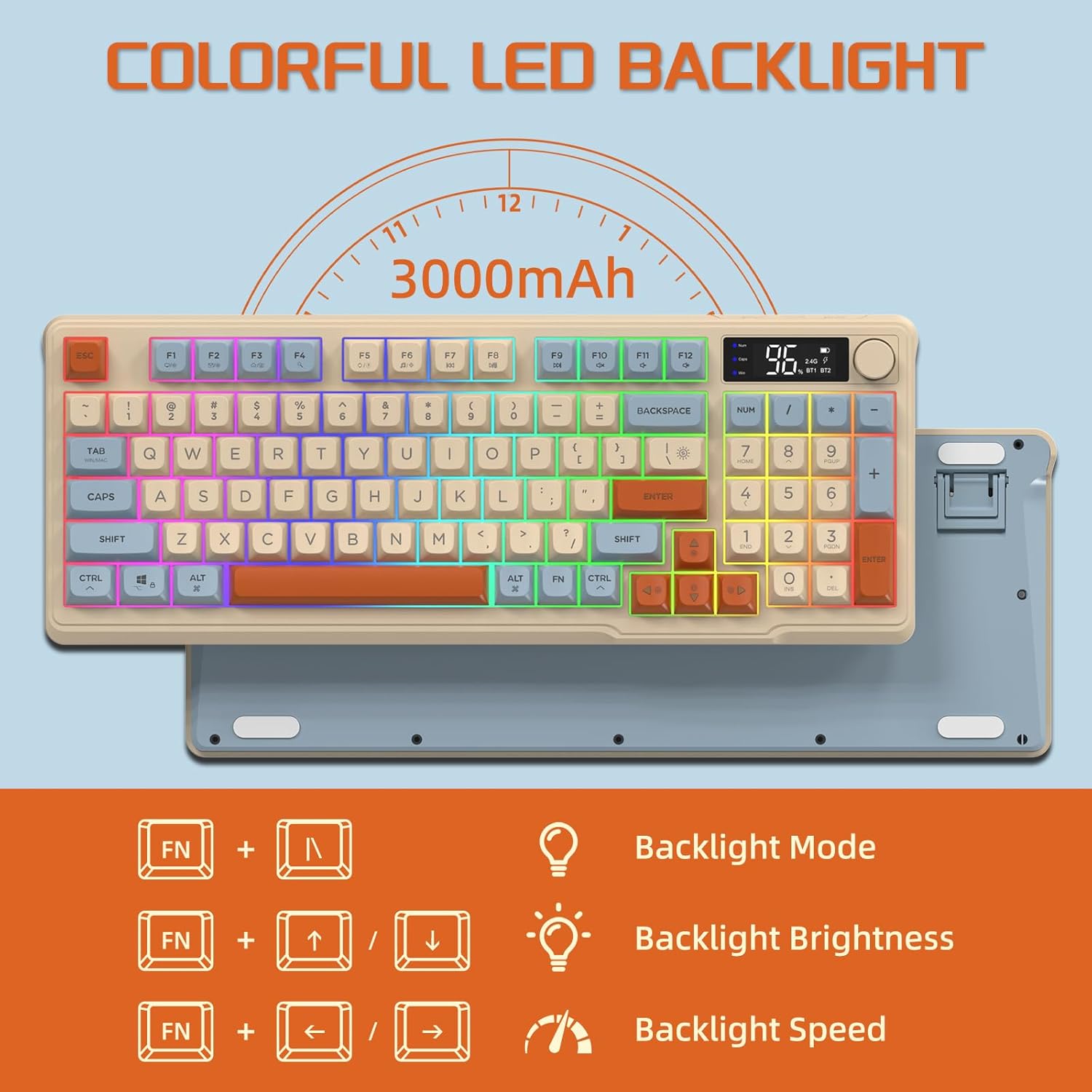
Image: The keyboard displaying the key combinations for controlling the colorful LED backlight, including changing backlight mode, brightness, and speed using the FN key with N, arrow keys.
4. Režimy úspory energie
The keyboard is designed with power-saving features to extend battery life:
- Sleep Mode (3 minutes inactivity): After 3 minutes of inactivity, the keyboard enters sleep mode, and the backlight turns off.
- Deep Sleep Mode (10 minutes inactivity): After 10 minutes in sleep mode, the keyboard enters deep sleep. The first key press will be ignored to wake the keyboard, and the second key press will activate it.
5. Kompatibilita
The FREEWOLF M96 keyboard is compatible with a wide range of operating systems, including Windows, Mac, and Linux, ensuring broad usability.
Údržba
1. Čištění
- Před čištěním klávesnici vypněte.
- Použijte měkký hadřík, který nepouští vlákna dampPovrch otřete vodou nebo jemným čisticím roztokem.
- K čištění mezi klávesami použijte stlačený vzduch nebo malý kartáč.
- Vyhněte se používání agresivních chemikálií nebo abrazivních materiálů.
2. Péče o baterie
- Vyhněte se častému úplnému vybíjení baterie.
- Pokud klávesnici delší dobu nepoužíváte, skladujte ji na chladném a suchém místě.
- Používejte pouze dodaný nabíjecí kabel nebo kompatibilní kabel USB-C.
Odstraňování problémů
| Problém | Možná příčina | Řešení |
|---|---|---|
| Klávesnice nereaguje. | Low battery; incorrect connection mode; receiver not plugged in (2.4G); Bluetooth not paired. | Charge the keyboard; switch to correct mode (2.4G/BT1/BT2); ensure 2.4G receiver is connected; re-pair Bluetooth. |
| Podsvícení nefunguje. | Backlight turned off; low battery; brightness set to minimum. | Check backlight settings using the knob or FN key combinations; charge the keyboard. |
| Klíče se neregistrují nebo se zobrazují jako ghosting. | Software conflict; low battery; interference. | Restart your device; charge the keyboard; move closer to the receiver/device; check for driver updates. |
| Nestabilní připojení Bluetooth. | Rušení; vzdálenost od zařízení; slabá baterie. | Reduce interference (other wireless devices); move keyboard closer to device; charge keyboard. |
Specifikace
| Funkce | Detail |
|---|---|
| Značka | SVOBODNÝ VLK |
| Číslo modelu | M96 |
| Technologie připojení | Bluetooth, bezdrátové připojení 2.4 G |
| Popis klávesnice | Mechanical feel with PBT keycaps |
| Počet klíčů | 94 keys (US Layout) |
| Podsvícení | RGB LED podsvícení |
| Kapacita baterie | 3000 XNUMX mAh |
| Speciální funkce | Electronic display, multimedia control knob, power saving modes |
| Kompatibilní zařízení | PC (Windows, Mac, Linux), iOS, Android |
| Barva | Blueberry (Myrtille) |
| Rozměry produktu | 385 mm (15.16 palce) x 145 mm (5.71 palce) x 40 mm (1.57 palce) |

Image: Diagram illustrating the product dimensions of the FREEWOLF M96 keyboard: 385mm (15.16 inches) length, 145mm (5.71 inches) width, and 40mm (1.57 inches) height.
Záruka a podpora
This FREEWOLF M96 Wireless Gaming Keyboard comes with a standard manufacturer's warranty. Please refer to the product packaging or the seller's information for specific warranty terms and conditions. For technical support or further assistance, please contact the retailer or manufacturer directly.
For the latest information and support, visit the official FREEWOLF webnebo kontaktujte jejich zákaznický servis.
Ask a question about this manual
Ask about setup, troubleshooting, compatibility, parts, safety, or missing instructions. Manuals+ will review the question and use this page’s manual context to help answer it.