
1. Konec produktuview
The COMHOMA CD47 L-shaped gaming desk is designed to provide a versatile and efficient workspace for gaming and work. It features an integrated power outlet, adjustable shelving, a metal punching board for organization, a monitor stand, and LED lighting. The desk's reversible design allows for flexible placement in various room layouts, and its sturdy construction ensures durability and stability.

Konecview of the COMHOMA CD47 L-shaped gaming desk, highlighting its integrated LED lighting, multi-tier shelving, and metal punching board for accessory organization. The desk is shown with various gaming peripherals and decorative items.
2. Obsah balení
Před montáží zkontrolujte, zda jsou všechny níže uvedené komponenty přítomny a nepoškozené. Pokud některé díly chybí nebo jsou poškozené, kontaktujte zákaznickou podporu.
- Desk panels (L-shaped main desk, monitor stand, shelves)
- Kovové komponenty rámu (nohy, příčníky)
- Integrated power outlet (2 AC, 1 USB)
- LED strip light with remote control
- Metal punching board
- 3 hooks for punching board
- Nastavitelné nožičky
- Montážní materiál (šrouby, vruty atd.)
- Návod k použití
3. Pokyny k nastavení
Assembly is required for this product. Please follow these general steps. Note that assembly tools are not included.
- Rozbalení a identifikace součástí: Carefully unpack all components and lay them out on a clean, soft surface to prevent scratches. Compare all parts with the provided parts list in the detailed assembly guide (not included in this document).
- Sestavte rám: Začněte montáží kovových komponentů rámu. Ujistěte se, že jsou všechna spojení bezpečná, ale šrouby zcela neutahujte, dokud není smontován celý rám.
- Připevnění panelů stolu: Secure the main L-shaped desk panels to the assembled frame.
- Instalace polic: Attach the multi-tier shelves. The shelf boards are adjustable in height and can be removed to accommodate larger items like a PC tower. Refer to the image below for customization options.

Images demonstrating the adjustable and removable shelf boards, allowing users to customize storage space for items like a PC tower or books.
- Instalace stojanu na monitor: Secure the elevated monitor stand to the main desk surface. This stand helps promote ergonomic posture.
- Attach Punching Board: Install the metal punching board onto the designated area of the desk. Use the included hooks for organization.
- Integrovaná zásuvka: Carefully install the integrated power outlet into the corner of the desk. Ensure it is properly seated and secured.
- Použití LED světel: Attach the LED strip light to the desired location, typically under the top shelf or along the desk edge. Connect it to the power source.
- Nastavení vyrovnávacích nožiček: Once the desk is fully assembled, place it in its desired location. Adjust the leveling feet at the bottom of the legs to ensure the desk is stable and does not wobble.
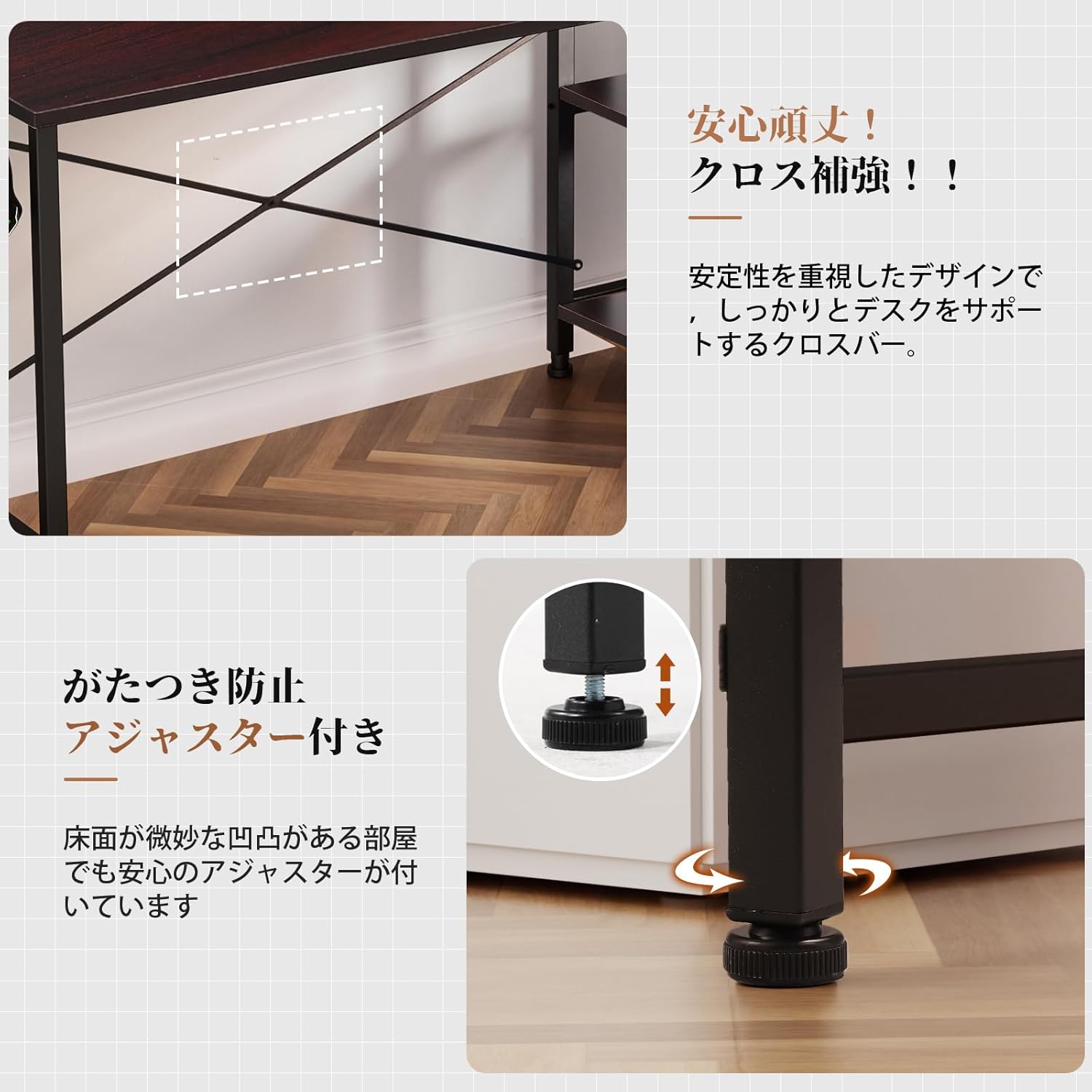
Detailní záběr views of the desk's sturdy construction, showing the cross-reinforcement bars for enhanced stability and the adjustable leveling feet designed to prevent wobbling on uneven floors.
- Reverzibilní konfigurace: The L-shaped desk can be configured with the longer section on either the left or right side to suit your room layout. Plan your desired orientation before starting assembly.

A visual guide illustrating how the L-shaped desk can be assembled with the longer section on either the left or right side, adapting to different room layouts.
4. Návod k obsluze
4.1 Používání integrované zásuvky
The desk includes a built-in power outlet with two AC ports and one USB port. To use, simply slide open the dust-proof cover and plug in your devices. Ensure the desk is connected to a wall power source.

Detail of the built-in power strip located on the desk corner, featuring two AC outlets and one USB port. A sliding cover protects the ports from dust and spills.
4.2 Ovládání LED světel
The LED strip light can be controlled using the provided remote control. Point the remote at the LED receiver to change colors, brightness, and lighting modes. Ensure the LED strip is properly connected to its power source.
4.3 Utilizing the Punching Board
The metal punching board provides a customizable storage area. Use the included hooks to hang headphones, cables, or other accessories. Magnets can also be used to attach notes or photos directly to the board.

Detailní záběr view of the metal punching board, demonstrating its use for hanging various accessories and organizing the workspace.
4.4 Ergonomický stojan monitoru
The elevated monitor stand helps position your screen at an optimal height, reducing neck and eye strain. It is also compatible with monitor arms for further customization.

An illustration demonstrating correct ergonomic posture when using the desk's elevated monitor stand, promoting a comfortable and healthy working or gaming position.
5. Údržba
Proper maintenance ensures the longevity and appearance of your COMHOMA CD47 desk.
- Čištění: Otřete povrch stolu měkkým hadříkemamp cloth. Avoid abrasive cleaners or harsh chemicals that may damage the finish. The eco-friendly P2 grade board material is water-resistant, making cleaning easy.

The desk surface is designed to be water-resistant, allowing for easy cleaning of spills with a cloth.
- Kontrola stability: Periodically check all screws and bolts to ensure they are tight. Adjust the leveling feet if the desk feels unstable.
- Péče o zásuvku: Keep the power outlet's dust-proof cover closed when not in use to prevent dust accumulation.
6. Řešení problémů
If you encounter any issues with your COMHOMA CD47 desk, refer to the following common solutions:
- Chvění stolu:
- Ujistěte se, že všechny montážní šrouby jsou zcela utažené.
- Adjust the leveling feet at the bottom of each leg until the desk is stable on uneven floors.
- Nefunkční zásuvka:
- Verify that the desk's power cord is securely plugged into a functional wall outlet.
- Check if the power outlet unit itself is properly installed and connected within the desk.
- LED světla nefungují:
- Ensure the LED strip is correctly connected to its power adapter and the adapter is plugged in.
- Zkontrolujte baterii v dálkovém ovladači.
- Ujistěte se, že mezi dálkovým ovladačem a LED přijímačem nejsou žádné překážky.
- Obtížnost při montáži:
- Review the detailed assembly guide (not included in this document) to ensure all steps are followed correctly.
- Do not overtighten screws until all parts are loosely assembled, then tighten them gradually.
7. Specifikace
| Funkce | Detail |
|---|---|
| Značka | COMHOMA |
| Číslo modelu | CD47 |
| Tvar | ve tvaru L |
| Typ stolu | Počítačový stůl |
| Rozměry produktu (D x Š x V) | 120 x 100 x 130 cm |
| Hmotnost položky | 20 kg |
| Barva | Hnědý |
| Styl | Rack/Shelf and Monitor Stand Included |
| Základní materiál | Kov |
| Materiál | Dřevo |
| Typ dokončení | Ropný olej |
| Speciální funkce | Compact, Built-in Monitor Stand |
| Doporučená použití | Gaming, Work |
| Zahrnuté komponenty | LED, USB, Built-in Power Outlet, Monitor Stand, Shelves, 3 Hooks |
| Počet polic | 5 |
| Tloušťka desky stolu | 2 cm |
| Max Recommended Weight | 100 kg |
| Montáž Vyžadována | Ano |
| All Assembly Tools Included | Žádný |
| Možnosti úložiště | Adjustable, Multi-layer Shelves |
| Typ montáže | Montáž na podlahu |
8. Záruka a podpora
8.1 Informace o záruce
This COMHOMA product comes with a 1 Year Limited Warranty Against Manufacturer DefectsTato záruka se vztahuje na vady materiálu a zpracování při běžném používání. Nevztahuje se na škody způsobené nesprávným použitím, nehodami, neoprávněnými úpravami nebo běžným opotřebením. Uschovejte si prosím doklad o koupi pro případné reklamace.
8.2 Zákaznická podpora
For any questions, concerns, or assistance with assembly, operation, or warranty claims, please contact COMHOMA customer support through the retailer where the product was purchased. Please have your model number (CD47) and proof of purchase ready when contacting support.