
1. Úvod
Welcome to the LongPlus X83 2K Wireless Outdoor Security Camera System. This manual provides detailed instructions for setting up, operating, and maintaining your new security cameras. Please read this manual thoroughly before use to ensure proper functionality and safety.

Image 1.1: LongPlus X83 2K Wireless Outdoor Security Camera System
This image shows three LongPlus X83 cameras, sleek and black, positioned in the foreground. In the background, a hand holds a smartphone displaying a live feed from one of the cameras, showing a clear view of a house and its driveway.
2. Co je v krabici
Zkontrolujte prosím obsah balení. Pokud některé položky chybí nebo jsou poškozené, kontaktujte zákaznickou podporu.
- Security Camera(s) with Bracket
- Sada šroubů
- Resetovat jehlu
- USB kabel
- Rychlý průvodce
3. Nastavení
3.1 Nabíjení fotoaparátu
Before initial use, fully charge the camera using the provided USB cable. The charging indicator light will show the charging status.
3.2 Instalace aplikace a vytvoření účtu
Your LongPlus X83 camera operates with the VicoHome app. Download the VicoHome app from the App Store (for iOS devices) or Google Play Store (for Android devices).
- Hledat "VicoHome" in your device's app store.
- Stáhněte a nainstalujte aplikaci.
- Otevřete aplikaci a podle pokynů na obrazovce vytvořte účet a přihlaste se.
3.3 Párování fotoaparátu
Follow these steps to pair your camera with the VicoHome app:
- Ensure your camera is fully charged and powered on.
- Open the VicoHome app and tap the "+" icon to add a new device.
- Vyberte model fotoaparátu ze seznamu.
- Follow the in-app instructions, which typically involve scanning a QR code displayed on your phone with the camera lens, or connecting to the camera's temporary Wi-Fi hotspot.
- Connect the camera to your home 2.4GHz Wi-Fi network.
3.4 Montážní pokyny
The LongPlus X83 cameras are designed for versatile installation, including ceiling mount, wall mount, or freestanding placement. Choose a location that provides optimal viewing coverage and a strong Wi-Fi signal.

Image 3.1: Flexible Mounting Options
This image illustrates the flexible mounting options for the LongPlus X83 camera. It shows the camera securely mounted to a wall, inverted from a ceiling, and placed freestanding on a flat surface, demonstrating its adaptability for different installation needs.
Montáž na stěnu/strop:
- Mark the desired drilling spots using the camera bracket as a template.
- Vyvrtejte otvory a v případě potřeby vložte do zdi hmoždinky.
- Secure the bracket to the wall or ceiling using the provided screws.
- Připevněte kameru k držáku a upravte viewúhel nastavení podle potřeby.
Volné stání:
- Umístěte kameru na stabilní, rovný povrch.
- Ensure the camera is not easily knocked over and has a clear line of sight.
4. Návod k obsluze
4.1 Živě View a přehrávání
Přístup k foo v reálném časetage a review recorded events through the VicoHome app.

Obrázek 4.1: Živý přenos View a rozhraní pro přehrávání
This image shows a smartphone held against a scenic beach background, displaying the VicoHome app interface. The screen illustrates both live video streaming and a timeline for reviewing recorded events, emphasizing the ability to monitor from anywhere.
- Žít View: Open the VicoHome app and select the desired camera to view jeho živý přenos.
- Přehrávání: Navigate to the playback section within the app to review recorded events stored on the Micro SD card or cloud storage.
4.2 Detekce pohybu a upozornění s umělou inteligencí
The camera utilizes advanced AI algorithms to distinguish between people, pets, vehicles, and packages, reducing false alarms.

Image 4.2: AI Detection Analysis
This image visually explains the AI detection analysis feature. It shows various objects such as a person, a package, a dog, and a car being identified and categorized by the camera's AI, with corresponding event notifications displayed on a smartphone screen.
- Upozornění v reálném čase: Získejte okamžitá upozornění na svůj smartphone, když je detekován pohyb.
- Siren and Strobe Light: The camera can automatically trigger an audible siren and strobe light to deter intruders upon detecting humanoid motion.
- Zóny aktivity: Customize specific areas within the camera's field of view for motion detection, ignoring irrelevant areas.
- Nastavitelná citlivost: Modify the detection sensitivity (High, Medium, Low) to suit your environment and reduce unwanted alerts.
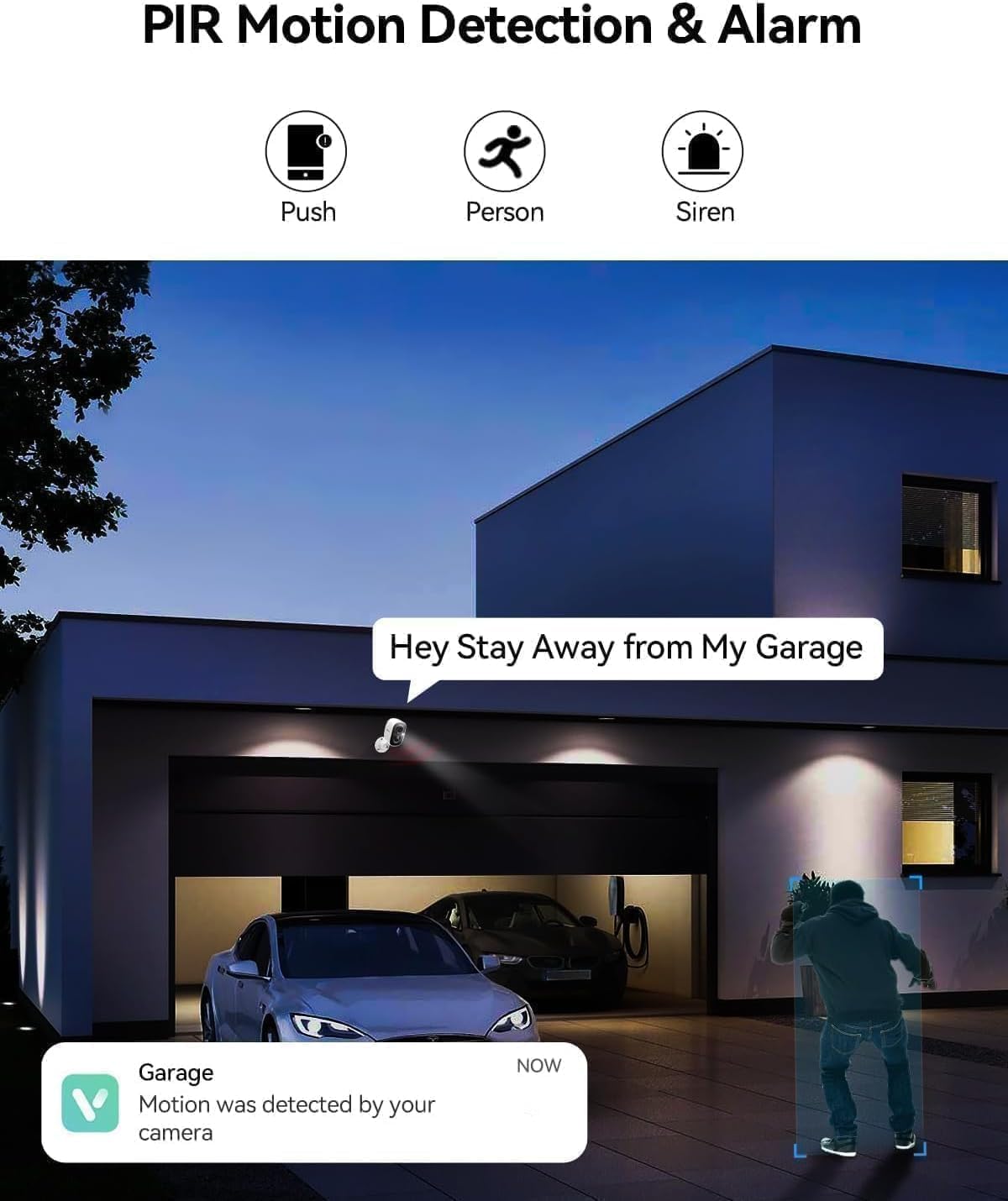
Image 4.3: PIR Motion Detection and Siren Alarm
This image depicts a LongPlus camera mounted above a garage, detecting a person. An on-screen notification reads "Hey Stay Away from My Garage," indicating the camera's ability to trigger an alarm and send alerts upon detecting suspicious activity.
4.3 Obousměrný zvuk
Communicate with visitors or deter unwanted guests using the built-in microphone and speaker.
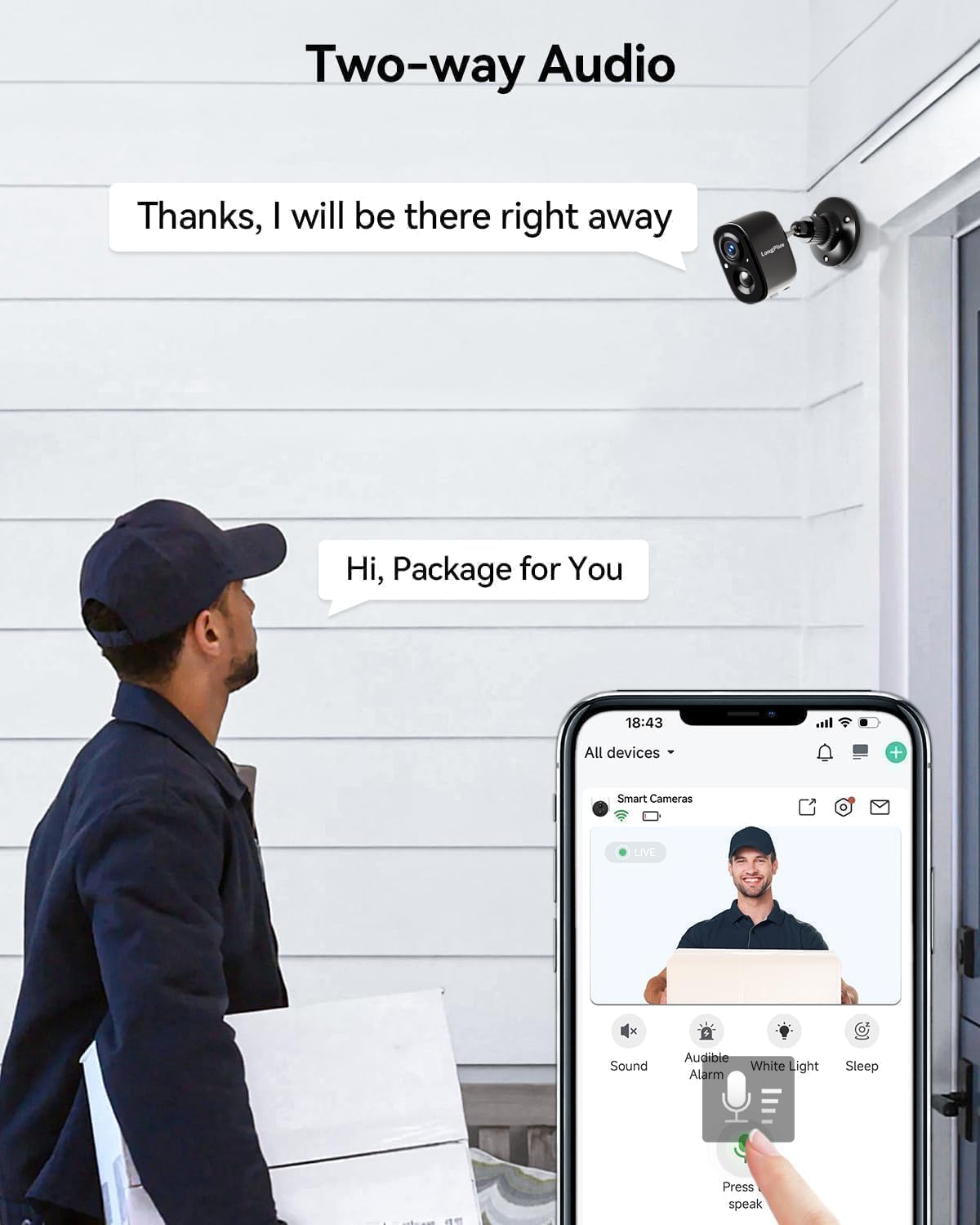
Image 4.4: Two-Way Audio Communication
This image shows a delivery person at a front door, holding a package. A LongPlus camera is mounted above the door. A speech bubble from the camera says, "Hi, Package for You," and another from the app interface says, "Thanks, I will be there right away," illustrating the two-way audio feature.
- Tap the microphone icon in the VicoHome app to speak through the camera.
- Listen to audio from the camera's location through the app.
4.4 Barevné noční vidění
The camera provides clear, vivid color images even in low-light conditions, extending up to 33 feet.
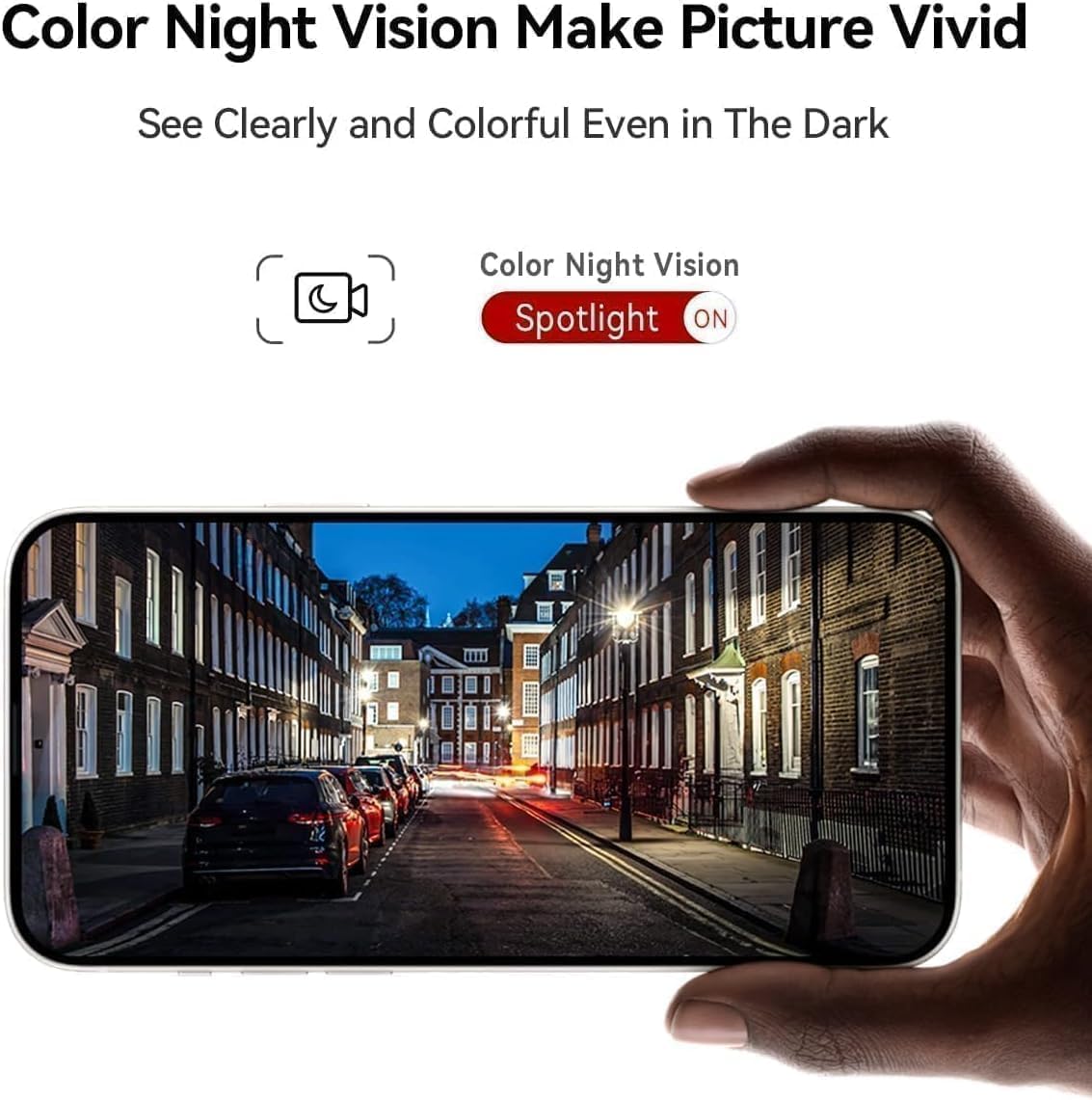
Image 4.5: Color Night Vision in Action
This image shows a smartphone held up, displaying a clear and vivid color night vision view of a street scene at night. The image highlights the camera's ability to capture detailed and colorful footage even in dark environments, with a 'Spotlight ON' indicator for color night vision.
- The camera automatically switches to color night vision mode when ambient light is low.
- Ensure the spotlight feature is enabled in the app for optimal color night vision performance.
4.5 Integrace s Alexou
Integrate your LongPlus X83 camera with Amazon Alexa for convenient voice control.

Obrázek 4.6: Kompatibilita s Alexou
This image shows a LongPlus camera positioned next to an Amazon Echo Show device. The Echo Show displays live footage of a person at a front door, illustrating how users can command Alexa, "Alexa, show me in front of the door," to view kamerové kanály.
- Enable the VicoHome skill in the Alexa app.
- Link your VicoHome account with Alexa.
- Používejte hlasové příkazy, například „Alexo, ukaž mi [název kamery]“. view živé přenosy na kompatibilních zařízeních Alexa.
4.6 Sdílení zařízení
Sdílejte přístup k fotoaparátu s členy rodiny nebo důvěryhodnými osobami.

Image 4.7: Family Sharing Feature
This image illustrates the device sharing capability, showing multiple family members (an elderly couple, a woman on a laptop, a man on a tablet) connected to the camera feed, which is displayed on a smartphone held by another person, watching a child playing in a pool. This highlights multi-user access for shared security.
- In the VicoHome app, navigate to the camera settings and find the "Share Device" option.
- Invite other users by entering their VicoHome account details.
- Shared users will have access to live view a nahrané jídlotage.
5. Údržba
5.1 Nabíjení baterie
The LongPlus X83 camera is battery-powered. Monitor the battery level in the VicoHome app and recharge as needed using the provided USB cable.

Image 5.1: Sleep Setting for Battery Optimization
This image shows a man working on a laptop, with a graphic overlay illustrating a customizable sleep schedule for the camera. This feature allows users to set specific activation dates and times (e.g., 09:00 to 18:00 on weekdays) to conserve battery life.
- To prolong battery life, utilize the "Sleep Setting" feature in the app to customize the camera's activation schedule.
5.2 Správa úložiště
Your camera supports both Micro SD card storage (up to 128GB, not included) and optional cloud storage.
- Micro SD karta: Insert a Micro SD card into the designated slot on the camera. The camera will automatically begin recording events to the card.
- Cloudové úložiště: Explore the VicoHome app for cloud storage options. A 30-day free trial is typically available.
5.3 Čištění
Pravidelně čistěte čočku a kryt fotoaparátu, abyste zajistili optimální výkon.
- Použijte měkký, damp hadřík k otření těla fotoaparátu.
- Na čočku použijte hadřík a roztok na čištění čoček, abyste zabránili poškrábání.
- Nepoužívejte agresivní chemikálie nebo abrazivní materiály.
6. Řešení problémů
If you encounter issues with your LongPlus X83 camera, refer to the following common problems and solutions:
| Problém | Možné řešení |
|---|---|
| Fotoaparát se nezapne | Ensure the battery is fully charged. Check the USB cable and power adapter. |
| Nelze se připojit k Wi-Fi | Verify your Wi-Fi network is 2.4GHz. Check Wi-Fi password. Move camera closer to router. Reset camera and try pairing again. |
| Žádné upozornění na detekci pohybu | Check app notification settings. Adjust motion detection sensitivity. Ensure Activity Zones are correctly configured. |
| Špatná kvalita obrazu | Clean the camera lens. Ensure there is sufficient lighting. Check Wi-Fi signal strength. |
| Nefunguje obousměrný zvuk | Check microphone and speaker permissions in your phone's app settings. Ensure camera's microphone/speaker are not obstructed. |
If these solutions do not resolve the issue, please contact LongPlus customer support.
7. Specifikace
| Funkce | Specifikace |
|---|---|
| Název modelu | X83 |
| Rozlišení záznamu videa | 2K |
| Efektivní rozlišení | 3 MP |
| Technologie připojení | Bezdrátové (Wi-Fi) |
| Zdroj napájení | Napájení baterií (2 lithium-polymerové baterie jsou součástí balení) |
| Vnitřní/venkovní použití | Uvnitř, venku |
| Úroveň odolnosti proti vodě | Vodotěsný (IP65) |
| Rozsah nočního vidění | 33 stop |
| Viewúhel | 130 stupňů |
| Možnosti úložiště | Micro SD (až 128 GB), cloudové úložiště |
| Speciální funkce | 2-Way Audio, AI Motion Detection, Color Night Vision, Siren Alarm, Alexa Compatible |
| Rozměry (D x Š x V) | 8.3 x 2.45 x 6.2 palce |
| Hmotnost položky | 2.4 libry |
8. Bezpečnostní informace
- Nevystavujte fotoaparát extrémním teplotám mimo jeho provozní rozsah (-20 °C až +60 °C).
- Neumisťujte kameru do blízkosti silných magnetických polí nebo zdrojů rušení.
- Use only the manufacturer-recommended charging accessories.
- Uchovávejte fotoaparát a jeho součásti mimo dosah dětí.
- Zajistěte správnou instalaci, aby nedošlo k pádu kamery.

Image 8.1: Outdoor Design and IP65 Rating
This image highlights the LongPlus camera's robust design for outdoor use, featuring an IP65 waterproof rating. It also displays the operational temperature range from -20°C to +60°C, indicating its resilience to various weather conditions.

Image 8.2: Privacy Protection
This image features a prominent shield icon with the 'LongPlus' logo, positioned in front of a house. It visually represents the commitment to privacy protection, indicating that AES-256 data encryption is used to secure footage during transmission and storage.
9. Záruka a podpora
LongPlus products are designed for reliability and performance. For warranty information, please refer to the documentation included with your purchase or visit the official LongPlus webmísto.
For technical support, troubleshooting assistance, or any questions regarding your LongPlus X83 camera, please contact LongPlus customer service through the VicoHome app or the official LongPlus support channels.