
Konec produktuview
The PPLEE Alarm Clock (Model: CR1001EPRO) is an upgraded digital clock designed for bedrooms, featuring a large, bold number display for easy readability. It includes dual alarms, weekend/weekday modes, adjustable brightness and volume, and convenient Type-C and USB charging ports. This clock is designed to provide reliable timekeeping and alarm functions with power-off memory for uninterrupted use.

Figure 1: PPLEE Alarm Clock with large white LED display and charging phone.
Klíčové vlastnosti
- Large Bold LED Display: 2.2-inch digits for clear visibility day and night, with an upgraded week display.
- Nastavitelný jas a hlasitost: 5 levels of brightness and volume to suit individual preferences and light sensitivity.
- Duální budíky: Set two independent alarms with daily, weekday (MON-FRI), and weekend (SAT-SUN) modes for flexible scheduling.
- USB + Type-C Charging Ports: Conveniently charge mobile devices directly from the clock.
- DST & 12/24H Format: Easy Daylight Saving Time (DST) adjustment and switch between 12-hour and 24-hour time formats.
- Big Snooze Button: Allows for an extra 9 minutes of sleep.
- Paměť pro vypnutí: Zachovává nastavení času a budíku i při výpadku napájenítages (requires backup batteries, not included).

Figure 2: Adjustable brightness levels of the alarm clock display.
Nastavení
1. Připojení napájení
Connect the provided AC adapter to the DC 5V IN port on the back of the alarm clock and plug it into a standard wall outlet. The display will light up.

Obrázek 3: Zadní view of the alarm clock with power and charging ports.
2. Záložní baterie (volitelné)
For power-off memory function, insert 2 AAA batteries (not included) into the battery compartment on the back of the clock. This will preserve time and alarm settings during power interruptions.

Figure 4: Illustration of the battery backup feature for power outage memory.
Návod k obsluze
1. Nastavení času
- Stiskněte tlačítko NASTAVTE ČAS jednou tlačítko. Číslice hodin budou blikat.
- Použijte HODINA nastavte hodinu.
- Stiskněte tlačítko MIN tlačítko pro nastavení minut.
- Stiskněte NASTAVTE ČAS again or wait a few seconds for the setting to save automatically.
2. Nastavení alarmů (duální alarmy)
The clock supports two independent alarms (ALARM1 and ALARM2).
- Stiskněte tlačítko ALARM1 or ALARM2 tlačítko. Čas budíku bude blikat.
- Použijte HODINA a MIN tlačítky nastavte požadovaný čas budíku.
- Stiskněte tlačítko ALARM1 or ALARM2 button again to confirm and activate the alarm. An alarm icon will appear on the display.
- To select alarm mode (Daily, Weekday, Weekend), press the corresponding ALARM button repeatedly until the desired mode icon appears.

Figure 5: Dual alarm settings with weekday and weekend options.
3. Funkce odložení buzení
Když zazní alarm, stiskněte velké SNOOZE/OK button on top to temporarily silence the alarm for 9 minutes.
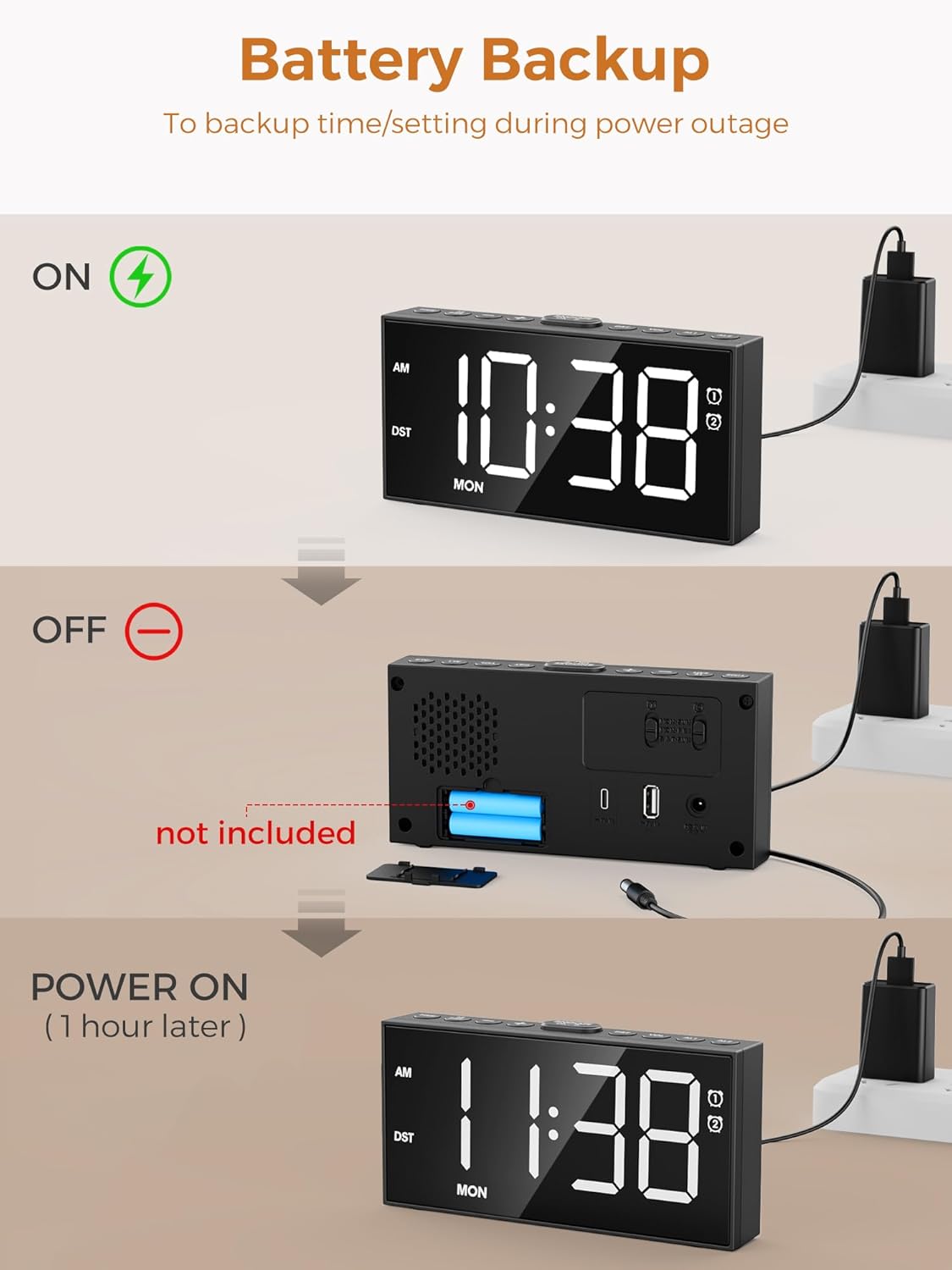
Figure 6: The large snooze button for temporary alarm silencing.
4. Nastavení jasu
Stiskněte tlačítko DIMMER button repeatedly to cycle through 5 levels of display brightness.
5. Nastavení hlasitosti
Použijte VOL+ a VOL- buttons on the side to adjust the alarm volume (5 levels).
6. 12/24 Hour Format & DST
Stiskněte tlačítko 12/24 hod button to switch between 12-hour (with AM/PM indicator) and 24-hour formats. Hold the DST button for 3 seconds to activate/deactivate Daylight Saving Time, which will adjust the time by one hour.

Figure 7: Time format and DST adjustment options.
Údržba
- Keep the clock clean by wiping it with a soft, dry cloth. Avoid abrasive cleaners.
- Ensure proper ventilation around the clock.
- Nevystavujte hodiny extrémním teplotám, přímému slunečnímu záření nebo vysoké vlhkosti.
- If using battery backup, replace batteries annually or when the display shows signs of dimming during power outages.
Odstraňování problémů
| Problém | Možná příčina | Řešení |
|---|---|---|
| Zobrazení hodin je vypnuté nebo tlumené. | No power or low brightness setting. | Check AC adapter connection. Press DIMMER tlačítko pro zvýšení jasu. |
| Alarm se nespustí. | Alarm not activated, volume too low, or incorrect alarm mode. | Ensure alarm icon is displayed. Increase volume using VOL+. Verify correct alarm mode (Daily/Weekday/Weekend). |
| Ztráta času/nastavení po výpadku napájenítage. | Žádné záložní baterie ani baterie nejsou vybité. | Vložte nebo vyměňte 2 záložní baterie typu AAA. |
| Cannot charge devices via USB/Type-C. | Problém s kabelem nebo nekompatibilita zařízení. | Ensure charging cable is functional. Check device compatibility with 5V 1A output. |
Specifikace
- Model: CR1001EPRO
- Značka: PPLEE
- Typ displeje: LED
- Zdroj napájení: Elektrické s kabelem (včetně síťového adaptéru)
- Bateriová záloha: 2 x AAA baterie (nejsou součástí balení)
- Nabíjecí porty: 1 x USB (5V 1A), 1 x Type-C (5V 1A)
- Rozměry produktu: 6.8 cm Š x 3.4 cm V
- Hmotnost položky: 9.9 unce
- Materiál: Akrylonitril-butadien-styren
Záruka a podpora
This PPLEE Alarm Clock comes with an extended warranty. For any product inquiries, technical support, or warranty claims, please contact PPLEE Customer Service at Support@ppleee.net.
Please refer to the official PPLEE webweb s nejaktuálnějšími informacemi o záruce a zdroji podpory.