
ACiQ ACIQ-07PTC
ACiQ ACIQ-07PTC 7,000 BTU PTAC Unit User Manual
Model: ACIQ-07PTC
Zavedení
This manual provides comprehensive instructions for the ACiQ 7,000 BTU PTAC unit (Model ACIQ-07PTC). It covers essential information for safe and efficient operation, including setup, daily use, maintenance, and troubleshooting. Please read this manual thoroughly before installing or operating your unit and retain it for future reference.
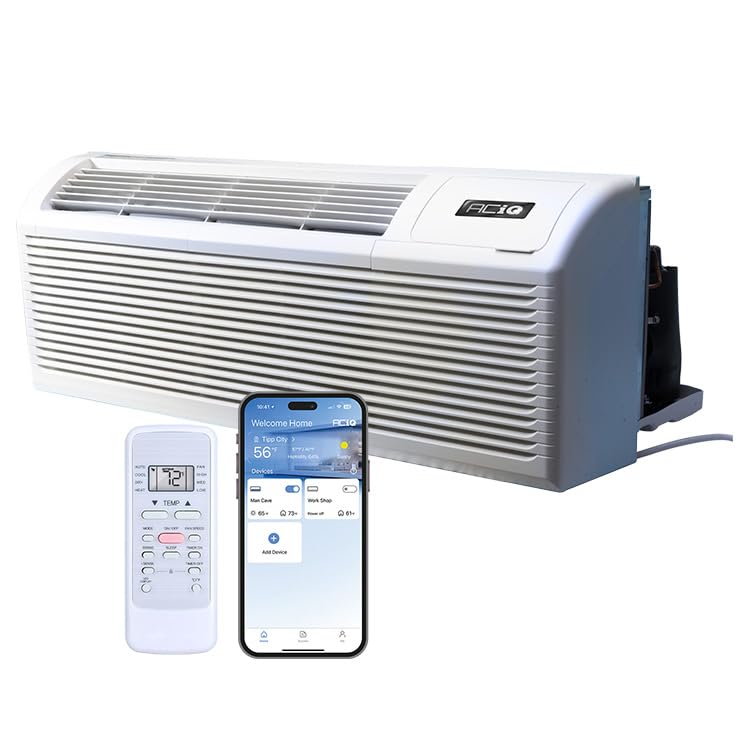
Figure 1: ACiQ ACIQ-07PTC PTAC Unit
Důležité bezpečnostní informace
Always follow basic safety precautions when using electrical appliances to reduce the risk of fire, electric shock, or injury. This unit operates on 208/230V power. Ensure proper grounding and use a dedicated circuit. Do not block air inlets or outlets. Disconnect power before servicing.
Nastavení a instalace
The ACiQ-07PTC PTAC unit is designed for drop-in replacement in standard 42" x 16" wall sleeves. A wall sleeve and grille are not included and must be purchased separately. Ensure the electrical supply is 208/230V with a NEMA 6-15P power receptacle.
Rozměry a umístění
The unit dimensions are approximately 20.94"D x 42.01"W x 15.98"H. Proper placement within a compatible wall sleeve is crucial for optimal performance and safety.

Figure 2: ACiQ PTAC Unit Sizing Diagram
Elektrické požadavky
The unit requires a 208/230V, 15 Amp electrical circuit. A 7 ft power cord with a NEMA 6-15P plug is included. Ensure the receptacle is correctly installed and grounded by a qualified electrician.

Figure 3: Electrical Specifications and Plug Type
Návod k obsluze
Your ACiQ PTAC unit offers multiple operating modes and smart features for optimal comfort.
Ovládací panel a dálkové ovládání
The unit features a sleek LED display and an integrated control panel. A remote control is included for convenient operation. Any 24-volt thermostat is also compatible for external control.

Obrázek 4: Ovládací panel jednotky
Provozní režimy
- Chlazení: Provides cooling for rooms up to 200-300 square feet.
- Topení: Utilizes a heat pump for efficient heating. A 2.5 kW backup electric heat kit activates if the heat pump struggles in extreme cold (around 32°F outdoor temperatures).
- Ventilátor: Cirkuluje vzduch bez ohřevu nebo chlazení.

Figure 5: Operating Modes and Temperature Ranges
Chytré funkce
- Infrared (IR) Sensor: Compatible with 3rd party controllers for enhanced automation.
- Automatické restartování: The unit automatically restarts with your most recent settings after a power outage.
- Vestavěná WiFi: Control the unit seamlessly via the ACiQ app for customized comfort from your smartphone.

Figure 6: Auto Restart Feature

Figure 7: ACiQ App for Smart Control
Údržba
Regular maintenance ensures optimal performance and longevity of your ACiQ PTAC unit.
Čištění vzduchových filtrů
The unit comes with two washable air filters. Clean them regularly to maintain air quality and unit efficiency. Refer to the filter access diagram for removal and reinstallation.

Figure 8: Removing Air Filter for Cleaning
Generální úklid
Otřete vnější část jednotky měkkým, damp cloth. Do not use abrasive cleaners or solvents. Ensure the drain kit is clear of obstructions for proper condensate drainage.
Odstraňování problémů
Tato část obsahuje řešení běžných problémů, se kterými se můžete setkat.
| Problém | Možná příčina | Řešení |
|---|---|---|
| Jednotka se nezapne | No power, circuit breaker tripped, power cord unplugged. | Check power supply, reset breaker, ensure cord is securely plugged in. |
| Nedostatečné chlazení/topení | Dirty air filters, blocked air vents, incorrect temperature setting, room size exceeds capacity. | Clean filters, clear vents, adjust temperature, ensure unit is appropriate for room size (200-300 sq ft). |
| Neobvyklý hluk | Loose parts, foreign object in fan, unit not level. | Inspect unit for loose components, remove any obstructions, ensure unit is level. If noise persists, contact support. |
Specifikace
| Funkce | Detail |
|---|---|
| Číslo modelu | ACIQ-07PTC |
| Chladicí kapacita | 13 500 BTU (0.58 tuny) |
| Topný výkon | 2.5 kW Backup Electric Heat |
| EER (Cooling) | 13.1 |
| Oblast pokrytí | 200-300 čtverečních stop |
| Rozměry produktu (D x Š x V) | 20.94 cm x 42.01 cm x 15.98 cm |
| Elektrický | 208/230V, 15 Amp, 1 Phase, 60Hz |
| Typ zástrčky | NEMA 6-15P |
| Speciální funkce | Infrared Sensor, LED Display, Washable Air Filters, Auto Restart, Built-in WiFi |
| Chladivo | R 410A |
Záruka a podpora
ACiQ provides reliable HVAC solutions. For warranty information and technical support, please refer to the documentation included with your purchase or visit the official ACiQ website. Ensure you register your product to activate your warranty.
For additional assistance, contact a certified ACiQ seller or technical support.
Produktová videa
Olmo Packaged Terminal Air Conditioner Overview
Toto video poskytuje přesview of the Olmo PTAC unit, highlighting its features, BTU capacities (9K, 12K, 15K), EER2 rating, Smart Connect app control, thermostat compatibility, heating capacity, and additional features like Auto Defrost, Dual Fan Speed, Auto Restart, LED Display, and Fresh Air Input. Note: The video mentions Olmo, which is related to ACiQ products.
Ask a question about this manual
Ask about setup, troubleshooting, compatibility, parts, safety, or missing instructions. Manuals+ will review the question and use this page’s manual context to help answer it.