
Amazon Fire TV Soundbar Plus
Uživatelská příručka k Amazon Fire TV Soundbar Plus
Model: Fire TV Soundbar Plus (ASIN: B0D1ZSC62P)
Zavedení
The Amazon Fire TV Soundbar Plus is a 3.1 channel all-in-one soundbar designed to enhance your home audio experience. It features integrated bass, clear dialogue, and supports advanced audio formats like Dolby Atmos and DTS:X, providing immersive sound for movies, music, and more. This manual provides detailed instructions for setting up, operating, maintaining, and troubleshooting your Fire TV Soundbar Plus.

Obrázek 1: Přední strana view of the Fire TV Soundbar Plus, highlighting its key audio technologies.
Nastavení
Obsah balení
Než začnete, ujistěte se, že v krabici jsou všechny položky:
- Fire TV Soundbar Plus
- Dálkové ovládání
- Kabel HDMI 2.0
- Síťový napájecí kabel
- 2 AAA baterie
- Sada pro montáž na zeď
- Rychlý průvodce

Figure 2: Contents included in the Fire TV Soundbar Plus package and product dimensions.
Fyzické umístění
The soundbar measures approximately 6.4 cm (height) x 94 cm (width) x 13.2 cm (depth) and weighs 4 kg. For optimal audio performance, place the soundbar centrally in front of your television. Ensure there are no obstructions in front of the soundbar. The included wall mount kit allows for wall installation if preferred.
Připojení Soundbaru
Follow these steps to connect your Fire TV Soundbar Plus to your television:
- HDMI (eARC/ARC) Connection: Connect one end of the included HDMI 2.0 cable to the HDMI (eARC/ARC) port on the back of the soundbar. Connect the other end to the HDMI eARC/ARC port on your television. This connection ensures optimal audio quality and allows your TV remote to control the soundbar's volume.
- Připojení napájení: Connect the AC power cable to the Power port on the soundbar and then plug it into a wall outlet.
- Optical Connection (Optional): If your TV does not have an HDMI eARC/ARC port, you can use an optical cable (not included) to connect the soundbar to your TV's optical audio output.
- Port USB-A: The USB-A port is typically used for service or firmware updates and is not for general user connection.

Obrázek 3: Zadní view of the soundbar displaying available connection ports.
Počáteční zapnutí
Once connected, the soundbar will typically power on automatically with your TV if using the HDMI eARC/ARC connection. If not, press the Power button on the included remote control.
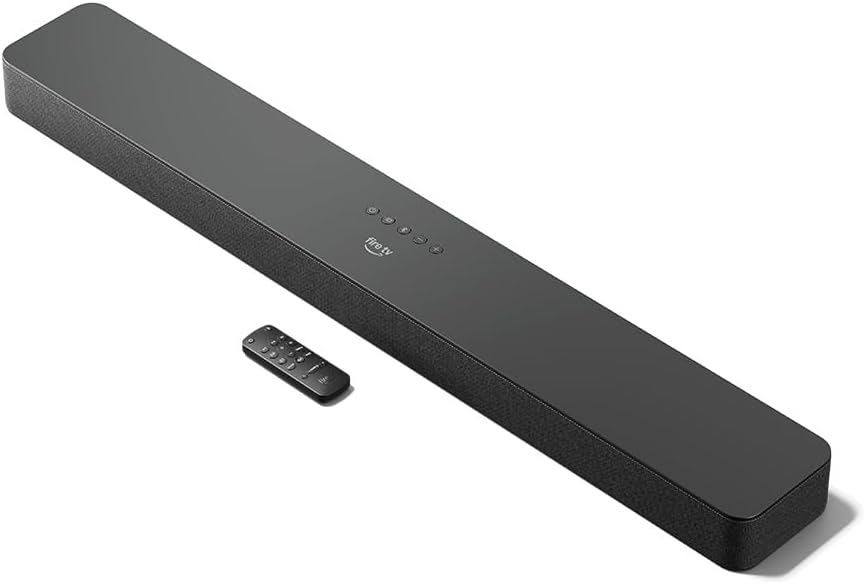
Figure 4: The Fire TV Soundbar Plus and its compact remote control.
Obsluha Soundbaru
Základní ovládací prvky
Use the included remote control to manage your soundbar's functions:
- Vypínač: Zapne nebo vypne soundbar.
- Zvýšení/Snížení hlasitosti: Upravuje hlavní úroveň hlasitosti.
- Tlačítko ztlumení: Vypne nebo vypne zvuk.
- Výběr vstupu: Switches between HDMI, Optical, and Bluetooth inputs.
- Zvukové režimy: Cycles through optimized audio presets.
Zvukové režimy
The Fire TV Soundbar Plus offers several equalizer modes to optimize audio for different content types:
- Režim filmu: Enhances cinematic soundscapes with dynamic range and surround effects.
- Hudební režim: Provides balanced audio for music playback, emphasizing clarity and bass.
- Sportovní režim: Optimizes audio for sports broadcasts, often enhancing commentary and crowd noise.
- Noční režim: Snižuje dynamický rozsah, aby se zabránilo náhlým hlasitým zvukům, ideální pro pozdní noční poslech viewIng.
The soundbar features a dedicated central channel for dialogue, ensuring clear conversations in all modes, especially beneficial for movies and TV shows.

Figure 5: Internal components illustrating the integrated speakers, tweeters, and subwoofer for rich sound.

Figure 6: The soundbar delivering immersive audio with Dolby Atmos and DTS:X in a home environment.
Bluetooth streamování
You can stream audio from your phone or tablet to the Fire TV Soundbar Plus via Bluetooth. To connect:
- Press the Bluetooth button on the remote control or select Bluetooth input.
- On your mobile device, go to Bluetooth settings and select "Fire TV Soundbar Plus" from the list of available devices.
- Po spárování se zvuk z vašeho zařízení bude přehrávat přes soundbar.

Figure 7: Connecting a mobile device via Bluetooth to stream music or podcasts.
Fire TV Integration
For seamless integration with Fire TV devices (sold separately), you can control both your TV and the soundbar with a single remote. Audio settings can be customized directly within the Fire TV interface on selected models.
Údržba
To ensure the longevity and optimal performance of your Fire TV Soundbar Plus, follow these maintenance guidelines:
- Čištění: K čištění povrchu soundbaru použijte měkký, suchý hadřík. Nepoužívejte tekuté čisticí prostředky ani abrazivní materiály, protože by mohly poškodit povrchovou úpravu.
- Větrání: Ujistěte se, že větrací otvory soundbaru nejsou zablokované, abyste zabránili přehřátí.
- Aktualizace softwaru: Periodically check for firmware updates to ensure your soundbar has the latest features and performance improvements. Updates are typically delivered automatically when connected to a Fire TV device or can be performed via USB if available.
Odstraňování problémů
If you encounter issues with your Fire TV Soundbar Plus, refer to the following common problems and solutions:
| Problém | Možná příčina | Řešení |
|---|---|---|
| Žádný zvuk ze soundbaru. |
|
|
| Zvuk je zkreslený nebo nejasný. |
|
|
| Dálkové ovládání nefunguje. |
|
|
| Problémy s párováním Bluetooth. |
|
|
Specifikace
| Funkce | Detail |
|---|---|
| Rozměry soundbaru (DxŠxV) | 94 cm x 13.2 cm x 6.4 cm |
| Hmotnost soundbaru | 4 kg (Actual dimensions and weight may vary based on configuration and manufacturing process) |
| Kanály reproduktorů | 3.1 (integrated subwoofer) |
| Režimy ekvalizéru | Movie, Music, Sport, Night |
| Podpora prostorového zvuku | Dolby Atmos, DTS:X |
| Porty | HDMI (eARC/ARC), Optical, AC Power, USB-A |
| Podpora Bluetooth | Ano |
| Kompatibilita | Chytré televizory a televizory s přehrávači streamovaných médií |
| Zahrnuto v krabici | Fire TV Soundbar Plus, remote control, HDMI 2.0 cable, 1 AC power cable, 2 AAA batteries, wall mount kit, Quick Start Guide |
Záruka a podpora
The Fire TV Soundbar Plus comes with a one-year limited warranty provided by the manufacturer. This limited warranty is in addition to, and does not compromise, consumer rights. Consumers may have additional rights provided by law even after the limited warranty expires. Use of the Fire TV Soundbar Plus is subject to the terms indicated by Amazon.
For further assistance, please refer to the official Amazon support channels or the Quick Start Guide included with your product.
Ask a question about this manual
Ask about setup, troubleshooting, compatibility, parts, safety, or missing instructions. Manuals+ will review the question and use this page’s manual context to help answer it.