
Zavedení
The Yesido YAU41 is a versatile 2-in-1 Bluetooth 5.0 audio adapter designed to function as both a transmitter (TX) and a receiver (RX). It enables wireless audio streaming for a wide range of devices, converting traditional audio systems into Bluetooth-enabled ones. Additionally, it features a built-in TF card reader for direct music playback. This manual provides essential information for proper setup, operation, and maintenance of your YAU41 device.
Konec produktuview
Klíčové vlastnosti:
- Bluetooth 5.0 pro stabilní a efektivní bezdrátové připojení.
- Funkce 2 v 1: Režim vysílače (TX) a přijímače (RX).
- Integrated TF card reader for direct audio playback.
- 3.5mm AUX audio input/output.
- Rechargeable battery with approximately 10 hours of music playback.
- Kompaktní a přenosný design.
- Intuitive TX/RX mode switch button.
Součásti zařízení:
Familiarize yourself with the various parts of your YAU41 audio adapter:
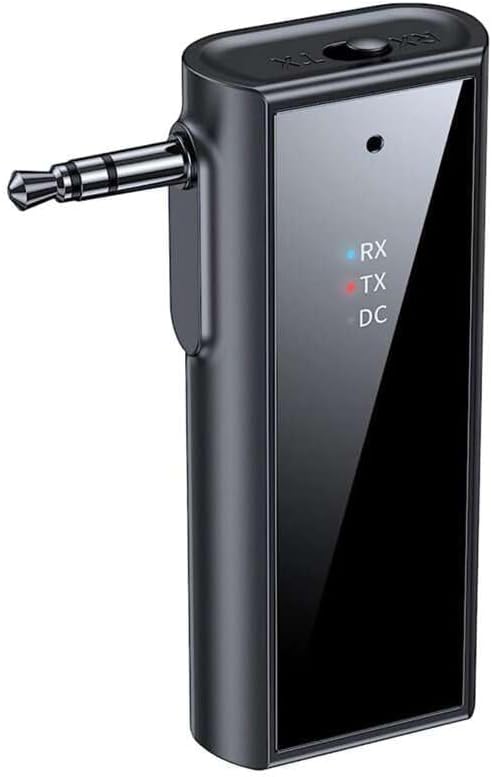
Obrázek: Přední strana view of the Yesido YAU41 Audio Adapter, highlighting the 3.5mm audio jack, mode indicator lights (RX, TX, DC), and the Yesido logo.
- 3.5mm audio jack: For connecting to audio sources (TX mode) or speakers (RX mode).
- TX/RX Switch Button: Přepíná mezi režimy vysílače a přijímače.
- Power Button/Multi-function Button: Powers the device on/off, plays/pauses music, answers/ends calls.
- Tlačítko pro zvýšení hlasitosti/následující skladbu: Zvyšuje hlasitost nebo přeskočí na další skladbu.
- Tlačítko pro snížení hlasitosti/předchozí skladba: Sníží hlasitost nebo přejde na předchozí skladbu.
- Slot na kartu TF: For inserting a TF (MicroSD) card for direct music playback.
- Nabíjecí port USB-C: Pro nabíjení zařízení.
- Indicator Lights (RX, TX, DC):
- RX (Blue): Indicates Receiver mode is active.
- TX (Red): Indicates Transmitter mode is active.
- DC (Green): Indikuje stav nabíjení.
Nastavení
1. Počáteční nabití:
Before first use, fully charge the YAU41 adapter. Connect the provided USB-C charging cable to the device's USB-C port and the other end to a standard USB power adapter (not included) or a computer USB port. The DC indicator light will illuminate during charging and turn off when fully charged.
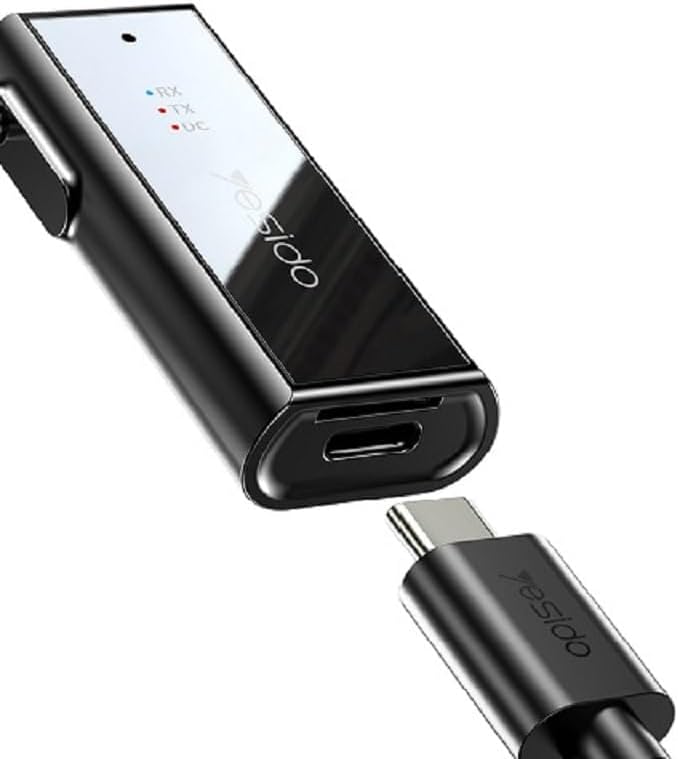
Image: The Yesido YAU41 Audio Adapter being charged via its USB-C port.
2. Zapnutí/vypnutí:
- Zapnutí: Press and hold the Power button for approximately 3 seconds until the indicator lights flash.
- Vypnutí: Press and hold the Power button for approximately 3 seconds until the indicator lights turn off.
Provozní režimy
Režim vysílače (TX):
In TX mode, the YAU41 transmits audio from a non-Bluetooth device (e.g., TV, computer, MP3 player) to a Bluetooth-enabled receiving device (e.g., Bluetooth headphones, Bluetooth speaker).
- Ensure the YAU41 is powered on.
- Slide the TX/RX switch to the TX position. The red TX indicator light will illuminate.
- Connect the YAU41's 3.5mm audio jack to the audio output port of your non-Bluetooth device using the provided 3.5mm audio cable.
- Place your Bluetooth receiving device (headphones/speaker) into pairing mode.
- The YAU41 will automatically search for and connect to nearby Bluetooth receiving devices. Once connected, the TX indicator light may change its blinking pattern or remain solid.
- Play audio on your non-Bluetooth device. The sound should now be transmitted to your Bluetooth headphones/speaker.
Režim přijímače (RX):
In RX mode, the YAU41 receives audio from a Bluetooth-enabled device (e.g., smartphone, tablet) and outputs it to a non-Bluetooth audio system (e.g., car stereo, home stereo, wired headphones).
- Ensure the YAU41 is powered on.
- Slide the TX/RX switch to the RX position. The blue RX indicator light will illuminate and flash, indicating it's in pairing mode.
- Connect the YAU41's 3.5mm audio jack to the audio input port (e.g., AUX-in) of your non-Bluetooth audio system using the provided 3.5mm audio cable.
- On your Bluetooth-enabled device (e.g., smartphone), enable Bluetooth and search for available devices. Select "YAU41" from the list to pair.
- Once successfully paired, the blue RX indicator light will remain solid.
- Play audio on your Bluetooth-enabled device. The sound will now be output through your connected audio system.

Image: The Yesido YAU41 Audio Adapter in a car, demonstrating its use with a TF card for direct music playback.
Přehrávání TF karty:
The YAU41 supports direct audio playback from a TF (MicroSD) card.
- Vložte TF kartu se zvukem files (e.g., MP3) into the TF card slot on the YAU41.
- The device will automatically switch to TF card playback mode.
- Use the Volume Up/Next Track and Volume Down/Previous Track buttons to control playback.
- The Power/Multi-function button can be used to play/pause.
- Ensure the YAU41 is connected to an audio output device (e.g., speaker in RX mode) to hear the audio.
Nabíjení
When the battery is low, the indicator light may flash or a voice prompt may be heard. To charge the device:
- Connect the YAU41 to a USB power source using the provided USB-C cable.
- The DC indicator light will turn on during charging.
- Once fully charged, the DC indicator light will turn off.
- A full charge typically takes approximately 1-2 hours and provides up to 10 hours of music playback.
Údržba
- Uchovávejte zařízení v suchu. Nevystavujte jej vlhkosti ani kapalinám.
- Zařízení čistěte měkkým, suchým hadříkem. Nepoužívejte agresivní chemikálie ani abrazivní čisticí prostředky.
- Přístroj skladujte na chladném a suchém místě mimo dosah přímého slunečního záření a extrémních teplot.
- Zabraňte pádu zařízení nebo jeho vystavení silným nárazům.
- Nepokoušejte se zařízení rozebírat ani upravovat, mohlo by dojít ke ztrátě záruky a poškození.
Odstraňování problémů
| Problém | Možné řešení |
|---|---|
| Zařízení se nezapne. | Ensure the device is fully charged. Press and hold the Power button for 3-5 seconds. |
| Cannot pair in TX/RX mode. |
|
| Žádný zvukový výstup/vstup. |
|
| Zpoždění/lag zvuku. | Bluetooth audio transmission can sometimes introduce minor latency. This device uses Bluetooth 5.0, which minimizes this, but some applications (e.g., live music performance) may still experience noticeable delay. Ensure no obstacles are between devices. |
Specifikace
| Funkce | Detail |
|---|---|
| Model | YAU41 |
| Verze Bluetooth | 5.0 |
| Provozní režimy | Vysílač (TX), přijímač (RX) |
| Konektivita | Bluetooth, 3.5 mm AUX |
| Podpora TF karet | Ano (MicroSD) |
| Přenosová vzdálenost | Až 10 metrů (33 stop) |
| Typ baterie | Rechargeable Lithium Ion/Polymer |
| Doba přehrávání hudby | Přibližně 10 hodiny |
| Nabíjecí port | USB-C |
| Kontrolní metoda | Tlačítka |
| Materiál | PC (polykarbonát) |
| Hmotnost | 300 gramů |
| Barva | Černý |
| Kompatibilní zařízení | TV, Radio, Speaker, Smartphone, Car Audio Systems |
Bezpečnostní informace
- Nevystavujte zařízení extrémním teplotám, přímému slunečnímu záření ani otevřenému ohni.
- Avoid using the device in dusty or dirty environments.
- Udržujte zařízení mimo dosah silných magnetických polí.
- Do not use unauthorized chargers or cables, as this may damage the device or pose a safety risk.
- Zařízení a jeho baterii zlikvidujte zodpovědně v souladu s místními předpisy.
Záruka a podpora
Informace o záruce a technickou podporu naleznete v dokumentaci dodané s vaším nákupem nebo se obraťte přímo na výrobce. Uschovejte si doklad o koupi pro případ reklamace.