
1. Úvod
This manual provides detailed instructions for the installation, operation, and maintenance of your CNBINGO 2-Gang 2-Way Touch Switch. Please read this manual thoroughly before installation and use to ensure safe and correct operation.
The CNBINGO 2-Gang 2-Way Touch Switch is designed to control a light from two different locations. It features a touch-sensitive glass panel and an LED status indicator.
2. Bezpečnostní informace
VAROVÁNÍ: Electrical installation should only be performed by a qualified electrician. Always turn off the main power supply at the circuit breaker before performing any electrical work.
- Před instalací nebo údržbou se ujistěte, že je odpojeno napájení.
- Do not touch the internal circuit board before installing the glass panel. This can prevent proper function.
- This switch is not a dimmer switch and is not compatible with smart home systems like Alexa or Google Home.
- This is a 2-way switch for controlling a single light from two locations. It is not a Wi-Fi switch.
- The glass panel is fire-resistant, scratch-resistant, and shock-resistant. It is safe to touch even with wet hands.
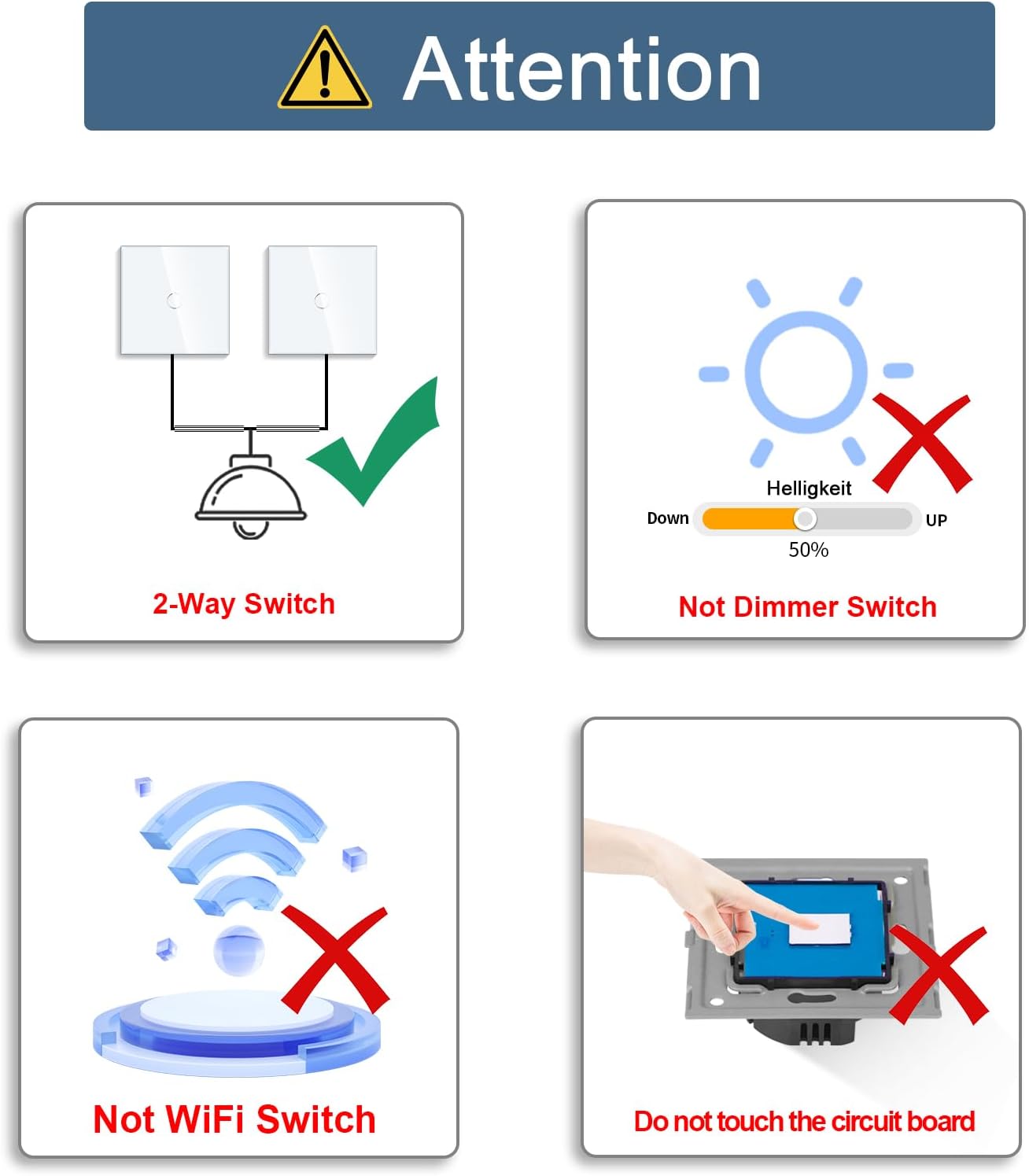
Image: Important safety and functional notes for the CNBINGO touch switch. It highlights that it is a 2-way switch, not a dimmer, not a Wi-Fi switch, and warns against touching the circuit board before glass panel installation.
3. Nastavení a instalace
3.1. Kontroly před instalací
- Verify that your existing wiring supports a 2-way switch configuration.
- Ensure the wall box has a depth of at least 25mm and a diameter of 60mm for proper fitting.
- No neutral wire is required for installation.

Image: Diagram showing the product dimensions (86mm x 86mm, 26mm depth) and illustrating compatible wall box types with a minimum depth of 30mm and 60mm diameter.
3.2. Schéma zapojení
For 2-way switching, a communication wire must be connected between the two switches. Follow the diagram below carefully.
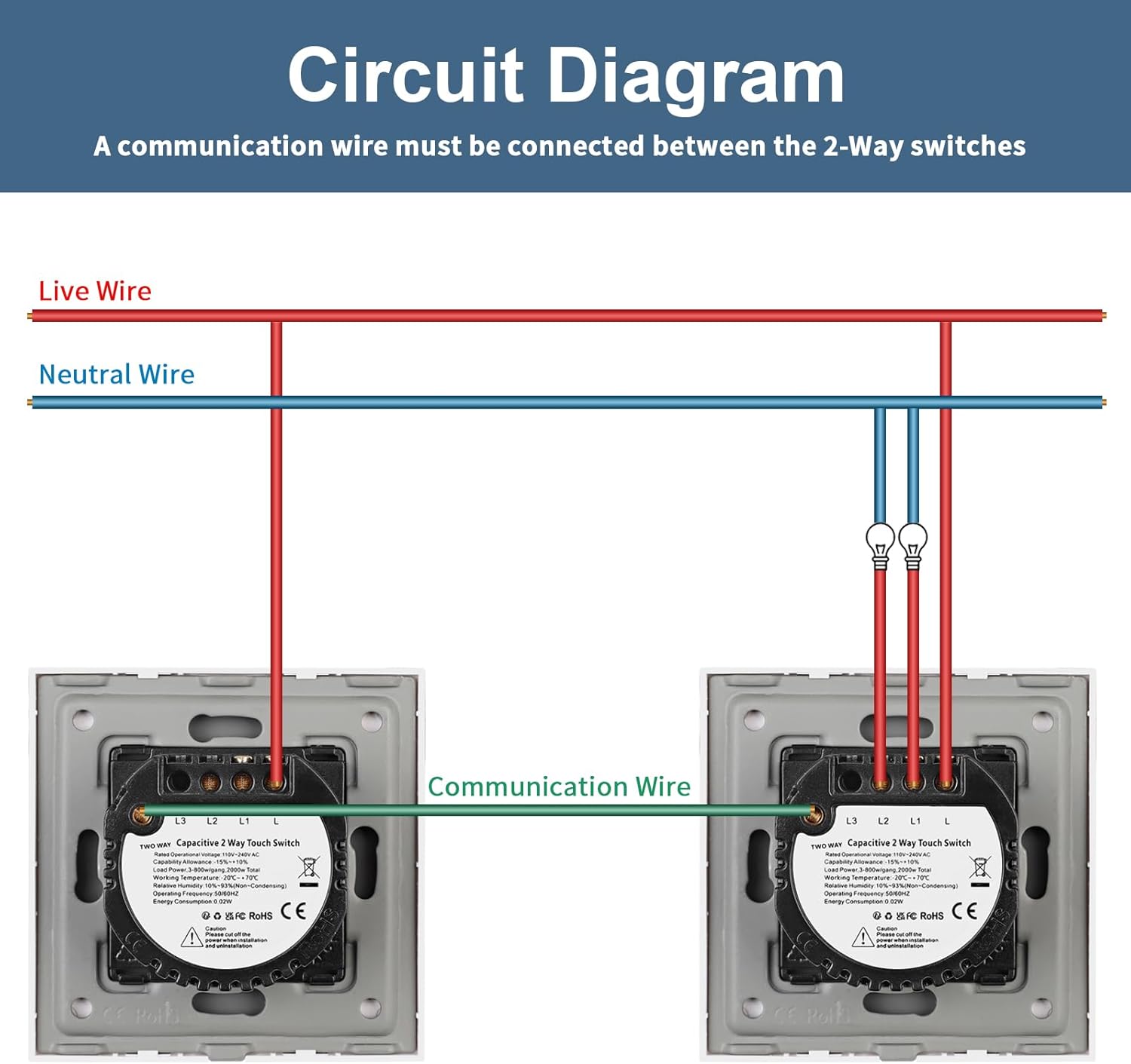
Image: Detailed wiring diagram for a 2-way touch switch setup, showing connections for Live Wire, Neutral Wire, and the Communication Wire between two switches to control a single light.
3.3. Kroky instalace
- Odpojit napájení: Turn off the main power supply at your circuit breaker before starting.
- Připojit dráty: Connect the Live, Neutral, and Communication wires to the corresponding terminals on the switch module as shown in the wiring diagram. Ensure all connections are secure.
- Mount Switch Module: Carefully place the switch module into the wall box and secure it with screws.
- Attach Glass Panel: Align the glass panel with the switch module and press firmly until it clicks into place. Důležité: Do not touch the touch button on the switch module before the glass panel is installed.
- Obnovit napájení: Znovu zapněte hlavní zdroj napájení.


Image: Visual guide for installing the switch, showing the wiring process and how to securely attach the glass panel to the switch module.
4. Provoz
4.1. Basic On/Off Function
To turn the light on or off, simply touch the corresponding button on the glass panel. The touch system responds quickly, within 40 milliseconds.

Image: A hand touching the CNBINGO 2-way touch switch to control a light in a bedroom, demonstrating its functionality.
4.2. 2-Way Switching
This switch supports 2-way control. After a prolonged press on the button of one switch to pair it with another switch of the same series, a single light can be controlled from two different locations.

Image: A schematic diagram showing two switches connected to control one light, representing the 2-way switching capability.
4.3. LED indikátor stavu
Each button on the switch is equipped with a backlight. A strong or weak blue light indicates the ON/OFF status of the light. This indicator is visible in the dark but is designed not to disturb sleep.

Image: Close-up of the touch switch showing the LED backlight indicating ON/OFF status, with an inset image of the touch sensor microchip.
5. Údržba
- Čištění: The glass panel can be cleaned with a soft, damp hadříkem. Nepoužívejte abrazivní čisticí prostředky ani rozpouštědla, která by mohla poškodit povrch.
- Inspekce: Periodically check the switch for any signs of damage or loose connections. If any issues are found, disconnect power and consult a qualified electrician.
6. Řešení problémů
| Problém | Možná příčina | Řešení |
|---|---|---|
| Switch does not respond or light does not turn on/off. |
|
|
| LED indicator is not working. | Vadná LED dioda nebo vnitřní součástka. | Požádejte o pomoc zákaznickou podporu. |
| Switch is not pairing for 2-way control. | Incorrect pairing procedure or incompatible switches. | Ensure both switches are of the same series and follow the prolonged press pairing procedure as described in the operation section. |
7. Specifikace
| Funkce | Detail |
|---|---|
| Značka | CNBINGO |
| Číslo modelu | M1-202B |
| Rozměry produktu (D x Š x V) | 8.6 x 8.6 x 3.6 cm |
| Hmotnost | 400 gramů |
| Barva | Černý |
| Materiál | Sklo |
| Typ napájení | AC |
| svtage | 240 voltů (AC) |
| Aktuální hodnocení | 10 A |
| Počet položek | 2 (balení po 2 kusech) |
| Typ přepínače | Dotek |
| Typ montáže | Držák na zeď |
| Styl přepínání | 2-Way Switch (Va-et-vient) |
| Osvědčení | IP67 |
| Provozní režim | ON-OFF-ON |
| Typ kontaktu | Normálně otevřeno |
| Typ konektoru | Šroub |
8. Záruka a podpora
For warranty information or technical support, please refer to the documentation included with your purchase or contact CNBINGO customer service directly. Keep your purchase receipt as proof of purchase.
CNBINGO is committed to providing high-quality products and reliable service.