
1. Úvod
Děkuji za nákupasing the Soundmaster MCD5600 Stereo System. This versatile audio system combines classic and modern audio technologies, including a record player, DAB+ and FM radio, double cassette deck, CD player, USB playback, and Bluetooth connectivity. It also features a digitization function to convert your analog media to MP3 files on a USB drive. This manual provides essential information for safe operation, setup, and maintenance of your device. Please read it thoroughly before use and retain it for future reference.
2. Bezpečnostní pokyny
- Zdroj napájení: Ujistěte se, že napájecí zdroj odpovídá objtage specified on the unit. Disconnect from the power outlet during lightning storms or when unused for long periods.
- Větrání: Neblokujte žádné větrací otvory. Ponechte kolem jednotky dostatečný prostor pro správné proudění vzduchu, abyste zabránili přehřátí.
- Voda a vlhkost: Nevystavujte přístroj dešti, vlhkosti, kapající ani stříkající vodě. Na přístroj nestavte předměty naplněné tekutinami, například vázy.
- Teplo: Udržujte jednotku mimo dosah zdrojů tepla, jako jsou radiátory, topná tělesa, sporáky nebo jiná zařízení (včetně amplifikátory), které produkují teplo.
- Čištění: Čistěte pouze suchým hadříkem. Nepoužívejte tekuté čističe nebo aerosolové čističe.
- Servis: Nepokoušejte se tento výrobek opravit sami. Veškerý servis svěřte kvalifikovanému servisnímu personálu.
- Umístění: Umístěte jednotku na stabilní, rovný povrch, aby nedošlo k jejímu pádu.
3. Obsah balení
Při vybalení prosím zkontrolujte, zda jsou všechny položky přítomny:
- Soundmaster MCD5600 Main Unit
- 2 externí reproduktory
- Dálkové ovládání
- Návod k použití (tento dokument)
- FM/DAB+ Antenna
- Napájecí kabel
4. Konec produktuview
Familiarize yourself with the main components and controls of your stereo system.
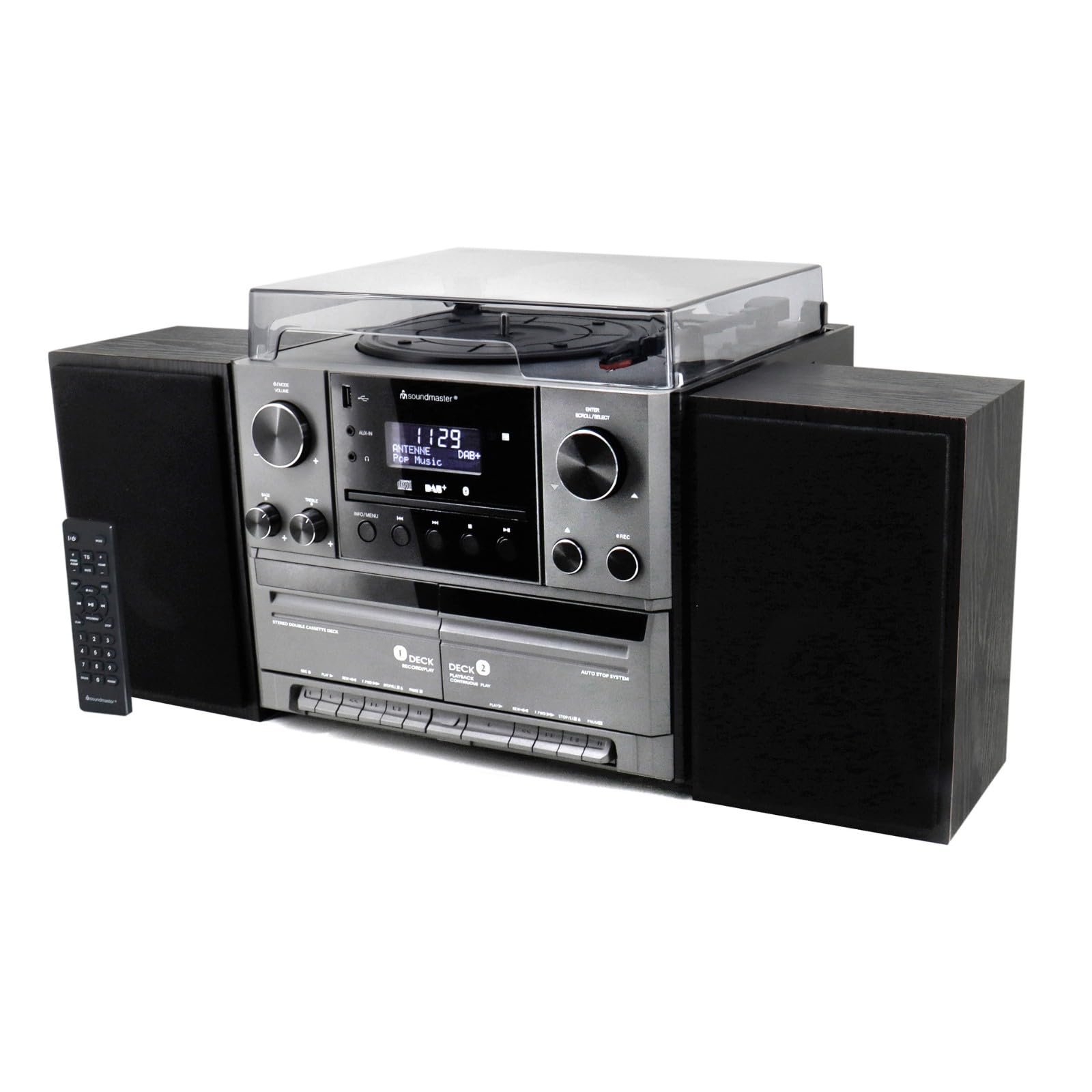
Obrázek 4.1: Přední view of the Soundmaster MCD5600 stereo system, showing the main unit flanked by two speakers, with the remote control positioned to the left. The display, control knobs, and various media inputs are visible.

Obrázek 4.2: Přední view of the Soundmaster MCD5600 stereo system with the CD tray open and a cassette tape inserted into one of the two cassette decks. This image highlights the multi-media capabilities of the unit.
5. Nastavení
5.1 Připojení reproduktorů
Connect the included speakers to the speaker terminals on the rear of the main unit. Ensure correct polarity (red to red, black to black) for optimal sound quality. Place speakers equidistant from the listening position for the best stereo effect.
5.2 Připojení antény
Connect the supplied 75 Ohm antenna to the FM/DAB+ antenna input on the rear panel. Extend the antenna fully and position it for the best possible radio reception.
5.3 Připojení napájení
Plug the power cable into the AC inlet on the rear of the unit, then connect the other end to a standard wall outlet.
6. Návod k obsluze
6.1 Obecné ovládací prvky
- Vypínač: Stiskněte pro zapnutí nebo vypnutí jednotky.
- Knoflík hlasitosti: Rotate to adjust the overall sound volume.
- Tlačítko Zdroj/Funkce: Press repeatedly to cycle through available audio sources (CD, Phono, Tape, FM, DAB+, Bluetooth, USB).
- Zobrazit: Shows current mode, track information, radio frequency, and time.
6.2 Ovládání CD přehrávače
- Stiskněte tlačítko CD source button.
- Stiskněte tlačítko OTEVŘÍT/ZAVŘÍT tlačítko pro otevření přihrádky na CD.
- Place a CD (CD/CD-MP3/CD-R/CD-RW/WMA compatible) with the label side up into the tray.
- Stiskněte OTEVŘÍT/ZAVŘÍT znovu zavřete přihrádku. Přístroj načte disk.
- Stiskněte PLAY/PAUSE pro spuštění nebo pozastavení přehrávání.
- Použití PŘESKOČIT VPŘED/ZPĚT tlačítka pro procházení stop.
- The NAPROGRAMOVAT a OPAKOVAT functions allow for customized playback sequences and continuous repetition.
6.3 Record Player Operation
- Stiskněte tlačítko FONO source button.
- Select the appropriate speed (33, 45, or 78 RPM) using the speed selector switch based on your record type.
- Place a record on the turntable platter. For 45 RPM singles, use the included adapter.
- Carefully lift the tonearm using the cueing lever and position it over the desired track on the record.
- Lower the tonearm gently onto the record. Playback will begin automatically.
- At the end of the record, lift the tonearm and return it to its rest.
6.4 Obsluha kazetového přehrávače
The unit features two cassette decks: Deck 1 (Record/Play) and Deck 2 (Continuous Play).
- Stiskněte tlačítko PÁSKA source button.
- Stiskněte tlačítko STOP/EJECT button on the desired deck to open the cassette door.
- Insert a cassette tape with the open edge facing upwards. Close the door.
- Stiskněte HRÁT pro spuštění přehrávání.
- Použití RYCHLE VPŘED a ZPĚT tlačítka pro navigaci na pásce.
- To record, ensure Deck 1 is selected, insert a blank tape, select your desired input source (e.g., Phono, CD, Radio), and press the ZÁZNAM tlačítko.
6.5 Radio (FM/DAB+) Operation
- Stiskněte tlačítko FM or DAB+ source button.
- For FM radio, use the LADĚNÍ knob or buttons to manually tune or auto-scan for stations.
- For DAB+ radio, the unit will automatically scan for available digital stations. Use the SCROLL/SELECT knob to browse and select stations.
- Chcete-li uložit stanici jako předvolbu, přečtěte si konkrétní pokyny v úplném manuálu pro váš model.
6.6 Provoz Bluetooth
- Stiskněte tlačítko BLUETOOTH source button. The display will show "PAIRING" or similar.
- Povolte Bluetooth na externím zařízení (chytrý telefon, tablet atd.).
- Hledat "MCD5600" (or similar device name) in your device's Bluetooth settings and select it to pair.
- Once paired, you can play audio from your device through the stereo system.
6.7 Přehrávání z USB
- Vložte USB flash disk do USB portu na předním panelu.
- Stiskněte tlačítko USB source button.
- The unit will read the contents of the USB drive. Use the navigation buttons to browse folders and select MP3 files pro přehrávání.
6.8 Digitization (Encoding)
The MCD5600 allows you to convert audio from vinyl records, cassette tapes, or radio broadcasts directly to MP3 files na připojeném USB disku.
- Vložte USB flash disk do USB portu.
- Select the desired audio source (Phono, Tape, FM, DAB+).
- Start playback of your chosen source (e.g., start a record, play a cassette, tune to a radio station).
- Stiskněte tlačítko ZÁZNAM button on the main unit. The display will indicate recording is in progress.
- Stiskněte ZASTÁVKA when you wish to end the recording. The audio will be saved as an MP3 file na vašem USB disku.
7. Údržba
- Čištění jednotky: Wipe the exterior surfaces with a soft, dry, lint-free cloth. Do not use abrasive cleaners or solvents.
- Record Player Stylus: Periodically check the stylus for dust and debris. Clean gently with a soft brush designed for styli, brushing from back to front. Replace the stylus if sound quality deteriorates significantly.
- Cassette Heads: After extended use, clean the cassette heads, pinch rollers, and capstans with a cotton swab lightly dampzakončené isopropylalkoholem.
- Objektiv CD: Avoid touching the CD lens. If cleaning is necessary, use a specialized CD lens cleaner disc.
8. Řešení problémů
| Problém | Možná příčina | Řešení |
|---|---|---|
| Žádná síla | Napájecí kabel není připojen; Vadná zásuvka | Zkontrolujte připojení napájecího kabelu; zkuste jinou zásuvku |
| Žádný zvuk | Příliš nízká hlasitost; Vybrán nesprávný zdroj; Reproduktory nejsou připojeny | Zvyšte hlasitost; Vyberte správný zdroj; Zkontrolujte připojení reproduktorů |
| CD přeskakuje nebo se nepřehrává | CD dirty or scratched; CD inserted incorrectly | Clean CD; Insert CD label-side up |
| Špatný příjem rádia | Anténa není vysunutá nebo správně umístěná | Extend and reposition antenna; Try auto-scan for DAB+ |
| Párování Bluetooth se nezdařilo | Device too far; Bluetooth not enabled on external device | Move device closer; Ensure Bluetooth is enabled and in pairing mode |
9. Specifikace
- Číslo modelu: MCD5600SW
- Značka: Soundmaster
- Barva: Černý
- CD přehrávač: CD, CD-MP3, CD-R, CD-RW, WMA compatible; Program/Repeat functions
- Gramofon: 33/45/78 RPM speeds
- Kazetový pult: Double cassette (Deck 1: Record/Play, Deck 2: Continuous Play)
- Rádio: FM-PLL with preset stations, DAB+ Digital Radio (75 Ohm antenna connection)
- Konektivita: USB port, Bluetooth
- Speciální vlastnosti: Digitization (CD, cassette, radio to USB-MP3 encoding)
10. Informace o záruce
This Soundmaster MCD5600 Stereo System comes with a manufacturer's warranty. Spare parts availability is guaranteed for 1 year from the date of purchase. For detailed warranty terms and conditions, please refer to the warranty card included with your product or contact your retailer. Keep your proof of purchase for any warranty claims.
11. Podpora
If you encounter any issues not covered in the troubleshooting section or require further assistance, please contact your retailer or the Soundmaster customer support. Contact details can typically be found on the manufacturer's webna webu nebo v obalu vašeho produktu.