
DCH CS-KSB002VX
DCH 3500mAh RB201 Battery Replacement User Manual
Model: CS-KSB002VX
1. Úvod
This manual provides essential information for the safe and effective use of your DCH 3500mAh RB201 replacement battery. This battery is designed as a direct replacement for various Hoover robotic vacuum cleaner models, ensuring your device continues to operate efficiently.
2. Bezpečnostní informace a varování
Please read and understand all safety instructions before using this battery. Failure to follow these instructions may result in fire, electric shock, explosion, or other hazards.
- Nerozebírejte: Nepokoušejte se bateriový blok rozebírat, otevírat ani opravovat.
- Vyhněte se fyzickému poškození: Do not crush, puncture, or short external contacts.
- Ovládání teploty: Do not dispose of in fire or water. Do not store above 60°C (140°F).
- Počáteční poplatek: New battery packs must be fully charged before first use to ensure optimal performance and longevity.
- Risk of Fire/Burns: To reduce the risk of fire or burns, always follow the instructions provided in your device's operating guide when using this battery.
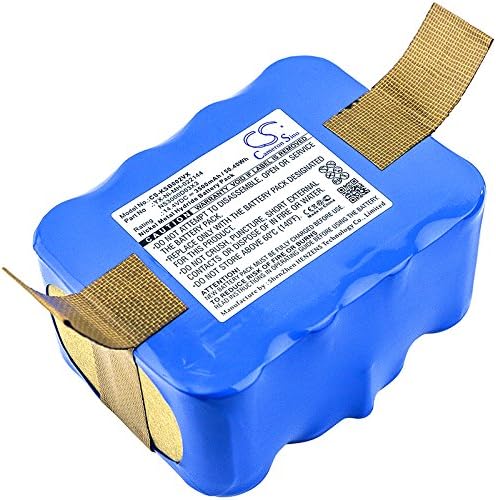
Obrázek: Nahoře view of the DCH RB201 replacement battery, highlighting the product label with important safety warnings and specifications.
3. Specifikace produktu
| Specifikace | Hodnota |
|---|---|
| Číslo dílu baterie | RB201, 35601254 |
| Typ baterie | Ni-MH (nikl-metal hydrid) |
| Kapacita | 3500 XNUMX mAh |
| Watt-Hours (WH) | 50.4 Wh |
| svtage | 14.4V |
| Rozměry (D x Š x V) | 90.06 x 69.53 x 45.45mm (3.55 x 2.74 x 1.79 palce) |
| Hmotnost | 789.0 g (1.74 liber) |
| Číslo modelu | CS-KSB002VX |
| Výrobce | DCH |
4. Kompatibilní modely
This DCH RB201 replacement battery is compatible with the following Hoover robotic vacuum cleaner models:
- RBC006011
- RBC003
- RBC012
- RBC009001
- RBC011011
- RBC007B
- RBC004B011
- RBC009013
- RBC002011
Note: Always verify your device's model number and the original battery's part number to ensure compatibility before purchase and installation.
5. Nastavení a instalace
Follow these general steps to install the replacement battery. Refer to your Hoover robotic vacuum cleaner's original user manual for specific instructions regarding battery compartment access and removal/installation procedures.
- Vypínací zařízení: Ensure your robotic vacuum cleaner is completely powered off and unplugged from any charging base or power source.
- Najděte přihrádku na baterie: Identify the battery compartment on your vacuum cleaner. This is typically located on the underside of the device.
- Vyjměte starou baterii: Carefully open the battery compartment cover (you may need a screwdriver). Disconnect the old battery and remove it.
- Vložení nové baterie: Connect the DCH RB201 replacement battery, ensuring the connectors are properly aligned. Place the new battery into the compartment.
- Bezpečná přihrádka: Zavřete kryt přihrádky na baterie a zajistěte jej.
- Počáteční poplatek: Place the vacuum cleaner on its charging base or connect it to its power adapter. Allow the battery to fully charge before its first use. This initial charge is crucial for battery calibration and longevity.

Obrázek: Boční view of the DCH RB201 battery, illustrating the contact points for proper installation into the device.
6. Provoz baterie
Once installed, the battery operates as the power source for your robotic vacuum cleaner. The vacuum cleaner's charging system will manage the charging and discharging cycles.
- Nabíjení: Always charge the battery using the original charging base or power adapter provided with your Hoover robotic vacuum cleaner.
- Vybíjení: Allow the vacuum cleaner to operate until the battery is low or depleted, as indicated by the device's indicators.
- Pravidelné používání: For optimal battery health, it is recommended to use your robotic vacuum cleaner regularly.
7. Údržba a skladování
Proper maintenance and storage can significantly extend the lifespan of your Ni-MH battery.
- Pravidelné nabíjení: Avoid leaving the battery completely discharged for extended periods. Recharge it promptly after use.
- Teplota: Store the battery in a cool, dry place, away from direct sunlight and extreme temperatures. The ideal storage temperature is between 0°C and 25°C (32°F and 77°F). Do not store above 60°C (140°F).
- Dlouhodobé skladování: If storing the battery for an extended period (more than a month), charge it to about 50-70% capacity and recharge it every 3-6 months to prevent deep discharge.
- Čištění: Udržujte kontakty baterie čisté a bez prachu a nečistot. V případě potřeby je otřete suchým hadříkem.

Obrázek: Úhlový view of the DCH RB201 battery, providing a comprehensive look at its form factor and label.
8. Řešení problémů
If you encounter issues with your DCH RB201 replacement battery, consider the following common troubleshooting steps:
- Baterie se nenabíjí:
- Ensure the battery is correctly installed and the contacts are clean.
- Verify that the charging base or power adapter is functioning correctly and receiving power.
- Check for any obstructions or debris on the charging contacts of both the vacuum and the charging base.
- Krátká doba běhu:
- Před použitím se ujistěte, že je baterie plně nabitá.
- The battery may require several full charge/discharge cycles to reach its optimal capacity.
- Verify that the vacuum cleaner's filters and brushes are clean, as excessive resistance can drain the battery faster.
- Zařízení se nezapíná:
- Confirm the battery is securely connected and fully charged.
- Check the device's power button and other controls.
If problems persist after following these steps, please refer to the support section.
9. Podpora a kontaktní informace
For any questions, concerns, or assistance regarding your DCH RB201 replacement battery, please feel free to contact us. We are committed to providing professional pre-sales and after-sales service to ensure your satisfaction.
Konkrétní kontaktní údaje naleznete v dokumentaci k nákupu nebo v informacích o prodejci.
Ask a question about this manual
Ask about setup, troubleshooting, compatibility, parts, safety, or missing instructions. Manuals+ will review the question and use this page’s manual context to help answer it.