Turtle Beach TBK-2002-01-US

Uživatelská příručka k magnetické mechanické herní klávesnici Turtle Beach Vulcan II TKL Pro RGB

Model: TBK-2002-01-US

Zavedení

This manual provides detailed instructions for the setup, operation, and maintenance of your Turtle Beach Vulcan II TKL Pro Magnetic Mechanical RGB Gaming Keyboard. This keyboard is designed for high-performance gaming and offers extensive customization options through its analog Hall-Effect switches and accompanying software.
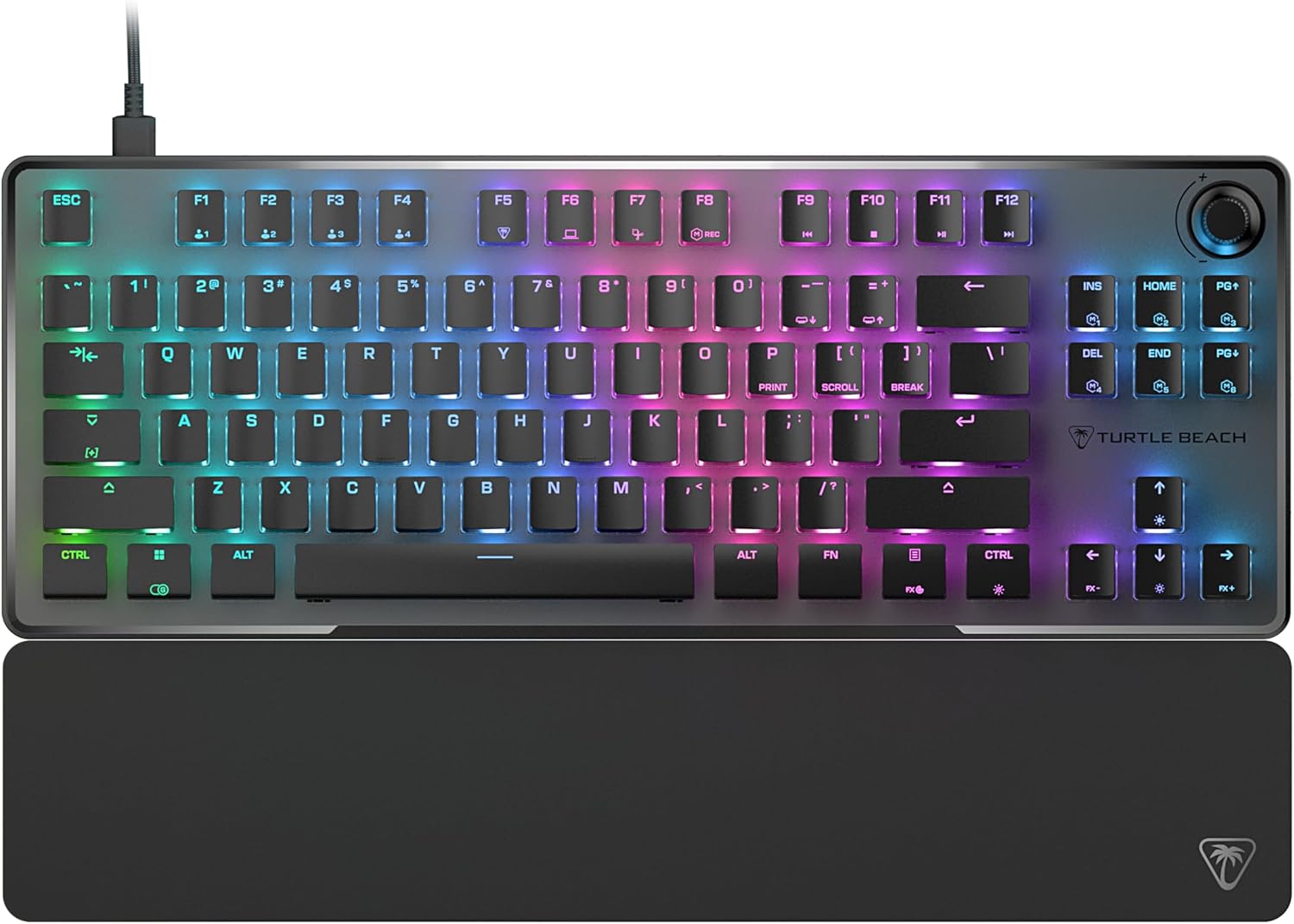
Shora dolů view of the Turtle Beach Vulcan II TKL Pro keyboard with RGB lighting and detachable palm rest.

Image: The Turtle Beach Vulcan II TKL Pro keyboard, showcasing its tenkeyless design, RGB lighting, and included palm rest.

Obsah balení

Ověřte prosím, zda jsou v balení produktu přítomny všechny položky:

  • Klávesnice Turtle Beach Vulcan II TKL Pro
  • Kabel USB-C na USB-A
  • Opěrka rukou
  • Rychlý průvodce
Diagram showing the keyboard, USB cable, and palm rest as package contents.

Image: Visual representation of the items included in the Vulcan II TKL Pro package: the keyboard, USB-C to USB-A cable, and palm rest.

Nastavení

  1. Připojení klávesnice: Insert the USB-C end of the provided cable into the port on the back of the Vulcan II TKL Pro keyboard. Connect the USB-A end to an available USB port on your PC or laptop.
  2. Attach the Palm Rest: Align the palm rest with the front edge of the keyboard and attach it for ergonomic support during use.
  3. Instalace softwaru Swarm II: For full customization and access to advanced features, download and install the Turtle Beach Swarm II desktop software from the official Turtle Beach website. This software allows you to adjust RGB lighting, key actuation points, assign macros, and more.
  4. Počáteční konfigurace: Once the software is installed, launch it to configure your keyboard settings, including lighting effects, key assignments, and actuation preferences.

Klíčové vlastnosti a ovládání

Analogové Hallovy magnetické spínače

The Vulcan II TKL Pro features ultra-responsive magnetic switches, pre-lubed for smooth key presses and rated for a 150 million click lifecycle. This Hall-Effect technology enables advanced features such as Rapid Trigger and adjustable multi-point actuation.

Diagram illustrating the internal components of an Analog Hall-Effect Magnetic Switch.

Image: A cutaway diagram of the Analog Hall-Effect Magnetic Switch, showing the magnetic sensor and the mechanism that allows for precise actuation detection.

Rapid Trigger Performance

The Rapid Trigger setting eliminates downtime between key presses, allowing for continuous and repeated key actuation with minimal finger lifting. This feature enhances movement control, responsiveness, and aiming speed in games.

Diagram comparing fixed vs. dynamic active/reset points for key actuation, highlighting Rapid Trigger.

Image: A comparison diagram showing how Rapid Trigger allows for dynamic active/reset points (0.1mm to 4.0mm) on the Vulcan II TKL Pro, unlike regular keyboards with fixed points, enabling faster repeated inputs.

Per Key Sensitivity Adjustment

Adjust the actuation point of each key individually or globally, from 0.1mm to 4mm. Shorter travel provides faster response for quick actions, while longer travel allows for more deliberate and precise control. Each key supports 40 preset heights and up to three inputs per key, configurable via the keyboard or Swarm II software.

Diagram showing adjustable actuation points from 0.1mm to 4.0mm for a key switch.

Image: A detailed diagram illustrating the adjustable actuation range of the key switches, from 0.1mm to 4.0mm, allowing for customized sensitivity.

Inteligentní RGB osvětlení AIMO

AIMO lighting technology provides smooth and vibrant RGB lighting effects with double the refresh rate of standard gaming keyboards. It can sync with other compatible AIMO-enabled products. Per-key RGB customization is available, and five on-board profiles allow saving custom lighting effects and key reassignments.

Keyboard and mouse with synchronized AIMO RGB lighting.

Image: The Vulcan II TKL Pro keyboard and a compatible gaming mouse displaying synchronized, vibrant AIMO Intelligent RGB lighting effects.

Pokročilé přizpůsobení se softwarem Swarm II

The Swarm II desktop software is essential for unlocking the full potential of your keyboard. It allows for comprehensive adjustments including RGB lighting, assigning up to three different inputs per key, adjusting key actuation points, enabling Rapid Trigger, and recording/assigning macro functions. It also supports controller emulator features for analog stick and trigger control in games.

Screenshot of the Swarm II software interface on a monitor, showing keyboard customization options.

Image: A monitor displaying the Turtle Beach Swarm II software interface, demonstrating the extensive customization options available for the Vulcan II TKL Pro keyboard.

Kopírka tlačítek Easy-Shift [+]

This technology adds a secondary function to compatible keys. By holding down a designated modifier key, you can instantly access a second layer of commands, which is fully customizable within the Swarm II software.

Keyboard key highlighted to show Easy-Shift [+] functionality.

Image: A close-up of the keyboard with a key highlighted, illustrating the Easy-Shift [+] feature that allows for a secondary function on compatible keys.

Pokročilý Anti-Ghosting

Optimized for gamers, the advanced anti-ghosting technology ensures that every keystroke is reliably registered, even when multiple keys are pressed simultaneously, preventing missed inputs during intense gaming sessions.

Kompatibilní s klávesami třetích stran

The Vulcan II TKL Pro comes with T-shaped ABS keycaps and is designed to be fully compatible with third-party keycaps, allowing users to further customize their keyboard's aesthetic and feel.

Bezklíčový tvarový faktor

The compact tenkeyless (TKL) design removes the numeric keypad, providing more desk space for mouse movement and allowing for a more natural and comfortable playing position, which can improve aiming accuracy in games.

Kolečko hlasitosti pro ztlumení

A built-in dial allows for convenient on-the-fly control of master volume. Simply push the dial to quickly mute or unmute audio.

Odolný design

The keyboard features a sand-blasted anodized aluminum top plate for structural integrity and resistance to wear and tear. The double kickstand design provides stable positioning, and the included soft palm rest ensures comfort during extended use.

Údržba

  • Čištění: Use a soft, dry cloth to wipe down the keyboard surface. For deeper cleaning, gently remove keycaps (if comfortable) and use compressed air to clear debris from beneath. Avoid using harsh chemicals or abrasive materials.
  • Péče o kabely: Ensure the USB cable is not excessively bent or kinked to prevent damage.
  • Skladování: Pokud klávesnici delší dobu nepoužíváte, skladujte ji v čistém a suchém prostředí mimo dosah extrémních teplot.

Odstraňování problémů

ProblémMožné řešení
Klávesnice nereaguje
  • Ujistěte se, že je kabel USB bezpečně připojen k klávesnici i k počítači.
  • Zkuste připojit klávesnici k jinému USB portu.
  • Restartujte počítač.
RGB osvětlení nefunguje nebo je nesprávné
  • Ensure the Swarm II software is installed and running.
  • Check lighting settings within the Swarm II software.
  • Update the keyboard firmware via Swarm II.
Klávesy se neregistrují nebo se píší dvakrát
  • Clean around the affected key with compressed air.
  • Adjust the actuation point for the specific key in Swarm II.
  • Ensure the latest drivers and firmware are installed.
Swarm II software not detecting keyboard
  • Reinstall the Swarm II software.
  • Ujistěte se, že máte aktuální operační systém.
  • Dočasně deaktivujte veškerý antivirový software nebo firewall, který by mohl rušit práci.

Specifikace

FunkceDetail
Číslo modeluTBK-2002-01-US
KonektivitaUSB-A (kabelové)
Typ přepínačeAnalogové Hallovy magnetické spínače
Akční bodNastavitelná od 0.1 mm do 4.0 mm
Keycap Compatibility3rd Party Keycap Compatible (T-shaped ABS keycaps)
OsvětleníAIMO Intelligent RGB (Per-key customizable)
Form FactorTenkeyless (TKL)
Palubní profesionálfiles5
Hmotnost1.38 libry (přibližně 0.62 kg)
Rozměry (DxŠxV)14.41 x 8.58 x 1.26 palců (přibližně 36.6 x 21.8 x 3.2 cm)
Zdroj napájeníUSB Powered

Záruka a podpora

For detailed warranty information and technical support, please refer to the Quick Start Guide included with your product or visit the official Turtle Beach support webwebu. Pro aktivaci záruky může být vyžadována registrace produktu.

Online podpora: www.turtlebeach.com/pages/support

© 2024 Turtle Beach. Všechna práva vyhrazena.

Související dokumenty - TBK-2002-01-US

Předview Stručný návod k obsluze mechanické herní klávesnice Turtle Beach Vulcan II
Stručný návod k mechanické herní klávesnici Turtle Beach Vulcan II s podrobným popisem jejích funkcí, specifikací, obsahu balení a pokynů k nastavení v několika jazycích.
Předview Turtle Beach Ear Force X32 Wireless Amplified Stereo Gaming Headset User Guide
Comprehensive user guide for the Turtle Beach Ear Force X32 Wireless Amplified Stereo Gaming Headset, covering package contents, headset and transmitter setup, Xbox 360 integration, pairing instructions, troubleshooting, technical specifications, safety information, and warranty details.
Předview Stručný průvodce hrou Turtle Beach Stealth 700 Gen 2 pro PlayStation
Get started quickly with the Turtle Beach Stealth 700 Gen 2 wireless gaming headset for PlayStation. This guide covers setup, pairing, charging, and key features for an optimal gaming experience.
Předview Universal User Manual for Consumer Electronics and Instruments
This comprehensive user manual provides essential information for the TBK series of consumer electronics and instruments, including models TBK-958Z and TBK-958ZP. It covers detailed safety warnings, operating instructions, technical specifications, maintenance guidelines, troubleshooting tips, and EU compliance information from Shenzhen Bagul Technology Co., Ltd.
Předview TBK-208 Вакуумный пресс, автоклав, сепаратор (3 v 1) - Инструкция по эксплуатации
Полное руководство пользователя для TBK-208 — многофункционального устройства, одлябщедина вакуумный пресс, автоклав a сепаратор. Инструкции по ламинированию a удалению пузырей для ремонта экранов смартфонов.
Předview Uživatelská příručka k mini laserovému značkovacímu stroji TBK-958B
Komplexní uživatelská příručka pro mini laserový značkovací stroj TBK-958B s podrobným popisem produktu, schématem, parametry, kroky obsluhy a řešením problémů.

Ask a question about this manual

Ask about setup, troubleshooting, compatibility, parts, safety, or missing instructions. Manuals+ will review the question and use this page’s manual context to help answer it.