
CIGMAN CNV00
Uživatelská příručka k brýlím s nočním viděním CIGMAN 4K CNV00
Model: CNV00 | Brand: CIGMAN
Zavedení
Thank you for choosing the CIGMAN 4K Night Vision Goggles. This device is engineered to provide superior clarity and extended visibility in low-light and complete darkness conditions, making it ideal for various outdoor activities such as hunting, wildlife observation, and security monitoring. This manual will guide you through the setup, operation, and maintenance of your new night vision goggles to ensure optimal performance and longevity.
Obsah balení
Ověřte prosím, zda jsou ve vašem balení obsaženy všechny níže uvedené položky:
- 1 x Night Vision Binoculars
- 1 x popruh na krk
- 1 x kabel typu C
- 1 x 32GB TF karta
- 1 x hadřík na čištění čoček
- 1 x látkový vak
- 1 x přenosná taška
- 1 x Kompas
- 1 x Uživatelská příručka

Klíčové vlastnosti
- Superior Clarity: Capture sharp, detailed images with a 58MP photo sensor that delivers Full HD resolution, day or night. The versatile video resolutions (4K, 1080P, 720P) cater to a range of practical needs, while the 5x digital zoom allows for enhanced detail in both photos and videos.

Image: The 3.99-inch large display screen highlighting 4K Ultra HD video and 58MP image capture capabilities. 
Image: Visual comparison demonstrating increased image clarity and detail from 10MP to 58MP resolution. 
Image: Graphic illustrating the effect of 5X digital zoom, bringing distant objects into clearer view. - Rozšířený rozsah: Powered by a starlight-level sensor and a high-intensity infrared spotlight, the CNV00 night vision goggles offer crisp, clear visibility up to 1968ft/600m, even in low-light environments. With the largest 3.99" high-definition display available on the market and an impressive f/1.0 aperture, it guarantees exceptional light capture for unparalleled clarity.

Image: Night vision goggles mounted on a tripod, demonstrating clear visibility of sheep in total darkness up to 1968ft/600m. 
Obrázek: Rozložený view diagram of the night vision lens system, highlighting components for Ultra HD 4K clarity and light capture. - Versatile Multi-functionality: This night vision scope is designed for a wide range of applications, featuring a built-in tactical light for illumination and outdoor rescue operations. It also includes an integrated microphone and speaker for smooth recording and playback, along with a dedicated backlight button for easy use during nighttime activities. With 3 adjustable IR levels, you can tailor the infrared light intensity for optimal visibility, even in complete darkness.

Image: The night vision goggles with their built-in flashlight illuminated, placed next to a compass on a map, demonstrating utility for navigation and illumination. 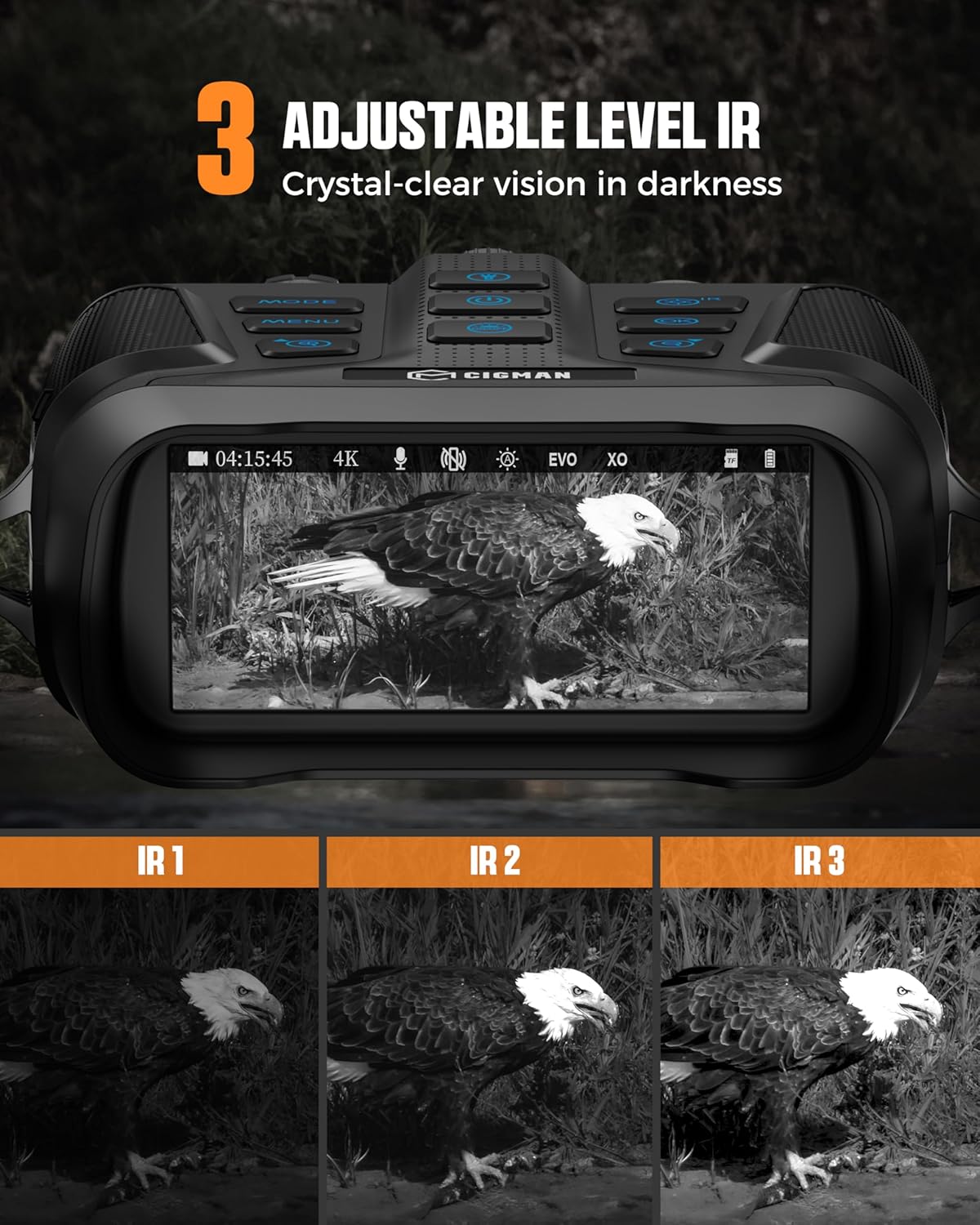
Image: Display showing the effect of three adjustable infrared (IR) levels on night vision clarity, from IR 1 to IR 3. - Adaptabilita na životní prostředí: With an IP65 rating, these night vision goggles are durable and reliable in wet conditions, perfect for outdoor adventures and tactical operations. Tripod compatibility provides extra stability for extended use, while their portability makes them ideal for camping, hiking, and wildlife observation.

Image: The night vision goggles covered in water droplets, illustrating their IP65 protection level for use in rainy environments.
Průvodce nastavením
1. Nabíjení baterie
The CIGMAN Night Vision Goggles are equipped with a powerful 5000mAh built-in lithium battery. Before first use, ensure the device is fully charged using the provided Type-C cable. Connect the cable to the device's Type-C port and a suitable power source. The charging indicator will show the charging status.

2. Vložení TF karty
A 32GB TF (MicroSD) card is included for storing photos and videos. Locate the TF card slot on the device, insert the card gently until it clicks into place. Ensure the card is inserted correctly to avoid damage.
3. Připevnění popruhu na krk
Attach the provided neck strap to the designated attachment points on the goggles. This will help prevent accidental drops and provide comfort during extended use.
4. Počáteční zapnutí a nastavení zaostření
Press and hold the Power On/Off button to turn on the device. Once powered on, adjust the Focus Ring on the lenses to achieve a clear image. Turn the ring towards 'FAR' for distant objects and 'NEAR' for closer objects.

Návod k obsluze
Ovládání je ukončenoview

Seznamte se s tlačítky a jejich funkcemi:
- Zapnutí/vypnutí: Dlouhým stisknutím zařízení zapnete nebo vypnete.
- Menu (M): Vstupte do hlavní nabídky pro nastavení a možnosti.
- Tlačítko OK: Potvrďte výběry v nabídce.
- Zoom In/Up: Increase digital zoom or navigate up in menus.
- Zoom Out/Down: Decrease digital zoom or navigate down in menus.
- Tactical Light Switch (TL): Activate the built-in tactical flashlight.
- Infrared Light Switch (IR): Adjust the infrared illumination levels.
- Přepínač podsvícení: Turn on/off the backlight for buttons for use in dark conditions.
Fotografování a natáčení videa
Zachycení médií:
- Stiskněte tlačítko Režim button to switch between Photo, Video, and Playback modes.
- V režimu Foto nebo Video stiskněte OK button to capture an image or start/stop video recording.
- Využijte Zoom In/Up a Zoom Out/Down buttons to adjust the 5x digital zoom for closer views.
Adjusting Infrared (IR) Levels
The device features 3 adjustable IR levels to optimize visibility in varying degrees of darkness:
- Stiskněte tlačítko IR button to cycle through the 3 infrared intensity levels.
- Select the level that provides the clearest image without overexposure.
Speciální funkce
- Časově omezená fotografie: Set intervals (2s, 5s, 10s) for automatic photo capture. Access this setting via the Menu.
- Souvislé fotografování: Capture multiple images in quick succession.
- Anti-Shake: This feature helps stabilize images and videos, reducing blur from hand movements.

File Transfer and Playback
Na review or transfer your media:
- In Playback mode, use the navigation buttons to browse through your captured photos and videos.
- Connect the device to a computer using the Type-C cable to transfer files. The device will appear as a removable storage device.

Údržba
Čištění
Regular cleaning ensures optimal performance:
- Use the provided lens cleaning cloth to gently wipe the lenses. Avoid using abrasive materials or harsh chemicals.
- Wipe the body of the goggles with a soft, damp tkanina.
Skladování
When not in use, store the goggles in the portable bag in a cool, dry place, away from direct sunlight and extreme temperatures.
Voděodolnost
The device has an IP65 rating, meaning it is protected against dust and low-pressure water jets. While it can withstand wet conditions, avoid submerging it in water.
Odstraňování problémů
If you encounter any issues with your CIGMAN Night Vision Goggles, please refer to the following common problems and solutions:
- Zařízení se nezapíná: Ensure the battery is fully charged. If the issue persists, try connecting to a power source and attempting to power on.
- Rozmazaný obraz: Adjust the focus ring on the lenses. Ensure the lenses are clean and free from smudges or debris.
- Špatný výkon nočního vidění: Check the IR level settings and increase if necessary. Ensure there are no obstructions blocking the IR illuminator.
- Nelze nahrávat ani ukládat files: Verify that the TF card is correctly inserted and has sufficient free space. The card may need to be formatted (refer to menu settings for formatting option).
For further assistance, please contact CIGMAN customer support.
Specifikace
| Funkce | Specifikace |
|---|---|
| Značka | CIGMAN |
| Model | 00 CNV |
| Rozměry balení | 10.28 x 8.23 x 4.02 palce |
| Hmotnost položky | 3.8 libry |
| Speciální funkce | High Magnification, Night Vision, Built-In Flash, Image Stabilization |
| Typ montáže | Držák na stativ |
| Binocular Prism Description | Porro Prism |
| Úroveň odolnosti proti vodě | Vodotěsný (IP65) |
| Baterie | 5000 mAh vestavěná lithiová baterie |
| Noc Viewing Range | Až do 1968ft / 600m |
| Clona objektivu | f/1.0 |
| Velikost obrazovky | 3.99 palců |
| Podpora paměťových karet | Max 512GB (32GB included) |
Bezpečnostní informace
Přečtěte si a dodržujte následující bezpečnostní pokyny:
- Do not look directly at strong light sources (e.g., sun, laser) through the device, as this can cause permanent eye damage.
- Chraňte zařízení před extrémními teplotami, vlhkostí a prachem.
- Nepokoušejte se zařízení rozebírat ani opravovat sami. Obraťte se na kvalifikovaný servisní personál.
- Uchovávejte mimo dosah dětí.
Záruka a podpora
CIGMAN products come with a standard manufacturer's warranty. For detailed warranty information, product support, or service inquiries, please visit the official CIGMAN webnebo se obraťte na jejich zákaznický servis. Uschovejte si doklad o koupi pro případ reklamace.
Ask a question about this manual
Ask about setup, troubleshooting, compatibility, parts, safety, or missing instructions. Manuals+ will review the question and use this page’s manual context to help answer it.