1. Úvod
This manual provides detailed instructions for the setup, operation, and maintenance of your Cheerlux C50 Projector. Please read this manual thoroughly before using the product to ensure proper function and to prevent damage.
The Cheerlux C50 is a high-performance projector featuring Android 9.0, Wi-Fi 5.0G, Bluetooth 5.1, autofocus, and 4P keystone correction. It offers a brightness of 4000 Lumens and a contrast ratio of 2500:1, delivering a full HD 1920x1080 resolution display.
2. Bezpečnostní informace
- Do not block the ventilation openings of the projector. Ensure adequate space around the device for proper airflow.
- Nedívejte se přímo do objektivu projektoru, když je lamp je zapnutý, protože jasné světlo může způsobit poškození očí.
- Neumisťujte projektor na nestabilní povrchy.
- Chraňte projektor před vodou, vlhkostí a extrémními teplotami.
- Používejte pouze napájecí adaptér dodaný s projektorem.
- Nepokoušejte se projektor rozebírat ani opravovat sami. Požádejte o pomoc kvalifikovaný servisní personál.
- Uchovávejte mimo dosah dětí.
3. Obsah balení
Ověřte, zda jsou v balení přítomny všechny položky:
- Projektor Cheerlux C50
- Dálkové ovládání
- Zástrčka
- AV signálový kabel
- Uživatelská příručka (tento dokument)
- Support Base (1x)
- Objektiv čistící hadřík
- VGA kabel
- Čisticí sada
4. Konec produktuview
Seznamte se s komponenty a porty projektoru.
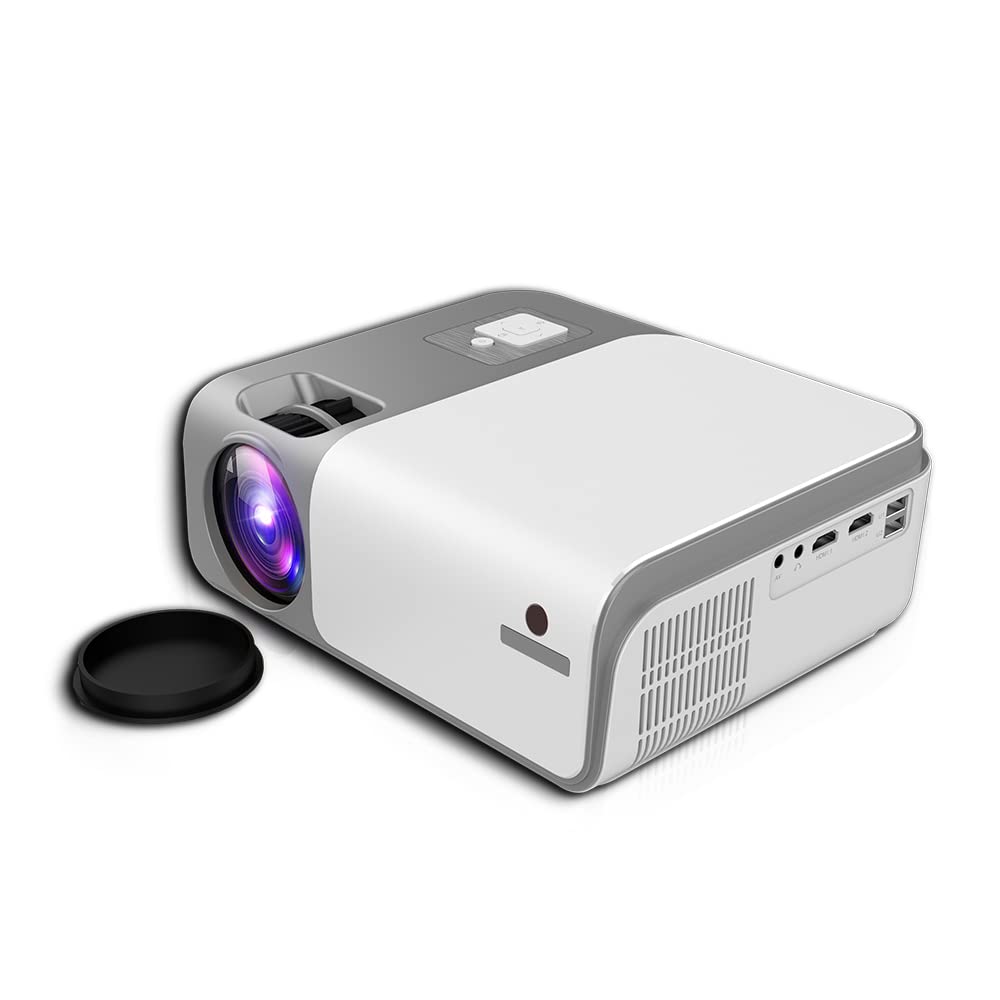
Obrázek 4.1: Přední a boční view of the Cheerlux C50 Projector. This image shows the projector's lens, ventilation grilles, and various input ports on the side, including USB and HDMI.

Obrázek 4.2: The Cheerlux C50 Projector demonstrating screen mirroring with a smartphone. A wireless signal icon indicates the mirroring function, allowing content from a mobile device to be displayed on the projector.
Vstupní/výstupní porty:
- 2x USB Sockets: Pro připojení USB disků nebo jiných USB zařízení.
- 2x HDMI Sockets: For connecting HDMI-enabled devices like laptops, gaming consoles, or media players.
- 1x Composite AV Socket: For connecting older devices using AV cables.
- Zásuvka pro sluchátka: Pro připojení externích audio zařízení nebo sluchátek.
5. Nastavení
5.1 Umístění
Position the projector on a stable, flat surface or mount it securely. Ensure the projector lens is perpendicular to the projection surface for optimal image quality.
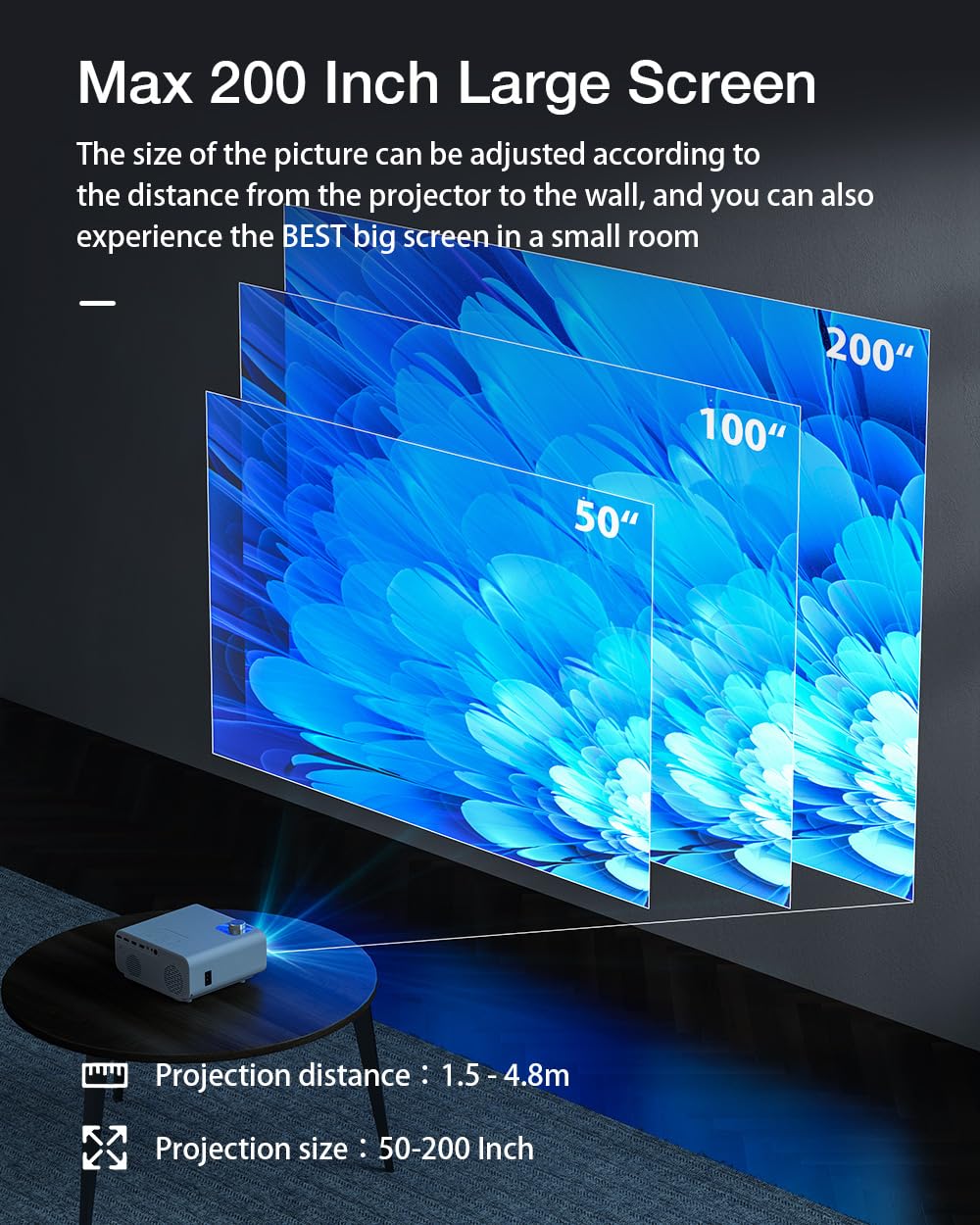
Obrázek 5.1: Projection distance and screen size guide. The projector can achieve a screen size of 50 to 200 inches with a projection distance ranging from 1 to 8 meters (approximately 3.3 to 26.2 feet).
- Projekční vzdálenost: 1–8 metry (3.3–26.2 stop)
- Velikost promítaného obrázku: 50 - 200 palce
- Poměr stran: 16:9
5.2 Připojení napájení
- Připojte napájecí kabel ke vstupnímu portu projektoru.
- Zapojte druhý konec napájecího kabelu do vhodné elektrické zásuvky.
- Kontrolka napájení na projektoru by se měla rozsvítit.
5.3 Zaostření a korekce lichoběžníkového zkreslení
- Automatické zaostření: The Cheerlux C50 features an autofocus function. The projector will automatically adjust the image clarity upon startup or movement.
- Korekce lichoběžníkového zkreslení 4P: If the projected image appears distorted (trapezoidal), use the 4P keystone correction feature to adjust each corner of the image independently until it forms a perfect rectangle. This is particularly useful when the projector is not perfectly aligned with the screen. Refer to the on-screen menu for keystone adjustment options.
6. Návod k obsluze
6.1 Zapnutí/vypnutí
- Zapnutí: Press the power button on the projector or the remote control. The projector will start up and display the Android 9.0 home screen.
- Vypnout: Press the power button again. A shutdown confirmation prompt may appear. Select "Power Off" to safely shut down the projector.
Operační systém Android 6.2 9.0
The Cheerlux C50 Projector runs on Android 9.0, providing access to a smart interface and various applications.

Obrázek 6.1: The Android 9.0 operating system interface on the Cheerlux C50 Projector. The screen shows various streaming and social media application icons, indicating smart functionality.
- Navigace: Pro navigaci v rozhraní systému Android použijte dálkové ovládání.
- Aplikace: Access pre-installed applications or download new ones from the app store (if available) to watch videos, browse the internet, and more.
- Nastavení: Adjust system settings, network connections, display options, and other preferences through the settings menu.
6.3 Zrcadlení obrazovky
The projector supports screen mirroring from compatible smartphones and tablets.
- Ensure both your mobile device and the projector are connected to the same Wi-Fi network.
- On the projector's Android interface, select the "Mirroring" or "Screen Share" application.
- On your mobile device, activate its screen mirroring feature (e.g., "Smart View" on Samsung, "Screen Cast" on Android, "AirPlay" on iOS).
- Select the projector's name from the list of available devices on your mobile device.
- The mobile device's screen content will now be displayed on the projector.
7. Konektivita
7.1 Wi-Fi připojení
Connect the projector to a wireless network to access online content and enable screen mirroring.
- Go to the projector's "Settings" menu.
- Vyberte „Síť a internet“ nebo „Wi-Fi“.
- Zapněte Wi-Fi a vyberte ze seznamu požadovanou síť.
- Pokud se zobrazí výzva, zadejte heslo k Wi-Fi a připojte se.
7.2 Připojení Bluetooth
Connect Bluetooth speakers, headphones, or other compatible devices for audio output.
- Go to the projector's "Settings" menu.
- Select "Connected Devices" or "Bluetooth".
- Turn on Bluetooth and put your Bluetooth device into pairing mode.
- Vyberte zařízení ze seznamu dostupných zařízení na projektoru a spárujte ho.
7.3 Kabelové připojení (HDMI, USB, AV)
- HDMI: Connect an HDMI cable from your source device (e.g., laptop, gaming console) to one of the projector's HDMI ports. Select the corresponding HDMI input source from the projector's input menu.
- USB: Insert a USB flash drive or external hard drive into a USB port. The projector's media player will typically detect the device, allowing you to browse and play media files.
- AV: Connect an AV cable from your source device to the projector's AV input. Select the AV input source from the projector's input menu.
8. Údržba
- Čištění objektivu: Use the provided lens cleaning cloth or a soft, lint-free cloth to gently wipe the projector lens. Do not use abrasive cleaners or solvents.
- Odstranění prachu: Regularly clean the projector's ventilation openings with a soft brush or compressed air to prevent dust buildup, which can affect performance and lifespan.
- Skladování: Pokud projektor delší dobu nepoužíváte, skladujte jej na chladném a suchém místě, chráněném před prachem a přímým slunečním zářením.
9. Řešení problémů
- Bez napájení:
- Ensure the power cable is securely connected to both the projector and a working power outlet. Check if the power indicator light is on.
- Bez obrázku:
- Verify that the correct input source (HDMI, AV, USB) is selected. Check cable connections. Ensure the lens cap is removed.
- Rozmazaný obrázek:
- Allow the autofocus to adjust. If still blurry, manually adjust focus if an option is available, or ensure the projector is within the recommended projection distance.
- Zkreslený obraz (lichoběžník):
- Use the 4P keystone correction feature in the projector's settings menu to adjust the image corners.
- Žádný zvuk:
- Check the volume settings on both the projector and the source device. Ensure external speakers or headphones are properly connected if used. Verify that the correct audio output is selected in settings.
- Problémy se zrcadlením obrazovky:
- Ensure both devices are on the same Wi-Fi network. Restart both the projector and the mobile device. Check for compatibility issues with your mobile device's mirroring protocol.
10. Specifikace
| Značka | Obecný |
| Název modelu | Cheerlux C50 |
| Operační systém | Android 9.0 |
| Jas | 4000 XNUMX lumenů |
| Kontrastní poměr | 2500:1 |
| Nativní rozlišení | 1920 x 1080 pixelů (Full HD) |
| Typ zobrazení | LED |
| Poměr stran | 16:9 |
| Projekční vzdálenost | 1 - 8 metrů |
| Projected Image Size | 50 - 200 palce |
| Technologie připojení | Wi-Fi 5.0G, Bluetooth 5.1 |
| Hardwarové rozhraní | 2x HDMI, 2x USB, 1x Composite AV, Headphone Socket |
| Speciální funkce | Autofocus, 4P Keystone Correction, Screen Mirroring, Built-In Wi-Fi |
| Kompatibilní zařízení | Gaming Console, Smartphone, Laptop, TV, Speakers |
| Rozměry produktu | 260 × 210 × 102 mm (21 × 26 × 10 cm) |
| Hmotnost položky | 1 kg |
| Wattage | 150 wattů |
| Obnovovací frekvence | 480 MHz |
11. Záruka a podpora
Informace o záruce a technickou podporu naleznete v dokumentaci dodané při nákupu nebo se obraťte na svého prodejce. Uschovejte si doklad o koupi pro případné reklamace.