
Anpviz IPC-D3243W-S
Anpviz 4MP PoE IP Camera User Manual
Model: IPC-D3243W-S
Zavedení
This manual provides detailed instructions for the installation, operation, and maintenance of your Anpviz 4MP PoE IP Camera. Please read this manual thoroughly before using the product to ensure proper setup and functionality. This camera is designed for both indoor and outdoor surveillance, offering advanced features such as AI human motion detection, smart dual light color night vision, and a built-in microphone.
Co je v krabici
Ověřte, zda jsou v balení přítomny všechny komponenty:
- 1x PoE Camera
- 1x Uživatelská příručka
- 1x výstražná nálepka
- 1x Voděodolné víko
- Šrouby

Image: Contents of the Anpviz 4MP PoE IP Camera package, showing the camera, user manual, waterproof lid, mounting screws, and a warning sticker.
Konec produktuview
The Anpviz 4MP PoE IP Camera is a turret-style security camera designed for robust performance in various environments. It features a durable full metal housing and is IP66 waterproof, making it suitable for both indoor and outdoor use.
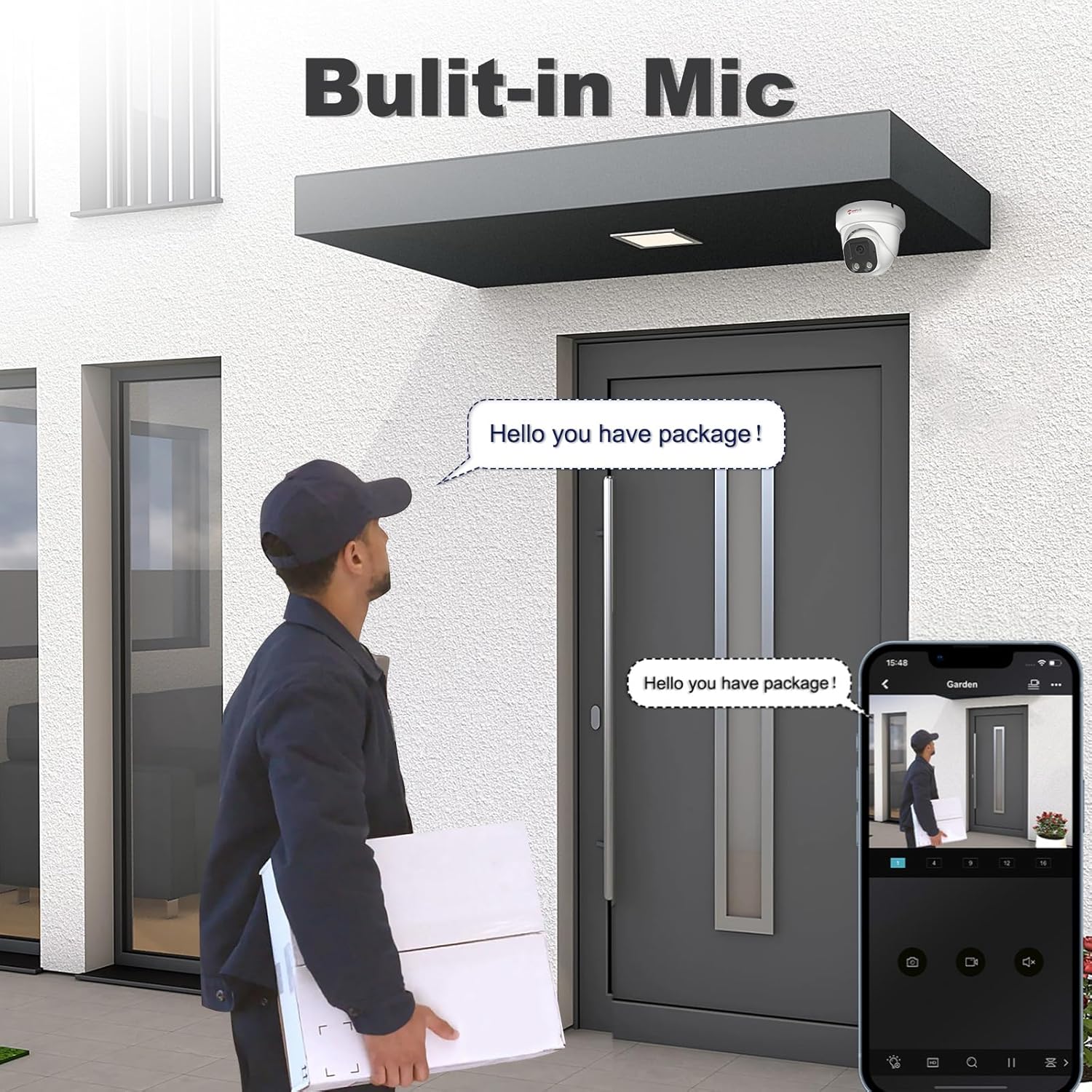
Image: A detailed diagram highlighting the key components of the Anpviz 4MP PoE IP Camera, including its metal housing, 2.8mm lens, built-in microphone, IR LEDs, spotlights, and connections for optional power supply and network cable.
Klíčové vlastnosti:
- Rozlišení 4 MP HD: Provides clear 2560x1440 video at 25 frames per second.
- 2.8 mm objektiv: Offers a wide 108°/110° field of view to cover more area.
- Smart Human & Motion Detection: Reduces false alarms by focusing on human shapes.
- Inteligentní noční vidění s dvojitou barvou světla: Delivers clear color images in low light conditions with spotlights.
- Vestavěný mikrofon: Umožňuje jednosměrné nahrávání zvuku.
- IP66 Waterproof & Full Metal Housing: Ensures durability and weather resistance.
- PoE (Power over Ethernet): Zjednodušuje instalaci tím, že zajišťuje napájení a přenos dat přes jediný kabel.
Nastavení
1. Montáž kamery
The Anpviz 4MP PoE IP Camera is designed for ceiling mount installation. Ensure the mounting surface is strong enough to support the camera's weight. Use the provided screws and waterproof lid for secure installation.
2. Způsoby připojení
Your Anpviz PoE IP Camera offers flexible connection options:
- Plug & Play with Anpviz NVR: Connect the camera directly to an Anpviz Network Video Recorder (NVR) for automatic detection and configuration.
- Connect to PoE Switch/PoE Injector: Use a PoE switch or injector to provide both power and data to the camera via a single Ethernet cable.
- Powered by Power Adapter (Not Included): If not using PoE, connect the camera to a standard 12V DC power adapter (not included) and a router via an Ethernet cable.
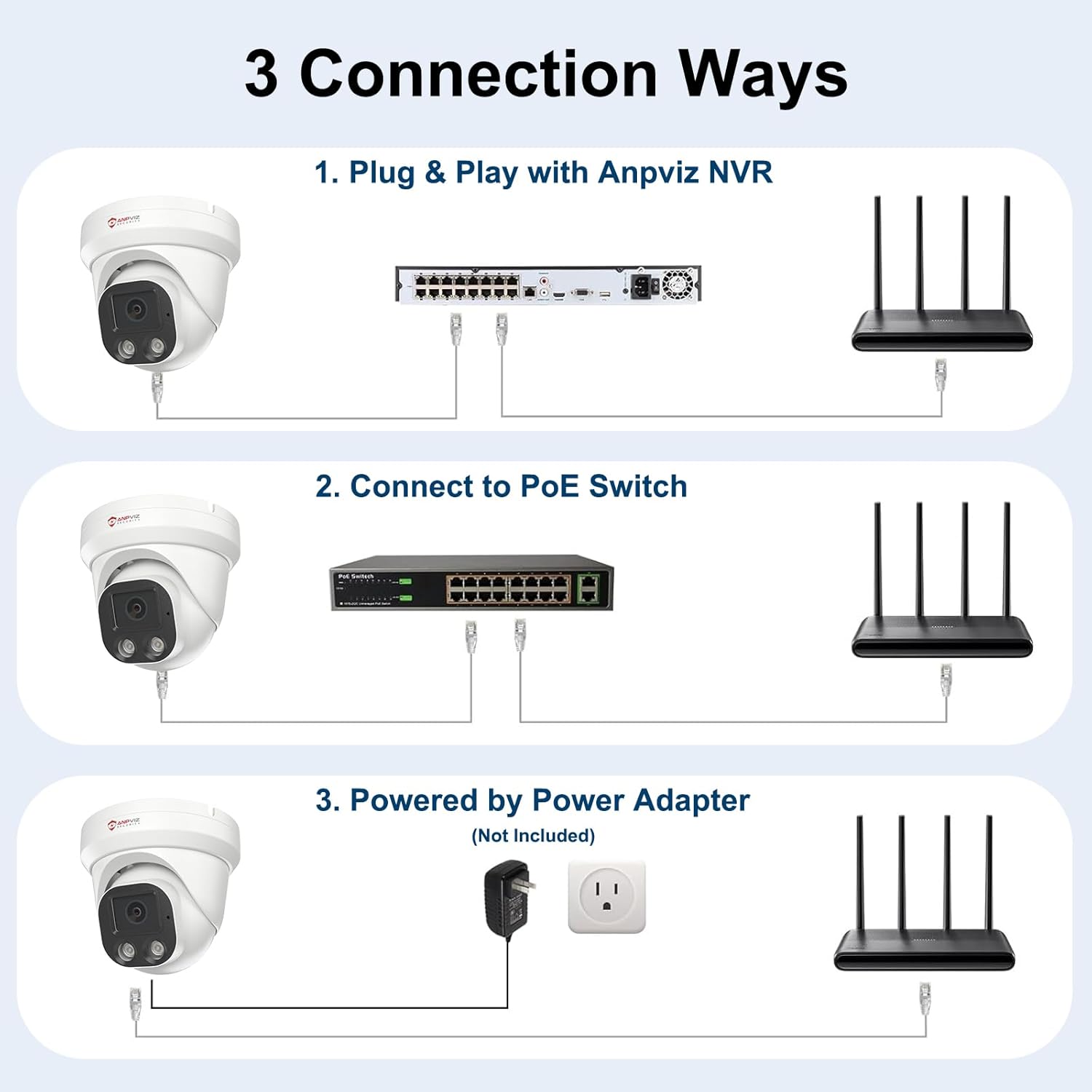
Image: Visual representation of the three primary connection methods for the Anpviz PoE IP Camera: direct connection to an Anpviz NVR, connection via a PoE switch, and connection using a separate power adapter and router.
3. Software and App Installation
To access and manage your camera, download the recommended software:
- Mobilní aplikace: Stáhněte si VideoLink app from Google Play Store or Apple App Store for remote viewing and control on your smartphone or tablet.
- PC Client: For desktop management, use the LMS PC Client. Refer to the Anpviz website for download instructions.
- Software třetích stran: The camera is compatible with various third-party software such as Blue-Iris, ISpy, and Milestone, and works with Synology NAS (NFS) and QNAP.
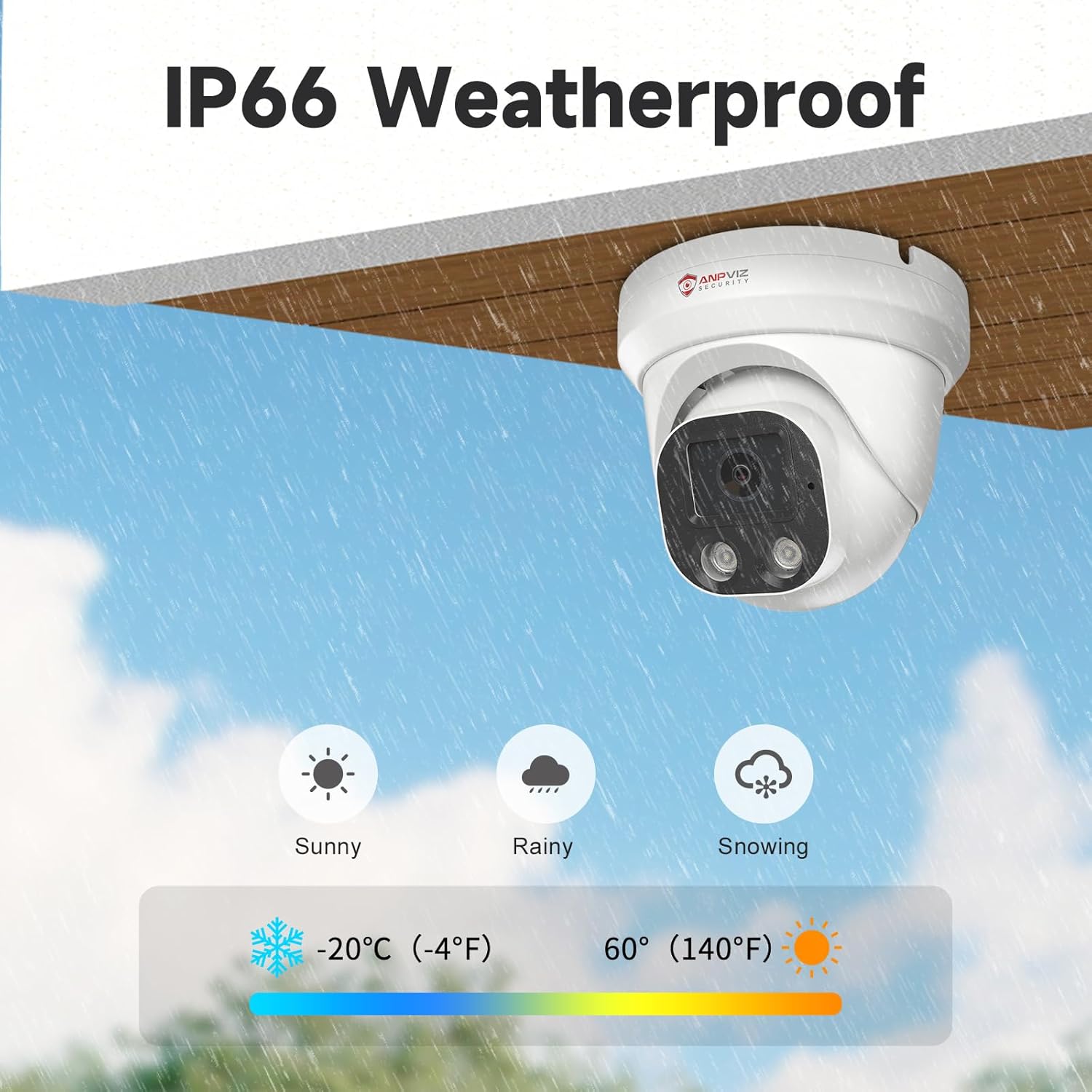
Image: This image demonstrates the remote access capabilities of the Anpviz camera, allowing users to view live feeds on various devices including desktop computers, tablets, and smartphones, supported by the VideoLink mobile app and LMS PC Client.
Obsluha fotoaparátu
Smart Human & Motion Detection
The camera features advanced human/motion detection technology. It is designed to send timely alerts and snapshots primarily when human figures are detected, significantly reducing false alarms caused by environmental factors like swaying trees, falling leaves, or changes in lighting. Please note that this feature does not support vehicle detection.

Image: An illustration of the camera's smart human detection feature, where a person is identified and highlighted, triggering alerts that can be sent via email, push notifications, or FTP.
Smart Dual Light Color Night Vision
This camera provides clear images with brilliant color even in low-light conditions. When an intruder is detected, the camera's built-in spotlights can be automatically triggered to deter potential criminals. You can also manually activate the spotlights to prevent incidents before they occur. The system intelligently switches between infrared (black and white) and full-color night vision based on detected activity.
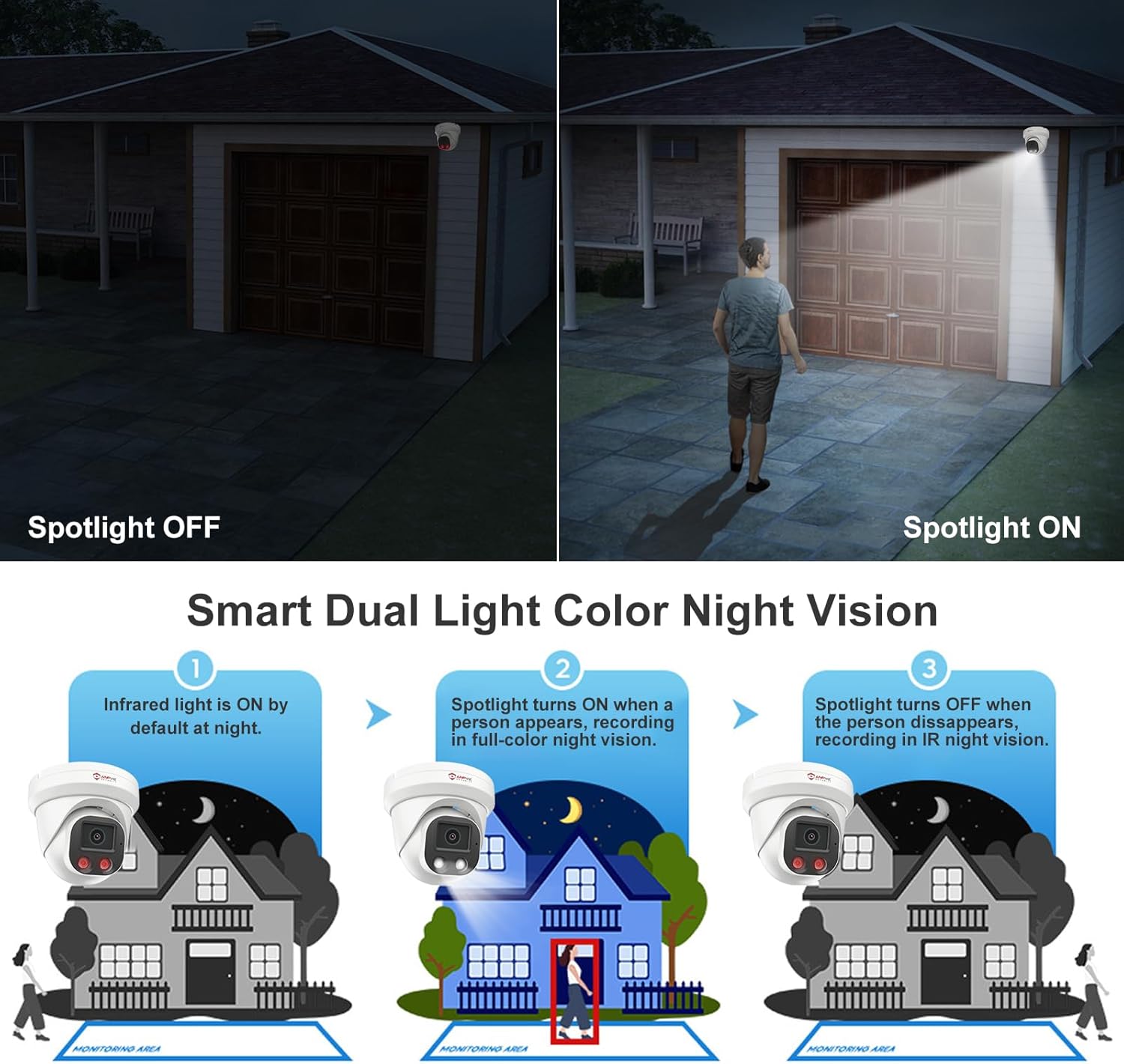
Image: This diagram illustrates the functionality of smart dual light color night vision: initially using infrared (black and white) at night, switching to full-color with spotlights upon human detection, and reverting to infrared once the person leaves the monitoring area.
Vestavěný mikrofon
The camera includes a built-in microphone for one-way audio capture. This allows you to record sound within the camera's vicinity, adding an extra layer of security and information to your surveillance footage.

Image: A visual representation of the camera's built-in microphone feature, depicting a delivery person at a door and a speech bubble indicating that audio is being captured by the camera.
Širokoúhlé pokrytí
The 2.8mm lens provides an ultra-wide 108°/110° viewing angle, allowing the camera to cover a larger area and capture more of your surroundings, ensuring comprehensive monitoring.
Nahrávání 24/7
The camera supports continuous 24/7 recording when connected to a compatible NVR or storage solution, providing constant surveillance.
Údržba
Odolnost vůči povětrnostním vlivům
The Anpviz 4MP PoE IP Camera is built with a full metal housing and boasts an IP66 waterproof rating, ensuring reliable operation in various weather conditions, including rain, snow, and extreme temperatures ranging from -20°C (-4°F) to 60°C (140°F).
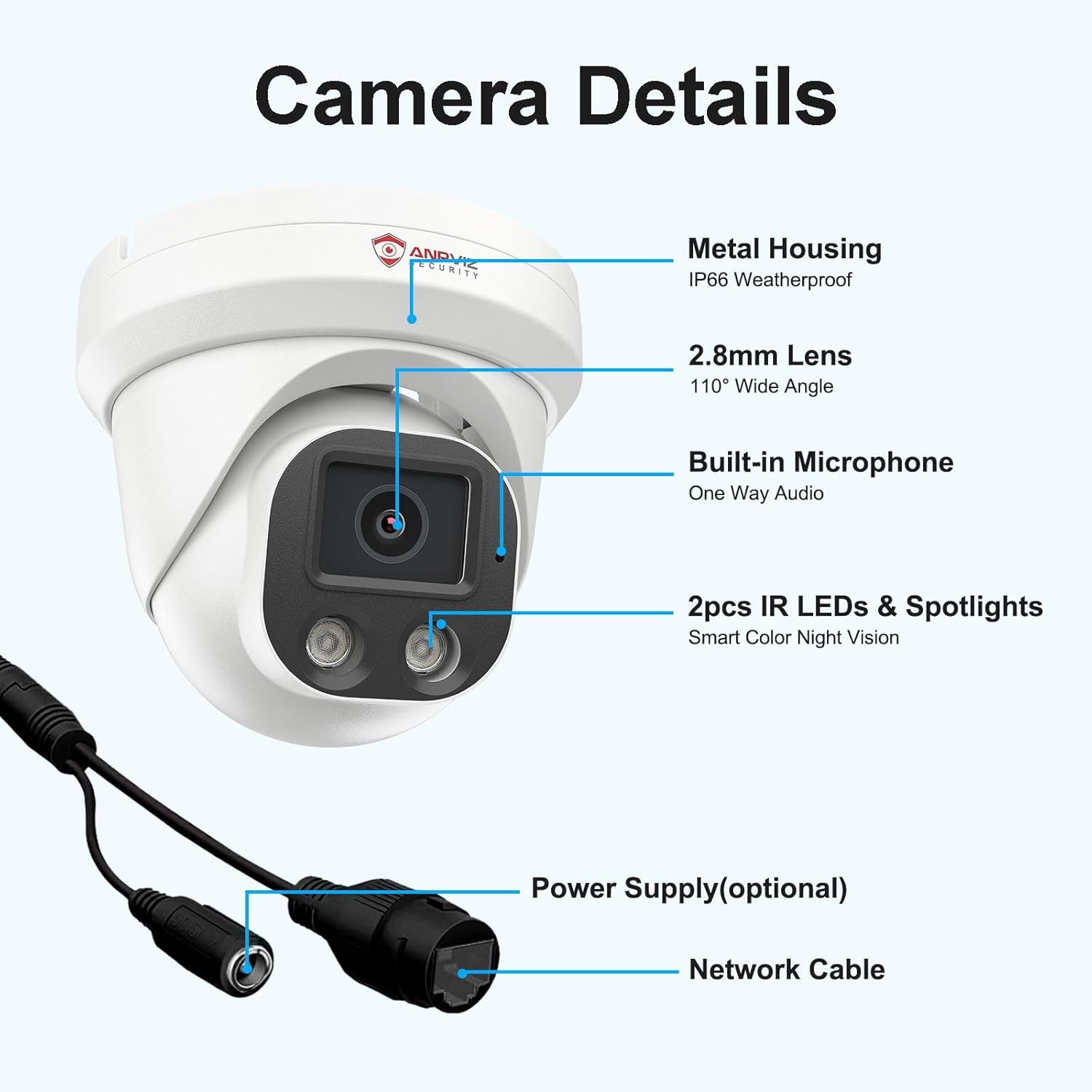
Image: This image highlights the IP66 weatherproof rating of the Anpviz camera, showing it mounted outdoors and capable of withstanding sunny, rainy, and snowy conditions, with an operational temperature range from -20°C (-4°F) to 60°C (140°F).
Čištění
To maintain optimal image quality, periodically clean the camera lens with a soft, lint-free cloth. Avoid using harsh chemicals or abrasive materials that could scratch the lens or housing. Ensure the camera is powered off before cleaning.
Odstraňování problémů
| Problém | Možná příčina | Řešení |
|---|---|---|
| Žádný zdroj obrázků/videí | Žádné napájení; Odpojený síťový kabel; Nesprávná IP adresa. | Check power connection (PoE or adapter); Ensure Ethernet cable is securely connected; Verify camera's IP address and network settings. |
| Špatná kvalita obrazu | Znečištěný objektiv; Nedostatečné osvětlení; Problémy s šířkou pásma sítě. | Clean the lens; Ensure adequate lighting for optimal night vision; Check network speed and reduce other network traffic if necessary. |
| Časté falešné poplachy | Motion detection sensitivity too high; Environmental factors (trees, shadows). | Adjust motion detection sensitivity settings in the camera's software; Configure detection zones to exclude areas with frequent non-human motion. |
| Nelze vzdáleně přistupovat k fotoaparátu | Network configuration issues; Firewall blocking access; Incorrect app settings. | Ensure port forwarding is correctly set up on your router (if applicable); Check firewall settings on your network; Verify app login credentials and camera pairing. |
Specifikace
| Funkce | Specifikace |
|---|---|
| Název modelu | IPC-D3243W-S |
| Rozlišení záznamu videa | 4 MP (2560x1440) |
| Snímková frekvence | 25 snímků za sekundu |
| Čočka | 2.8 mm |
| Viewúhel | 108° / 110° |
| Rozsah nočního vidění | 98 Feet (Smart Color Night Vision) |
| Technologie připojení | Wired Power over Ethernet (PoE) |
| Vnitřní/venkovní použití | Uvnitř, venku |
| Úroveň odolnosti proti vodě | IP66 Vodotěsný |
| Materiál | Celokovové pouzdro |
| Vestavěné komponenty | Microphone, IR LEDs, Spotlights |
| Rozměry (D x Š x V) | 4.52 x 4.52 x 4.72 palce |
| Hmotnost položky | 1.01 libry |
| Kompatibilní zařízení | Stolní počítač, notebook, chytrý telefon, tablet, televize |
| Typ ovladače | Android, Windows, iOS |
| Kódování videa | H.265/H.264 |
| Typ montáže | Stropní držák |
Záruka a podpora
Anpviz products are backed by a manufacturer's warranty. For specific warranty terms and conditions, please refer to the warranty card included with your product or visit the official Anpviz website. If you encounter any issues or require technical assistance, please contact Anpviz customer support through their official channels. Ensure you have your product model number (IPC-D3243W-S) and purchase details ready when contacting support.
Ask a question about this manual
Ask about setup, troubleshooting, compatibility, parts, safety, or missing instructions. Manuals+ will review the question and use this page’s manual context to help answer it.