
1. Úvod
The Vertiv Liebert EXS V-Model (EXSV-40KTN) is a compact, monolithic Uninterruptible Power System (UPS) designed to provide continuous, conditioned, and regulated output voltage. This UPS utilizes true on-line, double-conversion technology, ensuring the highest level of power protection for critical IT systems.
It is specifically engineered to power sensitive equipment such as computers, servers, networking devices, VoIP systems, ISDN, storage, and security systems. The EXS V-Model delivers economical, efficient, and reliable three-phase power for critical loads up to 40kVA, making it suitable for small data rooms, IT closets, and similar environments.
Key features include a unity power factor, high power density, an integrated maintenance bypass cabinet for continuous operation during service, and advanced battery monitoring capabilities. This manual provides essential information for the safe and efficient installation, operation, and maintenance of your Vertiv Liebert EXS V-Model UPS.
2. Bezpečnostní informace
Please read and understand all safety instructions before installing, operating, or performing maintenance on the Vertiv Liebert EXS V-Model UPS. Failure to follow these instructions may result in electric shock, fire, or serious injury.
- Kvalifikovaný personál: Installation and maintenance must be performed by qualified service personnel only.
- Elektrické nebezpečí: UPS obsahuje nebezpečné látkytages. Do not open the unit or attempt to service it unless specifically instructed to do so in this manual.
- Bezpečnost baterie: Batteries can present a risk of electrical shock and high short-circuit current. Observe all precautions when working with batteries.
- Základy: Ensure the UPS is properly grounded before connecting any loads or power sources.
- Nouzové zastavení: Familiarize yourself with the location and operation of the emergency power off (EPO) switch, if applicable.
- Větrání: Ensure adequate ventilation around the UPS to prevent overheating. Do not block ventilation openings.
- Hmotnost: The UPS is extremely heavy (1609 pounds). Use appropriate lifting equipment and techniques during installation to prevent injury.
3. Konec produktuview
The Vertiv Liebert EXS V-Model UPS is a robust tower unit designed for efficient power management. Below are visual representations and descriptions of its key components and external features.

Obrázek 3.1: Přední strana View UPS. This image displays the front panel of the Vertiv Liebert EXS V-Model UPS, highlighting the main enclosure and the integrated control panel with display and navigation buttons.
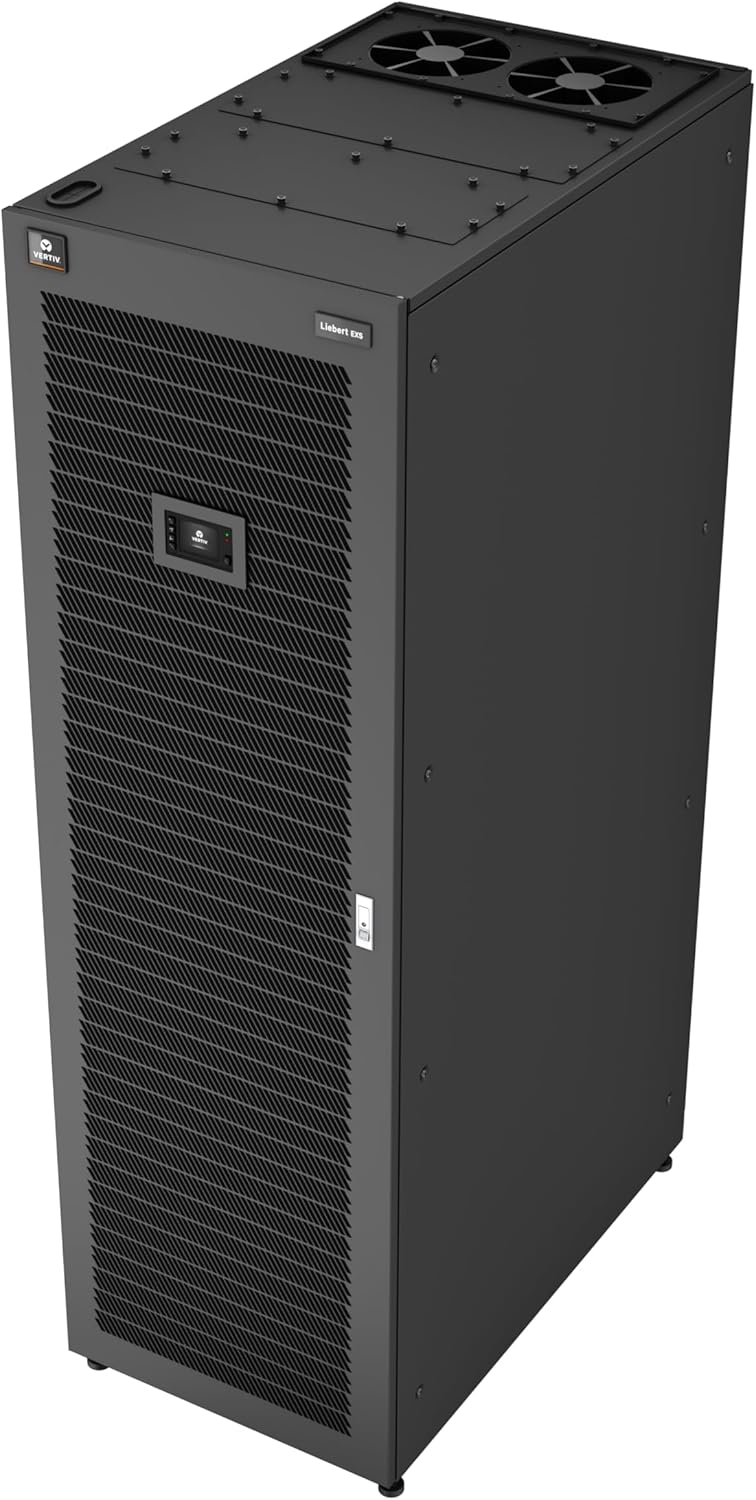
Obrázek 3.2: Strana View UPS. Tento obrázek ukazuje boční profesionálafile of the Vertiv Liebert EXS V-Model UPS, illustrating its tower form factor and ventilation grilles.

Obrázek 3.3: Zadní View UPS. Tento obrázek poskytuje view of the rear panel, detailing the power input/output connections and other interface ports.
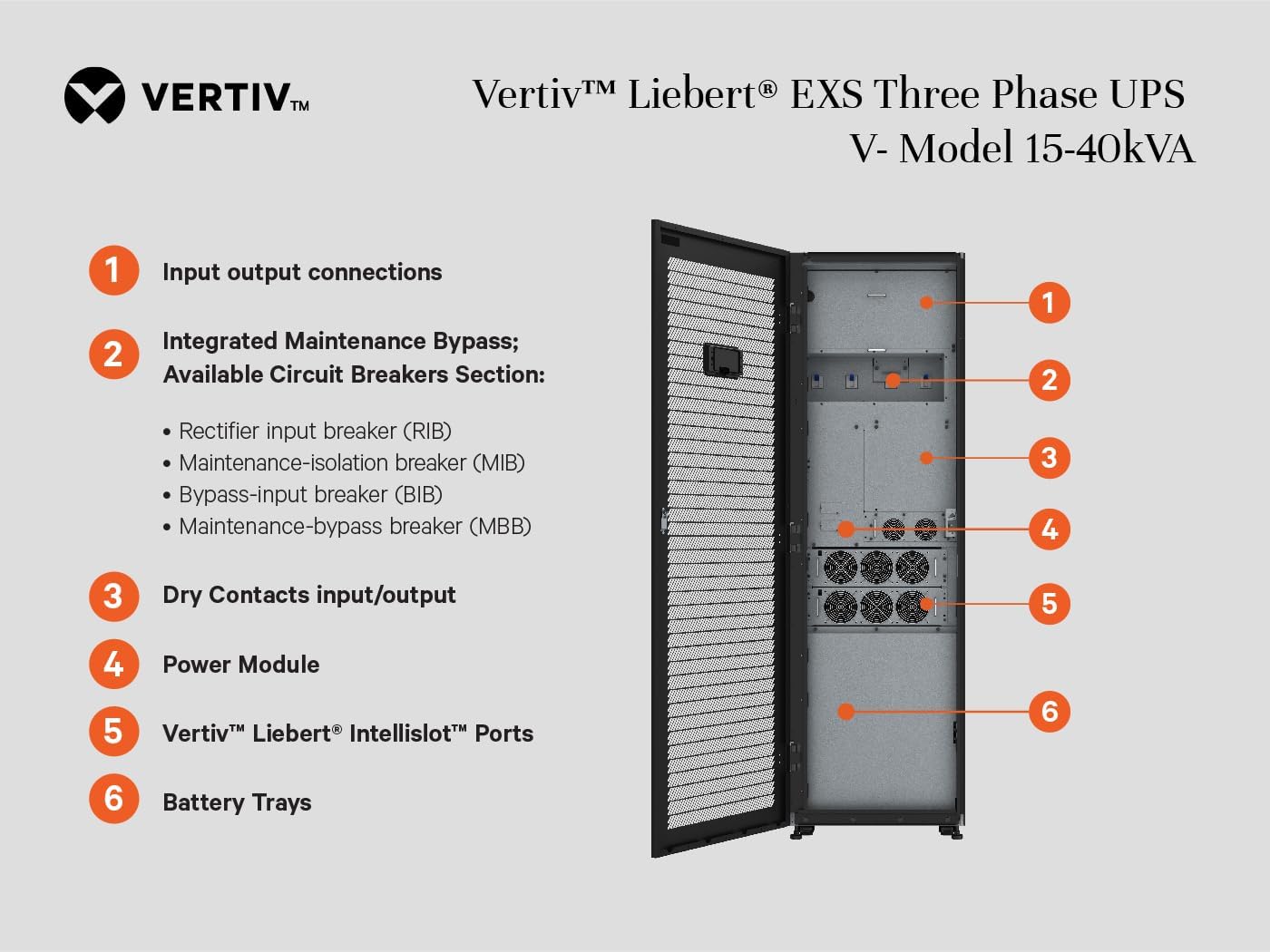
Figure 3.4: Internal Components and Connection Points. This diagram highlights key internal sections and connection points:
- Vstupní/výstupní připojení: Main power input and output terminals.
- Integrated Maintenance Bypass: Includes Rectifier Input Breaker (RIB), Maintenance-Isolation Breaker (MIB), Bypass-Input Breaker (BIB), and Maintenance-Bypass Breaker (MBB).
- Dry Contacts Input/Output: For external monitoring and control signals.
- Napájecí modul: The core power conversion unit.
- Vertiv Liebert Intellislot Ports: For communication cards like the is-Unity-DP.
- Battery Trays: Compartments for the internal battery modules.

Figure 3.5: UPS with Optional Battery Cabinet. This image illustrates the Vertiv Liebert EXS V-Model UPS configured with an additional battery cabinet, demonstrating its modularity and flexibility for extended runtime requirements.
4. Nastavení
4.1 Vybalení a kontrola
- Carefully unpack the UPS and all accessories from its packaging.
- Inspect the unit for any signs of shipping damage. If damage is found, contact your carrier and supplier immediately.
- Ověřte, zda jsou přítomny všechny součásti uvedené v dodacím listu.
4.2 Umístění
The Vertiv Liebert EXS V-Model UPS is designed with a front-access configuration, allowing for flexible placement in various environments such as in-row or against a wall. This design eliminates the need for rear clearance, simplifying installation and serviceability.
- Umístěte UPS do čistého, suchého a teplotně kontrolovaného prostředí.
- Ensure adequate airflow around the unit. Maintain a minimum clearance of 10 cm (4 inches) on all sides for proper ventilation.
- The floor must be capable of supporting the UPS's weight (1609 pounds).
- Avoid locations with excessive dust, humidity, or corrosive substances.
4.3 Elektrické připojení
Veškeré elektrické připojení musí být provedeno kvalifikovaným elektrikářem v souladu s místními a národními elektrotechnickými předpisy.
- Vstupní výkon: Connect the 3-phase, 4-wire input power source (208/120VAC or 220/127VAC) to the designated input terminals on the UPS. Refer to Figure 3.4 for connection points.
- Výstupní výkon: Connect your critical loads to the UPS output terminals. Ensure the total load does not exceed the UPS's 40kVA/40kW capacity.
- Základy: Connect the UPS to a reliable earth ground.
- Připojení baterie: If external battery cabinets are used, connect them according to the separate battery cabinet manual. Ensure correct polarity.
- Komunikační připojení: Install the Liebert Intellislot Card (is-Unity-DP) into the designated Intellislot port (refer to Figure 3.4) and connect necessary network cables for remote monitoring and management.
4.4 Počáteční zapnutí
- Before applying power, double-check all electrical connections for correctness and security.
- Ensure all internal breakers (RIB, MIB, BIB, MBB) are in the correct position as per the installation guide.
- Apply utility power to the UPS input. The UPS will perform a self-test.
- Follow the on-screen prompts on the UPS control panel to configure initial settings, such as date, time, and network parameters.
- Verify that the UPS is operating in normal mode and providing stable output power to the connected loads.
5. Návod k obsluze
5.1 Zapnutí/vypnutí
- Zapnout: Once input power is stable, the UPS will typically start automatically. If not, use the control panel to initiate startup. Follow the sequence displayed on the LCD.
- Vypnout: To shut down the UPS, first transfer the load to bypass (if available and desired) via the control panel. Then, initiate a shutdown sequence from the control panel. Finally, disconnect the input utility power.
- Nouzové vypnutí (EPO): In an emergency, activate the EPO switch. This will immediately shut down the UPS and disconnect power to the loads.
5.2 Monitorování
The UPS features an intuitive control panel and supports remote monitoring via the Liebert Intellislot Card (is-Unity-DP).
- Místní zobrazení: The front panel LCD provides real-time status, input/output voltage, zatížení procenttage, battery status, and alarm information. Navigate through menus using the control buttons.
- Vzdálený dohled: The Liebert Intellislot Card (is-Unity-DP) enables network-based monitoring and management. This allows for remote access to UPS status, event logs, and configuration settings via web browser, SNMP, or other network protocols.
- Pokročilé monitorování baterie: The UPS continuously monitors battery capacity, temperature, humidity, and can detect access or leaks, providing early warnings for potential issues.
5.3 Provozní režimy
The Liebert EXS V-Model UPS operates primarily in two modes:
- Double Conversion Mode: This is the standard operating mode, providing the highest level of power protection. Input AC power is converted to DC, then back to AC, isolating the load from utility disturbances. Efficiency is typically >93% in this mode.
- Režim ECO: For enhanced energy efficiency, the UPS can operate in ECO mode (up to 99% efficiency). In this mode, the UPS typically operates in bypass, and the inverter is only activated when the utility power falls outside predefined tolerances. This mode offers energy savings but with a slightly reduced level of power conditioning compared to double conversion mode.
6. Údržba
Regular maintenance ensures the longevity and reliable operation of your UPS. All maintenance procedures should be performed by qualified personnel.
6.1 Integrovaný údržbový bypass
The UPS features an integrated maintenance bypass cabinet, allowing the critical load to be transferred to the utility power source while the UPS is serviced. This ensures continuous operation of your equipment.
- Before performing any internal maintenance, ensure the load is safely transferred to the maintenance bypass.
- Follow the specific lockout/tagout procedures for the integrated maintenance bypass breakers (RIB, MIB, BIB, MBB) as detailed in the full product manual.
6.2 Údržba baterie
The UPS uses Lead Acid batteries. While the advanced battery monitoring system provides alerts, periodic physical inspection and testing are recommended.
- Inspect batteries for signs of swelling, leakage, or corrosion.
- Ensure battery terminals are clean and tight.
- Perform battery discharge tests periodically to verify runtime capacity. Consult the full manual for recommended intervals and procedures.
- Replace batteries as recommended by Vertiv or when their performance degrades significantly.
6.3 Obecné čištění
- Keep the exterior of the UPS clean and free of dust. Use a soft, dry cloth.
- Ensure ventilation openings are clear of obstructions. Periodically clean air filters if present and accessible.
7. Řešení problémů
This section provides general guidance for common issues. For detailed troubleshooting, refer to the comprehensive Vertiv Liebert EXS V-Model technical manual or contact Vertiv support.
| Problém | Možná příčina | Řešení |
|---|---|---|
| UPS se nezapne. | No input power; UPS internal breaker tripped; Battery disconnected. | Check utility power supply; Reset UPS input breaker; Ensure battery connections are secure. |
| UPS is in bypass mode unexpectedly. | Internal fault; Overload condition; High input voltage zkreslení. | Check UPS display for fault codes; Reduce load; Verify input power quality. |
| Krátká výdrž baterie. | Batteries are old or degraded; Overload; High ambient temperature. | Check battery health via monitoring system; Replace batteries if necessary; Reduce load; Ensure proper ventilation. |
| Alarms on control panel. | Various system events or faults. | Note the alarm code displayed on the LCD and consult the full manual for specific actions. |
If the problem persists after attempting these solutions, contact Vertiv technical support.
8. Specifikace
Below are the key technical specifications for the Vertiv Liebert EXS V-Model UPS (EXSV-40KTN).
| Funkce | Detail |
|---|---|
| Číslo modelu | EXSV-40KTN |
| Kapacita | 40kVA / 40kW |
| Input/Output Voltage | 208/120 V AC (220/127 V AC) 3fázový 4vodičový |
| Technologie | True On-Line, Double-Conversion |
| Provozní efektivita | >93% (Double Conversion Mode), 99% (ECO Mode) |
| Výstupní účiník | 1.0 |
| Typ baterie | Olověná kyselina |
| Integrované funkce | Maintenance Bypass Cabinet, Liebert Intellislot Card (is-Unity-DP) |
| Rozměry produktu (V x Š x H) | 78.74 x 23.6 x 39.37 palce (199.9 x 59.9 x 100 cm) |
| Hmotnost položky | 1609 libry (730 kg) |
| Barva | Černý |
9. Záruka a podpora
For detailed warranty information, please refer to the warranty card included with your product or visit the official Vertiv website. Technical support is available through Vertiv's customer service channels. Please have your model number (EXSV-40KTN) and serial number ready when contacting support.


