
1. Úvod
Thank you for choosing the Vortex Powerhub30 Black 30000 mAh External Battery. This device is designed to provide reliable portable power for your electronic devices. Please read this manual carefully before use to ensure proper operation and to maximize the lifespan of your power bank.
2. Bezpečnostní informace
- Nevystavujte powerbanku extrémním teplotám (nad 60 °C / 140 °F nebo pod 0 °C / 32 °F), přímému slunečnímu záření ani ohni.
- Avoid dropping, disassembling, or attempting to repair the device yourself. This may cause damage and void the warranty.
- Uchovávejte powerbanku mimo dosah vody, vlhkosti a korozivních materiálů.
- Nepoužívejte powerbanku, pokud je viditelně poškozená, nafouklá nebo z ní netěsní.
- Uchovávejte mimo dosah dětí.
- Používejte pouze certifikované nabíjecí kabely a adaptéry.
- Powerbanku zlikvidujte zodpovědně v souladu s místními předpisy.
3. Obsah balení
- Vortex Powerhub30 Black 30000 mAh External Battery
- USB Charging Cable (Micro-USB/Type-C compatible)
- Uživatelská příručka
4. Konec produktuview
The Vortex Powerhub30 is equipped with multiple ports and an LED display for convenient charging and monitoring.

Obrázek 1: Přední strana view of the Vortex Powerhub30 Black external battery, showing its compact design and the Vortex logo. The image also highlights its 30000 mAh capacity and illustrates its use with various devices like smartphones, tablets, and headphones.
Komponenty:
- Výstupní porty USB-A (x2): Pro nabíjení externích zařízení.
- Port USB Type-C: Bidirectional, used for both charging the power bank and charging external devices.
- Vstupní port micro-USB: Pro nabíjení powerbanky.
- LED displej: Zobrazuje zbývající procento baterietage.
- Vypínač: Activates the LED display and initiates charging.
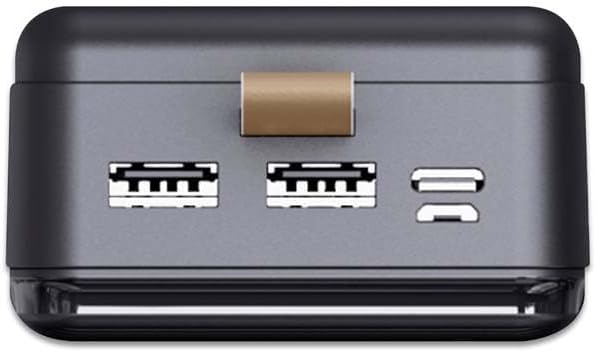
Obrázek 2: Nahoře view of the Vortex Powerhub30, clearly displaying the two USB-A output ports and the single bidirectional USB Type-C port. This view illustrates the multiple connectivity options available.

Image 3: Close-up top view of the Vortex Powerhub30, highlighting the integrated LED indicator which displays the current battery charge level. The power button is also visible next to the indicator.
5. Nastavení
Počáteční nabití powerbanky:
- Before first use, fully charge your Powerhub30.
- Connect the provided USB charging cable to either the Micro-USB input port or the USB Type-C port on the power bank.
- Druhý konec kabelu připojte k USB nabíječce (není součástí dodávky) nebo k USB portu počítače.
- The LED display will show the charging progress. Once 100% is displayed, the power bank is fully charged.
6. Návod k obsluze
Nabíjení externích zařízení:
- Connect your device's charging cable to one of the USB-A output ports or the USB Type-C port on the Powerhub30.
- Druhý konec kabelu připojte k chytrému telefonu, tabletu nebo jinému kompatibilnímu zařízení.
- Press the power button on the Powerhub30 to initiate charging. The LED display will show the power bank's remaining charge.
- The Powerhub30 can charge up to three devices simultaneously.
- Once your device is fully charged, disconnect it from the power bank. The power bank will automatically turn off after a period of inactivity.
7. Údržba
- Powerbanku čistěte měkkým, suchým hadříkem. Nepoužívejte agresivní chemikálie ani abrazivní čisticí prostředky.
- Pokud powerbanku nepoužíváte, uchovávejte ji na chladném a suchém místě.
- Pro zachování dobrého stavu baterie plně nabijte powerbanku alespoň jednou za tři měsíce, i když ji nepoužíváte pravidelně.
- Vyhněte se častému přebíjení nebo úplnému vybíjení baterie.
8. Řešení problémů
Powerbanka se nenabíjí:
- Ujistěte se, že je nabíjecí kabel bezpečně připojen k powerbankě i ke zdroji napájení.
- Zkuste jiný nabíjecí kabel nebo adaptér do zásuvky.
- Ověřte, zda je zdroj napájení aktivní.
Zařízení se nenabíjí z powerbanky:
- Ensure the power bank has sufficient charge (check the LED display).
- Stiskněte tlačítko napájení na powerbance pro aktivaci výstupu.
- Vyzkoušejte pro své zařízení jiný nabíjecí kabel.
- Ujistěte se, že vaše zařízení je kompatibilní s výstupními specifikacemi powerbanky.
Pomalé nabíjení:
- Ujistěte se, že používáte kvalitní nabíjecí kabel.
- Some devices may charge slower if multiple devices are connected simultaneously.
- Check if your device supports fast charging and if the cable/port used supports it.
9. Specifikace
| Model | Powerhub30 |
| Kapacita baterie | 30000 XNUMX mAh |
| Vstupní porty | Micro USB, USB typu C |
| Výstupní porty | 2x USB-A, 1x USB Type-C (bidirectional) |
| Speciální funkce | Compact design, LED battery display |
| Doporučené použití | Chytré telefony, tablety a další zařízení napájená z USB |
| Rozměry | 14.8 × 7 × 2.8 cm (approx.) |
| Materiál | ABS Casing |
10. Záruka a podpora
For warranty information and customer support, please refer to the official Vortex website or contact your retailer. You can also visit the Vortex Brand Store pro více podrobností.