
Rfiver MT200
Rfiver Mobile TV Stand MT200 User Manual
Model: MT200 | For 32-70 Inch TVs
1. Úvod
This manual provides essential information for the safe and correct assembly, operation, and maintenance of your Rfiver Mobile TV Stand MT200. Please read all instructions carefully before beginning assembly and retain this manual for future reference.
Bezpečnostní informace
- Před montáží se ujistěte, že jsou všechny díly přítomny a nepoškozené. Nepoužívejte, pokud některé díly chybí nebo jsou vadné.
- Do not exceed the maximum load capacity of 40 kg (88 lbs) for the TV and 10 kg (22 lbs) for the media shelf.
- Tento stojan je určen pro televizory s úhlopříčkou od 32 do 70 palců.
- Always ensure the casters are locked when the stand is in a stationary position to prevent accidental movement.
- Assembly should be performed by at least two people for safety.

Obrázek 1.1: Konecview of the Rfiver Mobile TV Stand MT200 with a TV and laptop.
2. Obsah balení
Ověřte, zda jsou všechny níže uvedené komponenty součástí balení. Pokud některé díly chybí nebo jsou poškozené, kontaktujte zákaznickou podporu.
- Základna (ve tvaru X)
- Vertical Support Pillars (2)
- Držák na TV
- Mediální police
- Casters (4, with locking mechanism)
- Sada hardwaru (různé šrouby, podložky, distanční podložky, imbusový klíč)
- Klipy pro správu kabelů

Image 2.1: Key features and components of the TV stand.
3. Pokyny k nastavení
Follow these steps carefully to assemble your Rfiver Mobile TV Stand.
3.1 VESA Compatibility and TV Requirements
Před montáží se ujistěte, že váš televizor splňuje následující kritéria:
- Velikost obrazovky: 32 až 70 palců
- Nosnost: Maximálně 40 kg (88 liber)
- Vzor VESA: Compatible with VESA patterns from 100x100 mm to 400x400 mm. (e.g., 100x100, 200x100, 200x200, 300x200, 400x200, 300x300, 400x300, 400x400 mm).
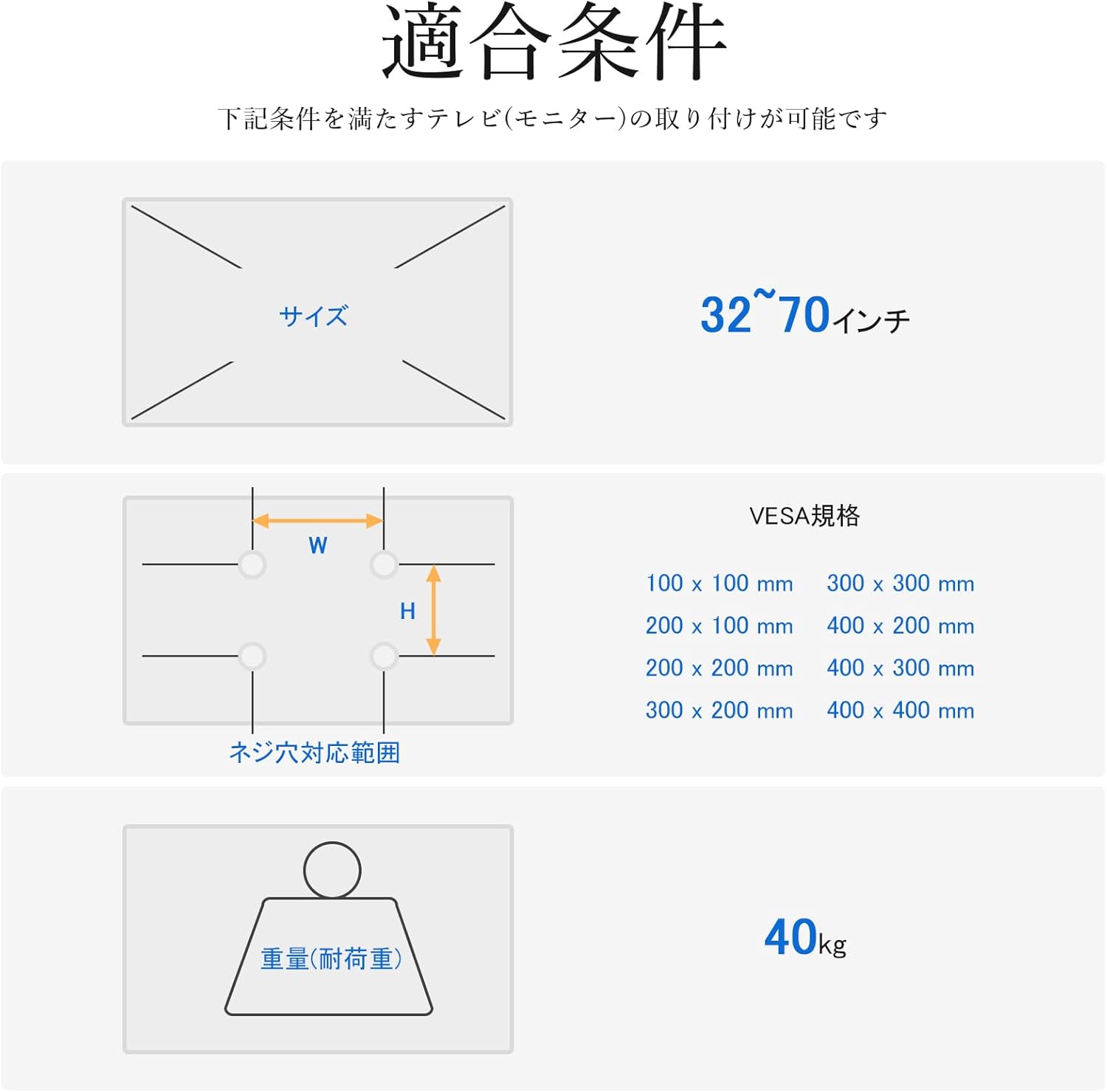
Image 3.1: VESA mounting hole patterns, compatible TV sizes, and maximum load capacity.
3.2 Montážní kroky
- Sestavte základnu: Attach the four casters to the X-shaped base using the provided screws. Ensure they are securely tightened.
- Attach Vertical Pillars: Secure the two vertical support pillars to the assembled base using the designated hardware.
- Instalace montážního držáku televizoru: Attach the TV mounting bracket to the top of the vertical pillars. Ensure it is oriented correctly and securely fastened.
- Montáž televizoru: Carefully attach the TV to the mounting bracket. Use the appropriate screws and spacers from the hardware kit that match your TV's VESA pattern. Ensure the TV is centered and level.
- Instalace police pro média: Attach the media shelf to the vertical pillars at your desired height. The shelf is adjustable and can hold devices up to 10 kg.
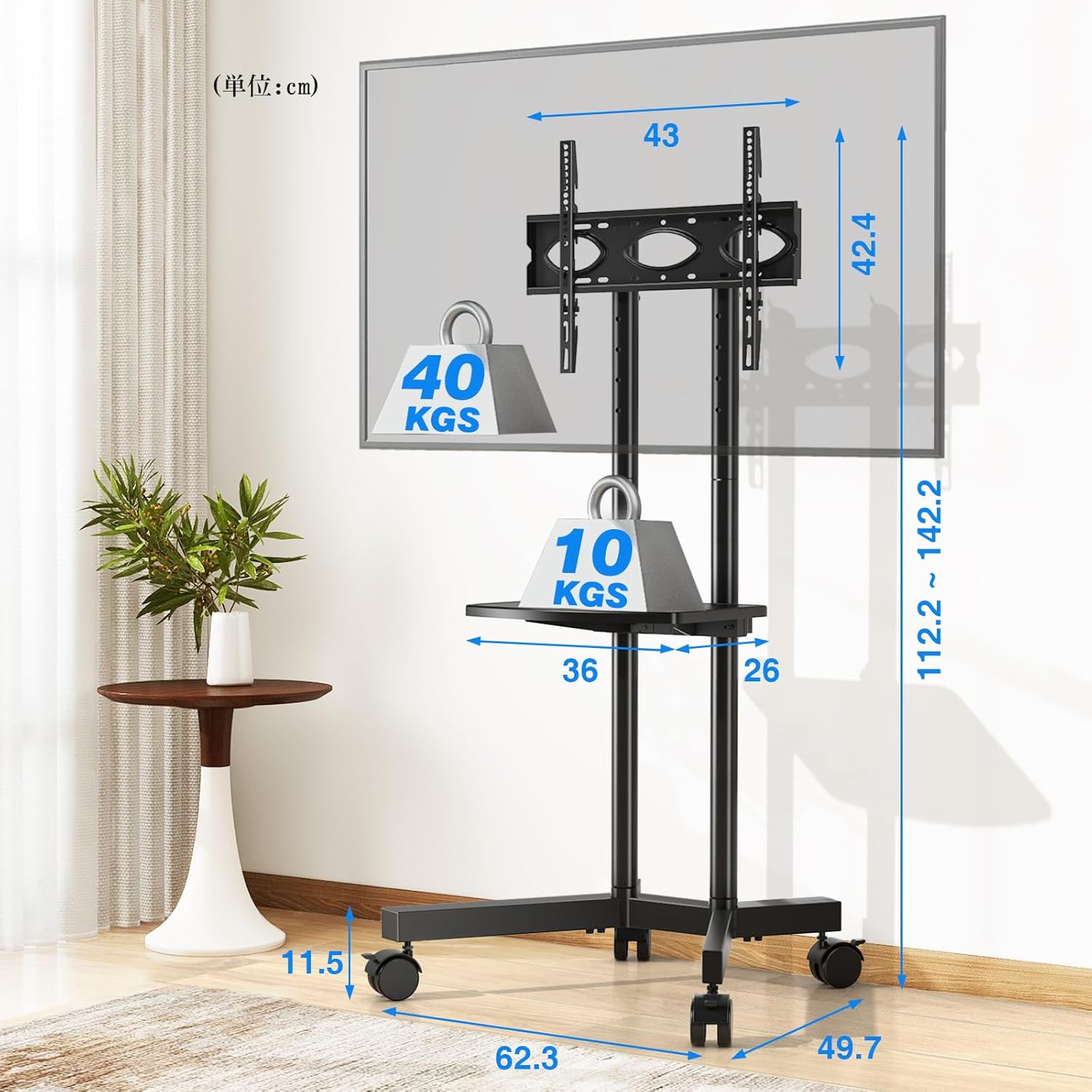
Image 3.2: Detailed dimensions and load capacities of the stand and shelf.
4. Návod k obsluze
4.1 Nastavení výšky
The Rfiver Mobile TV Stand offers flexible height adjustment for optimal viewIng.
- Celková výška: The stand's total height can be adjusted from 112.2 cm to 142.2 cm.
- Nastavení televizní desky: The TV plate has 5 adjustable height levels.
- Seřízení držáku: The TV mounting brackets have 3 adjustable height levels.
To adjust the height, loosen the securing bolts on the vertical pillars and TV plate/brackets, slide to the desired height, and re-tighten all bolts securely.

Image 4.1: Height adjustment options for the TV plate and mounting brackets.
4.2 Mobilita a stabilita
The stand is equipped with four 360° rotating casters for easy movement. Each caster includes a stopper for stability.
- Přesun stojanu: Unlock all four casters by flipping their stoppers upwards. Gently push the stand to its new location.
- Zajištění stojanu: Once in the desired position, lock all four casters by pressing their stoppers downwards to prevent unintended movement.

Image 4.2: Detail of the 360° rotating casters with locking function.
4.3 Správa kabelů
Integrated cable management clips help keep your cables organized and out of sight, contributing to a tidy setup.
- Route TV and device cables along the vertical pillars.
- Use the provided cable management clips to secure the cables neatly to the pillars.
5. Údržba
Pravidelná údržba zajistí dlouhou životnost a bezpečný provoz vašeho televizního stolku.
- Čištění: Otřete stojan měkkým, suchým hadříkem. Na odolné skvrny použijte lehceamp hadříkem a jemným čisticím prostředkem a poté důkladně osušte. Nepoužívejte abrazivní čisticí prostředky.
- Zkontrolujte připojení: Pravidelně kontrolujte všechny šrouby a vruty, zda jsou pevně utažené. V případě potřeby je dotáhněte.
- Funkce kolečka: Keep casters free of debris to ensure smooth movement. Lubricate if needed.
6. Řešení problémů
Pokud narazíte na nějaké problémy, podívejte se na následující běžné problémy a jejich řešení:
- Stojan je nestabilní:
- Ensure all screws and bolts are securely tightened.
- Verify the TV weight does not exceed 40 kg and is centered on the bracket.
- Ensure the stand is on a flat, level surface. - Obtížnost při přemisťování stojanu:
- Check that all casters are unlocked.
- Clean any debris from the caster wheels.
- If casters are stiff, apply a small amount of lubricant. - Televizor se nehodí do držáku:
- Re-check your TV's VESA pattern against the stand's compatibility (100x100mm to 400x400mm).
- Ensure you are using the correct screws and spacers from the hardware kit. - Chybějící části:
- Double-check the package contents against Section 2. If parts are genuinely missing, contact customer support.
7. Specifikace
| Funkce | Specifikace |
|---|---|
| Číslo modelu | MT200 |
| Kompatibilní velikosti TV | 32-70 palců |
| Maximum TV Load Capacity | 40 kg (88 lb) |
| Maximální nosnost police | 10 kg (22 lb) |
| Kompatibilita VESA | 100x100 mm až 400x400 mm |
| Rozsah nastavení výšky | 112.2 cm - 142.2 cm |
| Rozměry police na média | Rozměr 36 cm x 26 cm |
| Rozměry produktu (D x Š x V) | 62.3 x 49.7 x 137.2 cm |
| Hmotnost produktu | 7.2 kg |
| Materiál | Legovaná ocel |
| Barva | Černý |
| Typ pohybu | Swivel (Casters) |
| Způsob montáže | Montáž na podlahu |
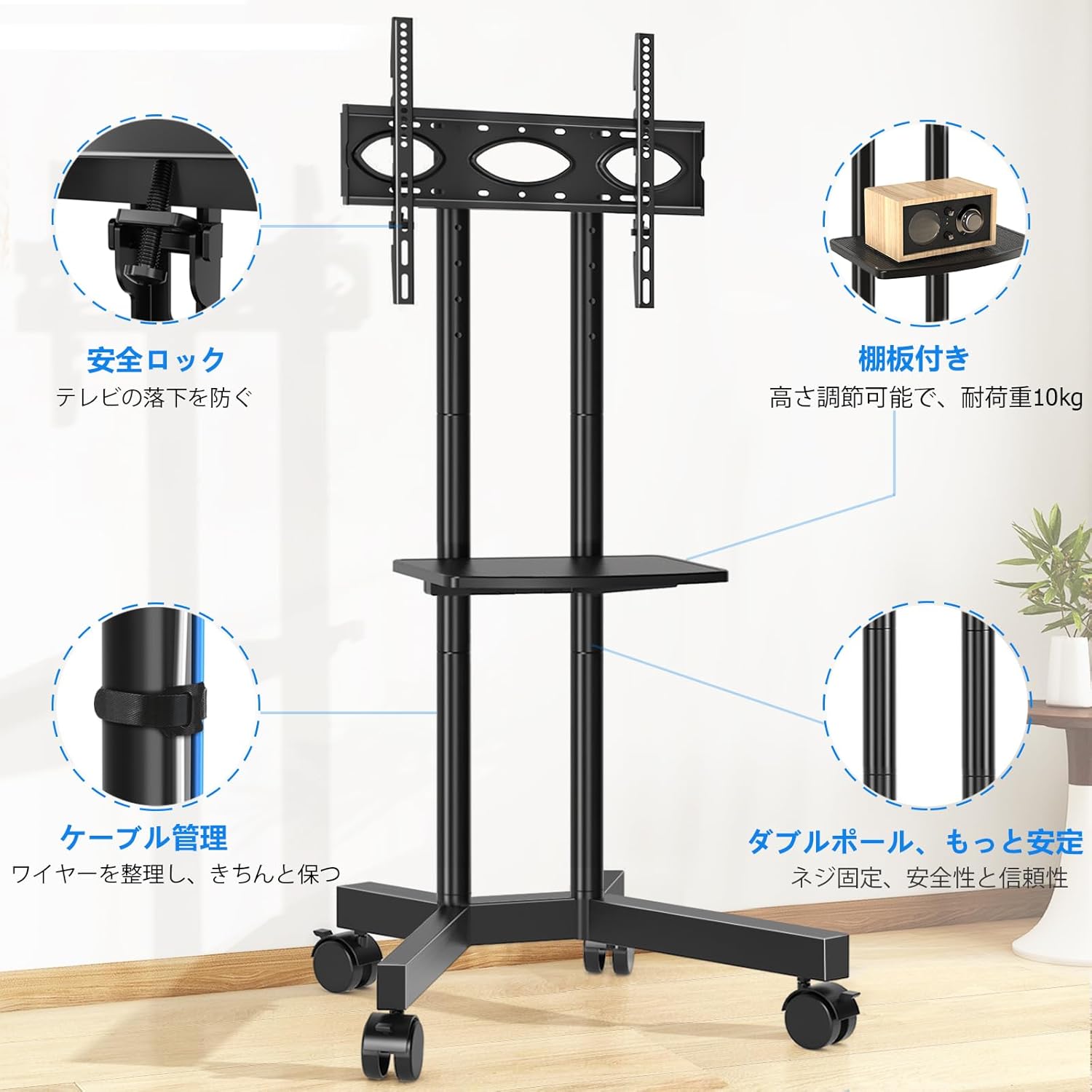
Image 7.1: The Rfiver Mobile TV Stand in a living room environment.
8. Záruka a podpora
Rfiver products are manufactured with quality and durability in mind. For warranty information, technical support, or to report missing/damaged parts, please contact your retailer or the manufacturer directly. Please have your model number (MT200) and purchase date available when contacting support.
Ask a question about this manual
Ask about setup, troubleshooting, compatibility, parts, safety, or missing instructions. Manuals+ will review the question and use this page’s manual context to help answer it.