
Konec produktuview
The MONODEAL MD08 Air Conduction Headphones are designed for comfort and clear communication, featuring an open-ear design, Bluetooth 5.1 connectivity, and a noise-canceling microphone with a mute function. These headphones transmit sound through air conduction, providing an alternative to traditional in-ear or bone conduction devices, aiming to reduce pressure and discomfort during extended use.

Image: MONODEAL MD08 Air Conduction Headphones, showcasing the open-ear design and boom microphone.
Co je v krabici
- Air Conduction Headphones (1 unit)
- Nabíjecí kabel USB-C (1 kus)
- Uživatelský manuál (1 jednotka)
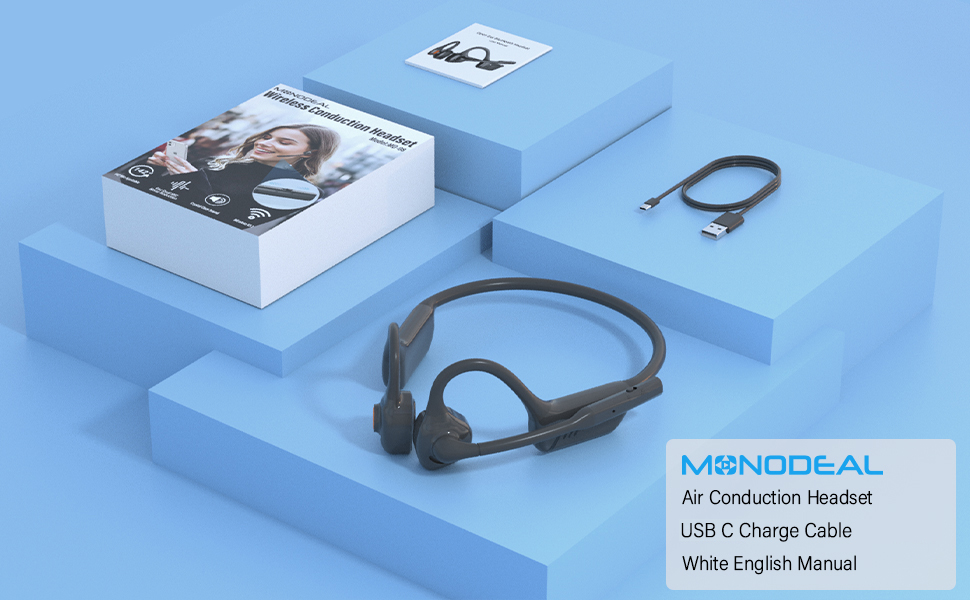
Image: The MONODEAL MD08 headphones, USB-C charging cable, and user manual laid out, representing the package contents.
Nastavení
1. Nabíjení sluchátek
Before initial use, fully charge the headphones. Connect the provided USB-C charging cable to the charging port on the headphones and plug the other end into a compatible USB power source. A full charge typically takes approximately 2 hours.

Image: Diagram illustrating the charging process and battery life indicators: 8 hours usage, 36 hours standby, 2 hours charging time.
2. Párování Bluetooth
To connect your MONODEAL MD08 headphones to a device:
- Ujistěte se, že jsou sluchátka vypnutá.
- Press and hold the multi-function button until the indicator light flashes red and blue, indicating pairing mode.
- Na svém zařízení (chytrý telefon, tablet, počítač) povolte Bluetooth a vyhledejte dostupná zařízení.
- Select "MD08" from the list of found devices to connect. A voice prompt will confirm successful pairing.
3. Multi-Point Connection (Connecting to Two Devices Simultaneously)
The MD08 headphones support connecting to two Bluetooth devices at the same time. This allows you to seamlessly switch between audio sources, for example, listening to music on your tablet and answering calls on your phone.
- Krok 1: Pair the headphones with the first device (e.g., your phone) as described in the Bluetooth Pairing section.
- Krok 2: Once connected to the first device, turn off Bluetooth on the first device. This will put the headphones back into pairing mode.
- Krok 3: Pair the headphones with the second device (e.g., your tablet).
- Krok 4: Turn Bluetooth back on for the first device. The headphones should automatically reconnect to both devices.
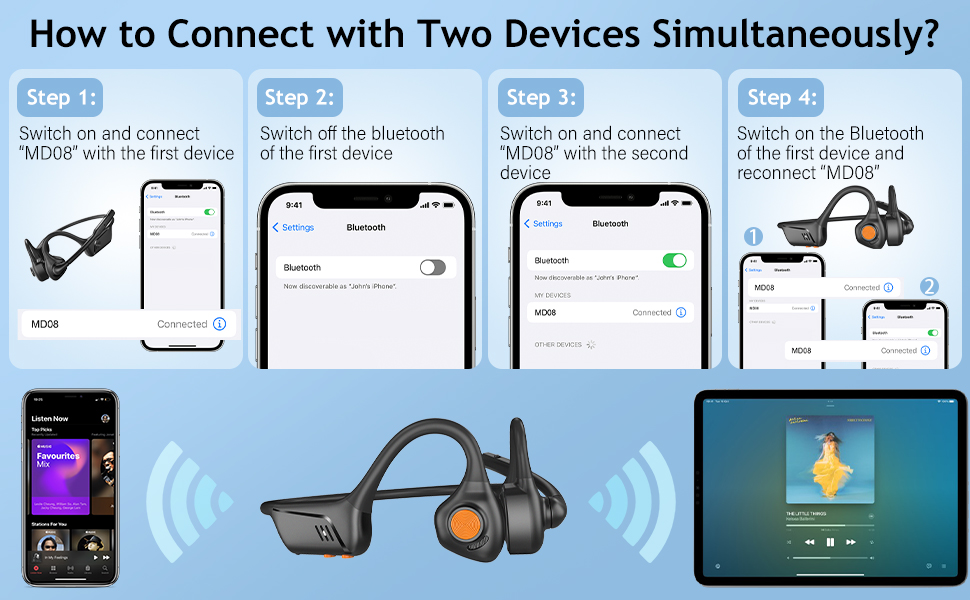
Image: Visual guide demonstrating the four steps to connect the MD08 headphones to two devices simultaneously, showing a phone and a tablet.
Návod k obsluze
1. Nošení sluchátek
Position the headphones with the speakers resting gently in front of your ears, allowing the sound to be transmitted through air conduction. The flexible band should rest comfortably around the back of your head. The open-ear design ensures you remain aware of your surroundings.

Image: A man wearing the MD08 headphones, illustrating the open-ear design and comfortable fit, emphasizing its lightweight nature (40g) and stable design.
2. Základní ovládací prvky
The headphones feature a multi-functional button and volume controls for easy operation:
- Zapnutí/vypnutí: Stiskněte a podržte multifunkční tlačítko.
- Přehrát/pozastavit: Jednou stiskněte multifunkční tlačítko.
- Přijmout/ukončit hovor: Během příchozího nebo aktivního hovoru stiskněte multifunkční tlačítko jednou.
- Odmítnout hovor: Během příchozího hovoru stiskněte a podržte multifunkční tlačítko.
- Zvýšení/Snížení hlasitosti: Použijte vyhrazená tlačítka hlasitosti.
- Další skladba: Dvakrát stiskněte multifunkční tlačítko.
- Předchozí skladba: Třikrát stiskněte multifunkční tlačítko.
- Aktivace hlasového asistenta (Siri/Google Assistant): Stiskněte a podržte multifunkční tlačítko po dobu 2 sekund.

Image: A user demonstrating the controls of the MD08 headphones, with icons indicating functions like Play/Pause, Skip Track, Control Calls, Volume+/-, and Voice Assistant.
3. Funkce ztlumení mikrofonu
The MD08 headphones feature a dedicated mute button on the microphone boom. During a call, you can easily touch this button to mute or unmute your microphone, providing privacy when needed.

Image: A woman using the MD08 headphones, highlighting the microphone mute function and environmental noise reduction technology, showing 96% noise filtered during calls.
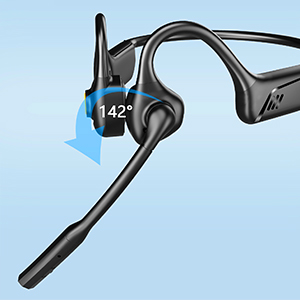
Image: Close-up of the MD08 microphone, showing its 142-degree rotation capability for optimal positioning.
Údržba
- Čištění: K čištění sluchátek používejte měkký, suchý hadřík. Nepoužívejte agresivní chemikálie ani abrazivní materiály.
- Skladování: Sluchátka skladujte na chladném a suchém místě mimo dosah přímého slunečního záření a extrémních teplot.
- Nabíjení: Chcete-li prodloužit životnost baterie, vyvarujte se častého úplného vybíjení. Sluchátka pravidelně nabíjejte, i když je delší dobu nepoužíváte.
- Voděodolnost: While designed for active use, avoid submerging the headphones in water.
Odstraňování problémů
| Problém | Řešení |
|---|---|
| Sluchátka se nezapínají. | Ujistěte se, že jsou sluchátka plně nabitá. Připojte je ke zdroji napájení a zkuste to znovu. |
| Nelze spárovat se zařízením. |
|
| Žádný zvuk nebo nízká hlasitost. |
|
| Mikrofon nefunguje. |
|
| Přerušované připojení. |
|
Specifikace
| Funkce | Detail |
|---|---|
| Název modelu | MD08 |
| Technologie připojení | Bezdrátové (Bluetooth) |
| Verze Bluetooth | 5.1 |
| Dosah Bluetooth | Až 10 metrů (33 stop) |
| Typ zvukového ovladače | Ovladač pro vedení vzduchu |
| Výdrž baterie (hudba/hovor) | Až 8 hodin |
| Pohotovostní doba | Až 36 hodin |
| Doba nabíjení | Přibližně 2 hodiny |
| Nabíjecí port | USB-C |
| Hmotnost | 1.41 unce (přibližně 40 g) |
| Umístění uší | Otevřete ucho |
| Kontrola hluku | Aktivní potlačení hluku (pro mikrofon) |
| Speciální funkce | Microphone Included, Multipoint Pairing, Rechargeable Battery, Volume Control, Mute Function |
Záruka a podpora
MONODEAL products are designed and manufactured to high-quality standards. For warranty information, technical support, or customer service inquiries, please refer to the contact information provided with your purchase or visit the official MONODEAL webmísto.
Výrobce: MONODEAL