
ÚTOK ŽRALOKA X85
ATTACK SHARK X85 Gasket Mechanical Keyboard
Uživatelská příručka
1. Úvod
Thank you for choosing the ATTACK SHARK X85 Gasket Mechanical Keyboard. This manual provides detailed instructions on how to set up, operate, and maintain your new keyboard. Please read this manual thoroughly before use to ensure optimal performance and longevity of your device.

The ATTACK SHARK X85 Gasket Mechanical Keyboard, featuring a compact 75% layout with a multi-function knob.
2. Obsah balení
Ověřte prosím, zda jsou ve vašem balení obsaženy všechny níže uvedené položky:
- ATTACK SHARK X85 Gasket Mechanical Keyboard
- Kabel USB-C na USB-A
- Bezdrátový přijímač 2.4 GHz
- Nástroj na stahování krytů kláves a spínačů
- Additional Keycaps (Purple accent keycaps)
- Uživatelská příručka (tento dokument)
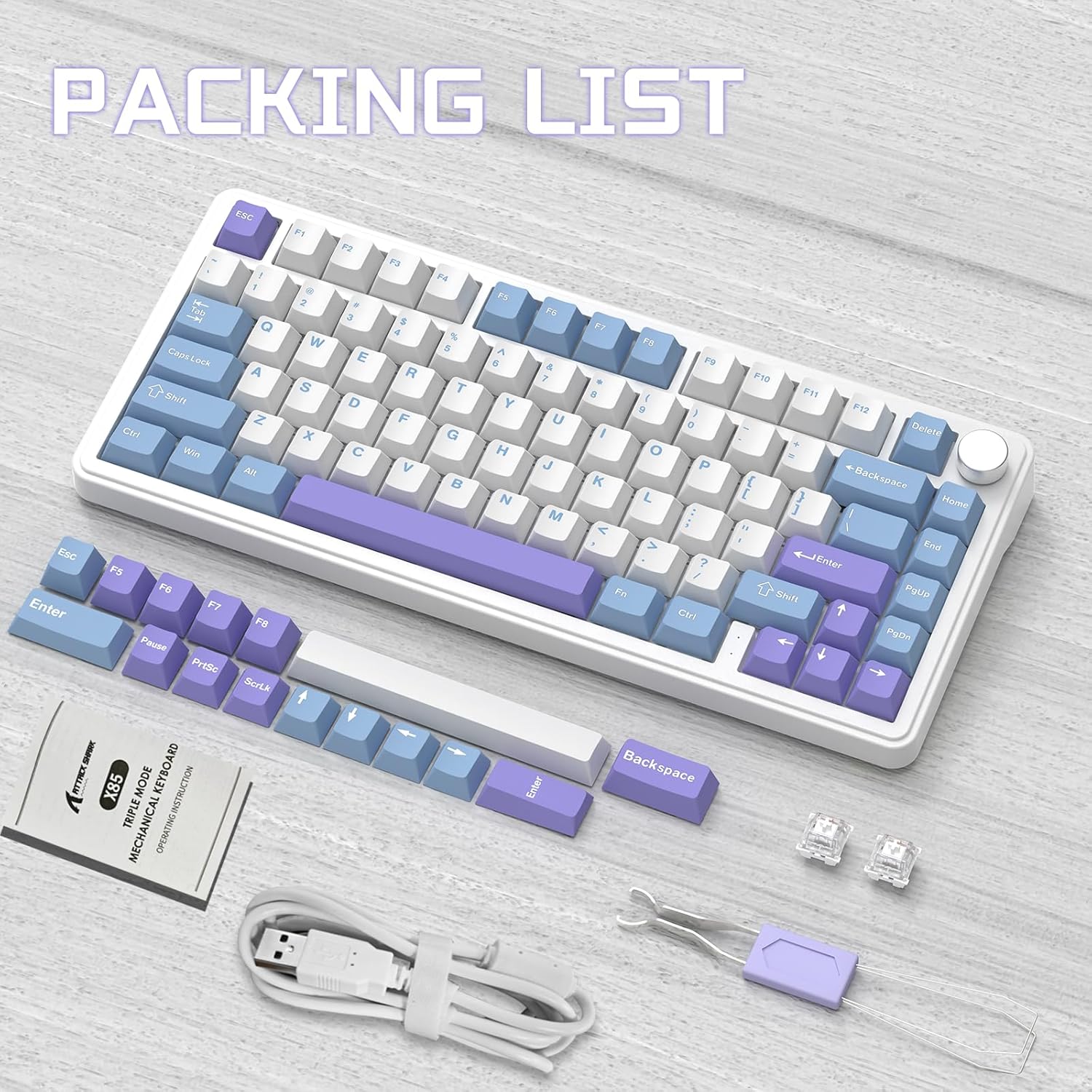
Contents of the ATTACK SHARK X85 keyboard package, including the keyboard, cables, tools, and extra keycaps.
3. Konec produktuview
3.1 Klíčové vlastnosti
- 75% kompaktní rozvržení: 81-key design maximizing desk space.
- Třírežimové připojení: Supports Bluetooth 5.0, 2.4 GHz wireless, and USB-C wired connections.
- Konstrukce těsnění: Five-layer sound and shock-absorbing internal padding (PORON foam, IXPE switch pad, PET sound enhancement pad, bottom silicone pad) for a soft, flexible typing feel.
- Přepínače vyměnitelné za provozu: Compatible with most 3-pin mechanical switches for easy customization.
- Multifunkční knoflík: Controls computer volume and keyboard backlight settings.
- PBT klávesy: Durable, wear-resistant keycaps with thick walls.
- RGB podsvícení: 19 RGB modes, 7 monochrome modes, and full-color backlight with adjustable speed and intensity. Customizable via software.
- Baterie 5000 mAh: High-capacity battery for extended wireless use with auto-sleep power saving.
- 100% Anti-Ghosting: Ensures all key presses are registered accurately during fast typing or gaming.
- Široká kompatibilita: Fully compatible with Windows and Mac operating systems.
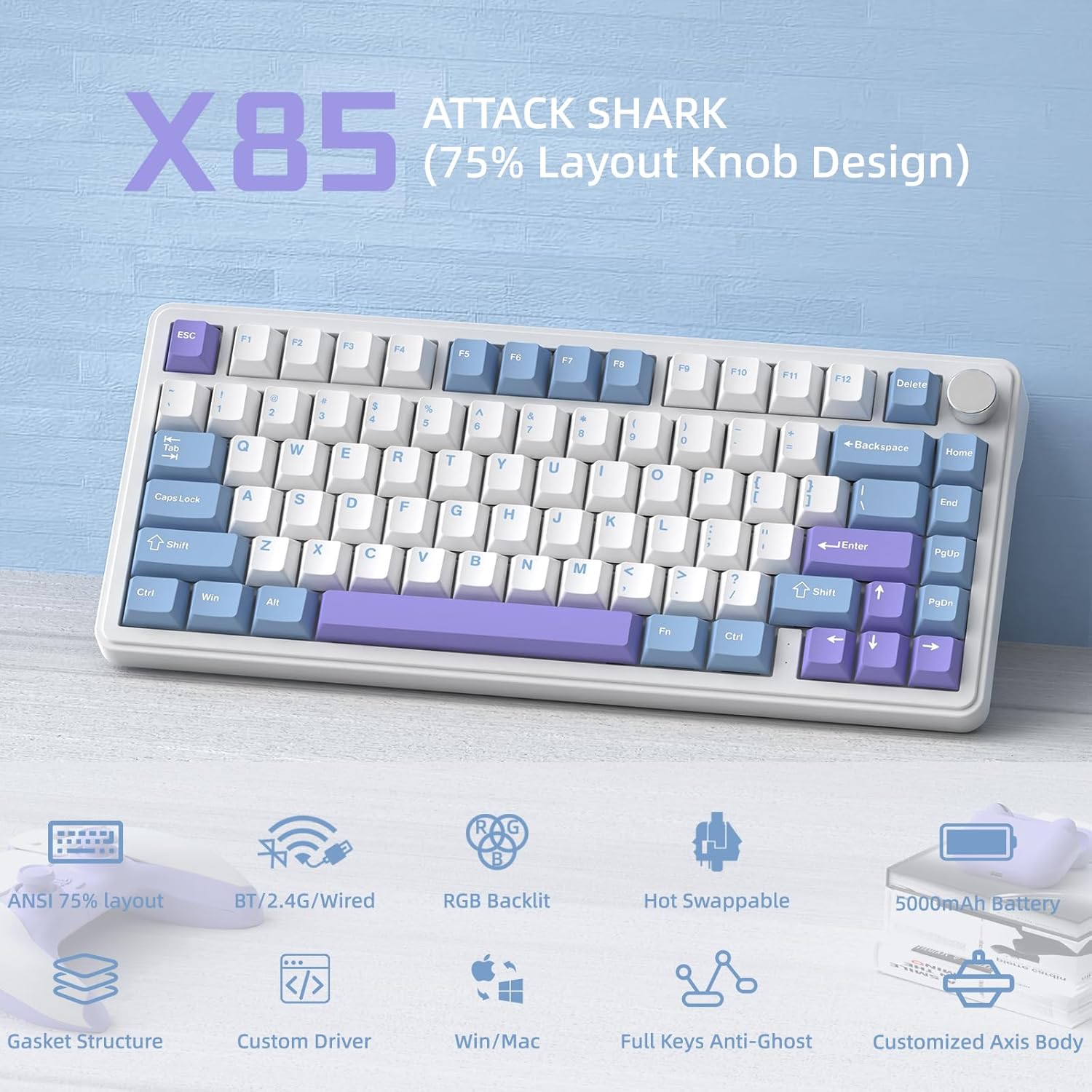
Konecview of the ATTACK SHARK X85's key features, including its 75% layout, tri-mode connectivity, RGB lighting, and hot-swappable design.
3.2 Internal Structure (Gasket Mount)
The X85 features an advanced gasket mount design with multiple layers for enhanced acoustics and typing feel:
- Knoflík
- PBT Keycaps
- Horní kryt
- Přepínač
- PC Horizontal Slotted Positioning Plate
- PORON Quilted Cotton
- IXPE Switch Pad
- PET Sound Enhancement Pad
- Single Key Slotted PCB
- Switch Seat Silencer Bottom Cotton
- Silikonová podložka
- Spodní pouzdro

Diagram illustrating the five-layer padding and gasket mount structure of the X85 keyboard, showing its various internal components.
4. Nastavení
4.1 Třírežimové připojení
The ATTACK SHARK X85 keyboard supports three connection modes: Bluetooth, 2.4 GHz wireless, and USB-C wired. The connection mode can be easily switched using the toggle switch on the back of the keyboard.

Visual guide for connecting the ATTACK SHARK X85 keyboard via Bluetooth, 2.4G wireless, and USB-C wired modes.
4.1.1 Připojení Bluetooth
- Toggle the switch on the back of the keyboard to the "BT" position.
- Dlouhé stisknutí Fn + Q, Fn + Wnebo Fn + E for more than three seconds until the corresponding key's backlight flashes rapidly. This indicates pairing mode.
- On your device (computer, tablet, or smartphone), enable Bluetooth and search for "ATTACK SHARK X85".
- Select the keyboard to connect. Once connected, the key's backlight will stop flashing and remain solid.
- You can pair up to three Bluetooth devices and switch between them by pressing Fn + Q, Fn + Wnebo Fn + E.
4.1.2 Bezdrátové připojení 2.4 GHz
- Locate the 2.4 GHz wireless receiver (dongle) in the package.
- Toggle the switch on the back of the keyboard to the "2.4G" position.
- Plug the 2.4 GHz wireless receiver into an available USB port on your computer.
- The keyboard should automatically connect. If not, ensure the receiver is properly inserted and the keyboard is in 2.4G mode.
4.1.3 Kabelové připojení USB-C
- Toggle the switch on the back of the keyboard to the "Line" (wired) position.
- Připojte jeden konec dodaného kabelu USB-C k portu USB-C na klávesnici.
- Připojte druhý konec kabelu USB-A k volnému portu USB v počítači.
- The keyboard will be recognized as a standard USB keyboard and is ready for use.
4.2 Kompatibilita operačních systémů
The ATTACK SHARK X85 keyboard is fully compatible with both Windows and Mac operating systems. Use the toggle switch on the back of the keyboard to select between "Win" and "Mac" modes for optimal key mapping.
5. Návod k obsluze
5.1 Multifunkční otočný knoflík
The knob on the top right of the keyboard serves multiple functions, controlling both volume and backlight settings.

Instructions for using the multi-function rotary knob to control lighting and sound settings on the X85 keyboard.
- Přepínací režimy: Press and hold the knob for more than three seconds to switch between Light Mode and Sound Mode.
- Světelný režim:
- Press once to cycle through different backlight modes.
- Turn left to decrease backlight brightness.
- Turn right to increase backlight brightness.
- Režim zvuku:
- Press once to play/mute audio.
- Turn left to decrease volume.
- Turn right to increase volume.
5.2 Přizpůsobení RGB podsvícení
The X85 keyboard offers extensive RGB lighting options. You can adjust settings directly on the keyboard or through the dedicated software.
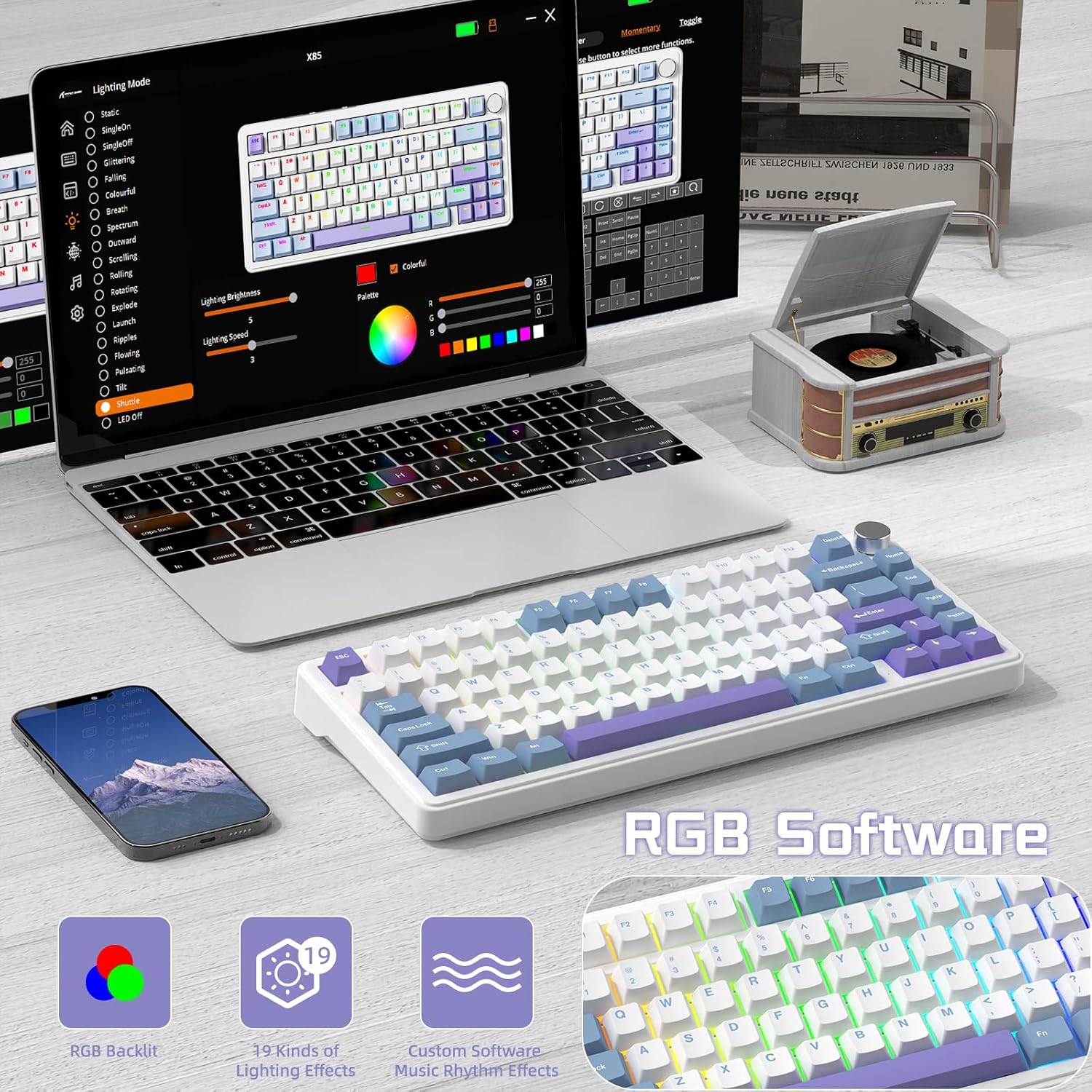
The software interface for customizing RGB lighting and other settings on the ATTACK SHARK X85 keyboard.
- On-Keyboard Controls:
- Use the knob in Light Mode to cycle modes and adjust brightness.
- Refer to the keyboard's quick function keys (usually Fn combinations) for additional lighting effects and speed adjustments.
- Přizpůsobení softwaru:
- Download the official ATTACK SHARK software from the manufacturer's webmísto.
- The software allows for advanced customization of RGB effects, colors, speed, and brightness. It may also offer key remapping and macro creation.
- Note: The software may default to Chinese. Please navigate to settings within the software to change the language to English if needed.
5.3 Přepínače vyměnitelné za provozu
The X85 features a hot-swappable PCB, allowing you to easily change mechanical switches without soldering. This enables customization of your typing experience.

Demonstration of the hot-swappable feature of the X85 keyboard, showing how switches can be easily removed and replaced.
- Odstranění krytky kláves: Pomocí nástroje pro vytahování kláves jemně odstraňte požadovanou klávesu.
- Odstraňte přepínač: Use the switch puller tool to grasp the top and bottom clips of the switch and gently pull it straight up.
- Vložit nový přepínač: Align the pins of the new 3-pin mechanical switch with the holes on the PCB. Gently push the switch straight down until it clicks into place. Ensure the pins are not bent.
- Výměna krytky kláves: Nasaďte krytku kláves zpět na nový dřík spínače.
The X85 supports 3-pin mechanical switches. Ensure the replacement switches are compatible to avoid damage.
5.4 100% Anti-Ghosting
The keyboard features 100% anti-ghosting, meaning all simultaneous key presses are registered accurately, which is crucial for fast-paced gaming and typing.
6. Údržba
6.1 Čištění klávesnice
- Před čištěním odpojte klávesnici od počítače.
- Pomocí stlačeného vzduchu odfoukněte prach a nečistoty z prostoru mezi klávesami.
- For surface cleaning, gently wipe the keycaps and chassis with a soft, slightly damp, hadřík, který nepouští vlákna. Zabraňte nadměrné vlhkosti.
- Nepoužívejte agresivní chemikálie, abrazivní čisticí prostředky ani rozpouštědla.
6.2 Péče o baterii
The X85 keyboard is equipped with a 5000mAh high-capacity battery. To maximize battery life and performance:

Battery life estimates for the ATTACK SHARK X85 keyboard: 35 hours with backlight on, 75 hours with backlight off.
- Před prvním použitím klávesnici plně nabijte.
- When the battery is low, connect the USB-C cable to charge.
- The keyboard features an auto-sleep power saving technology to conserve battery when idle.
- Nevystavujte klávesnici extrémním teplotám.
7. Řešení problémů
| Problém | Možné řešení |
|---|---|
| Klávesnice se nepřipojuje přes Bluetooth. |
|
| 2.4 GHz wireless connection is unstable or not working. |
|
| Klávesy nereagují nebo se píší nesprávně. |
|
| RGB backlighting is not working or behaving unexpectedly. |
|
| Multi-function knob is not responding. |
|
8. Specifikace
| Funkce | Detail |
|---|---|
| Značka | ÚTOČNÉHO ŽRALOKA |
| Model | X85 |
| Rozložení | 75 % (81 kláves) |
| Konektivita | Bluetooth 5.0, 2.4 GHz bezdrátové připojení, USB-C kabelové připojení |
| Kapacita baterie | 5000 XNUMX mAh |
| Materiál krytky klíče | PBT (polybutylen tereftalát) |
| Typ přepínače | Hot-swappable (supports 3-pin mechanical switches) |
| Podsvícení | RGB (19 modes, 7 monochrome, full color) |
| Anti-Ghosting | 100% ochrana proti ghostingu |
| Kompatibilita | Windows, Mac |
| Hmotnost položky | 1.03 kg |
| Rozměry balení | 35.6 x 18.6 x 4.9 cm |
9. Záruka a podpora
The ATTACK SHARK X85 Gasket Mechanical Keyboard comes with a standard manufacturer's warranty. Please refer to the warranty card included in your package or visit the official ATTACK SHARK webpodrobné záruční podmínky naleznete na webu.
For technical support, troubleshooting assistance, or any inquiries regarding your product, please contact ATTACK SHARK customer service through their official webnebo kontaktní informace poskytnuté při nákupu.
Ask a question about this manual
Ask about setup, troubleshooting, compatibility, parts, safety, or missing instructions. Manuals+ will review the question and use this page’s manual context to help answer it.